
Updated on: June 19, 2026
- 🥇 Norton : Simple-to-use antivirus and PC repair software for Windows, with great optimization tools that clean junk files, boost startup times, and free up system memory. Its advanced malware detection can remove hidden threats that slow your PC down, and the cloud-based scanner ensures minimal impact on performance.
There are plenty of free Windows antiviruses out there, but most aren’t worth downloading. I tested dozens of options to find the ones that reliably blocked malware, phishing sites, ransomware, and other common threats without dragging down a Windows PC.
I also looked beyond malware protection. A good free antivirus should be easy to use, lightweight, transparent about what’s actually free, compatible with Windows security tools like Microsoft Defender, and have a strong reputation for safeguarding your privacy.
It’s worth knowing that every free antivirus comes with tradeoffs. Some lack real-time protection, some restrict features behind paywalls, and others constantly push upgrades. That’s why premium antivirus software still offers the best overall protection. But if you want solid, no-cost security, the options below are the best free Windows antivirus programs I tested.
Try NORTON (60 Days Risk-Free)
Quick Summary of the Best Free Windows Antiviruses for 2026


🥇1. Norton — Best Overall Windows Antivirus With a Long Money-Back Guarantee
Norton is my favorite Windows antivirus — and while it doesn’t have a free plan, it regularly offers free trials and has a risk-free 60-day money-back guarantee, which gives you 2 months to try it out and see if it’s right for you. It has an advanced malware engine, a wide range of additional features, and affordable plans that cover all operating systems.
- Advanced phishing protection
- Free malware removal tool
- Regular free trials
- 60-day money-back guarantee
- No free antivirus plan
Norton’s free-forever features are great, even without a free antivirus plan. The password manager generates, saves, and auto-fills secure logins while auditing password strength. The Private Browser blocks ads, trackers, and shields you from online threats. Additionally, the email breach checker scans for data breaches, alerting you if your email is compromised. These standalone tools are always free, easy to use, and enhance your security without requiring a paid plan.
Power Eraser is another free Norton tool that excels at removing stubborn malware from your Windows PC. It supports full system scans and can be configured to detect rootkits and PUPs/PUAs. However, Power Eraser lacks real-time protection, automatic scanning, and the ability to scan USB drives. You must manually initiate a custom scan to use it. In contrast, Norton’s premium plans automatically scan USB devices upon detection, offering more robust protection.
In all of my tests of the premium plans, Norton was able to identify every malware sample, from simple ones like viruses to sophisticated threats like rootkits. It also has excellent phishing protection, a smart firewall with tons of customization options, and online banking and shopping protection.

Norton’s premium plans include a wide range of high-quality extras, such as:
- VPN (unlimited data) — maintains fast speeds, works with streaming sites like Netflix, and has extras like Tor support and split-tunneling.
- Parental controls — filters inappropriate content, limits device usage, and monitors YouTube and Hulu usage (Norton ranks #1 on our list of the best antiviruses with parental controls and #2 on our list of the best standalone parental control apps).
- System optimization tools — remove unwanted files from Windows and web browsers, improve boot time, and defragment the hard drive.
- Premium dark web monitoring — scans dark web forums, data breach databases, and credit reports in real time.
Norton’s dark web monitoring is particularly impressive, using human agents to actively investigate forums and uncover leaks that automated tools might miss. The free email breach checker provides a taste of this, but the premium version offers comprehensive protection.

Overall, Norton provides a better user experience than any other antivirus. It’s very easy to use and integrates well with Windows Defender, so you don’t have to adjust any settings. It even has a gaming mode, so you can play games without interruption while it runs in the background.
There are several plans available, but Norton 360 Deluxe is the best value — plus, with our special 60% discount, you can get it for only $49.99 / year*. Norton also offers LifeLock plans in select countries, which start at $99.99 / year* and add identity theft protection with up to $3M in insurance payouts and legal assistance. All of Norton’s plans are covered by a 60-day money-back guarantee.

Bottom Line:
Norton offers unparalleled malware protection, a wide range of high-end security features, and affordable plans. It also has a ton of extras, including a fast VPN, a secure password manager, and the best antivirus-bundled parental controls around. While it doesn’t have a free Windows plan, it does provide a great free malware removal tool for PCs called Power Eraser. But it’s worth picking up a paid plan, as they provide the best value on the market and come with a 60-day money-back guarantee, so you can try Norton out risk-free for 2 whole months.
Read the full Norton review here >
🥈2. Bitdefender Antivirus Free for Windows — Lightweight With Advanced Malware & Web Protections
Bitdefender Antivirus Free for Windows is one of the best free-forever antiviruses out there — its malware scanner scored a 100% detection rate during my tests, detecting viruses, trojans, ransomware, and even rootkits, which are notorious for being difficult to eradicate.
- Excellent malware detection
- Lightweight cloud-based scanner
- Excellent phishing protection
- Real-time protection
- Limited free features
- VPN data limits
Bitdefender uses a cloud-based scanner, which means most of the detection and analysis doesn’t happen on your PC. Thanks to this, I didn’t notice any slowdowns on my computer, even during full system scans.

Bitdefender also provides excellent anti-phishing protection with its free antivirus. During testing, it blocked many phishing websites that had evaded detection from the built-in protections on the Chrome and Firefox browsers, as well as the anti-phishing tools of other antiviruses. Out of all the brands on this list, only Bitdefender and Norton had perfect anti-phishing results.

The free version of Bitdefender, while robust, lacks the extra features found in its premium plans. It delivers top-tier malware, web, and real-time protections, ransomware protection that enhances Windows’s BitLocker encryption, and manual USB drive scanning. However, upgrading to a premium plan unlocks additional tools like a VPN, device optimization, a password manager, parental controls, a dedicated firewall (the free version relies on Windows Defender’s firewall), and automatic USB drive scanning. One drawback is that most Bitdefender plans impose strict VPN data limits, unlike Norton, which offers unlimited VPN data on most of its plans.
Bitdefender’s paid plans are very affordable, starting as low as $34.99 / year for Bitdefender Antivirus Plus. Then there’s Total Security, which includes most of Bitdefender’s features for 5 devices (it’s missing the unlimited-data VPN and a couple of minor features). It costs $54.99 / year. If you need the full version of the VPN, opt for Premium Security, which costs $64.99 / year. All plans are backed by a 30-day money-back guarantee.
Bottom Line:
Bitdefender’s free Windows antivirus is a top-tier, no-frills solution to protect your device from malware and web-based threats. It has perfect detection rates and will barely impact your device’s performance. To get access to a bunch of extra features, however, you’ll have to upgrade to one of Bitdefender’s premium plans. All of its plans are backed by a 30-day money-back guarantee, so you can try it out risk-free.
Read the full Bitdefender review here
🥉3. Panda Free Antivirus for Windows — Good Virus Protection With Decent Extras
Panda Free Antivirus for Windows is lightweight, secure, and easy to use — during my tests, Panda’s free antivirus scanner detected significantly more adware, spyware, and ransomware files than Windows Defender. Panda’s real-time protection also performed really well, blocking most of the malware files I tried downloading to my PC.
- Strong malware protection
- Automatic gaming mode
- USB Rescue Kit
- Lightweight interface
- Limited VPN data
- No web protection
One reason Panda’s free antivirus is a good choice for Windows users is its Rescue Kit, which allows you to download a bootable version of Panda to a USB drive and then use the USB drive to clean an infected PC and get it up and running again. You can download a bootable copy of Windows from Microsoft’s website and use its repair function, but in my tests, Panda was better than Windows at spotting malware on a PC that won’t start.

I like that Panda has a gaming mode in its free antivirus — whenever you’re playing a game or watching a full-screen video, Panda automatically suspends notifications. Its USB Vaccine feature automatically scans and disables autorun malware on USB drives, making it great for gamers using external storage for mods. However, I still prefer Norton for gaming, as the gaming mode can actually speed up your PC (especially if you subscribe to the gamer plan).
Panda’s free antivirus also comes with a secure (but limited-data) VPN. It provides fast connection speeds, but it only lets you connect to 1 server and has a data limit of 150 MB per day — this is an improvement over Avira’s 500 MB per month, but it’s still not nearly enough data for streaming or file sharing. If you’re interested in unlimited streaming or torrenting, you’ll need a better VPN (check out our list of the best antiviruses with VPNs here or our list of the best free VPNs).
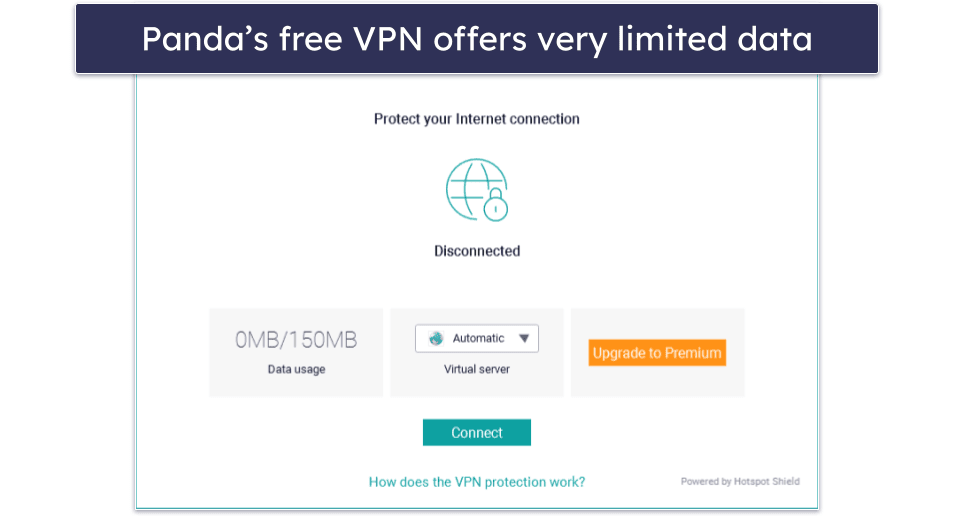
The Panda Dome Premium plan offers an unlimited-data VPN (and access to worldwide servers), and it also has features like a firewall, anti-ransomware protection, anti-phishing protection, advanced system tune-up tools, a password manager, and basic parental controls for $42.00 / year. All of Panda’s premium plans come with a 30-day money-back guarantee.

Bottom Line:
Panda’s free antivirus is a good, easy-to-use antivirus, offering 100% free real-time malware protection. With lightweight malware scanning, an automatic gaming mode, a Rescue Kit, and a VPN, Panda is an excellent free internet security product that improves on Windows’s default tools. But if you want an unlimited-data VPN and other extras like a firewall, anti-phishing, password manager, and basic parental controls, you’ll need to upgrade.
Read the full Panda review here >
4. TotalAV — Most Intuitive Antivirus, Great for Beginners
TotalAV provides an excellent malware scanner. During my tests, it detected and removed more malware samples (viruses, trojans, ransomware, spyware) than most other antivirus programs (including Windows Defender). As a cloud-based tool, it uses fewer resources than a lot of other programs, too, which is great!
- Beginner-friendly interface
- High malware detection
- System optimization tools
- No real-time protection
- Limited free plan
TotalAV offers a limited free plan (you can check for and remove viruses and manually scan USB drives), but it also has a 30-day money-back guarantee on its annual plans, and it regularly offers huge first-year discounts, which make it one of the most affordable antiviruses on the market. I really think it’s worth paying a few dollars for an antivirus such as TotalAV, which combines top-notch security with perfect ease of use.
The software functions inside a minimalistic, well-designed dashboard. I had no problems navigating TotalAV’s dashboard, and I found it very simple to use and test all of the provided tools. Like Norton, it integrates seamlessly with the Windows operating system, automatically turning off Defender’s real-time protection so it won’t interfere with TotalAV.

In addition to real-time malware protection, you get useful extras like device optimization tools, an ad blocker, a secure browser, a VPN with unlimited data, a password manager, and more.
The VPN is pretty good — in fact, it’s our top-rated antivirus-bundled VPN. It works with all major streaming services and supports P2P file sharing on all its servers outside the US. While it didn’t slow down my connection too much, I don’t think it’s quite as good as standalone VPNs like ExpressVPN.
TotalAV’s paid plans start at $19.00 / year to cover 3 devices. But my favorite plan is TotalAV Total Security, which covers 8 devices for $49.00 / year and includes all of TotalAV’s features, including a solid password manager. All plans are also backed by a risk-free money-back guarantee of 30 days.
Bottom Line:
TotalAV’s Windows antivirus is excellent at removing various kinds of malware. It’s also one of the most intuitive antivirus programs on the market, which makes it an ideal choice for beginners. TotalAV has a limited free plan, but its paid Internet Security and Total Security plans are also very affordable and include real-time scanning, PC optimization tools, and a VPN with no limitations.
Read the full TotalAV review here >
5. Avast One Basic — Effective Antivirus With Nice Privacy Tools
Avast One Basic is fairly comprehensive for a free Windows antivirus. It’s actually one of two free antiviruses offered by Avast — the other, Avast Free Antivirus, is basically identical to AVG’s free antivirus. Avast One Basic comes from the company’s newest product line and offers more free features, including a VPN and PC speedup tools. I found it easy to use and was pleased to see that it detected 100% of the malware samples I tested it on. Note that Avast One is only available in a handful of countries.
- Perfect malware detection
- Free firewall included
- Privacy Advisor tools
- Cluttered interface
- Limited VPN servers
I like that it encourages users to review their overall online security via the Privacy Advisor. The app automatically suggested I review my privacy settings on various websites and provided links and clear instructions on how to do so. Windows doesn’t provide anything like this on its own, so it’s a great addition.

Avast One Basic comes with a built-in VPN, but it isn’t ideal. You can’t change servers on the free version, and the provider doesn’t have a no-logs policy (and has some data-selling concerns in its history). Still, it’s nice that it operates within the same app as the antivirus and lets you use up to 5 GB of data each week (which is more than the other free VPNs on this list).
The free firewall is solid, monitoring traffic and blocking threats with user-friendly settings. It auto-scans USBs, offers strong web protection (blocking most malicious sites), and includes Network Inspector for Wi-Fi vulnerability checks. However, the interface feels a tad cluttered and less intuitive than Norton’s.
Avast’s premium plans start at $35.88 / year and include additional protections, such as webcam protection, extra online privacy features, and the ability to use Avast on 5, 10, or 30 devices. Avast also provides credit, social media, and identity theft monitoring to Avast One Platinum customers for $119.88 / year. All paid plans come with a 30-day money-back guarantee.
Bottom Line:
Avast One Basic is a good free-forever antivirus package with a powerful scanner. While it may not be the best free antivirus software out there, it has a solid firewall, good network protection, and nice privacy features that improve upon Microsoft Defender. The VPN has a fairly generous data allowance, and the app is quite easy to use. If you want unlimited data or added web protections, you’ll have to subscribe to one of Avast’s premium plans, starting at $35.88 / year.
Read the full Avast review here >
6. Avira Free Security for Windows — Advanced Cloud-Based Malware Scanner With System Cleanup
Avira Free Security for Windows has a solid anti-malware engine that operates fully in the cloud. In contrast to Microsoft Defender, this makes Avira fast, lightweight, and easy on system resources. During my testing, Avira’s anti-malware engine detected all of the malware files I previously downloaded to my computer, and I liked that I could run CPU-intensive programs during scans with almost zero slowdown.
- Perfect malware detection
- Lightweight cloud scanner
- Safe Shopping extension
- Limited VPN data
- No advanced optimization
Avira is also user-friendly — its display is very easy to navigate, with all features clearly listed. It comes with many excellent and completely free extra features, too. These include:
- Firewall.
- Safe Shopping browser extension.
- Privacy & performance optimizer.
- VPN (500 MB monthly limit).
- Password manager.
- Speed booster.
- File shredder.
- USB scan protection.

The Safe Shopping browser extension is really good — it blocks phishing sites, trackers, and annoying ads, plus it finds better deals while you shop. It works on Firefox, Chrome, Opera, and Edge. That said, if you’re worried about shopping safely online, I recommend checking out Norton’s Private Browser, which comes with built-in protection, a privacy guard, and more, and is 100% free.
I’m also a fan of Avira’s privacy and performance optimization tools — they cleaned out my cookies and junk files and also fixed hidden privacy settings that were leaking personal information on the web. Even the free versions of the driver updater and junk cleaner are a huge improvement over Windows, which makes these essential tasks surprisingly difficult. But unfortunately, Avira’s best optimization tools are locked behind a paywall.
It’s a shame that Avira’s free VPN is limited to just 500 MB per month, which is barely enough to watch a couple of really short videos (and substantially less than Panda offers on its free plan). Plus, Avira only lets you connect to your nearest server location on the free plan.
Avira Prime offers the VPN with unlimited data and costs $59.99 / year — it’s a bit pricier than some competitors, but it’s one of the best antivirus suites of 2026, and it also includes multi-device support and advanced system optimization tools. Avira backs all yearly subscriptions with a 60-day money-back guarantee.
Bottom Line:
Avira’s cloud-based, free virus scanning engine is a good way to keep your PC safe. It’s lightweight, fast, has great detection rates, and is 100% free. I’m also a big fan of Avira’s free Safe Shopping browser extension and privacy optimizer, both of which offer a significant improvement over Microsoft’s built-in protections. To get more advanced internet security protection, you’ll need to upgrade to one of Avira’s paid plans, which start at $26.99 / year.
Read the full Avira review here >
7. Malwarebytes Free — Minimalistic Virus Scanner With a Couple of Neat Extras
Malwarebytes Free is a good choice for users looking for a simple antivirus that they can install at no cost and forget about. It performed pretty well in my tests, detecting around 95% of the malware files I hid on my PC. However, it did miss a few well-hidden files that competitors like Norton and Bitdefender detected.
- Decent malware detection
- Free dark web monitoring
- Browser Guard extension
- No real-time protection
- Limited extra features
Apart from the scanner, you also get Browser Guard, a free browser extension that protects against a wide range of threats, including malware, ads and trackers, scams, and PUPs. Though far from perfect, it blocked 90% of the risky sites on every browser I tested, outshining the basic web protections provided by the Windows operating system. It also blocks ads, though it isn’t as effective as Avira’s free extension.

You also get free dark web monitoring. I really like this feature: I simply entered my email address, and Malwarebytes showed me all of my exposed passwords, usernames, and other PII linked to that email, all in the form of a visually appealing diagram. The experience was chilling, but I was genuinely impressed by the thoroughness of Malwarebytes’s scan.
However, without real-time protection in the free version, you must depend on the somewhat underwhelming safeguards offered by Defender. What’s more, features like Wi-Fi protection, a firewall, system tune-up tools, and a password manager aren’t available even in the premium plans. If you just need the basics, Malwarebytes is fine, but it’s pretty barebones compared to top competitors like Norton and Bitdefender.
For real-time protection, you can upgrade to Malwarebytes Standard, which provides coverage for 1-20 devices starting at $59.99 / year. Malwarebytes Plus also adds a decent VPN for $39.99 / year. Both of Malwarebytes’s premium plans are covered by a generous 60-day money-back guarantee. Additionally, Malwarebytes Free includes a 14-day free trial of Malwarebytes Standard, allowing you to test the paid features without any risk.
Bottom Line:
Malwarebytes Free is a minimalistic antivirus scanner with good virus detection and removal rates. It also comes with a browser extension that blocks malware, phishing sites, ads, and trackers (though the ad blocking is hit-and-miss). Upgrading to Malwarebytes Standard brings you real-time protection and coverage for up to 20 devices, whereas Malwarebytes Plus also adds a VPN.
Read the full Malwarebytes review >
8. AVG AntiVirus Free — Solid Malware Scanner With File Protections
AVG offers a solid free antivirus that’s easy to use and has some nice features. It’s basically identical to Avast Free Antivirus — they’re owned by the same company and feature more or less the same underlying technology. It’s pretty distinct from Avast One Basic, though.
- Perfect malware detection
- Free firewall included
- HackCheck alerts
- Weak web protection
- Upsell-heavy interface
The free virus scanner works well — it detected 100% of the malware samples on my PC. What’s more, you can run 5 types of scans. The Deep Scan worked quite well, but the quick-running Smart Scan missed a few items in my test. The boot scan is similar to Windows’s Offline Scan, but it worked much faster when I tested it. There’s an option to run a performance scan to tune up your PC, but you can’t do anything with it on the free version. As soon as a scan finishes, you’ll be met with upsells, which annoyed me.

AVG comes with some good features you don’t normally see in free Windows antiviruses. Namely, it comes with a firewall that’s way better than Microsoft’s built-in firewall. I also really like HackCheck, a feature that immediately alerts you if your email has been compromised (though it’s nowhere near as in-depth as Norton’s data-breach alerts). On a more basic level, File Shield successfully issued a warning when I tried to open a malware-infected file, and AVG was able to quarantine dangerous files without any issues.
You get added protection from Behavior Shield, a tool that scans for malware that isn’t listed in databases. It actively scans apps for suspicious activity. If any is found, the program is automatically blocked.
Unfortunately, the ransomware and web protections aren’t perfect. The Web Shield only blocked some of the phishing sites I tested it against, and ransomware protection did nothing when I ran a ransomware simulator.
For extra protection from phishing, spyware, and webcam hacking, there’s AVG Internet Security. This premium service starts at $39.99 / year. It’s also available as a 30-day free trial, and it comes with a 30-day money-back guarantee. You can bundle Internet Security with AVG’s tune-up tool, anti-tracking tool, and an unlimited-data VPN by getting the Ultimate plan for $59.99 / year.
Bottom Line:
Overall, AVG’s free antivirus is a solid choice for users who want basic protection for their computer. While it does have some limitations, its ease of use and the inclusion of a firewall make it an excellent option for users who just need the essentials. To access the more advanced features like webcam protection and upgraded ransomware protection, you have to upgrade to AVG Internet Security (plans start at $39.99 / year).
Read the full AVG review here >
9. ZoneAlarm — Effective Malware Scanner With a Free Firewall

ZoneAlarm offers a free and effective antivirus solution complete with a firewall. It’s easy enough to use and has good customer support options, even if you don’t have a premium subscription. It also comes with free real-time protection and automatic updates, which is pretty cool. However, it lacks extra features like a VPN, optimization tools, and a password manager. On the plus side, it works right out of the box on Windows computers, automatically replacing Windows Defender features.
- Reliable malware detection
- Real-time protection & firewall
- Automatic updates
- No web protection
- Resource-heavy scans
During my tests, ZoneAlarm detected all of the malicious files I downloaded onto my PC. The scan took about an hour, slowed my PC down substantially, and the report it provided lacked detail. If you have an older device, you’re probably better off with a cloud-based tool like Bitdefender.

That said, the inclusion of a firewall in the free app is ZoneAlarm’s best feature. It offers inbound and outbound protection, ensuring your network remains safe from hackers and other threats. It worked well when I simulated a network attack.
Unfortunately, the free version doesn’t come with any web protection, meaning you will still be vulnerable to phishing attempts and other web-based threats (though the paid version wasn’t very effective in my tests anyway).
ZoneAlarm Pro Antivirus + Firewall costs $24.95 / year on 1 PC (the same plan can cover up to 50 devices for an additional fee). For mobile security and ransomware protection, you need ZoneAlarm Extreme Security NextGen, which goes for $34.95 / year for 1 device license (also upgradable to 50). I think these are pretty decent deals, but if you’re in the market for a premium product, there are better options on this list.
Bottom Line:
ZoneAlarm is pretty good for a free antivirus. The free malware scanner is complemented by an effective firewall and decent real-time protection. It’s lacking in web protection and only works on Windows, but it’s still a good security tool. For more features, you’ll need to get Pro Antivirus + Firewall or the Extreme Security NextGen plan, which adds mobile support and a few other features.
Read the full ZoneAlarm review here
Quick Comparison Table
Testing Methodology: Comparison & Ranking Criteria
To compile this list, I used our tried-and-true testing methodology. This means I ran rigorous tests of each antivirus’s security, speed, features, value, and customer support. Only the antiviruses that performed in line with this methodology made this list. Here are the exact areas I tested:
- I tested each antivirus’s malware detection rates. I ran full system scans on each of the antiviruses above, as well as their other scans. I recorded malware detection rates, how long each scan took, and whether they slowed down my computer. I made sure to only include programs that identified both known and new malware, including trojans, spyware, ransomware, rootkits, and keyloggers. All of my top choices have perfect or near-perfect malware detection rates.

- I looked for products that don’t cause too much slowdown. I tried running intensive apps while each antivirus was open. I also checked each antivirus’s impact on my computer’s task manager. I didn’t notice any slowdown, and all the antiviruses on this list had minimal impact, with Bitdefender being the most lightweight of all.
- I checked for extra features. Each of the antiviruses on this list went above and beyond in terms of extra features in my tests. For example, Avira has a basic free password manager, and Panda has a free VPN (150 MB/day).
- I tested how each antivirus interacts with Windows. A good antivirus (even a free one) will deploy by itself, and Windows will react accordingly, detecting which aspects of Defender should be shut off to make way for the third-party software. Each item on this list works right out of the box, complementing the Windows operating system.
- I made sure the software was free or offered a free trial or money-back guarantee. Many cybersecurity brands are shady when it comes to free apps and trials. Some don’t provide any warning when the free trial period is ending, and others issue you with ads when you try to access features you think are free. I’ve personally checked all of the brands listed here, and they all offer free protection. Norton doesn’t have an entirely free plan, but it does have a 60-day money-back guarantee, so you can use it for free for 2 months.

- I checked the upgrade prices. It might be that after using a free product for a while, you opt to upgrade to the paid version. There are some products out there that charge extortionate amounts at this point, but all the brands on my list offer very reasonably priced premium plans.
Risks & Disadvantages of Using a Free Windows Antivirus
Free antivirus software can be an effective way to protect against malware and online threats, but only if you’re using a trusted free antivirus like the ones on this list. Even then, free software comes with tradeoffs:
- Missing real-time protection
- Weak phishing or ransomware defenses
- Constant upgrade prompts
- Limited VPN data allowances (if VPN is included)
- Fewer support options
- Missing extras like password managers or dark web monitoring
Some free antivirus apps are also fake or misleading. If a product asks for payment details before giving “free” protection or looks suspiciously unknown, avoid it.
Yes, Windows comes with its own free antivirus (Windows/Microsoft Defender), which does a good job of protecting your PC from malware. However, its malware protections aren’t always as fast or effective as those offered by premium antiviruses like Norton, and it’s also missing many important features.
The best premium antiviruses include everything you need to secure your PC, including anti-malware engines that use AI and machine learning to detect both known and unknown viruses, as well as malicious website protection and identity theft monitoring tools.
Free Antivirus vs. Paid Antivirus
Free antiviruses like Norton’s Power Eraser and Bitdefender Free are pretty good, and they offer decent protection. But free antivirus software doesn’t come with all of the extra features needed for complete online protection — you’ll need a premium antivirus to stay 100% safe.
Premium antiviruses are way better, as they come with all of the internet security protections you need to stay as safe as possible online. And I’m not just talking about anti-malware protection here — extras like a VPN (to ensure you’re anonymous online), a password manager (to protect your sensitive data, including financial information), and parental controls (to make sure your child is protected on the internet) all contribute to complete cybersecurity protection.
Together with a malware scanner, these tools are crucial to building a good online defense against hackers, scammers, and predators — it’s incredibly difficult to achieve the same level of security only using free antivirus software.
Windows Defender vs. Free Antiviruses: What Are the Limitations?
Microsoft Defender gives Windows users a solid baseline level of security, and it’s far better than the built-in protection Windows offered years ago. For many casual users, it may be enough. That said, several free third-party antiviruses still offer advantages in several areas.
One common weakness is phishing protection. While Defender helps block known malicious sites, some free antiviruses like Bitdefender and Avira often provide stronger web filtering and can catch suspicious links that browser protections or Defender may miss.
Another difference is system performance. Defender can feel heavier during scans on some PCs, especially older devices. Cloud-based options like Bitdefender Free and Avira Free Security are often lighter, with less noticeable slowdown during full scans.
Defender is also relatively basic when it comes to extra tools. Many free antiviruses include features such as VPN access, password managers, privacy tools, breach alerts, gaming modes, or USB scanning. For example, Panda Free Antivirus includes a Rescue Kit and gaming mode, while Avast One Basic adds privacy and network tools.
Bottom line: Windows Defender is a respectable starting point, but the best free antiviruses can offer lighter performance, stronger phishing defenses, and more useful features at no cost.
Tips to Improve Online Safety in 2026
You should always make sure to follow the best online safety practices, even if you decide to invest in a premium antivirus — but especially if you don’t. These common-sense measures include:
- Update software regularly. Software updates patch any software vulnerabilities hackers can exploit to gain access to your system. Premium antiviruses like Avira have vulnerability scanners that flag out-of-date software and even offer to update it for you, but you can also manually update any program on your device.
- Download files responsibly. Only download programs or files from websites you trust, and only open email attachments if you’re sure they’re safe. If you’re not 100% sure a download link is safe, don’t click on it.
- Only use HTTPS sites. Sites that use HTTPS encrypt all of the data that is sent and received between the user and the site. Sites that use an HTTP connection (no S at the end!) don’t encrypt any data, meaning that anyone who intercepts the data you’re sending and receiving from the site can see all of the data.
See more tips
- Avoid using unsecured networks. If you have to use one, use a VPN to encrypt your data and shield yourself from potential hackers who might attempt to steal your information. The top antivirus-bundled VPNs are TotalAV or Norton.
- Use a VPN. Even if you are using a secure network, VPNs provide an extra layer of protection by anonymizing your web traffic. This is great in terms of privacy and also makes it harder for criminals and corporations to learn intimate details about your web usage and personal information. Most free VPNs are fairly limited, but there are excellent premium options.
- Generate secure passwords for your online accounts. Instead of using the same login for all or most sites, you should create unique, complex passwords for each online account. You can check out our recommendations for the best free password managers here.
What Free Windows Antiviruses Should You Avoid?
- Wolfram Antivirus. This one is nothing more than a scam. It’s a recent variant of a well-known piece of software that masquerades as a free antivirus. It will not only infect you with malware but also try to get you to pay for the privilege.
- Total Antivirus 2020. Total Antivirus 2020 isn’t effective and might even do harm to your PC. It simply isn’t safe and uses scare tactics and other means to try to convince users to hand over money for the “premium” version.
- Spybot Search & Destroy. I used to really like Spybot Search & Destroy, but these days, it isn’t any good. It really feels like a relic from the past. First of all, its malware detection rates are abysmal in 2026. What’s more, the interface is tricky, and it’s hard to install as various features are spread out across different apps.
- ClamAV. Though it’s a good choice for Linux users, I can’t recommend ClamAV for anyone with a Windows PC. It’s light on features and difficult to use. This can become a significant problem as support options for Windows users are quite limited.
Many free antiviruses are ineffective, ad-heavy, or outright malware in disguise, like Wolfram Antivirus and Total Antivirus 2020. While ClamAV and Spybot Search & Destroy are legitimate programs, they’re not suitable for Windows due to their limitations. A product’s absence from this ‘avoid’ list doesn’t guarantee quality. Always research by reading reviews on trusted websites; if there’s little information online, it’s likely unreliable and best avoided.
Other Antivirus Brands That Didn’t Make the Cut
- McAfee. McAfee is one of my favorite antiviruses of 2026. It comes with an advanced anti-malware engine, excellent web protection, and a VPN with unlimited data. But unfortunately, McAfee doesn’t have a free plan. However, if you need a high-quality antivirus, McAfee’s low-cost internet security packages are some of the best on the market.
- Heimdal. The premium version of Heimdal is actually a pretty decent antivirus, but its free plan is nothing more than a software updater. It’s a handy tool to have on your PC — but it won’t protect you from malware.
- Sophos. Sophos used to have a good free plan, but it’s been discontinued, so I had to remove it from my list. That said, Sophos’s paid version provides great cybersecurity protection at a decent price.
Frequently Asked Questions
What’s the catch with free antiviruses?
There is no such thing as a truly free antivirus. You‘re always going to “pay” with something. Most antivirus companies limit the free version of their software to only offer basic protection. This leaves a lot of holes in your computer’s cybersecurity defense. The antivirus company hopes you’ll recognize you’re not well protected, and they’ll try to get you to upgrade to the paid plan by sending you a ton of notifications and advertisements.
If you’re only using your device for simple online browsing or word processing, you’re probably fine with a free antivirus (and the ones on this list are the best free antiviruses out there). But, in general, if you store any kind of sensitive information on your Windows device, it’s always better to invest in a full-featured internet security suite than it is to trust a free antivirus.
Why should I use another free antivirus instead of Windows Defender?
Windows Defender, or Microsoft Defender as it’s called in the newer versions of Office 365, is not a bad antivirus — it even ranks better than many third-party free antiviruses. But it just can’t compete when top cybersecurity companies like Bitdefender are handing out excellent free antivirus software, which offers free protection against threats Windows Defender doesn’t protect against (like phishing sites, malicious web trackers, data breaches, etc.).
Indeed, most of the products on this list have substantially better free antivirus protection than Microsoft’s built-in antivirus.
Can Windows Defender & another antivirus run together?
Technically, you can run Windows/Microsoft Defender and another antivirus simultaneously. But having two anti-malware engines running at the same time can cause interference, meaning malware and other threats could potentially go undetected. That’s why most third-party antiviruses will automatically turn off Defender (or portions of it) when you install them — and you shouldn’t stop them from doing that.
Is it safe to use a free antivirus?
If you choose an antivirus program from a trustworthy company, then yes. All of the brands on this list here are perfectly safe to use — the only difference between their free and paid versions is that the paid software includes additional features, like a VPN, a password manager, and parental controls, as well as better customer support options.
What’s the best free antivirus?
All free antiviruses have some limitations and lock most of their best features behind a paywall. While a free antivirus can be a decent temporary solution, I strongly recommend that you get a premium antivirus like Norton. It has perfect malware detection rates, more extras than almost all competitors, and easy-to-use apps for all operating systems. Starting at just $29.99 / year*, Norton is also very affordable, and all of its paid plans are backed by a risk-free 60-day money-back guarantee — this gives you 2 months to try it out and see if it’s the right product for your needs.
But if you absolutely do not want to pay for antivirus protection, I recommend you take a look at Bitdefender, which has a cloud-based malware scanner plus web and real-time protection.
Is there a 100% free antivirus?
Yes, there are antivirus programs that are 100% free. However, while decent free antiviruses can offer full virus protection, they are usually missing important features that are offered by premium antiviruses to fully protect your PC and personal information, like identity theft protections, VPNs, password managers, and more.
Sure, top free antiviruses like Bitdefender’s free version come with solid malware scanning and real-time protection, which may be good enough for some users who only need basic protections. But if you want to ensure your PC and data are protected in the best possible way, you should consider investing in a premium antivirus suite.
Most top premium antiviruses have extended money-back guarantees, meaning you can try them before committing to a premium plan.
Is a free antivirus good enough?
A trusted free antivirus can adequately protect your PC from malware and basic threats. However, free options typically lack advanced features like ID theft protection or enhanced web security.
If you need complete protection for your PC and personal data, it’s best to try a premium antivirus suite, like Norton. That said, if you only need basic malware protection, a good free antivirus will do the job pretty well.
What are the most common types of viruses that affect Windows computers?
Trojans and adware are the most common malware affecting Windows computers, though there are literally billions of malware attacks of all kinds reported annually. Disguised as files like .exe and .doc — once downloaded, they can initiate a backdoor attack to steal user data, to incorporate a Windows device into a botnet, to give a hacker direct access to a computer, or to simply crash and erase the entire OS.
Because hackers are constantly developing new malware for Windows, it’s crucial that your antivirus uses a malware database that’s consistently updated. Norton’s malware database is always up-to-date, with no need for users to worry about downloading or installing database updates.
Will Windows allow me to install a free antivirus?
Yes, Windows allows you to install a free antivirus, automatically disabling Microsoft Defender when a third-party antivirus is installed. If you uninstall the third-party software, Defender reactivates.
While free antivirus is an option, premium cybersecurity software provides superior protection. You get what you pay for, and a paid antivirus like Norton 360 can better secure your devices and data.
If you’re looking for advanced protection and a lot of other great cybersecurity features, check out this list of the best premium antivirus products on the market.
Can I use free antivirus software for my business?
While it’s technically possible to use free antivirus software for your business, it’s not advisable. Free antivirus solutions often come with serious limitations, such as lack of real-time protection, fewer features, and no customer support, which is a deal-breaker for a business environment. Premium business-oriented antiviruses like Bitdefender offer more comprehensive protection, centralized control, and dedicated support to ensure the security and smooth operation of your business networks and systems.