
Published on: June 16, 2021 Updated 45 times since publishing
- 🥇 Intego ONE . It’s the best macOS antivirus out there — detecting and removing all viruses and malware and ensuring that your Mac stays fast, clean, and optimized. It’s not 100% free, but it has a risk-free 30-day money-back guarantee.
Most antivirus brands that offer free products make you “pay” in some way — with intrusive ads, limited features, and serious vulnerabilities that leave you and your Mac unsecured. And there are also free antiviruses that are actually spyware in disguise, designed to steal user data.
That’s why it’s important to find a product that has been extensively tested and that is guaranteed to offer at least a basic level of protection without compromising your cybersecurity. I’ve researched and tested all major antivirus software designed for Macs to find the best 100% free products available to help you stay protected.
There are several decent free Mac antiviruses, but they all have limitations. Many generate false positives, and some even cause performance lags that disrupt creative workflows, especially with tools like Adobe Creative Cloud.
Investing in a paid antivirus is the best way to protect yourself against ransomware and advanced malware attacks, without system slowdown. I recommend Intego ONE, which won the #1 spot on our list of the best paid antiviruses for macOS in 2026, and it’s backed by a 30-day money-back guarantee. Editor's Note: Intego ONE and this site are in the same ownership group.
Quick Summary of the Best Free Mac Antiviruses in 2026


1.🥇 Intego ONE — Best All-in-One macOS Security Suite in 2026

Intego ONE is my favorite Mac antivirus in 2026 — it has perfect Mac-specific malware detection rates, provides a wide range of useful extras that improve upon Apple’s built-in security, and is super easy to use. While Intego ONE isn’t 100% free, it comes with a 30-day money-back guarantee. This gives you plenty of time to use the service and see if it’s the best choice for you.
- Perfect 100% malware detection rate
- Low false positive rate
- Lightweight scans
- Comprehensive extras
- Not fully free
Intego ONE’s powerful Antivirus feature will reliably protect you from the latest Mac-specific malware, regardless of whether you have an Apple silicon- or Intel-based Mac.
Intego ONE’s Firewall is a big improvement over Mac’s built-in firewall. It automatically changes security settings based on whether you’re using your home network, work network, or a public Wi-Fi. This ensures your online safety at all times.

I love how Intego ONE has a low system impact and false positive rate, so if you use tools like Adobe Creative Cloud or Final Cut Pro, you’ll face minimal workflow disruptions on macOS.
Intego ONE also comes with an advanced and highly customizable system optimizer called SmartClean. It finds and removes old, unused, or duplicate files on your Mac. It helped me clean a ton of junk I didn’t need and made my Mac faster.

This one-app approach that Intego ONE has introduced is much better than the previous multi-app system it had. Now you don’t have to install multiple apps but instead all of the features are organized in one interface, which is clean and straightforward. Unfortunately, Intego ONE doesn’t offer parental controls, but it offers a VPN with the highest tier plan.
Intego ONE is fully compatible with macOS Monterey and higher and has several plans to choose from. At $56.24 / year, the Essential package includes real-time malware scanning, anti-phishing protection, and a firewall, but that’s pretty much it. Users who want Intego ONE’s system optimization, SmartClean, should opt for the Advanced or Complete plan. The Complete plan, which starts at $112.49 / year also includes a VPN and covers up to 5 devices.

Bottom Line:
Intego ONE provides the best virus and malware protection for Mac devices, with seamless compatibility for creative workflows on macOS. It caught all of the malware samples in my testing, and its firewall, system optimization tools (SmartClean), and VPN all worked flawlessly. While Intego ONE’s not completely free, it has a risk-free 30-day money-back guarantee, giving you enough time to test all of its features and see if it works for you.
Read our full Intego ONE review here
2.🥈 TotalAV Free for Mac — Good Antivirus Scanner With a 7-Day Free Trial of Premium
TotalAV has an excellent virus scanner you can use for free on Mac. It had near-perfect malware detection rates in all of my tests, detecting common Mac malware such as backdoors, stealers, and fake cryptocurrency apps. It’s also very fast and lightweight and doesn’t cause any system slowdown.
- Near-perfect malware detection rate
- Optimizes system performance
- Affordable premium plans
- Good for beginners
- No real-time protection
- High false positive rate
Its Smart Scan can also identify PUPs, junk and duplicate files, cookies and trackers, as well as startup programs that may be slowing down your Mac. I like that TotalAV combines all these scans into one, making it really easy to get a complete overview of your system and what needs fixing. You can fix most issues you find (remove malware, clean up junk files etc.) with the free plan — but I like that it also has a 7-day free trial that lets you test all the premium features, including real-time protection.
While it would be nice if TotalAV let you have real-time protection for free beyond the trial period, I think upgrading is worth it because of all the advanced features you get on paid plans. These include:
- Real-time protection.
- Phishing protection.
- Secure browser.
- Ad blocker.
- Advanced system optimization tools.
I tested all of these features and can confirm their effectiveness. For example, when I tested the optimization tools, TotalAV found over 200,000 junk files on my Mac, taking up almost 17 GB of space. Cleaning those files noticeably improved my system speeds. However, I noticed a higher false positive rate, which may occasionally flag files, though you can easily whitelist these to maintain smooth workflows on macOS.

Another feature I was really happy with was Total Adblock. It’s one of the best antivirus-bundled ad blockers out there, and there’s even a free version of it — although, it doesn’t block ads on the majority of popular sites, so its usability is limited. The premium version, however, worked great on all sites I visited, even on YouTube and social media platforms. And it’s super intuitive to use.
Overall, TotalAV lets you try out all of its premium features on the free trial, and you can use it to scan for and remove viruses and junk for free even after the free trial expires. Its low-cost plans start at $19.00 / year, making this antivirus one of the most affordable on the market. All purchases are also backed by a risk-free 30-day money-back guarantee.

Bottom Line:
TotalAV’s highly effective virus scanner tackles Mac threats like backdoors and fake crypto apps, with a Smart Scan that efficiently identifies PUPs, junk files, and trackers, fixable in just a few clicks. While false positives may occasionally affect creative workflows, whitelisting ensures minimal disruption for professionals using Adobe tools. Premium features include real-time protection, phishing defense, system optimization tools, and Total Adblock. TotalAV also provides a risk-free 30-day money-back guarantee.
Read the full TotalAV review here>
3.🥉 Bitdefender Virus Scanner for Mac — Excellent Cloud-Based Malware Scanning
Bitdefender Virus Scanner for Mac is a powerful, cloud-based anti-malware scanner that performs on-demand scans but doesn’t provide real-time protection.
- 100% malware detection rate
- Cloud-based scanning
- Low false positive rate
- Minimal extras on free plan
- No real-time protection
Bitdefender offers 3 scan options. One of the best options is the program’s “Critical Locations Scan”, which scans the parts of your Mac where malware is most likely to be found, like downloads, temporary files, and cached files. There’s also the option to do a “Deep System Scan” of the entire Mac or a “Custom Location Scan”, which scans specific files or folders.

During my tests, Bitdefender scored a perfect 100% malware detection rate, detecting all of my Mac-specific malware samples, including the ones that most competitors failed to catch (such as sophisticated backdoor malware). Bitdefender’s scanner is cloud-based, meaning it won’t slow down your Mac, not even during CPU-intensive processes like video editing or streaming.
Bitdefender’s free virus scanner is a good quick fix for your Mac if you’re worried about its performance and think you may have a malware infection. But it’s not a long-term security solution, as it lacks essential cybersecurity protections, such as real-time protection, web protection, a VPN, a password manager, and all of the other features that make Bitdefender Total Security ($54.99 / year) one of the top internet security suites on the market.

If you want Bitdefender’s unlimited-data VPN, check out the Premium Security plan, which costs $64.99 / year and gets you a full-featured password manager and coverage for up to 5 devices. All Bitdefender plans are covered by a risk-free 30-day money-back guarantee.

Bottom Line:
Bitdefender Virus Scanner for Mac is an excellent cloud-based anti-malware scanner that’s great for detecting and removing malware from your device. However, other than the scanner, Bitdefender’s free plan doesn’t have any other features — it lacks real-time protection, anti-phishing protection, device optimization tools, a VPN, etc. Users looking for an all-around cybersecurity suite for Mac computers should take a look at Bitdefender Total Security, which covers up to 5 devices, or Bitdefender Premium Security, which adds a VPN with no limitations and a fully-featured password manager.
Read the full Bitdefender review here>
4. Malwarebytes for Mac (Free) — Decent Antivirus Scanning and Removal
Malwarebytes for Mac (Free) offers good malware detection and removal. Users can choose from several scan types, including “Threat Scan” and “Custom Scan”. The Threat Scan will search the places where Mac-specific malware typically hides, while the Custom Scan can be customized to just scan one specific folder or your whole disk drive.
- Good malware detection rate
- Free Browser Guard
- User-friendly interface
- No real-time protection
- Medium false positive rate
In my testing, Malwarebytes detected around 95% of the malware on my disk, including very tricky files like rootkits that can usually escape detection, infostealers such as AMOS (which was, in fact, first detected by Malwarebytes researchers), and browser hijackers such as Crossrider, Vsearch, and Genieo. While this is a decent malware detection rate, it’s not as good as Intego’s. Plus, Malwarebytes had a medium false positive rate during testing, which occasionally flags files, but like with TotalAV, you can whitelist these to ensure minimal disruptions.

Malwarebytes is a good option if you have malware on your device and need to quickly disinfect your Mac computer. The free plan also includes dark web monitoring for your email address. But apart from the scanner and dark web monitoring, Malwarebytes’s free plan doesn’t come with any other features (although you do get a 14-day trial of the premium version with it).
Users can also download Malwarebytes’s free Browser Guard extension, which protects against malicious sites, phishing sites, ads, and trackers. It also includes Advanced Skimmer Protection that stops malicious scripts from picking up your credit card number on checkout pages. The extension is available for Chrome, Firefox, Edge, and Safari.

Malwarebytes Standard adds real-time protection, ransomware protection, and web protection, whereas Malwarebytes Plus also includes a VPN. The most comprehensive package is Total: in addition to Plus features, it includes identity theft protection and $1M in identity insurance. Malwarebytes’s plans start at $39.99 / year, and there’s a 14-day free trial of Malwarebytes Standard included with the free Mac software. All purchases are backed by a generous 60-day money-back guarantee.
Bottom Line:
Malwarebytes for Mac (Free) is a good malware scanner, but it doesn’t provide many additional protections. Malwarebytes offers 3 paid plans: Malwarebytes Standard, which adds real-time protection and web protection, Malwarebytes Plus, which also includes a VPN, and Malwarebytes Total, which adds identity protection services and coverage.
Read the full Malwarebytes review here>
5. Avira Free Security for Mac — Advanced Virus Scanner + Decent Free Extras
Avira Free Security for Mac offers lightweight cloud-based malware scans and plenty of free features, including real-time protection, basic system tuneup tools, a surprisingly good password manager, and even a VPN.
- 100% malware detection
- Free password manager
- Lightweight, cloud-based scans
- Basic system tuneup tools
- Limited-data VPN
Avira’s anti-malware scanner detected 100% of the malware files in my tests, including viruses, spyware, trojans, and ransomware. And because it’s cloud-based, Avira’s malware scanner runs smoothly in the background without any interruptions — I was able to run programs like Photoshop and Ableton Live with no slowdown, even during full system scans.

Avira’s Phantom VPN is good but quite limited — it has fast speeds and all the essential security features, but you’re restricted to a 1 GB monthly limit, which is only enough to watch a few hours of Netflix. If you want a better option, check out our list of the best free VPNs for Mac here.
Avira’s system optimization tools are basic — you can only use the junk cleaner on the free version, while the app uninstaller and startup manager are limited to premium plans. I much prefer Intego’s SmartClean tool. Also, Avira doesn’t offer parental controls on any of its plans (you can check out our list of the best free parental controls here).
On the other hand, Avira provides one of the best free password managers on the market, with unlimited password storage, biometric logins, and a built-in TOTP (time-based one-time password) authenticator.
Upgrading to Avira Prime ($59.99 / year) brings you a heap of extra features, including unlimited data with the VPN, password security auditing, data breach monitoring with the password manager, advanced system optimization tools, and coverage for up to 25 devices across all operating systems. All Avira yearly purchases come with a 60-day money-back guarantee.
Bottom Line:
Avira is a great 100% free antivirus for Macs. It provides lightweight real-time malware scanning, good anti-phishing protection, an excellent free password manager, and a decent VPN. The malware scanner blocked every malware file in my testing, and the web protections reliably blocked phishing sites and trackers. Upgrading to Avira Prime adds a VPN with no limitations, additional password manager features, and coverage for up to 25 devices.
Read the full Avira review here>
6. Avast Free Antivirus for Mac — Basic Real-Time, Web, and Email Protection
Avast Free Antivirus for Mac provides reliable protection against various malware threats. It’s one of the few free Mac antiviruses that offer real-time protection. Its anti-malware engine can scan your entire system and connected external drives, and in my tests, it performed exceptionally well, blocking 100% of malware samples I had hidden on my Mac and a USB connected to it.
- 100% malware detection
- Real-time protection
- Web and Mail Shields
- Medium false positive rate
- Minor Sequoia performance lags
In addition to the antivirus scanner, the free version includes Web Shield and Mail Shield. The Web Shield blocks malicious websites, downloads, and trackers. It can also redirect you to the right website if you mistype its address. The Mail Shield works with popular email clients, scanning incoming and outgoing messages for malware-infected attachments.
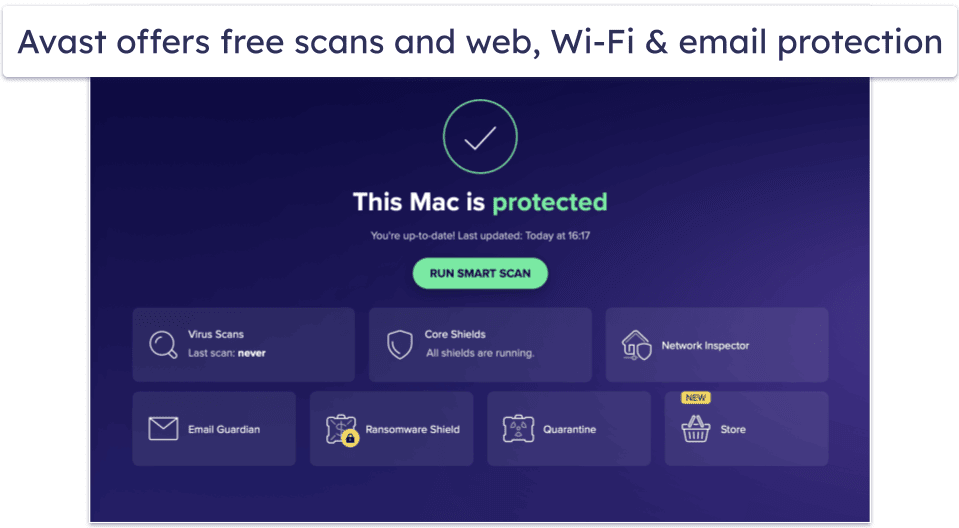
Wi-Fi network protection is another important feature of Avast Free Antivirus for Mac. It scans your home network and identifies potential vulnerabilities, such as weak passwords and unauthorized access points.
Avast’s more advanced security features are locked behind a paywall, so you’ll need to upgrade to Avast Premium Security for $39.99 / year to unlock them. The premium plan includes advanced ransomware and phishing protection, online shopping and banking protection, and Wi-Fi alerts. While these are all welcome additions, I still think brands like Intego and TotalAV offer way more on their premium plans.
Bottom Line:
Avast Free Antivirus for Mac offers a high level of protection against malware threats, enhanced by its Web Shield and Mail Shield components. Its Wi-Fi network protection feature helps you secure your home network from potential vulnerabilities. Avast’s premium features can be tested using the generous 30-day free trial, and there’s also a 30-day money-back guarantee for all purchases.
Read the full Avast review here>
7. AVG AntiVirus Free for Mac — Reliable but Limited Mac Protection
AVG AntiVirus Free for Mac is another free solution for protecting your Mac in real time. Feature-wise, AVG’s offering is similar to Avast’s free antivirus for Mac. Its most important component, the anti-malware engine, works pretty well in blocking various types of malware, including viruses, ransomware, and spyware. It also includes protection against PUPs (potentially unwanted programs). Like Avast, AVG provides real-time protection on its free plan, which is great.
- Effective real-time protection
- Lightweight scanner
- Web and email protection
- Medium false positive rate
- Minor Sequoia performance lags
- No Wi-Fi protection
I like that AVG’s scanner is lightweight, so it won’t slow down your system while working in the background to protect your Mac. You can choose between full, quick, custom, and external storage scans.

AVG’s online protections include blocking unsafe websites, links, downloads, and email attachments. These work well, and I found adding exceptions easy. That said, AVG had more false positives with Adobe Creative Cloud files than competitors like Intego and Bitdefender.
However, unlike Avast, AVG doesn’t offer Wi-Fi protection on its free plan, which is a bit disappointing. To scan and secure your Wi-Fi network, you’ll have to upgrade to AVG Internet Security, which costs $39.99 / year and also comes with advanced ransomware and anti-phishing protection. You can test all these features for 60 days on a free trial, and there’s also a 30-day money-back guarantee.
Bottom Line:
AVG Antivirus for Mac provides a high degree of protection against various malware threats, further reinforced by its Web and Email protection components, but not much else. The Wi-Fi network protection and other advanced and extra features all require upgrading to AVG Internet Security, which does come with a generous 60-day free trial.
Read the full AVG review here>
Quick Comparison Table
Editor's Note: Intego ONE and this site are in the same ownership group.
Testing Methodology: Comparison & Ranking Criteria
To provide you with actionable insights into the dynamic market of Mac antiviruses you can get for free, I applied our rigorous testing methodology. In particular:
- I tested for good malware detection. A good Mac antivirus needs to provide perfect or near-perfect malware detection rates. I performed extensive stress-testing by downloading over 900 Mac-specific malware files to my MacBook in order to test each program’s full disk scanning, and all of the brands on this list detected most (or all) of the malware samples.

- I confirmed that the antiviruses are easy to use. Mac antiviruses need to be intuitive and simple to use, both for beginner and advanced users. All of the products I recommend come with well-designed Mac apps, and all of their features are easy to find and use. They’re all fully compatible with Mac’s built-in defenses, too, and won’t interfere with Gatekeeper.
- I looked for minimal slowdown. An antivirus may slow down your system or generate false positives, disrupting creative workflows with tools like Adobe Creative Cloud, making it difficult or even impossible to use your Mac normally. All the antiviruses on my list are lightweight solutions that won’t interfere with you using your Mac while you perform a scan.

- I checked for extra features. Many antiviruses nowadays come with a wide range of extras for additional cybersecurity protection, but free Mac antiviruses are usually very limited. Still, I took into account all of an antivirus’s features to make sure that you’re getting a well-rounded product designed for maximum protection.
- I chose products with decent customer support. If you ever encounter a problem with your antivirus, you need to be able to get professional support to quickly resolve your issue. All of the best free antiviruses for Mac have good knowledge bases and a decent range of customer support options. Some, like Bitdefender, even offer all of their support options to all users, free or paid.
Risks & Disadvantages of Using a Free Mac Antivirus
Most “free” antiviruses have intrusive ads, offer extremely limited features, and can even infect your Mac with spyware or adware. So if you must go for a free product, always ensure it’s from a reputable company like the ones on my list.
The free antiviruses on my list are all from trustworthy companies and will provide you with some basic protection. But even the best free products come with some frustrating limitations. For example, most products on my list lack real-time protection, meaning they can’t properly protect your Mac from malware between scans.
Plus, free products lack the useful extra features that a premium antivirus offers. For example, TotalAV’s premium plans come with the best antivirus-bundled VPN on the market, and Bitdefender’s paid plan comes with an unlimited-data VPN and a password manager.
Free Antivirus vs. Paid Antiviruses
In terms of antivirus software, you genuinely get what you pay for. Free options, such as those provided by Bitdefender and Malwarebytes, include decent malware scanners, but they don’t have the extensive toolkit required for defending your device against all forms of internet threats.
Premium antiviruses provide more than just malware defense; they come with password managers, VPNs, and parental controls, and also work well with tools like Adobe Creative Cloud. Free versions just can’t compete.
Paid antivirus products often have superior customer support, including live chat and phone support, which is ideal if you need immediate assistance. But the top-tier antiviruses are so easy to use and function properly, so you’ll rarely need help anyway.
Overall, I think it’s well worth paying a few dollars to protect yourself online. You can read more about the best paid antiviruses for Mac here — they all have affordable plans and offer free trials and/or money-back guarantees (Intego has a 30-day money-back guarantee, so you can try it risk-free make sure it works for you).
Free Mac Antiviruses to Avoid
- MacSweeper. MacSweeper presents itself as a free antivirus solution, but it’s actually malware. It tricks you into thinking it’s scanned your device, offers overstated reports of adware, spyware, or viruses, and prompts you to spend money to remove them. While the official website for this fake antivirus has long been removed, you can still find copies of it on shady websites.
- Airo. Airo is an antivirus for Mac that’s been discontinued. However, you can still download it from 3rd-party websites. Unfortunately, if you do, you’ll run into issues trying to install it on the latest versions of Mac. Even if you manage to install it, it won’t have the latest malware definitions to fully protect you.
- Mac Guard. Like MacSweeper, Mac Guard is actually a virus that disguises itself as a free antivirus solution. Other names of the same malicious program include MacDefender, MacProtector, and MacSecurity. It will constantly issue you with ads, show annoying notifications, and change your search results to results that generate revenue for the cybercriminals behind it. If you accidentally install Mac Guard, you should download a program like Intego and run a system scan as soon as possible.
- MacClean. MacClean offers a malware scanner and free optimization tools for Mac, but its detection rates aren’t as good as any of the options on this list, and it constantly crashed in my tests.
Top Brands That Didn’t Make the Cut
- Norton. Norton is one of the best all-around antiviruses out there, and it offers a 60-day money-back guarantee on its Norton 360 plans (which include Mac protection). It’s one of my favorite antiviruses for Mac, providing extras like a VPN, a smart firewall, and much more. But Norton doesn’t have a free Mac plan, so I couldn’t include it on this list.
- McAfee. McAfee has an excellent Mac scanner as well as a ton of extra security features that build on top of Apple’s security features, but it doesn’t offer a free product.
- MacKeeper. MacKeeper is an incredibly intuitive antivirus program designed specifically for Macs. It’s also very good at detecting malware. But its free plan is very limited — in order to actually fix all of the problems it finds, you’ll have to subscribe.
- Sophos. Sophos discontinued its free version, so I had to remove it from this list. That said, Sophos’s paid plan comes with a 30-day free trial and provides reliable protection for a good price.
Frequently Asked Questions
Can Macs get viruses?
Yes, absolutely. While macOS contains some great built-in security protections, these protections aren’t enough to keep you safe from serious cybersecurity threats like spyware, adware, ransomware, and phishing attacks.
Being careful online isn’t enough to protect your Mac from cyberattacks. That’s why it’s so important to get a high-quality Mac antivirus like Intego, which comes with features like real-time malware scanning, web protection, and network protection.
Are free antiviruses for Mac good enough?
Not really, no. However, they can be good tools to remove malware from your disk, and some even offer real-time protection to keep your Mac protected after you’ve cleaned up your system.
But paid antivirus software provides better malware scanning, network protections, web protections, and helpful extras like parental controls, VPNs for online privacy, and disk cleanup tools to keep your device running smoothly. Intego is a Mac-only internet security suite that contains a ton of excellent features to keep you (and your family) safe online.
Can I just use a free online virus scanner and not download anything?
You can, and using a good online scanner is certainly better than ignoring security issues on your Mac. But a truly online scanner will only be able to detect an issue, not remove it. Free online scanners also lack real-time protection. Instead, they provide on-demand scanning, so they’re best used for checking individual files or URLs for malware.
Finally, even though one online scanner can combine the findings of dozens of anti-malware engines to provide you with more exhaustive results, you should know that most providers of these engines, in order to remain competitive, don’t share all of their malware definitions with free online scanners.
In my opinion, while free online scanners, just like free antiviruses, have their place, the superior protection and peace of mind offered by a premium antivirus like Intego make it a worthwhile investment.
Why do these companies offer free antiviruses?
It depends. Many companies lure users with promises of amazing features and then put all of those features behind a paywall in the actual app (unfortunately, even some of my favorite antiviruses, like TotalAV, are guilty of this kind of upselling).
Free stuff on the internet is never really free (you either pay with your data, are forced to watch ads, or your device gets infected with spyware or adware, etc.), which is why it’s usually better to just pay for the services that you consider to be valuable.