
Published on: November 10, 2020 Updated 21 times since publishing
- 🥇 Norton : Best antivirus of 2026 with excellent malware detection rates and a password manager that is highly secure.
I tested all of the most popular antiviruses on the market to find those with strong malware protection AND an excellent bundled password manager that could generate, save, and auto-fill passwords across all my browsers and devices.
There are some excellent standalone password managers, like Dashlane and 1Password, but there’s something to be said for combining a password manager and an antivirus in one subscription. You can save money, and it’s nice to forgo the hassle of managing two subscriptions.
Luckily, a few antiviruses come with great password managers comparable to standalone password managers in terms of security and features.
After a few weeks of testing, I found 10 products that are better than the rest — they have advanced anti-malware scanners that can detect all types of malware, password managers that can compete with some standalone products, and additional features that add to the overall value of the program. Norton is my #1 choice, but all of the products on this list are great options, so see which suits your needs and budget best.
Quick Summary of the Best Antiviruses With a Password Manager


🥇1. Norton 360 — Best Antivirus With a Password Manager in 2026



Norton 360 is my favorite antivirus with a password manager — the malware scanner uses artificial intelligence and machine learning to detect threats before they infect your system, and the included password manager is just as good as most standalone competitors.
The malware scanner performed extremely well in my tests, successfully detecting and removing 100% of my computer’s viruses, trojans, ransomware, and other malware samples. Beyond basic security, Norton’s antivirus comes with a host of extras. Depending on the package, you’ll get:
- VPN.
- Identity theft protections.
- Data broker removal tool (US only)
- Parental controls.
- Optimization tools.
- And a lot more…
The password manager is secure, feature rich, user friendly, and offers unlimited storage of passwords, credit cards, and secure notes. Although it doesn’t have a desktop app, it’s available as an intuitive web-based app, a browser extension for Firefox, Chrome, Safari, and Edge, and a mobile app for iOS and Android. It comes with most of the features that standalone password managers have, like seamless auto-save/auto-fill, multi-device sync, 2FA, and more. There is an automatic password-changing tool, too, but it didn’t work when I tested it.

The password auditing tool is quite good, alerting me to numerous weak, duplicate, and old passwords. While this is a common feature in standalone password managers like Dashlane, not all antivirus-bundled password managers include this, so I was pleased to see Norton does. Norton 360 plans also include dark web monitoring, which alerts you if your passwords or logins have been compromised in a cyberattack or data breach.
All Norton 360 packages include a password manager, a malware scanner, a firewall, a VPN, and dark web monitoring. Norton 360 Standard ($39.99 / year*) covers either 1 or 3 devices (varies by country), while 360 Deluxe ($49.99 / year*) covers up to 5 devices and adds extras like parental controls and 50 GB cloud storage. For additional identity protections like credit monitoring and up to $25,000 in stolen funds reimbursement, you can get 360 with LifeLock Select Plus for $99.99 / year*.
Bottom Line:
Norton 360 is by far the best antivirus package I’ve tested. In addition to Norton’s powerful anti-malware engine, all Norton 360 plans include a really good password manager with advanced features like 2FA, auto-fill, and password auditing. Norton’s 360 plans also include a VPN, a firewall, dark web monitoring, and many other useful extras. You can try all Norton packages risk-free, as they come with a 60-day money-back guarantee.
🥈2. Bitdefender Premium Security — Best Lightweight Antivirus With a Password Manager
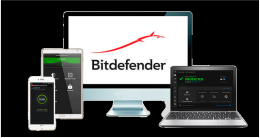
Bitdefender has an advanced and lightweight anti-malware engine plus a secure and feature-rich password manager. The anti-malware engine scored a perfect 100% detection rate during my tests. Its lightweight scanner uses machine learning and traditional scanning to identify and block even the most advanced malware threats.
I was impressed with SecurePass, Bitdefender’s password manager. It’s secure, packed with features, and easy to use. For computer users, it’s an extension for Chrome, Firefox, Edge, and Safari. There are also mobile apps for both Android and iOS. Here’s what you get:
- Unlimited password storage.
- Credit card storage.
- Multi-device sync.
- Password generator.
- Auto-save and auto-fill.
- Password health auditing.
- Password sharing + shared folders.
- 2FA and biometric logins (on mobile).
- Account recovery.
- Secure notes.
- Remote logout.
Like the antivirus, Bitdefender’s password manager is easy to use, making it a great option for non-tech-savvy users. It’s also about as feature-rich as antivirus-bundled password managers come, being the only option on this list that allows for secure password sharing.

The antivirus is similarly abundant in features. The web protections are great, with an extension and a secure browser pre-loaded with SecurePass. You can also get optimization tools, webcam protection, and unlimited-data VPN.
The cheapest Bitdefender plan with the password manager is Total Security ($54.99 / year), which also gets you parental controls, optimization tools, and more. But to get Bitdefender’s unlimited VPN, you’ll need Premium Security ($64.99 / year). Both plans cover 5 devices and come backed by a 30-day money-back guarantee.
Bottom Line:
Bitdefender offers advanced anti-malware protection and a great feature-rich password manager. While the password manager doesn’t have as many features as the best standalone password managers, it’s one of the better antivirus-bundled options. All of Bitdefender’s plans are backed by a 30-day money-back guarantee.
Read the full Bitdefender review >
🥉3. TotalAV Total Security — Best for Intuitive Password Vault Interface

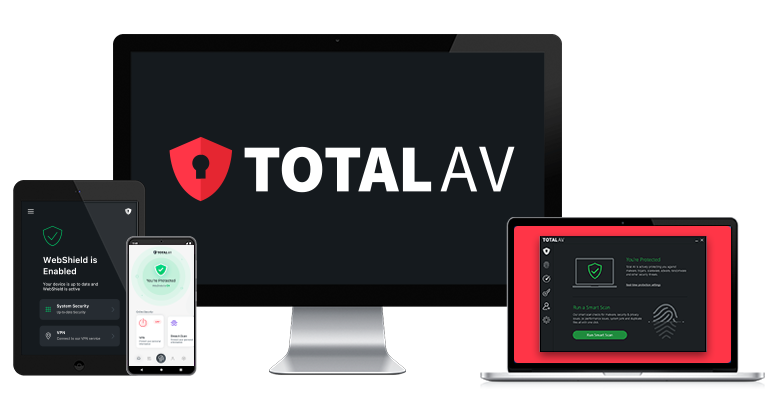
TotalAV provides a good antivirus package with a secure and intuitive password manager. The antivirus scanner detected over 99% of the sample malware files during my tests, missing only a couple of threats that Norton and Bitdefender detected and blocked. The highest-tier plan includes Total Password, TotalAV’s password manager, which is both secure and feature rich.
I was impressed by the whole TotalAV package. In addition to a top-notch anti-malware kit, you get useful optimization tools, a VPN, and more. I particularly like the web protections, which include a security extension, a safe browser, and a great ad and tracker blocker. My biggest complaint is the lack of a firewall.
Total Password has more features than most antivirus-bundled password managers. It can generate security reports, create and store an unlimited number of virtually unbreakable passwords, and there’s even a neat feature that lets you log out of all of your accounts remotely. All this comes on top of excellent security features like 2FA and top-notch encryption. That said, it’s missing features like password sharing.

Both the antivirus and password manager are super easy to use. The extensions (available on all major browsers) make it easy to access every feature, and the same is true of the antivirus. The auto-save/auto-fill functions worked perfectly with stored passwords and credit cards. Though I found every feature to be intuitive, I like that there’s a knowledge base covering all of the main functionalities of both products.
Unfortunately, you only get the password manager with Total Security, TotalAV’s most comprehensive plan. The bundle also comes with a good VPN, optimization tools, and more. It costs $49.00 / year and covers up to 8 devices. You can also get Total Password as a standalone product for $1.99 / month.
Bottom Line:
TotalAV is a reliable antivirus with a secure and easy-to-use password manager. TotalAV’s anti-malware engine blocked just under 100% of the malware samples during my tests. While the password manager is basic compared to the best standalone options, it’s very intuitive, making it a good choice for beginner or non-technical users. TotalAV is backed by a 30-day money-back guarantee, so you can try it out risk-free.
Read the full TotalAV review >
4. Avira Prime — Best for Password & Online Account Security Monitoring

Avira has an excellent cloud-based anti-malware scanner and a great password manager. The antivirus had a 100% malware detection rate in my tests, and the password manager makes it very easy to understand and access all of its features. I had no trouble generating secure passwords or auto-filling login fields.
The password manager is available in a limited form for free, as is the antivirus. Both free products are good, offering unlimited password storage and real-time protection, making Avira one of the best free options. But you’ll need a premium bundle to get password auditing, data breach alerts, and antivirus features like a firewall.
These are the features Avira’s premium password manager comes with:
- Auto-save and auto-fill.
- Unlimited password + credit card storage.
- Multi-device sync.
- Password auditing.
- Password generator.
- Data breach monitoring.
- Two-factor authentication (2FA).
- Biometric logins (on mobile).
- TOTP authenticator for saved accounts.
- Secure notes.
This is a pretty solid list of features. I particularly like the built-in authenticator, something even most standalone password managers lack. Plus, the data breach monitoring that alerts you if any of your passwords are leaked is a huge plus.

On the antivirus side, Avira has a lot going for it regarding features and utility. The optimization tools are some of the best on the market, and the VPN has an ironclad no-logs policy (although it isn’t great for streaming). The web protections are effective, but I encountered some visual bugs. But if you’re worried about identity theft, Avira frankly pales in comparison to the likes of Norton.
At $59.99 / year, Avira Prime is the best-value plan for most users — it includes all of Avira’s features for up to 5 devices across all operating systems. There’s also Avira Internet Security ($34.99 / year), which covers 1 device and includes the password manager, anti-malware scanner, and some system clean-up tools.
Bottom Line:
Avira has a really good antivirus scanner with a fully functional and easy-to-use password manager. The scanner blocked all of my test malware, the password manager has all the essential tools, and an intuitive auditing tool warns users of weak and breached passwords. Avira’s Prime package covers multiple devices and adds a VPN and system optimization tools, making it an excellent overall value. You can try Avira using a 60-day money-back guarantee.
5. McAfee — Powerful Malware Scanner & Password Manager for Enhanced Security


McAfee has a comprehensive antivirus suite with a decent password manager on all plans. The malware scanner and real-time protections caught 100% of worms, trojans, and ransomware in my tests. Though the password manager is light on features, even missing password auditing, the antivirus is really good.
However, the password manager handles the basics well, with seamless auto-save and auto-fill. I had a user-friendly experience across True Key’s extensions (available for all major browsers, save Safari) and mobile apps. You’ll also get a solid password generator, cross-device syncing, biometric logins on mobile devices, and 2FA. However, unlike Bitdefender, McAfee’s password manager can’t share logins.
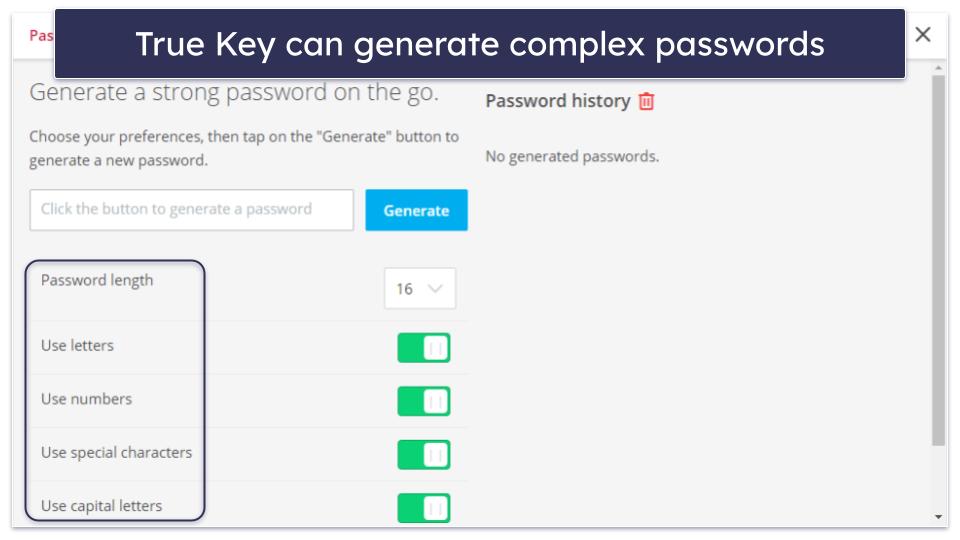
In contrast, McAfee’s antivirus has all the standard features and then some. It comes with a basic but effective firewall, a VPN, and great web protections that block dangerous sites and warn you about sketchy links on social media. The top plan also comes with extensive identity theft protections.
You can get TrueKey with any of McAfee’s plans. Most provide unlimited device licenses, and every plan is available in a family variant that adds parental controls. Essential ($39.99 / year) is the cheapest plan, with other plans adding basic identity monitoring (Premium) and up to $1 million in payouts in the event of identity theft (Advanced). All plans are backed by a 30-day money-back guarantee.
Bottom Line:
McAfee combines a powerful malware scanner with a user-friendly password manager, offering a seamless experience for managing and securing passwords. McAfee’s antivirus is more advanced when it comes to extra features, but both tools are solid and backed by a 30-day money-back guarantee.
6. Trend Micro — Best for Keylogging Protection


Trend Micro combines an AI-based scanning engine with a decent password manager. The antivirus engine is fast and powerful, scoring a good 97% malware-detection rate overall. The password manager, meanwhile, combines security and good features in an intuitive package.
Trend Micro’s password manager has a well-designed, uncluttered interface. It works with all operating systems and has browser extensions for Chrome, Firefox, Edge, and Safari.
Trend Micro’s password manager includes:
- Unlimited password storage.
- Credit card and other data storage.
- Secure notes.
- Two-factor authentication.
- Password generator.
- Password auto-save and auto-fill.
- Password auditing.
- Biometric logins (for mobile).

I really like that the password manager doubles as an ad, tracker, and phishing site blocker. Given the risk of keyloggers, the keystroke encryption is another good feature. On the other hand, it’s unfortunate that, unlike Norton or Bitdefender, there aren’t any good recovery options.
As an antivirus, I like that Trend Micro’s optimization tools take the form of a 1-click scanner. The VPN is basic but works well (same story with the parental controls). Subscribers in the US willing to pay for the top plan can also get strong identity theft protections.
Trend Micro’s password manager is included with its Maximum Security ($49.95 / year) and Premium Security Suite ($54.95 / year) plans. The former covers 5 devices, while the latter covers 10 and adds a VPN, dark web monitoring, and identity theft insurance.
Bottom Line:
Trend Micro offers good antivirus protection and a decent password manager. While the password manager isn’t the most feature-rich option, it includes all essential tools, plus keylogger protection. You can get it with the Maximum Security or Premium Security Suite plans. All of Trend Micro’s premium plans come with a 30-day money-back guarantee.
Read the full Trend Micro review >
7. Avast — Strong Antivirus With a Secure & User-Friendly Password Manager

Avast features a powerful malware scanner, along with one of the most user-friendly antivirus-bundled password managers I’ve tested. The antivirus engine blocked 100% of the malware in my tests, including ransomware, trojans, and spyware. I also appreciated how lightweight it is — even during full scans, I could stream and work without slowdowns, which isn’t always the case with antivirus software.
Avast Password Manager offers a free version and a paid subscription, unlocking two premium features. The first, Password Guardian, is a password auditing tool, and the second, One-Touch Login, lets you use your mobile device to log in on a desktop by accepting a notification.
I like that even on the free plan, you can store an unlimited number of logins, credit cards, and secure notes. It also offers auto-save/auto-fill, password auditing, and a password generator. While it doesn’t include password sharing like Bitdefender’s SecurePass, it’s easy to set up, and it syncs automatically across devices. Auto-fill worked flawlessly on every website I tried, and I didn’t encounter the occasional glitches I saw with some competitors.
Avast’s suite includes a Wi-Fi Inspector that scans networks for vulnerabilities and a Ransomware Shield that protects sensitive folders from unauthorized encryption. It also offers dark web monitoring, which alerts you if your saved email addresses or passwords appear in data breaches, but it’s not as comprehensive as what you get with competitors like Norton 360. The VPN and performance optimization tools in higher-tier plans are also solid, though the VPN isn’t as fast as Norton’s.
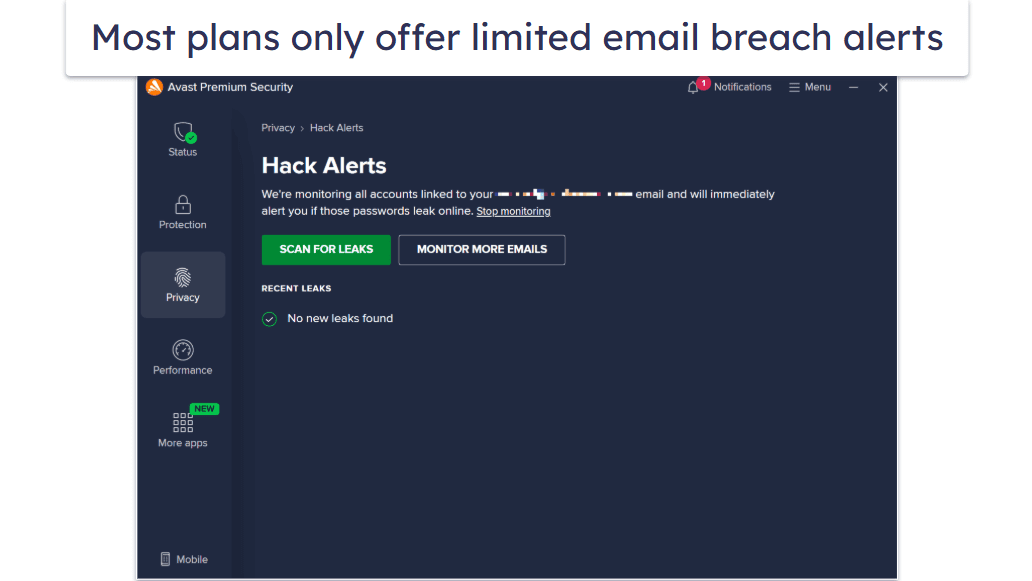
You can get access to Avast Password Manager with the Avast Free Antivirus plan, but you won’t have access to advanced tools like Password Guardian and One-Touch Login. For the full-featured experience, you’ll need Avast Premium Security, which starts at $39.99 / year) or Avast Ultimate ($55.99 / year). All plans are backed by a 30-day money-back guarantee.
Bottom Line:
Avast is a strong all-rounder with excellent malware detection and a secure, easy-to-use password manager. The added extras, like Wi-Fi Inspector, ransomware folder protection, and dark web monitoring, give it an edge over simpler competitors. While its password manager doesn’t offer sharing options, it’s reliable and integrates seamlessly into Avast’s wider security suite.
8. Panda Dome — Best for Simple Password Management


Panda Dome has a good antivirus with decent extras, including a password manager, a VPN, and parental controls. The antivirus scanner detected 95% of the sample malware in my tests. While pretty good, it can’t compare with the 100% scores from the likes of Norton. But it is intuitive and easy to use.
Panda’s password manager is pretty good. I really like its simple, intuitive interface and the fact that all of its main features can be accessed with one click. It doesn’t have a desktop app, but it has browser extensions for Chrome, Edge, and Firefox, as well as mobile apps for Android and iOS. I just wish Panda was clear about the type of encryption its password manager uses.
Panda’s password manager includes:
- Unlimited password storage.
- Credit card and other data storage.
- Multi-device sync.
- Password generator.
- Auto-login, auto-fill, and auto-save.
- Security reports.
- Two-factor authentication (2FA).

In addition to managing passwords, Panda’s antivirus has a VPN, parental controls, optimization tools, and more. The web protections aren’t very good, though, and malware scans take too long.
Panda’s password manager comes bundled with its two highest-tier plans: Premium ($42.00 / year) and Complete ($27.00 / year). Both plans are expensive, but they include a wide range of features and are available for 1, 3, 5, 10, or an unlimited number of devices. The password manager is also available as a separate standalone subscription, but it’s not a great value.
Bottom Line:
Panda Dome offers feature-rich internet security suites with good antivirus protection and a simple but effective password manager. Panda’s password manager is available with the Complete and Premium plans, which you can try out risk-free with a 30-day money-back guarantee.
9. ESET — Well-Rounded Antivirus With a Solid Password Manager


ESET’s cybersecurity suite offers protection from online threats, plus a password manager. The malware scanner caught most of the threats I tested it against, including ransomware, keyloggers, and viruses.
The password manager comes with all the basic features that every password manager should have. However, it doesn’t have password sharing or customizable templates like the best standalone password managers offer.
ESET’s password manager comes with the following features:
- Multi-device sync.
- Auto-save and auto-fill.
- Leaked password check.
- Password auditing.
- Password generator.
- Basic 2FA.
- Biometric login on mobile.

As an antivirus software, ESET is better than most but still far from being the best. I could circumvent some of the parental controls easily, and the cleanup tools leave something to be desired. Still, it blocked 100% of malware in my tests and comes with nice extras like an effective firewall, a decent VPN, and anti-theft tools.
To get the password manager, you need ESET Premium or Ultimate. Premium costs $41.99 / year for 3 devices and includes the antivirus and password manager, plus extras like optimization tools and a firewall, while Ultimate costs $125.99 / year for 3 devices and adds a VPN and ID theft protection and coverage (up to $1M). All of ESET’s individual plans can cover up to 25 devices and come with a 30-day money-back guarantee. Premium is also available for a 30-day free trial.
Bottom Line:
ESET is a solid antivirus suite that stopped most malware in my tests. It’s effective against viruses as well as phishing sites. The password manager is fairly limited but is still secure and easy to use, and it’s available on the Premium and Ultimate plans.
10. Aura — Good Identity Protections (Plus a Basic Password Manager)

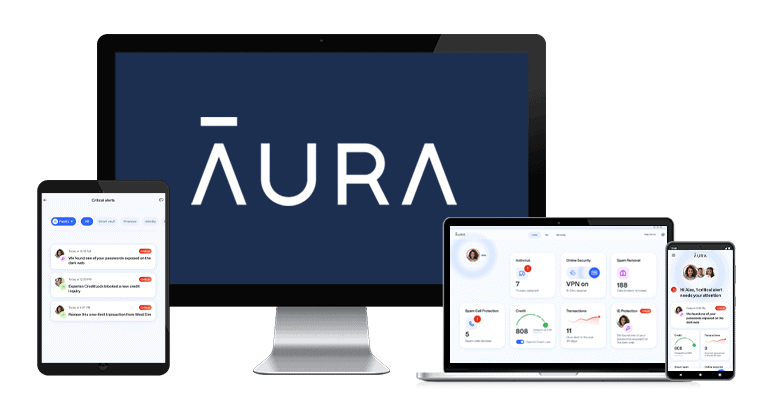
Aura offers a password manager, antivirus, and top-notch identity protection. The latter is only available in the US, but users in Canada can still get the antivirus and password manager. The anti-malware toolkit caught almost every malware sample in my tests.
Most Aura plans come with a password manager, but it’s missing essential features, and the auto-fill is a bit buggy. It does have 2FA, but SMS is the only option, unfortunately.
On the plus side, it offers email spoofing. This means you can sign up for sites with a fake email, and Aura will forward everything to your real address. It’s a great way to reduce spam. 1Password also supports this feature, but only as an add-on. I also like that the auditing tool actually checks for leaked passwords.
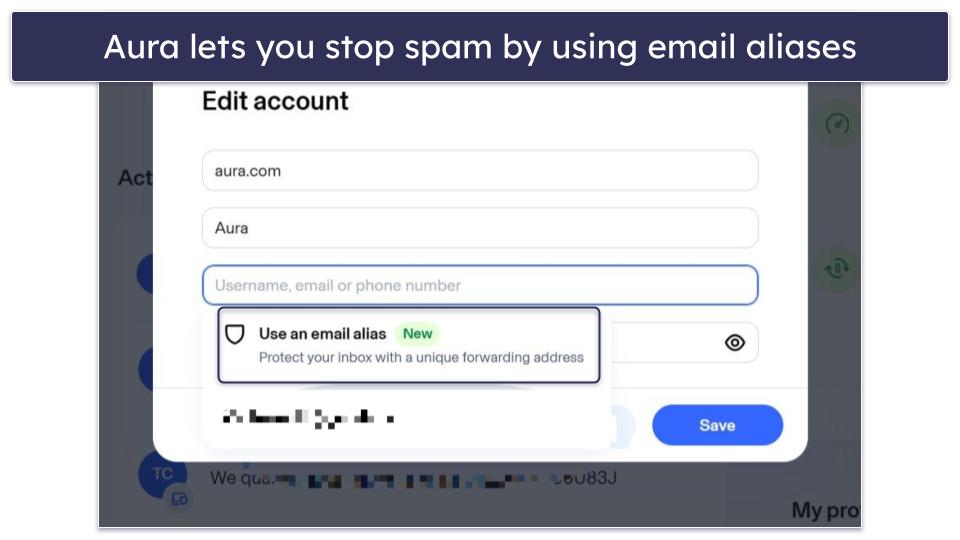
The identity and fraud protections are definitely Aura’s strong suit. As an antivirus and password manager, it’s quite limited in terms of features, but the anti-fraud measures are on par with Norton Lifelock.
I can’t recommend Aura as an antivirus and password manager alone, but if you’re in the US and looking for insurance against identity theft, it’s worth considering. To get the password manager, you’ll need either the Antivirus Plus ($47.88 / year) or Ultimate ($59.88 / year) plan. I recommend the latter as it includes all of Aura’s excellent identity protections. All plans are backed by a 60-day money-back guarantee.
Bottom Line:
Aura has good identity theft protections, but it’s lacking in the antivirus and password management departments. It offers American customers insurance of up to $5 million in the event of identity theft or fraud while providing a very basic password manager and malware scanner. All plans come with the VPN and password manager.
Quick Comparison Table
Testing Methodology: Comparison & Ranking Criteria
To find the best antivirus/password manager combos, I tested dozens of options, evaluating them based on our criteria for assessing antiviruses and password managers. Here are some of the things I considered:
- I looked at the software’s fundamental security. Every option on this list combines an antivirus with strong malware protections and a password manager backed by uncrackable encryption, ensuring your private information and devices stay safe. For example, Norton has a 100% malware detection rate and protects passwords with 256-bit AES encryption.

- I assessed whether the package offered good value. To earn my recommendation, a product needs not only to be good but also have a reasonable price. The options on this all fit the bill.
- I took into account the breadth of features available. Beyond just detecting malware and storing passwords, there’s a lot that antiviruses and password managers can do. I prioritized features like dark web monitoring, web protections, vault auditing, and more. Every combo in this article has at least a few valuable extras. For example, Bitdefender has data breach alerts, webcam protection, and biometric logins.
- I considered how easy each was to use. I may be a tech expert, but I recognize that not everyone else is. For that reason, I only selected password managers and antiviruses that are easy to use. Every option on this list has a fairly clean and intuitive interface.

How to Set Up an Antivirus-Bundled Password Manager
Here, I’ll show you exactly how to get started with a password manager. I’ll use Norton in this example, but the process will be fairly similar with most of the other options. Here’s how to do it:
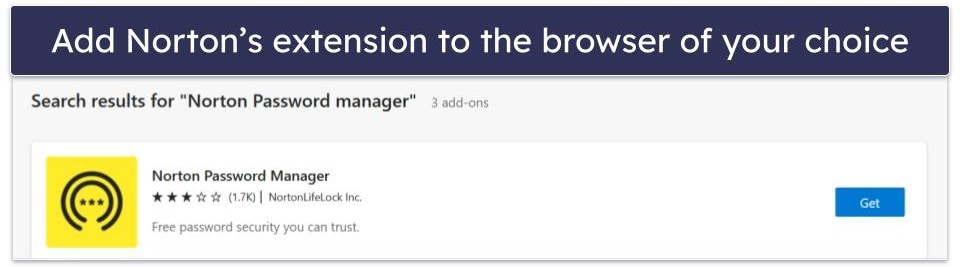
- Go to your browser’s extension store and search for your chosen password manager. With Norton, you can also find a link through your account dashboard.
- Log into your Norton account and create a strong master password.

- Download your recovery PDF. Write down the 16-digit recovery key, storing it somewhere safe, and then deleting the file. If you ever forget your master password, you’ll need this key to get back into your account. Note that not every password manager will give you a recovery code.

- Follow the prompts to set Norton as your browser’s default password manager.

- You’ll now be taken to your new password vault. To manually add passwords, click on the yellow circle.

- Enter the URL of the site you want to add, followed by your email/account name and password. Norton comes with a few popular sites loaded in, so these are super easy to add.

- If you want to import passwords from elsewhere, click on How to add more passwords.
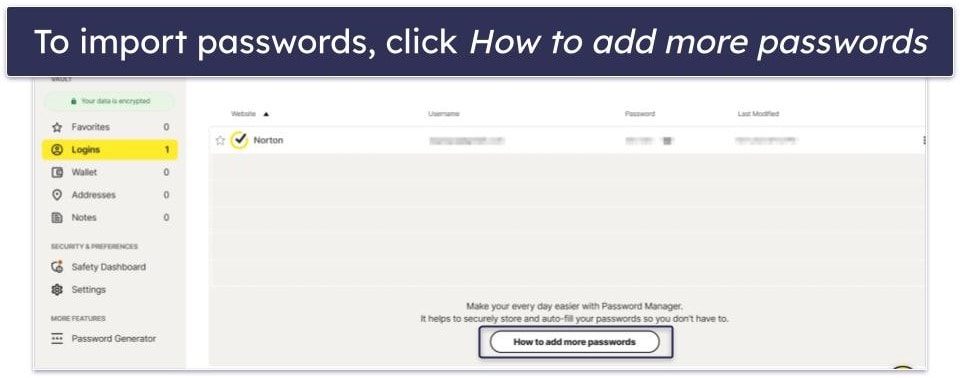
- Follow the prompts and upload a file to import. Norton will provide instructions on how to import from other password managers. If you have passwords stored in a browser, you should be able to download your passwords as a .csv file. Wherever they’re stored, upload the file with your stored passwords through the Norton extension.
Here’s an example if you have your passwords stored in 1Password: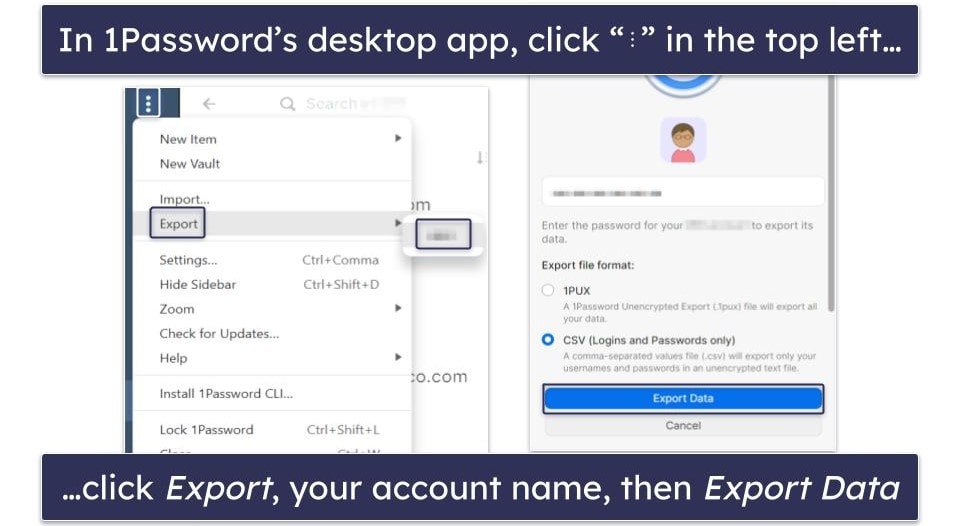
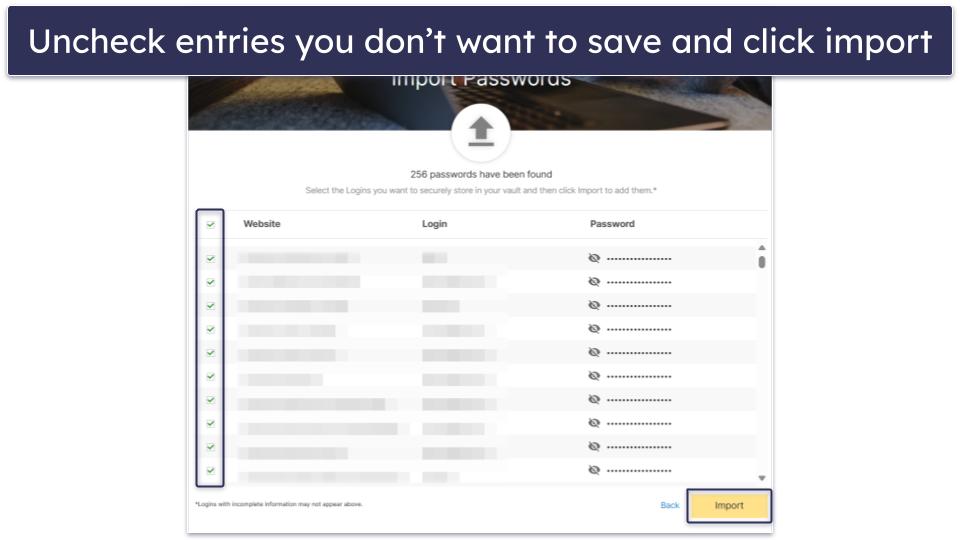
- Finalize the process by clicking Import in the Norton Extension. You can import the entire file or deselect any passwords you don’t want to save by unchecking the nearby box.
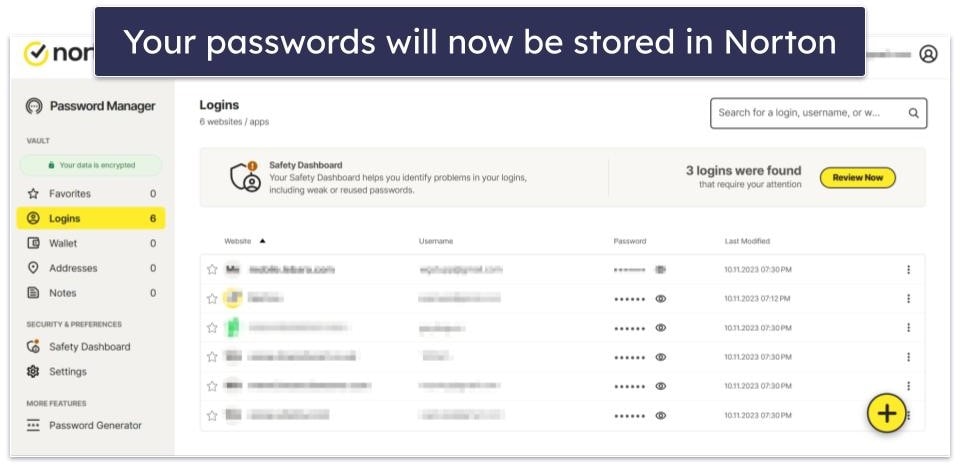
- Presto! Your Norton vault will be populated with all your passwords.
Top Brands That Didn’t Make the Cut
- F-Secure — F-Secure has a good antivirus, and it also comes with a password manager, but it doesn’t have essential features like 2FA. I’m also not a fan of the password manager’s browser extension, which doesn’t include the password generator — meaning you’ll have to open the desktop app every time you need a strong new password.
- iolo — While iolo does offer good optimization tools, neither the antivirus nor ByePass (the password manager) is quite good enough to earn my recommendation. The apps are somewhat limited, and ByePass is only included in the most expensive bundles.
- ZoneAlarm — Though it offers solid protection from malware, ZoneAlarm is missing a password manager and other extra features, like dark web monitoring and optimization tools.
Frequently Asked Questions
What’s the best antivirus with a password manager?
Norton 360 is my top choice — it has comprehensive malware and cybersecurity protections and a fully featured password manager. Both were outstanding during my tests. Its password manager has all basic password management features, plus some useful extras — like password auditing, 2FA, and more.
Norton 360 is also a great value, as even its lowest-priced plan offers real-time protection from all kinds of malware and includes cloud backup, a secure VPN, a firewall, a password manager, and more.
Are antivirus-bundled password managers safe to use?
All of the antivirus-bundled password managers on this list are 100% safe. They use advanced encryption to protect all passwords and other data stored in a user’s password vault. Many also come with extra security features, like two-factor authentication (2FA) and biometric logins to further secure a user’s data.
Norton’s 360 packages offer one of the most advanced antivirus-bundled password managers. In addition to 2FA and biometric logins, all data stored in Norton’s password manager is secured by 256-bit AES encryption — the same level of encryption used by banks and governments.
Can I get a free antivirus with a password manager?
Most internet security companies don’t provide free antiviruses with bundled password managers. Avira does have a free plan that comes with a password manager, but it’s limited — it doesn’t let you analyze the strength of your passwords, it doesn’t alert you in case your accounts have been hacked, and it doesn’t check whether a website you’re registered for is safe or not (but all of these features are included in Avira Prime).
If you’re ready to invest in a premium product, you can try an antivirus and password manager bundle at a very low cost. For example, Norton 360 includes a password manager even in its cheapest plan, which you can try risk-free for 60 days using the company’s money-back guarantee.
Should I get an antivirus plan with a password manager, or is it better to go for a standalone password manager?
All of the password managers on this list are just as good as most standalone password managers.
Plus, when you get an antivirus with a password manager, you’re getting 2 high-quality products at the price of 1 — this doesn’t just save you money, but it can also save you the hassle of finding 2 separate products, getting 2 different subscriptions, and dealing with 2 different customer support teams. That said, the best standalone password managers tend to have even more advanced features than those on this list. If you want advanced 2FA or unique features like a travel mode, passkey support, and more, you should look at standalone password managers.