Published on: November 3, 2021 Updated 12 times since publishing
- 🥇 ExpressVPN : Provides the fastest gaming speeds on the market, has support for cloud gaming platforms, and also comes with really user-friendly apps (including a router app). What’s more, it has affordable plans and a 30-day money-back guarantee for all first-time subscribers.
I always use a VPN when playing online games like Counter-Strike 2, Call of Duty, Minecraft, and Dota 2. I do that to make sure my internet service provider (ISP) doesn’t selectively slow down my gaming speeds and to protect my gaming traffic. Plus, a VPN protects me from DDoS attacks when I host multiplayer games or play older games. And using a VPN increases my odds of getting into bot lobbies in multiplayer games to improve my skills.
I managed to find a handful of really good gaming VPNs. All the VPNs on this list provide really fast speeds for gaming, have easy-to-use apps on all platforms (one even has an app for routers), include excellent security features, and are affordable.
Editor's Note: ExpressVPN and this site are in the same ownership group.
Quick Summary of the Best VPNs for Gaming


Editor's Note: Intego ONE, Private Internet Access, CyberGhost and ExpressVPN are owned by Kape Technologies, our parent company.
🥇 1. ExpressVPN — Best VPN for Gaming in 2026

Basic 12-Months plan: $3.99 / month
1-month plan: $12.99 / month

ExpressVPN is the best gaming VPN on the market — it has the fastest gaming speeds of any VPN out there, and easily tops all other options on my list. It also features easy-to-use apps, including a native router app, and works extremely well with cloud gaming platforms.
- Best gaming & P2P speeds
- Native router app
- Official cloud gaming support
- Excellent for gaming consoles
- Expensive subscription
In my tests, I had very enjoyable gaming sessions — I didn’t experience crashes, my connection to the gaming servers never dropped, and my ping was stable the entire time. Plus, ExpressVPN provides access to servers in 105 countries, so it’s really easy to game on nearby servers to get the fastest speeds.
Also, ExpressVPN barely slowed down my speeds when I used Lightway (ExpressVPN’s proprietary protocol that’s faster than OpenVPN and IKEv2/IPSec). I connected to gaming servers almost instantly on my PC, and I always had low ping — even when I used distant servers.

I love how user-friendly ExpressVPN’s apps are — installing them takes 1–2 minutes and the interface is simple to navigate (even if you’re new to VPNs). There’s a quick-connect feature that automatically connects you to the fastest server, but it’s also easy to manually find and connect to a server.
And on top of mobile and desktop apps, there’s also a router app. ExpressVPN’s router app is very easy to install, and there are helpful setup tutorials — it took me less than 8–9 minutes to set up the app on my router. I was able to game on my console, PC, and smartphone while connected to any one of ExpressVPN’s server locations. Another option is Aircove, which is the provider’s own router that comes with the app preinstalled.
And I really like how ExpressVPN supports cloud gaming services, which stream video games to portable devices like smartphones and tablets. ExpressVPN works with popular cloud gaming services like Xbox Game Pass, PlayStation Plus Premium, and more.
Bottom Line:
ExpressVPN is my favorite gaming VPN in 2026 — it’s extremely fast, its apps are easy to install and use, and it even has a user-friendly router app so you can use ExpressVPN on your consoles. ExpressVPN also supports cloud gaming.
Read the full ExpressVPN review
🥈 2. Private Internet Access — Great Easy-to-Use VPN for Gaming

6-month plan: $7.50 / month
1-month plan: $11.95 / month
Private Internet Access (PIA) is a great pick for gamers who are new to VPNs, as its apps are extremely simple to navigate and use. Plus, it allows unlimited simultaneous connections, making it a great pick for large families or gamers who game online on multiple devices.
- Fast for gaming & P2P
- Highly customizable apps
- Supports port forwarding
- Not ideal for beginners
- Manual router config
I also like how there are automation options available, so you can configure the VPN app to automatically connect to a VPN server when you game on public Wi-Fi. It even lets you customize your encryption and other settings like packet size, which is particularly helpful for smooth mobile gaming on slower public Wi-Fi. PIA doesn’t have a native router app, but it provides step-by-step guides that show you how to configure its service on your router.
PIA doesn’t guarantee it will work with cloud gaming platforms — that said, I was still able to use this VPN to game on platforms like GeForce Now and Amazon Luna.

PIA also provides great security for gamers. It has Identity Guard, which is a data breach monitoring tool that lets you secure your login details for gaming accounts. In addition, it has MACE, which is an excellent ad blocker that gets rid of ads on gaming sites and also blocks connections to malicious sites that claim to host online games.
PIA is a really good pick for desktop gamers who like to torrent royalty-free games — it allows P2P traffic on all servers, works with top P2P apps like uTorrent and Vuze, has port forwarding (connects you to more peers to get faster downloads), and provides SOCKS5 proxy support, which changes your IP address like a VPN but doesn’t use encryption, so you get much faster speeds.
Bottom Line:
Private Internet Access is a very beginner-friendly VPN for gamers, as its apps work on most platforms and are very simple to use. The VPN also allows unlimited connections, has customizable features for mobile gamers, provides strong security, and has excellent P2P support.
Read the full Private Internet Access review
Editor's Note: Private Internet Access and this site are in the same ownership group.
🥉 3. CyberGhost VPN — Dedicated Gaming Servers & Great Automation


6-month plan: $6.99 / month
1-month plan: $12.99 / month
CyberGhost VPN provides access to 80+ gaming servers in 4 countries (the US, the UK, France, and Germany) — those servers provide faster downloads and gaming speeds than its regular servers. I had better speeds using these servers during Fortnite matches compared to regular servers.
- Dedicated gaming servers
- SmartRules automation
- 45-day money-back guarantee
- No router app
- No official cloud gaming support
There’s no router app (unlike ExpressVPN), but you can perform a relatively quick manual setup on your router if you follow the provider’s tutorials. Also, CyberGhost VPN’s apps are very intuitive — I especially like that the dedicated gaming servers have their own category, which makes it very easy to find and connect to them.

And I’m a big fan of the Smart Rules feature, which is a feature that lets you customize your VPN preferences. For example, I used Smart Rules to set CyberGhost up to automatically connect to the fastest server whenever I opened Steam on my PC.
Unfortunately, there’s no official cloud gaming support; however, CyberGhost VPN worked without issues when I tried using it with services like Amazon Luna.
Bottom Line:
CyberGhost VPN is a secure and intuitive VPN with dedicated gaming servers, great speeds for online gaming, including shooter and MOBA games, and convenient automation features for both beginner and advanced VPN users.
Read the full CyberGhost VPN review
Editor's Note: CyberGhost and this site are in the same ownership group.
4. NordVPN — Good VPN for Secure Gaming & Hosting Virtual LAN Parties

Plus 24-month plan: $3.59 / month
Complete 24-month plan: $3.99 / month
Prime 24-month plan: $6.99 / month
NordVPN is great for securing your gaming traffic. I especially like its Threat Protection Pro feature — not only does it block ads and shady sites, but it also protects you from malware-infected downloads (which is great for securing your device against potentially malicious game files).
- Excellent security features
- Meshnet for LAN parties
- Track compromised gaming logins
- Expensive if you want all features
- Missing port forwarding
Not to mention that, on Windows, Threat Protection Pro also has an app vulnerability scanner — so it can quickly flag outdated gaming apps that could put your entire system at risk.

I also like the provider’s Meshnet feature — it lets you create a secure, private network and link up to 60 devices over encrypted VPN connections. This helps you host virtual LAN parties securely so you can game with all of your friends (for example, you can use it to host private Minecraft servers).
The VPN also has a dark web monitoring tool that alerts you if any of your login details have been compromised. This includes everything from your favorite gaming accounts to emails or even your NordVPN login details.
The only minor complaint I have is that the provider doesn’t come with a router app (like ExpressVPN does). But it’s still pretty simple to manually set up NordVPN on your router to use it on your gaming console.
Bottom Line:
NordVPN provides very strong security for gaming, including malware protection, an app vulnerability detector, and a data breach monitoring tool. Also, it’s great for securely hosting virtual LAN parties.
5. Surfshark — Great for Playing Augmented Reality (AG) Games on Android


One 24-month plan: $2.49 / month
One+ 24-month plan: $4.19 / month
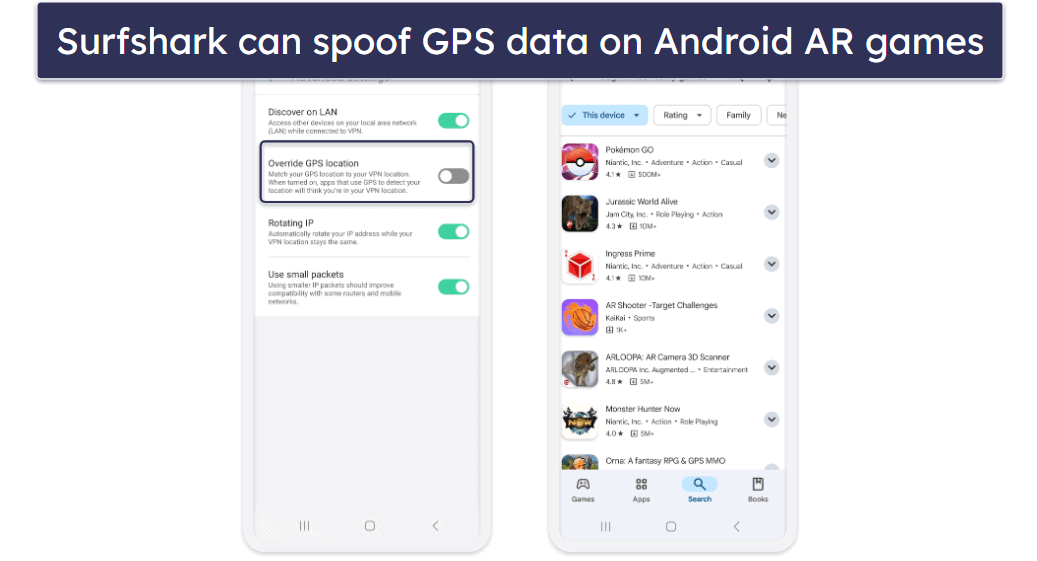
Surfshark is a good pick for AR gamers on Android. AR games (like Pokémon GO and Jurassic World Alive) superimpose virtual 3D elements on top of the user’s view of the real world, essentially blending the physical and digital world.
- Great for AR gaming
- Excellent DDoS protection
- Very fast on nearby servers
- Distant servers are notably slower
- Only DNS leak protection
I personally think Surfshark is great for AR gaming on Android because its Android app has a GPS-spoofing feature. This makes it possible to change your in-game location to access more features and events — as long as the game’s terms of service don’t prohibit this, of course. You could even change your Google Play Store location to access a different games library.
Surfshark is also great for gaming on other platforms since it provides fast gaming speeds and strong security features. I particularly like its IP Rotator feature, which regularly changes your VPN IP without dropping your connection — this provides great protection against DDoS attacks on games like PUBG, so you won’t get kicked out of the match or experience ping spikes.
It also has intuitive apps, but it lacks a router app (like ExpressVPN has). However, it does support the very fast WireGuard protocol on some routers, which means you’ll get better speeds (most routers require OpenVPN, which is slower).
Bottom Line:
Surfshark is great for playing AR games on Android, since its Android app has a feature that spoofs GPS data. In addition, the VPN provides an overall great gaming experience thanks to its fast speeds (even on routers) and strong security tools.
Read the full Surfshark review
6. Proton VPN — Best Free Gaming VPN


12-month plan: $3.49 / month
1-month plan: $4.99 / month
Proton VPN has the best free plan for gaming (and also one of the best free plans on the market) — it’s one of the only free plans that allows unlimited data, so you can use it to game as much as you want. It also comes with unlimited speeds, which is rare for a free plan.
- Solid gaming speeds
- Full IP leak protection
- Free plan has unlimited data
- Free plan limited to 1 device
- No dedicated router app
The free plan limits you to servers in 5 countries, including the US, the Netherlands, Romania, Poland, and Japan. The free version doesn’t let you manually connect to a server location, but it automatically connects you to the fastest server for your location (which is still convenient).

While the free plan limits you to 1 device, you can use Proton VPN on your router to cover all devices, including consoles. Unfortunately, there’s no router app, but there are useful tutorials that make the setup process pretty simple.
Upgrading to Proton VPN’s paid plans adds more perks, including 10 simultaneous connections, servers in 148 countries, a very good ad blocker, access to VPN Accelerator (a unique feature that boosts VPN speeds on distant servers), and more. Overall, a pretty good package, but the server selection and speeds aren’t quite on the level of my top choices like ExpressVPN or Private Internet Access.
Bottom Line:
Proton VPN has the best free plan for gamers — it comes with unlimited data and strong security, unlimited speeds, servers in 5 countries, and 1 connection. Upgrading to the premium plans gets you a speed-boosting tool, servers in 148 countries, up to 10 connections, and a great ad blocker.
Read the full Proton VPN review
7. IPVanish — Good VPN for Torrenting Copyright-Free Games


Advanced 24-month: $3.59 / month
IPVanish provides access to good P2P support, as it allows torrenting on all of its servers, works with top P2P apps, and has SOCKS5 proxy support. So, it’s a great pick if you need a VPN to torrent copyright-free games.
- Perfect forward secrecy
- Excellent for cloud gaming
- SOCKS5 support
- Doesn’t stop WebRTC leaks
- Not great in restrictive countries
Plus, I like how IPVanish has support for cloud gaming platforms — I never experienced any issues while using this VPN to game on GeForce Now.
IPVanish has easy-to-use apps for iOS, Android, Windows, and macOS, works on Linux, and supports manual router setups. The apps aren’t as sleek as ExpressVPN, Private Internet Access, and CyberGhost VPN, but they’re still intuitive — there’s an Optimal Location feature, it’s simple to manually connect to a server, and almost all settings have helpful short explanations. It also supports unlimited connections, so it’s good if your entire family plays games like Monopoly GO or Among Us.
Bottom Line:
IPVanish provides good P2P support for gamers. It also provides fast speeds while gaming and maintains stable ping, allows unlimited connections, and has support for cloud gaming. IPVanish’s apps have intuitive interfaces, so they’re great for VPN beginners, too.
Other Options
If you still haven’t found the best VPN for PC gaming, here are 4 more excellent choices. They didn’t quite make the top of my list, but they are still solid low-ping VPN options well worth considering.
- VyprVPN — This service is very cheap, works well with many cloud gaming services, boasts more than 300,000 IP addresses, and has very user-friendly apps. That said, its customer service is not very helpful, and split-tunneling functionality on Windows is limited.
- PrivateVPN — This VPN offers excellent connection speeds for gaming and solid security features, but doesn’t work reliably with many cloud gaming services, such as GeForce Now.
- TunnelBear — An excellent option for beginners, with a highly user-friendly interface and even a digital map of its servers. It also has split-tunneling and cloud gaming service support, but is hampered by its very small international server network and overall average connection speeds.
- Hotspot Shield — It offers good gaming speeds even on distant servers, a free plan with unlimited data for one device, and well-designed apps for both mobile and desktop users. That said, there is no dedicated router app or official support for cloud gaming services, so you’ll have to manually set up your console, and there’s no guarantee that cloud gaming will work.
Quick Comparison Table
Editor's Note: Intego ONE, Private Internet Access, CyberGhost and ExpressVPN are owned by Kape Technologies, our parent company.
Testing Methodology: Comparison & Ranking Criteria
To find the best VPNs for gaming, I followed our tried-and-true testing methodology. This involved comprehensive testing of lots of VPNs on the market under a multitude of gaming-specific scenarios to assess their capabilities and effectiveness. Below, you’ll find the criteria I used to test, compare, and ultimately rank the VPNs:
- I only picked secure VPNs. I made sure to only include providers that have essential security features to keep you safe while gaming, such as DDoS attack protection. Other important ones include 256-bit AES encryption, a no-logs policy, a kill switch, and leak protection.
- I only chose providers with a huge number of server locations. I prioritized VPN providers with servers in most parts of the world — for example, the top 5 VPNs on my list have servers in 90+ countries. This makes it easy to game on nearby servers to ensure you get stable ping.

- I only picked VPNs with fast gaming speeds. Speed is essential when playing online games, so I tested each VPN on this list to ensure it provides fast, lag-free gaming on nearby and distant servers. ExpressVPN provided me with the fastest gaming speeds.

- I mainly ranked VPNs with good cloud platform compatibility. Almost half of the VPNs on my list guarantee 24/7 access to cloud gaming services, such as GeForce Now and Xbox Game Pass. While the other half doesn’t claim to have cloud gaming support, those providers still work with cloud gaming services at least 50% of the time.
- I only added user-friendly gaming VPNs to my list. The providers on my list have intuitive apps that make it super easy to connect to a server and start gaming securely. Most of them also have features that automatically connect you to the fastest server so that you can start gaming right away.
- Finally, I picked VPNs that offer an overall good value. I decided to only recommend VPNs that come with useful extra features for gaming, such as split-tunneling or an ad blocker (for websites that host free browser games). Also, the VPNs on my list are affordable and offer free plans or generous refund policies.
Why Should You Use a VPN for Gaming?
Here are the main reasons you’d want to use a VPN while gaming:
- Secure gaming traffic. VPNs encrypt your internet traffic, making it 100% unreadable. This means nobody can monitor your gaming traffic or compromise it.
- Prevent bandwidth throttling. When you use a VPN, your gaming traffic will be encrypted. So, your ISP won’t be able to see it. Due to this, your ISP won’t be able to selectively throttle your gaming speeds during internet peak hours (evenings and over the weekend).
- Avoid DDoS attacks. VPNs prevent malicious actors from seeing your real IP address. So, they can’t use it to target your network with DDoS attacks to force you offline.
- Game on restrictive networks. School and campus networks often use firewalls to block access to online games and gaming sites. With a VPN, you can get around this issue. Basically, you’ll connect to the web via the VPN’s IP address, which doesn’t have any firewall restrictions linked to it.
- Boost your odds of finding bot lobbies. If you use a VPN to change your location, you might have better chances of ending up in a bot lobby. Bot lobbies are good for increasing your skills in a game because they usually offer an easier matchup.
Can You Use a VPN on Gaming Consoles?
Yes, but not directly. Gaming consoles don’t support VPN apps, meaning you can’t download and install a VPN app from the app store on your console.
Instead, you’ll need to set up the VPN on your router. Once you do that, all web-connected devices in your home (like your gaming console) that use the router to access the web will use the VPN connection.
Setting up a VPN on your router is a bit complicated, but hopefully this guide will make things easy for you. If you’re interested in doing this, I recommend getting ExpressVPN, as it’s one of the only VPNs with a router app — you can install it directly on your router, which is more convenient than performing a manual setup. And if you don’t want to deal with that and don’t mind spending some money, you can just buy ExpressVPN’s Aircove router, which comes with the VPN pre-installed on it.
Can a VPN Help You Circumvent Bans in Games?
Hypothetically, it can, but doing so is not recommended as it risks breaching the terms of service you’ve agreed to in order to play the game. It also mostly depends on the ban you’re dealing with. If it’s an IP ban, then yes, a VPN will help you circumvent it. You just need to connect to a VPN server to get a new IP address, and you’ll be able to rejoin the gaming server (as the VPN’s IP isn’t banned).
That said, many games might use account-level bans. This means the game developer bans your gaming account. In this case, a VPN can’t help you circumvent the ban — the only realistic option would be to set up a new account.
Also, VPNs can’t get around hardware bans — this is when the game ban is tied to your hardware ID (HWID), which is the unique identifier associated with a hardware component installed on your device.
It’s honestly best to just avoid getting banned in the first place, and if you do, don’t use a VPN to try and get unbanned.
Top Brands That Didn’t Make the Cut:
- Perfect Privacy. This provider is very secure, but its server network is really small (and I always experienced noticeable slowdowns while gaming on distant servers). Plus, its desktop apps are difficult to use.
- TorGuard. TorGuard is secure and has decent speeds, but its server network is pretty smally (only 50+ countries). I also don’t like how most of its apps are confusing to use and how the desktop apps don’t come with split-tunneling.
- Astrill VPN. Astrill VPN is easy to use and includes great security features for gaming, but it’s very expensive. All of the VPNs on this list offer a better value.
Frequently Asked Questions
What’s the best VPN for gaming?
ExpressVPN is my favorite gaming VPN in 2026 — it provides the fastest gaming speeds on the market, has very intuitive apps (including a router app), and includes support for cloud gaming platforms.
Do you need a VPN for gaming?
Yes, there are good reasons to use a VPN while gaming. First, a VPN encrypts your traffic, which makes it unreadable — this keeps your gaming traffic safe and stops your internet service provider from intentionally slowing down your gaming traffic. A VPN also hides your IP address, which protects you from Distributed-Denials-of-Service (DDoS) attacks and helps you avoid IP bans too. In addition, VPNs might help you get into bot lobbies, and they let you play games on restrictive networks, like at school.
If you want to use a VPN for gaming, I recommend ExpressVPN — it provides excellent security features, has the fastest speeds on the market, provides support for cloud gaming platforms like GeForce Now, and comes with very intuitive apps (including a router app).
How do you use a VPN for gaming?
You can start using a gaming VPN in just 3 quick and simple steps:
- Pick a good gaming VPN. Choose a VPN that is secure, fast, and easy to use — I recommend ExpressVPN.
- Download and install the VPN app. The installation process takes about 1–2 minutes.
- Connect to a VPN server. Open the VPN app, and either use the quick-connect feature (it connects you to the fastest server for your location) or manually scroll through the list of available locations and pick a server. And that’s it — you can now game securely and privately.
Does a VPN actually lower ping?
Usually not, as it’s impossible to speed up your base internet connection through a VPN. That said, if you use ExpressVPN (the best VPN for gaming with low ping) or one of my other gaming VPNs, it’s possible to get a more stable connection, which will stop your ping from fluctuating during the game, improving overall responsiveness.
Is it illegal to use a VPN for gaming?
No, absolutely not. The act of using a VPN is not illegal in most countries in the world, and as you gain no real in-game advantage, the only way you could potentially get into trouble is if you were to use one of my suggested VPNs to avoid IP bans, which is against the Terms of Service in most, if not all, multiplayer games.
Can you use a free VPN for gaming?
Yes, though keep in mind that most free VPNs come with annoying limitations. For example, they limit how much data you can use or have very slow speeds. If you insist on using a free VPN for gaming, try Proton VPN’s free version since it allows unlimited data.
What’s the fastest VPN for gaming?
In my tests, ExpressVPN provided me with the fastest gaming speeds (which isn’t surprising, as this is the fastest VPN on the market) — I connected to gaming servers nearly instantly, I always maintained good ping across all servers, I didn’t experience lag, and large updates downloaded really fast.
But I also had fast speeds with all the top VPNs on this list.
Editor's Note: ExpressVPN and this site are in the same ownership group.