
Published on: February 1, 2022 Updated 8 times since publishing
Only 3 Steps (Quick + Easy) to Watch Disney+ From Anywhere in 2026:
- Download and install a VPN that works with Disney+. I recommend ExpressVPN due to its lightning-fast streaming speeds, large server network (servers in 105 countries), and excellent streaming support. It only takes a few minutes to download and install a VPN app on your device.
- Choose a server. Scroll down through the VPN’s list of server locations and select a nearby server.
- Log into Disney+. Log into your Disney+ account, select your favorite show or movie, and kick back and relax with your favorite streaming content.
A VPN is the best way to securely watch Disney+. It’s an app that encrypts your traffic, making it unreadable, so nobody will know what you’re watching on Disney+.
VPNs change your IP address, which reveals your general location, so when you connect to a VPN server in a different location, it makes it seem as if you’re located elsewhere. This lets you access Disney+ from anywhere.
Not all VPNs work with Disney+. I spent the past few weeks testing all of the top VPNs on the market in 2026, and I found some great options that consistently work with Disney+.
Editor’s Note: The VPN services we recommend below have strict no-logging policies, meaning they don’t track your online activities. It’s up to you to use a VPN correctly, so please follow all the necessary rules and regulations. At SafetyDetectives, we don’t support copyright infringement.
Editor's Note: ExpressVPN and this site are in the same ownership group.
How to Watch Disney+ Content on Any Device
1. Pick a VPN that reliably accesses Disney+.
I recommend ExpressVPN because it works with different Disney+ libraries and offers fast speeds for buffer-free streaming in HD.
2. Get the VPN on your device.
Visit the VPN provider’s website and download the app for your device or get it from your device’s app store. Then, follow the on-screen instructions to install the VPN.

3. Connect to a server in the VPN app and start streaming Disney+.
Now, it’s time to grab snacks and drinks and watch a classic Disney movie!

Quick Summary of the Best VPNs for Watching Disney+ Content in 2026


🥇 1. ExpressVPN — Best VPN for Streaming Disney+

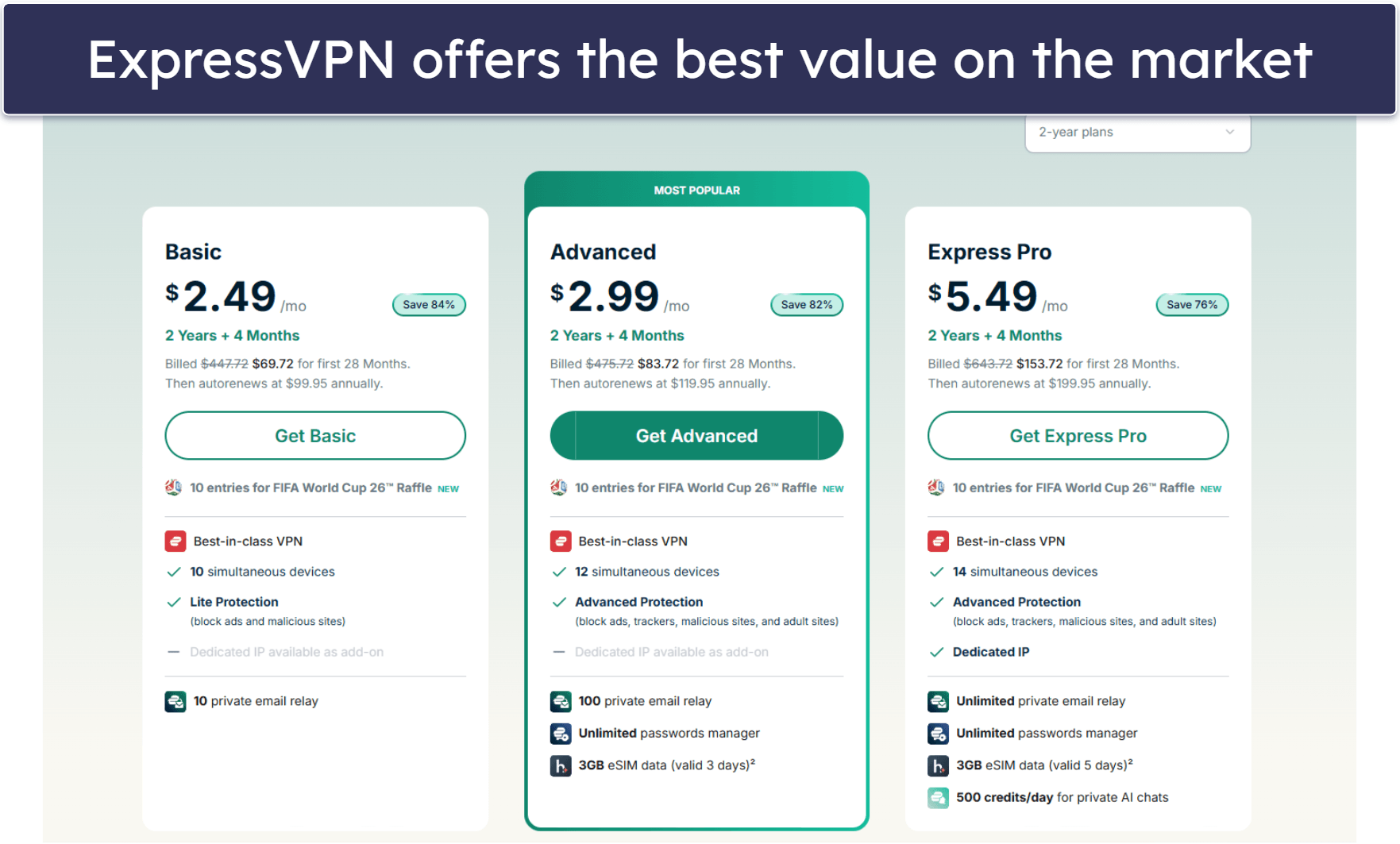
Basic 12-Months plan: $3.99 / month
1-month plan: $12.99 / month

ExpressVPN is my favorite VPN for watching Disney+ — it works with numerous Disney+ libraries, including in the US, the UK, Canada, Romania, and North Macedonia. And thanks to ExpressVPN’s large server network in 105 countries, most users will be able to connect to a server to watch their favorite Disney+ titles.
Plus, ExpressVPN is extremely simple to use. It only took me 2–3 minutes to install its desktop, mobile, and smart TV apps. The intuitive interface is very easy to navigate, and I connected to a server in mere seconds. I also really like how you can create 1-click shortcuts for apps once you connect to ExpressVPN. For example, I created a shortcut for Disney+ so that I could instantly visit the streaming site with just 1 click.
Read our full ExpressVPN review
🥈 2. Private Internet Access — Great for Streaming Disney+ on Android & iOS Devices

6-month plan: $7.50 / month
1-month plan: $11.95 / month
Private Internet Access (PIA) has customizable mobile apps, very fast speeds, and strong security. PIA offers dedicated streaming servers for Disney+ in 5+ countries, including the US, Japan, and Italy, but its regular servers work with Disney+, too.
I like that the Android and iOS apps allow you to personalize 20+ settings, including changing your encryption level to 128-bit AES encryption (it may give slightly faster speeds than 256-bit AES), changing your protocol (WireGuard was the fastest for me, but my colleague in the UK said OpenVPN provided him with the best speeds), and deciding if you approve connections to unsecured Wi-Fi networks (for streaming Disney+ at an airport, hotel, or cafe).
Private Internet Access is one of the most affordable VPNs on the market.
Read our full Private Internet Access review
🥉 3. CyberGhost VPN — Good Speeds + Strong Streaming Capabilities


6-month plan: $6.99 / month
1-month plan: $12.99 / month
CyberGhost VPN is a great choice for VPN beginners that want to securely stream Disney+ content — it has a clean and simple design, is very easy to navigate, and allows you to create favorite servers.
CyberGhost is an excellent VPN for streaming — it has 50+ dedicated streaming servers across 20+ countries that are optimized for many of the top streaming apps. CyberGhost has just 3 dedicated streaming servers for Disney+ (in the US, India, and Italy), but it works reliably when connected to its regular servers as well.
Read our full CyberGhost VPN review
Editor's Note: Intego ONE, Private Internet Access, CyberGhost and ExpressVPN are owned by Kape Technologies, our parent company.
Quick Comparison Table
Editor's Note: Intego ONE, Private Internet Access, CyberGhost and ExpressVPN are owned by Kape Technologies, our parent company.
How to Choose the Best VPN for Streaming Disney+ Content in 2026
- Select a VPN that reliably works with Disney+. The VPN should work flawlessly with Disney+ every single time (the ones on my list do).
- Ensure it has excellent streaming support. I only recommend VPNs that work with Disney+ and all of the other popular streaming services, including Netflix, Amazon Prime, and Hulu. My top pick, ExpressVPN, claims to work with 100+ streaming services.
- Make sure the VPN offers fast streaming speeds. Although VPNs naturally reduce speeds somewhat due to encryption, top VPN services ensure consistently fast speeds on all their servers. The VPNs that made it to my list all maintain high performance, and I was able to watch content smoothly with no interruptions when I tested them.
- Pick a VPN that’s easy to use. I only recommend VPNs that include easy-to-install and intuitive apps for Android, iOS, Windows, macOS, smart TVs, routers, and more, have user-friendly designs, and make it simple to watch Disney+ content on any device.
- Select a VPN that provides strong security and privacy. All the VPNs on this list include industry-standard VPN security features like 256-bit AES encryption, a kill switch (disconnects you from the internet if your VPN connection fails to prevent traffic leaks), a no-logs policy (prevents the VPN from logging your IP address and online traffic), and leak protection.
- Select a good-value VPN that fits your requirements. My suggestions include VPNs that allow numerous simultaneous device connections (like ExpressVPN, which supports 14 connections), have reasonably-priced plans and deals, and come with a money-back guarantee.
Frequently Asked Questions
What’s the best VPN to watch Disney+?
ExpressVPN is my favorite VPN for watching Disney+ — it works Disney+ 100% of the time, maintains some of the fastest streaming speeds in the industry, has easy-to-use apps for many different devices, and also works with 100+ other streaming sites like Netflix, Hulu, and Amazon Prime.
Can I use a free VPN to watch Disney+?
Maybe, but most free VPNs don’t work with Disney+. For example, Proton VPN has a good free plan, but it doesn’t support streaming.
Instead, I recommend getting a premium VPN like ExpressVPN for streaming Disney+ — it works with Disney+, has lightning-fast speeds, and is affordable.
Do all VPNs work with Disney+?
No, most VPNs don’t work Disney+. If Disney+ detects that you’re using a VPN, you will likely get a blank screen when you try to visit the site or the app. However, a top VPN like ExpressVPN consistently works with Disney+.
Editor's Note: ExpressVPN and this site are in the same ownership group.