

IObit Review: Quick Expert Summary
IObit offers valuable tools to optimize and protect Windows computers. Its antivirus uses a threefold scanner: an engine powered by Bitdefender, its own engine, and a dedicated anti-ransomware scanner. This setup works well, but Bitdefender’s engine is the most powerful tool in IObit’s kit.
Unfortunately, IObit lacks several essential security features and divides its features into 2 plans. The Advanced SystemCare plan provides PC tuneup tools, while the Malware Fighter plans focus more on device security. However, both lack a firewall, VPN, and other essential features.
IObit also promotes third-party products so heavily that it borders on distasteful. By default, it bundles third-party extras like a data backup tool during installation and then tries to upsell you through pop-up ads and paywalled features. I’d like to see IObit consolidate its plans and cut back on the needless upselling.
That said, IObit offers good protection from threats and some solid optimization tools. It even has free plans (though they’re pretty limited). The premium plans are reasonably priced and backed by a generous 60-day money-back guarantee.
IObit Full Review — Decent Malware Protection but Disappointing Features
IObit offers decent malware protection and PC tuneup tools but lacks standard features like a firewall. While it comes packed with extras, most aren’t super useful. Even the priciest bundle doesn’t have a built-in VPN, password manager, or dark web monitoring (IObit partners with iTop and sells its VPN separately).
My tests proved IObit effective against malware and phishing scams, but it still fell short of the best antiviruses in 2026. It did better than some competitors on the PC cleanup side but not as well as the best optimization tools. The best part about iObit is that the antivirus uses Bitdefender’s lightweight malware engine, which was 100% effective in my tests.
IObit Plans & Pricing — Distinct Plans for Optimization & Device Security
IObit’s features are split between 2 products: Malware Fighter and Advanced SystemCare. If you want to optimize and tidy up your PC, you’ll need Advanced SystemCare; for protection from malware, go with Malware Fighter. IObit backs its software with a 60-day money-back guarantee regardless of your plan.
IObit Malware Fighter
IObit Malware Fighter is free in a limited form, but you’ll need to pay for a yearly subscription to get the full version. The free version is pretty good, but I wouldn’t rely on it to protect me from complex modern threats. There are better free options out there.
The premium version, Malware Fighter PRO, adds Bitdefender’s engine, ransomware protection, and other security features on 3 PCs for $25.99 / year. If you don’t mind paying a little extra, there’s a bundle that throws in IObit’s premium defragmentation and uninstaller tools, too. You can protect as many devices as you need, and there’s a huge discount if you want to cover precisely 3 devices. Other than that, there aren’t any discounts for getting more licenses.
Here’s a quick overview of IObit’s antivirus plans:
IObit Advanced SystemCare
IObit’s device optimization and cleanup tool is structured like Malware Fighter — a limited version is available for free alongside a premium product. Though primarily oriented around improving performance, Advanced SystemCare offers a few security features, such as web protection and spyware removal.
It’s not too bad for a free tuneup tool. I wish there were a single app that combined the free versions of Malware Fighter and Advanced SystemCare. You can also get IObit’s premium tune-up on 3 Windows computers for $14.99 / year. Again, you can get as many licenses as you need, but there aren’t any bulk discounts.
Here’s a quick overview of all of IObit’s device optimization plans:
IObit Security Features — Decent Malware Scanner & Optimization Tools (That’s About It)
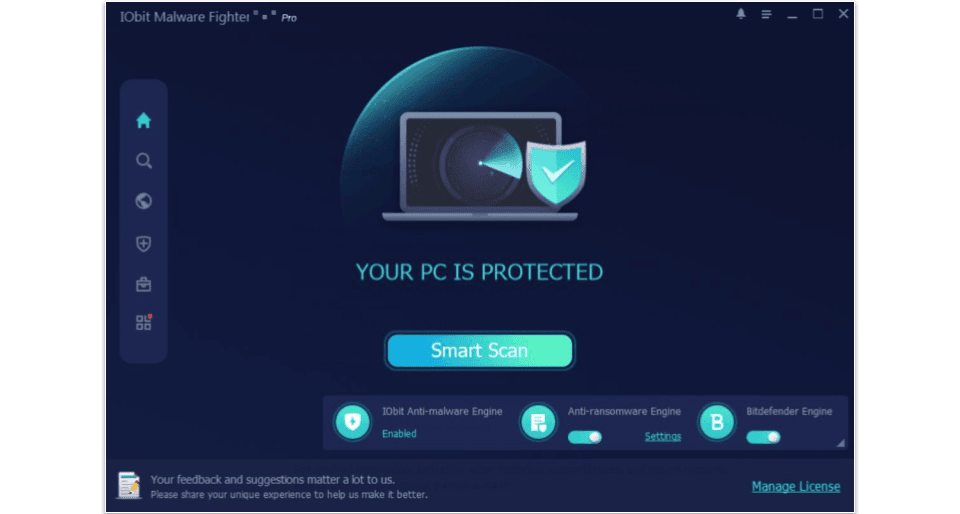
IObit divides its plans into 2 sets: IObit Malware Fighter and IObit Advanced SystemCare. The Malware Fighter plans focus on device protection, while the Advanced SystemCare plans offer device optimization (but not enough security features to keep you safe from most threats).
IObit Malware Fighter
IObit Malware Fighter uses a tripartite engine, combining an in-house engine, a dedicated ransomware scanner, and Bitdefender’s malware scanner. My tests showed that the end result effectively protects against most threats in 2026.
By default, Malware Fighter Pro uses all 3 engines to scan your device, but you can turn any of them off at will. I tested all possible combinations. Unsurprisingly, IObit performed best when it relied on all engines together. I downloaded a package of roughly 1,000 malware samples onto my (virtual) PC, and backed by all 3 scanners, it found and quarantined every single threat. When it comes to protection from malware, IObit is as effective as Norton or, unsurprisingly, Bitdefender.
The in-house scanner is reasonably good, detecting about 93% of threats. Without Bitdefender, IObit’s malware database consists of over 200 million samples. Scans finished faster and had a smaller performance impact, but I prefer to wait longer and have the backing of the Bitdefender scanner. You can only access the IObit scanner if you get the free version. Without access to Bitdefender’s scanner, some threats slipped through in my tests.
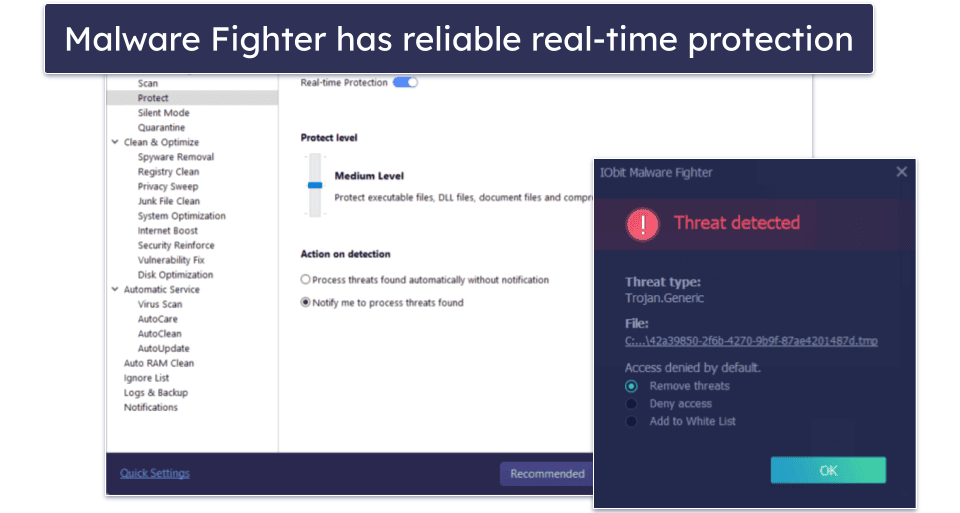
IObit’s real-time protections performed well in my tests, blocking all threats when I enabled Bitdefender’s engine. The IObit scanner is pretty good, but several malware samples were able to activate on my device. I like that the real-time protections can be customized. For example, you can choose what type of files are monitored, from only executables to every kind of file.
There’s also a free browser extension that can protect you from malicious websites, exploits, and ads. It effectively blocked exploits and about half of the phishing pages, but the ad blocker barely worked. All in all, there are better antiviruses out there for internet security.
Though much less comprehensive than the optimization tools with the Advanced SystemCare plans, Malware Fighter also comes with some handy extras for system tuneup. Namely, you can use a privacy cleanup tool to delete all traces of your browsing history quickly.
IObit Advanced SystemCare
IObit Advanced SystemCare has excellent system optimization tools and many miscellaneous tools. On the premium plan, you’ll get the following features:
- Startup optimizer.
- Registry cleaner.
- Unused RAM cleaner.
- Software and driver updater.
- Junk cleaner.
- Browser cleanup.
- Disc defragger.
- And more…
The startup manager is easy to use and lets you control which applications turn on during startup. I also like the junk file cleaner. You can use it for one-click cleanup or to look for specific things like duplicates and large files. The hardware accelerator makes it easy to update your device’s drivers. This can fix various issues, protect you from exploits, and even improve your performance in some cases.
There’s also a tool that claims to boost your browsing speed by up to 300% by optimizing your settings, but in my experience, it didn’t make a very noticeable impact unless I went out of my way to give myself horrible browser settings first.
On the other hand, Turbo Boost did help improve my PC’s performance. While it obviously can’t give your device more RAM, it effectively identifies where your memory resources are being allocated inefficiently. In the right circumstances, this can result in noticeable speed increases.
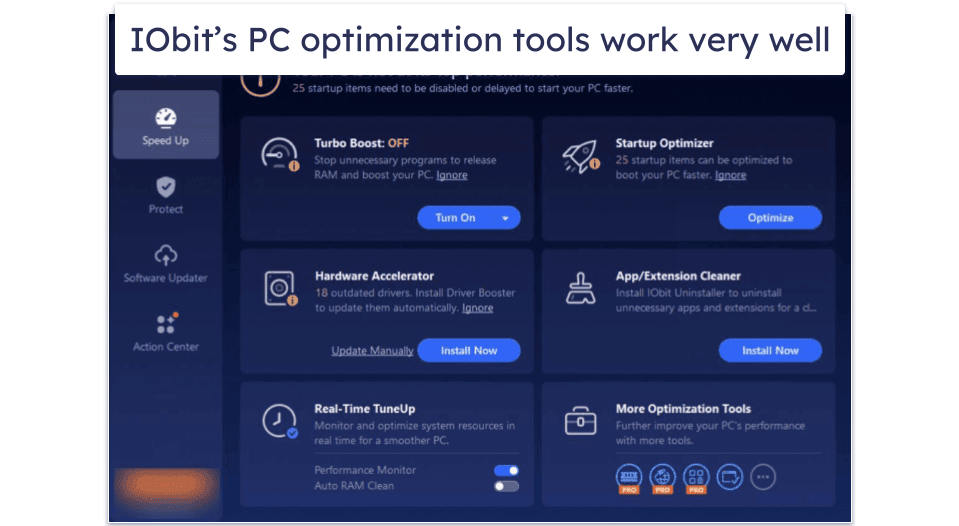
The software updater works well, too. It found 3 applications on my laptop that hadn’t been updated in a long time and helped me get them up-to-date.
Though oriented around optimization rather than security, it protects against spyware and points you toward a free browser extension that blocks dangerous sites.
On the whole, Advanced SystemCare offers good optimization tools for Windows computers. It isn’t an antivirus and won’t protect you from the vast majority of threats, but it still brings some good things to the table. If you want to use IObit Advanced SystemCare, I highly recommend picking it up alongside one of the top antiviruses of 2026.
IObit Ease of Use & Setup — Intuitive Interface, But Intrusive Advertisements
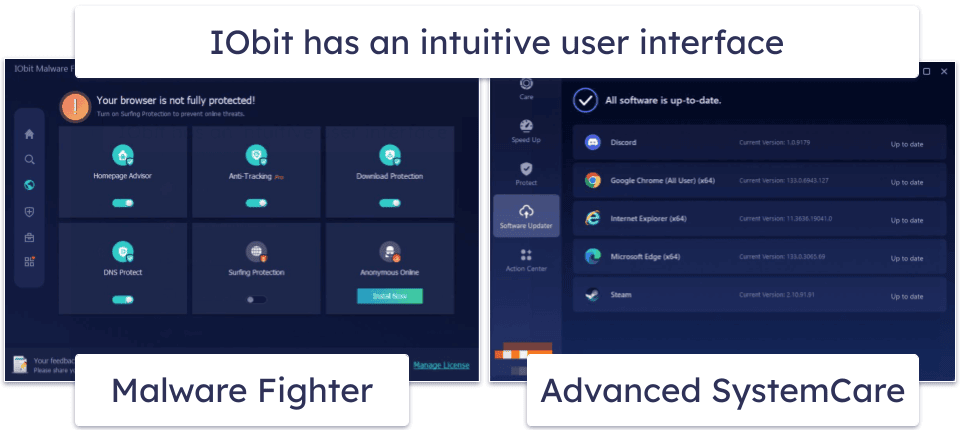
Both of IObit’s apps have an intuitive, modern user interface — running scans and customizing features is not complex. I like that despite having a relatively basic UI, Malware Fighter and Advanced SystemCare have surprising depth regarding customization options.
How to Install IObit (Just 3 Simple Steps):
- Pick your plan. Navigate to the official IObit website and choose your plan. If you opt for a premium version of IObit, you’ll also need to enter your payment information.
- Click the download link. Once you purchase your plan, IObit will send you a download link. Click that link, and the download process will begin. Once it’s finished, open your File Manager and open the file.
- Follow the setup prompts. After opening the file, you’ll be prompted to accept a few prompts. IObit tries to bundle extra downloads together, so read the prompts carefully. Once that’s finished, IObit will install itself.
Unfortunately, setting up IObit is a different story. When you first install IObit, it prompts you multiple times to install additional products. First, it’s a small check box, but on the next page, it appears you need to install another program. I lost count of how many ads I had to go through. After it’s installed, you’re likely to see more. Things that appear to be features (like the VPN) are actually just links to buy other products.
The website is also full of promotions. There’s a whole page of advertisements masquerading as security advisors. If I could change any part of IObit, I’d reduce the in-app advertisements. By comparison, top picks like Bitdefender barely advertise extra features.
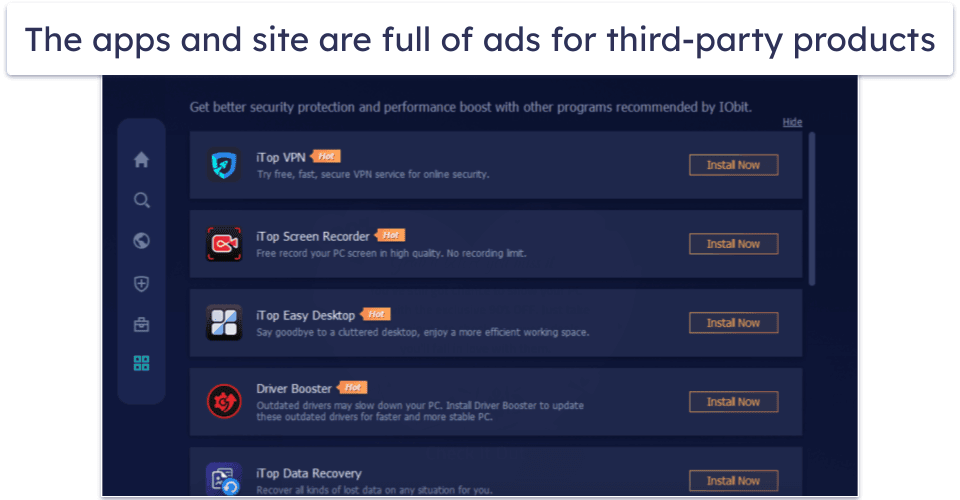
Overall, IObit is easy to use, even if you’re a complete beginner. The problem is that it will try to sell you on other products, which can get super annoying.
IObit Customer Support — Simple FAQs & Email Support
IObit’s customer support is fairly minimalistic but not bad. It covers the basics with FAQs and offers email support. The support page is divided into 6 sections, some with more information than others.
The FAQ page provides accurate and up-to-date answers that aren’t overly wordy. There are also product manuals for each piece of IObit software.
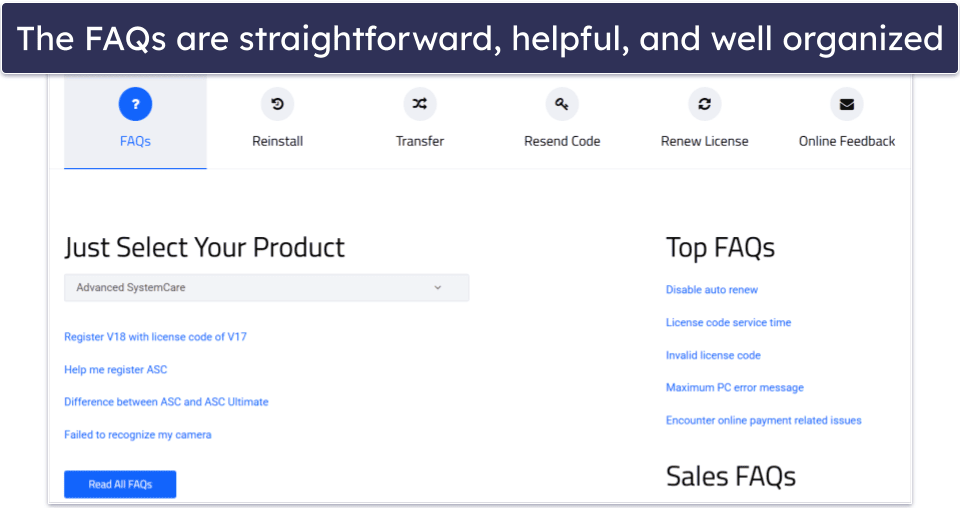
The other tabs make it easy to add IObit to other devices, send extra licenses to friends, and more. This is a nice touch, as some antiviruses make it difficult to understand how to perform such simple tasks.
There’s also an email service for customers. I got a response in about an hour, and the agents were friendly and helpful. Each follow-up email took about 30–45 minutes. If you have a complicated problem, you might expect a longer wait.
Overall, IObit has a completely serviceable customer support center. While I’d love to see live chat and phone support, the FAQ page and email support are functional and offer a lot of information. The manuals are also detailed enough that you might not need any further assistance.
Does IObit Offer Enough to Protect Your PC?
IObit exists in a weird spot. Malware Fighter is safe enough to protect you from most threats, and Advanced SystemCare, though it isn’t an antivirus, has valuable tools for cleaning up PCs. That said, it’s far from a comprehensive cybersecurity suite as it lacks many features I’d expect to see.
Malware Fighter is excellent at dealing with threats — the in-house scanner isn’t bad, and the incorporation of Bitdefender’s engine makes it flawless. It’s also pretty good at blocking dangerous websites and has nice extras like webcam protection. This is all good, but when you consider that competitors offer all those things plus extras like VPNs, dark web monitoring, and password managers, IObit’s antivirus loses much of its luster.
The tune-up tools included with Advanced SystemCare are pretty darn good, even if the claim that it can increase browser speeds by 300% is ridiculous. It checks for outdated software and drivers, fixes common issues, and cleanses junk. Just know it isn’t an antivirus and can’t be trusted to keep you safe.
Overall, IObit has a solid antivirus and good optimization tools. However, you should look elsewhere if you want comprehensive protection and privacy essentials like a VPN. IObit uses Bitdefender’s engine, so you should check out Bitdefender instead. Still, it has a 60-day money-back guarantee if you want to test it yourself.
Frequently Asked Questions
Is IObit Malware Fighter Free good?
IObit’s free plan is decent but limited. It only offers a basic malware scanner and real-time protection. The malware scanner detected common malware samples but didn’t catch as many complex threats as its top competitors. The real-time protection works well enough (certainly better than previous iterations of Malware Fighter), but it still missed a few critical malware samples.
You can upgrade to Malware Fighter PRO to get Bitdefender’s superior malware engine, web protection, and ransomware protection, but the lack of a VPN (among other things) means it scores lower than top antiviruses like Norton. However, you can always try IObit’s premium plan risk-free, as it comes with a 60-day money-back guarantee.
What’s the difference between Malware Fighter and Advanced SystemCare?
IObit Malware Fighter and Advanced SystemCare serve different purposes. Malware Fighter focuses on security, offering real-time protection against malware, ransomware, web protection, and other security features.
In contrast, Advanced SystemCare is a PC optimization tool. It cleans junk files, fixes registry issues, and boosts your computer’s speed. While it includes some basic security tools, most of its features are geared towards optimization.
Are IObit’s third-party tools safe?
Yes, they’re safe. IObit’s promotes third-party software in its app and on the website. I tested them all out, and none were flagged as suspicious. And though IObit is easy to use, these ads can make it a frustrating experience. I recommend doing research and running your own tests on third-party apps from developers you don’t recognize.
Can IObit be trusted?
Yes, IObit can be trusted, but better antivirus software is still available. For starters, IObit tries to bundle third-party software with your download, and it’s pretty aggressive when it comes to upselling and advertising its own features. In the past, Malwarebytes accused it of intellectual property theft, and its forums were also reportedly hacked in 2021 and used to distribute ransomware to IObit users.
For all these reasons, I recommend checking out an antivirus from a brand with a stronger reputation. For example, Bitdefender powers the best part of IObit’s antivirus engine. Bitdefender offers better real-time and web protection and adds a VPN and dark web monitoring to its higher-end plans.