
Published on: February 18, 2022 Updated 36 times since publishing
- 🥇 Norton : It doesn’t have a free plan, but Norton is the best Android antivirus on the market — detecting and removing all Android malware and sketchy apps, blocking phishing sites, and offering extras like Wi-Fi monitoring, a VPN, and identity theft protection. While it’s not 100% free, it has a 14-day free trial, and if you get it as part of Norton’s multi-device plans, you can try it for 60 days risk-free.
I tested dozens of free antivirus apps in the Google Play Store — after weeks of testing, I found a few products that I’m confident can keep Androids well-protected against malware.
However, most of the free Android antivirus apps I tried didn’t work well. They were ineffective against malware, packed with ads, sent frequent notifications, and/or drained my battery. Some even asked for unnecessary permissions to harvest my data!
I did find a few good free apps that didn’t have these problems, but none were as good as the best premium apps. If you’re looking for an antivirus that can fully protect you and your devices, you’ll need a premium product (I recommend Norton’s superb Android app).
But if you only need basic protection, there are a few free Android apps that are pretty good — offering free real-time or on-demand virus scanning, free anti-theft protections, and a handful of good extra features to strengthen your Android’s mobile security.
Do You Really Need a Free Antivirus on Android?
It depends on how you use your device. Android is more secure than it used to be, but it’s still the most targeted mobile OS due to its global market share and support for app sideloading.
If you only install apps from the Google Play Store, keep Android updated, and avoid suspicious links, the built-in protections are usually enough for basic malware prevention. In this low-risk scenario, a third-party antivirus adds limited extra value.
However, a free Android antivirus becomes useful if you:
- Install APKs or use third-party app stores
- Frequently browse unfamiliar sites or click links in emails, SMS, or social apps
- Use public Wi-Fi networks
- Want visibility into malicious apps before or after installation
Most Android malware infections originate from sideloaded apps, phishing links, or malicious ads, not the Play Store itself. Free antivirus apps help fill these gaps by adding real-time scanning, phishing protection, and app risk alerts that Android’s default tools often miss.
Quick Summary of the Best Free Android Antivirus Apps in 2026


🥇1. Norton — Advanced Cybersecurity Protections for Android

Norton Mobile Security is hands-down my favorite Android antivirus app in 2026. It offers advanced malware protection and more internet security protections than almost any competitor — but it’s not free. However, you can try all of Norton’s mobile features for free by using a 14-day trial and 60-day money-back guarantee (depending on which package you go for).
- Perfect malware detection rates
- Advanced anti-phishing protection
- Comprehensive Wi-Fi security
- Minimal impact on device performance
- No 100% free plan
To keep your Android safe from malicious apps, Norton’s App Advisor scans apps before you download them to your device and alerts you in case the apps in question contain viruses and malware. It also scans all apps on your device and flags any that collect too much sensitive information, use too much data or battery, or in any other way present a risk to your device or privacy. Unlike many apps (especially free ones), Norton doesn’t share customer data with third parties.
In my tests, Norton’s Android app detected all of the risky apps I had installed on my Samsung Galaxy. Plus, its anti-phishing protection blocked the vast majority of phishing and malicious links I attempted to open on my phone’s browser (it flagged more risky sites than almost any other competitor). The web protections also highlight dangerous links on social media and certain messaging apps.

Norton’s Android app also comes with good Wi-Fi protection — it warns you of any unsecured Wi-Fi networks, and includes a secure VPN with certain plans. Norton’s VPN protects your browsing data with 256-bit AES encryption, maintains fast speeds across most servers, and works with most streaming sites.
I was very satisfied with my overall experience using Norton. It protected my device without draining its battery or crippling its performance — I could play games like Genshin Impact without any issues. It’s also easy to use and keeps notifications to a minimum.
Norton Mobile Security is available as a standalone purchase (or as part of Norton’s excellent internet security suites). The standalone app costs $19.99 / year* and covers just 1 Android device, whereas Norton 360 Deluxe covers up to 5 devices across all operating systems for only $49.99 / year* (and is our #1 antivirus suite in 2026). The mobile app comes with a 14-day free trial, and all of Norton’s internet security suites are backed by a generous 60-day money-back guarantee.

Bottom Line:
Norton provides the most comprehensive cybersecurity app for Android users — it isn’t just capable of removing all Android malware, but it also scans apps in the Google Play Store before download, ensuring your device doesn’t get infected in the first place. Plus, it comes with useful extras like anti-phishing protection, Wi-Fi security, and a VPN, plus dark web monitoring with some purchases. Norton’s Android app is available as a standalone purchase or as part of Norton’s 360 Deluxe and LifeLock plans.
🥈2. TotalAV — Easy to Use & Good Data Breach Scanning

TotalAV Mobile Security offers a decent range of features in the free version, including an app lock checker and a data breach scanner. The app is also incredibly easy to use, so it’s a great choice for beginners.
- Easy-to-use interface
- Low performance impact
- Breach scanner identifies leaked email
- Unreliable app lock checker
- Frequent upsell notifications
The paid plan comes with WebShield, which brings the same level of protection to every browser on your Android. While I wish WebShield came with the free version, I like that you can try it (and all of TotalAV’s premium features) with a 7-day free trial.
The free data breach scanner worked well in my tests — I entered my personal email address and found it had been leaked in 1 data breach — but it’s nowhere near as advanced as Norton’s breach detection, which actively scans for all kinds of leaked data, including email addresses, home addresses, phone numbers, passports and ID cards, and more.

I was pleased to discover that TotalAV barely affected my phone’s performance. It isn’t as efficient as Norton when it comes to battery use, and it does generate more notifications than I’d like when using the free version, but it’s much less obtrusive than most free Android apps. However, the app lock checker did not work well — it notified me that my screen lock was active, but this was, in fact, not true.
Overall, the free version of TotalAV is decent, but if you’re looking for more advanced protection, it’s definitely worth upgrading to TotalAV Premium, which includes the full version of the mobile app (with an unlimited-data VPN, WebShield, malicious app protection, and more) and the premium desktop version for just $19.00 / year. All TotalAV plans are backed by a 30-day money-back guarantee.

Bottom Line:
TotalAV offers a decent range of free Android protections, including a data breach scanner, which works well. While TotalAV’s free offering is good, the premium version offers a wider range of features, including a VPN, real-time protection, and malicious app protection — which you can try out with its 7-day free trial.
Read the full TotalAV review >
🥉3. Bitdefender — Easy to Use With Excellent Malware Protection
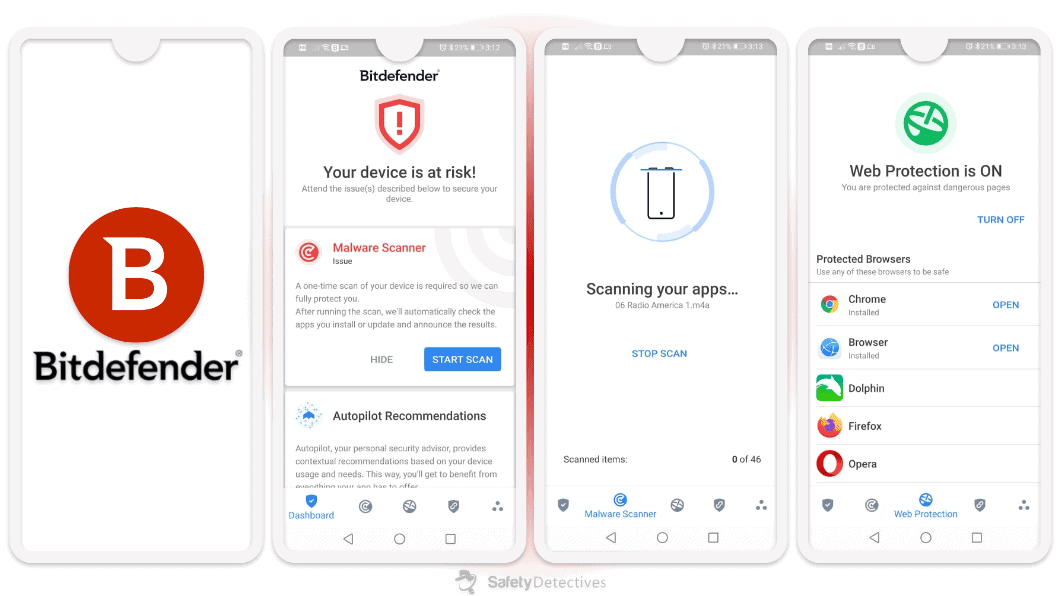
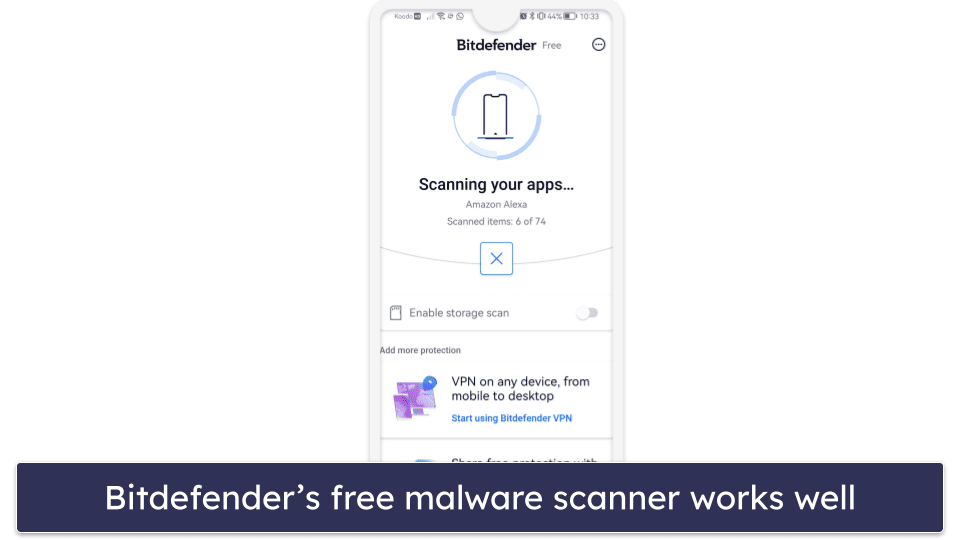
Bitdefender Antivirus is an intuitive Android app that comes with excellent malware detection. Its one-tap antivirus scanner performed very well in my tests, identifying and removing the vast majority of the malware I’d previously downloaded to my phone.
- Excellent malware detection
- Low system impact
- Minimal notifications and upselling
- No free web protection
- Limited VPN data (200 MB/day)
Using cloud-scanning technology, Bitdefender’s free Android antivirus equips your Android device with effective virus detection. Also, unlike most free apps, it didn’t interfere with my mobile experience, drain my battery, or upsell me on the premium version.
The scanner examines your files as well as apps, ensuring your Android device is kept clean and safe. This feature offers peace of mind as you try new applications, keeping you informed and protected. But that’s all Bitdefender’s free app does, really.
However, Bitdefender offers greater protection through a premium app called Bitdefender Mobile Security. Its App Anomaly Detection monitors app behaviors for any unusual activity. Web Protection and Scam Alert guard against phishing and fraudulent sites. Other features include a limited VPN (200 MB daily unless you upgrade to Bitdefender’s top-tier plan), anti-theft protections, smart watch compatibility, and an app locker.
That may sound like a lot, but despite the numerous features, the app is very streamlined. Most notifications are actually useful, and the app doesn’t affect performance very much. Unlike Norton, Bitdefender does share some information with third parties, but only your user ID, which I don’t see as a big issue.
Mobile Security can be purchased as a standalone app through the Play Store, but you can also get it as part of the Bitdefender Total Security package (which covers Android, iOS, Windows, and Mac devices for $54.99 / year), or the Bitdefender Premium Security plan (for 5 devices), which costs $64.99 / year. I recommend getting one of these as you’ll be covered by Bitdefender’s 30-day money-back guarantee.
Bottom Line:
Bitdefender’s free Android app offers great malware protection, but that’s it. You’ll need the premium app to get web security, anti-theft tools, and the App Anomaly Detection feature. Bitdefender is very easy to set up and use, making it a really good choice for non-technical users. All premium plans come with a 30-day money-back guarantee.
Read the full Bitdefender review >
4. Panda Dome — Good Antivirus Scanning With Great Smartwatch Compatibility
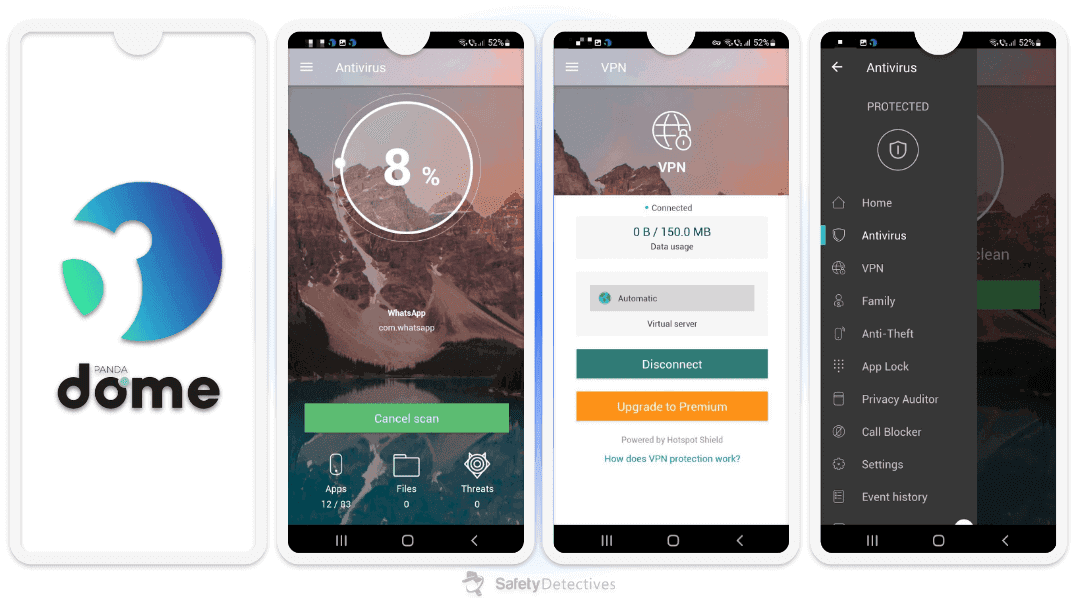
Panda Dome has a decent free antivirus for Android. It offers good antivirus protection, anti-theft features, an app privacy scanner, and a VPN — and most of these features can be operated remotely from an Android Wear smartwatch!
- Good real-time malware scanning
- Remote anti-theft features
- Smartwatch-compatible controls
- Intrusive video ads
- Misses some malware
The big downside is that it’s supported by video ads, but you won’t encounter them very often. On the plus side, unlike most free competitors, Panda doesn’t sell any user data.
Panda’s real-time scanner detected most malware samples, but not as many as Norton or TotalAV. It missed a few samples, but I was pleased that it successfully identified all ransomware and spyware applications. Additionally, I received notifications on my smartwatch whenever Panda detected new malware.
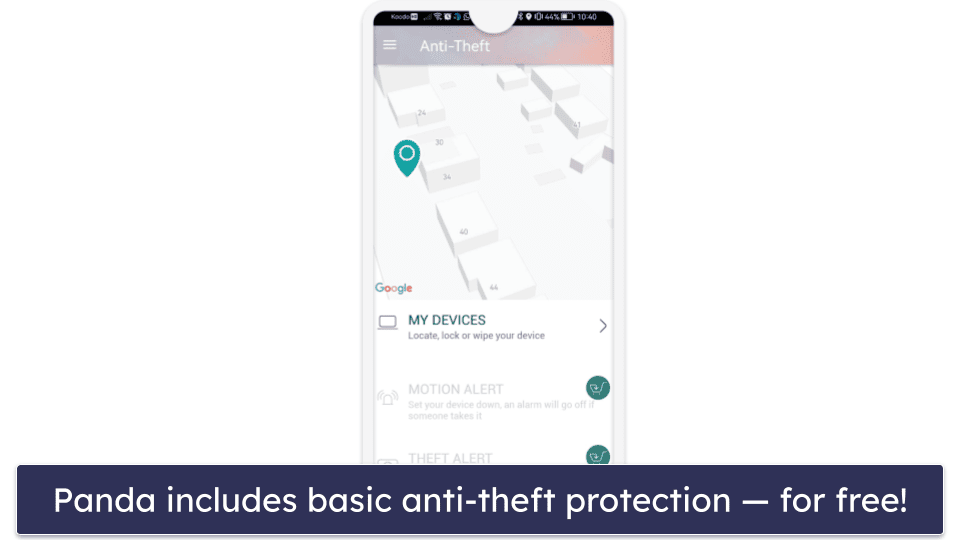
Panda also includes anti-theft features like remote location tracking, data wiping, and device locking. However, its remote selfie camera and alarm features are only available in the paid Android app, which is available as part of Panda’s internet security suites. And even the paid version of Panda’s Android app is missing features that Norton has, like spam SMS filtering.
Panda Dome’s privacy auditing is also highly effective. It analyzes the permissions requested by apps on your Android device, clearly showing which data each app can access (e.g., contacts, location, photos). I was surprised by how many apps had access to my location, but I was able to easily revoke that access for several of them with a single click.
Panda Dome also comes with a free VPN, but it only includes 150 MB per day. This is barely enough for light browsing.
To get the unlimited version of the VPN, access the parental controls, and get rid of ads, you need to upgrade to Panda’s comprehensive Panda Dome Premium antivirus suite ($42.00 / year). All of Panda’s internet security packages include a risk-free 30-day money-back guarantee when you buy through its website.
Bottom Line:
Panda’s free Android antivirus app provides real-time malware scanning, anti-theft tools, and convenient compatibility with Android smartwatches. I like that you can perform malware scans, wipe data remotely, and even track your device’s location from a smartwatch. However, you’ll have to upgrade to Panda’s paid Android plan to get remote selfie capture and alarm tools, along with a spam blocker and app-locking tools. Users looking to get a VPN with unlimited data should consider the Panda Dome Premium antivirus package.
Read the full Panda Dome review >
5. Avira — Feature-Rich & Easy to Use

Avira Free Security has an excellent virus detection and removal engine. It also comes with a good range of additional security features and is super-easy to use. The free Android app comes with an app privacy scanner, a VPN (1 GB/month with registration), a scam call blocker, a data breach scanner, and more.
- Excellent virus detection and removal
- Good privacy scanner
- Minimal performance impact
- No anti-phishing protection
- Limited VPN data (1 GB/month)
I really like the privacy scanner. It analyzed every app on my device, offering a transparent and easily digestible overview of the data and system functions each one could access. For instance, the breakdown clearly showed which apps had access to my contacts, photos, and browsing history.
In addition, Avira’s Call Blocker is effective at mitigating unwanted or nuisance calls. I liked that I could easily create blacklists of unwanted numbers, preventing calls from those numbers from reaching my device. There’s also an app locker and a tool that highlights files taking up lots of space.
Avira’s free plan is decent, with minimal performance impact and few upsells. However, it lacks anti-phishing protection and shares user data with third parties.Features like anti-phishing protection, a password manager, and microphone and camera protection are only available by upgrading to Avira’s premium mobile app, but even the premium web protections and location tracking are less effective than rivals like Norton.
Avira’s premium mobile protection is also bundled with the Avira Prime antivirus package, which offers coverage for up to 5 devices, including Android, Windows, macOS, and iOS, for $59.99 / year. Buy Avira Prime through the official site, and you’ll get a generous 60-day money-back guarantee.
Bottom Line:
Avira offers many excellent, easy-to-use, and reliable free Android antivirus features, including malware protection, an app privacy scanner, and a Wi-Fi scanner. The VPN is good but limited to 1 GB/month. Paid tiers add anti-phishing and a password manager, while the Prime package includes an unlimited VPN and coverage for multiple devices across all OSs. Avira’s yearly paid plans all have a risk-free 60-day money-back guarantee.
6. Avast — Basic Security for Android + Encrypted Photo Vault

Avast Antivirus & Security offers a good range of free features for Android, including a malware scanner, a Wi-Fi network scanner, data breach alerts, excellent web protection, and a secure vault for your photos (10 with the free plan). It offers decent protection, but it’s not as feature-rich as top competitors like Norton.
- Effective malware & web protection
- Secure Photo Vault feature
- Wi-Fi network scanner
- Annoying ads in free version
- Excessive notifications
Avast’s free security tools are simple but very effective — the basic system scan only took a couple of minutes to complete, and it was able to detect all of the malicious apps on my device. I also like the Web Guard feature, which successfully blocked every phishing site I tried to visit.
The free version is unfortunately ad-supported, and these ads can be quite bothersome. Furthermore, it aggressively pushes for upgrades and sends an excessive number of notifications.

I like Avast’s Photo Vault free feature, which lets you store up to 10 photos that you want to keep private in an encrypted folder. No one can access these images without your PIN or biometric login, so they’re safe even if someone gets hold of your phone or tablet.
Avast’s Hack Alerts feature provides basic data breach monitoring. It monitors public databases and alerts you if your email is associated with a data breach — but the free version will only monitor one email address. It works, but it’s a far cry from Norton’s mobile identity protection tools.
Avast’s premium Android app comes with more comprehensive features, including an unlimited photo vault, automatic malware scans, app locking, and a VPN. You can get it as part of Premium Security, which costs $39.99 / year and comes with a 60-day money-back guarantee when you sign up through the website.
Bottom Line:
Avast is a decent free option for Android users looking for basic antivirus protection, with a range of features including a malware scanner, Wi-Fi network scanner, junk cleaner, data breach alerts, web protection, and photo vault. Avast’s premium plans offer more comprehensive features, and you can get them as part of Avast’s antivirus suites, which are backed by a risk-free 60-day money-back guarantee.
Read the full Avast review here >
Quick Comparison Table
My Comparison & Ranking Criteria
I used our time-tested testing methodology to assess the qualities of different antiviruses. This process is a little bit different with mobile apps, but it basically involves testing the antivirus in real-world situations by downloading malware, exploring the app’s settings, and more. Every free Android app that made this list did well by these metrics, outshining the competition. Here’s a look at the different criteria I tested:
- I looked into each product’s malware-beating capabilities. More specifically, I downloaded a large sample of malicious apps, dangerous APK files, and other threats onto my Samsung Galaxy, then ran a scan with each antivirus to see what it would find. While each product detected and removed most threats, those with higher scores, like Norton, earned a better ranking.
- I made sure that each app was easy to use. To make my list, a free Android antivirus app had to be simple to set up and use, and have intuitive settings and customization options. Each antivirus on this list performed really well by these standards.

- I accounted for bonus features. Most free Android antiviruses are pretty limited in terms of features, so any product with nice extras earned more weight in my ranking. TotalAV got second place in part due to its useful data breach scanning tool. I also gave extra marks for features like Wi-Fi checkers and app privacy scanners.
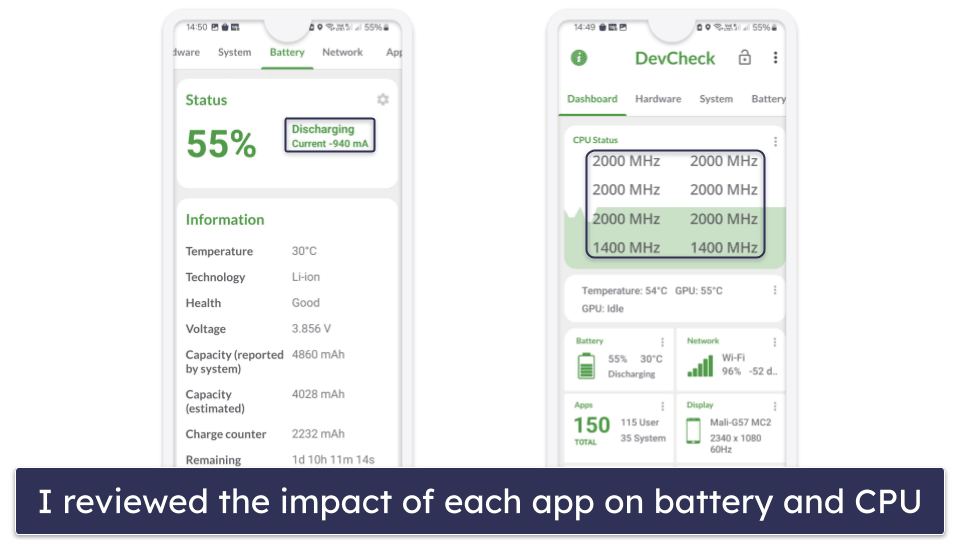
- I considered the impact each app had on my phone. I looked into how each app impacts the user experience, specifically focusing on battery drain and resource consumption to ensure they weren’t excessive. Beyond technical performance, I checked for annoying issues like frequent upselling or too many notifications, confirming none of these apps cause frustrating problems.
- I reviewed all relevant web security tools. Not every app on this list comes with web protections, but those with strong measures against phishing and other web-based threats earned extra points. I tested each by trying to visit dozens of dangerous sites, noting which were blocked and how many got through.
Is Google Play Protect Enough on Its Own?
For many users, Google Play Protect provides a solid baseline — but it isn’t a complete security solution.
Play Protect automatically scans apps from the Google Play Store, checks installed apps periodically, and removes known malicious software. It’s built into Android and enabled by default, which makes it effective at stopping known malware distributed through official channels.
However, Play Protect has clear limitations:
- It offers limited protection against phishing, especially links delivered via SMS, email, or messaging apps
- It struggles with malicious ads and scam websites opened in browsers
- It provides minimal visibility into app behavior after installation
- It’s far less effective against sideloaded APKs, which account for the majority of real-world Android malware cases
Independent testing has repeatedly shown that Play Protect’s detection rates are significantly lower than those of dedicated antivirus apps, particularly for newer or obfuscated threats. That’s because it relies heavily on signature-based and reputation-based detection rather than continuous real-time monitoring.
In contrast, third-party antivirus apps add:
- Real-time app and file scanning
- Phishing and malicious link protection across browsers and apps
- Alerts for risky permissions and suspicious behavior
Bottom line: Play Protect is better than nothing — and sufficient for very cautious users who stick to the Play Store. But if you sideload apps, browse widely, or want proactive protection against phishing and scams, it isn’t enough on its own. A free antivirus meaningfully closes those gaps without requiring a paid upgrade.
Risks & Disadvantages of Using a Free Android Antivirus
Android devices are highly susceptible to malware and security breaches. Without a comprehensive antivirus program, you’re at risk of falling victim to phishing attacks, ransomware, spyware, potentially unwanted apps, unsafe Wi-Fi connections, and more.
That’s why I advise against relying solely on a free antivirus app on your Android device. I’ve found that free antivirus apps for Android often lack essential security features like web protection or only come with very limited privacy tools — for example, Avira‘s free VPN limits users to 1 GB of data per month, so you can’t always protect your privacy or secure your data (especially on public Wi-Fi networks).
Honestly, I always recommend paid antivirus software — the best premium antiviruses on the market offer a comprehensive set of internet security tools, including a firewall, phishing protection, Wi-Fi monitoring, web protection, parental controls, a VPN, a password manager, and lots more.
Fortunately, quality antivirus suites are available at very affordable prices. For example, Norton 360’s Deluxe package costs $49.99 / year*, offers a ton of excellent internet security features, covers up to 5 devices across all operating systems, and has a 60-day money-back guarantee.
Free vs. Paid Antiviruses for Android
The best free Android antiviruses come equipped with excellent tools to safeguard against the newest online threats. Typically, they provide a malware scanner, Wi-Fi scanner, and app privacy options. However, the downside is that they often reserve many essential features for their premium subscribers. For example, Avira’s free plan excludes anti-phishing protection and microphone and camera security.
The top paid antiviruses give you access to a wide range of internet security features. My favorite Android antivirus, Norton, has an industry-leading malware scanner, a smart firewall, and anti-phishing protection, as well as extras like parental controls, a VPN with unlimited data, and a password manager — and purchasing one of its LifeLock plans (available only in select countries) adds up to $1 million in identity theft reimbursement and credit monitoring from top credit bureaus.
One frustration with free antiviruses is their reliance on ads and frequent upsells. These can interrupt your experience and give the impression that the app is more concerned with sales than security. Even if you don’t see any ads, there’s a good chance that the free app you’re using is selling your data.
Paid antivirus programs, like Norton, also offer frequent updates to protect against new threats whereas free antiviruses may update less frequently — leaving your device vulnerable for longer periods. Additionally, paid services provide comprehensive customer support, including 24/7 access via live chat or phone.
Overall, free antivirus plans for Android provide decent protection. They also come with some good features, but the best way to keep your devices safe is with a paid antivirus — there are many good ones out there that offer competitive prices and have a money-back guarantee.
Free Android Antiviruses to Avoid
Free antivirus apps may seem like an attractive option to protect your Android from malware, but there are certain free products you should avoid. There are even fake antivirus apps that are actually malicious files themselves!
You should watch out for these fake apps in particular:
- Antivirus, Super Cleaner.
- Powerful Cleaner, Antivirus.
- Center Security – Antivirus.
- Mister Phone Cleaner.
- Kylhavy Mobile Security.
- Atom Clean-Booster, Antivirus.
- Alpha Antivirus, Cleaner.
However, there are bound to be others on the market, so a bit of caution is needed — only download antiviruses from trusted sources like the Google Play Store and always check app ratings and reviews before downloading. It’s also a good idea to use a reliable security solution that can protect your device from threats, such as Norton Mobile Security for Android.
Top Free Android Antiviruses That Didn’t Make the List
There are many antivirus apps for Android that didn’t make the cut. Here are a few well-known brands you may have been expecting to see on this list:
- G DATA Mobile Security Lite. G Data offers good malware protection, but it’s missing features such as real-time protection, Wi-Fi scanning, and more.
- Dr.Web Light. Dr.Web Light is a decent antivirus app for Android, but its app is basic and doesn’t offer many extra features.
- Systweak. Systweak Anti-Malware is a free app for Android users, but it’s very limited. It only scans apps, ignoring all other (potentially dangerous) files on your device.
- PCProtect. PCProtect offers a free antivirus app for Android, but its features are pretty lacking, and it doesn’t have any real-time protection.
Frequently Asked Questions
Are free Android antivirus apps safe?
The ones on this list are all safe. I’ve thoroughly tested these apps, and they’re all legitimate, safe, and work exactly as promised. Each app comes from a brand with a strong reputation for creating excellent cybersecurity products. My top pick, Norton Mobile Security, is produced by a company with millions of users worldwide and decades of experience in the cybersecurity industry.
Will an Android antivirus drain my battery?
The impact of an Android antivirus on battery life can vary widely based on the antivirus software itself and how it’s configured. Some antivirus apps, such as Norton and Bitdefender, are known for being energy-efficient and have a minimal impact on battery life, while others can be more resource-intensive and may drain the battery more quickly. Features like real-time scanning, cloud-based scanning, and frequent updates can contribute to higher battery usage.
Do I need an antivirus on my Android phone?
The short answer is — yes! When compared to other platforms like iOS, Android isn’t as secure an operating system. Android OS is notable for having many indie developers, coders, and modders around the globe. Unfortunately, this also makes it a playground for hackers.
Ransomware, spyware, cryptojacking software, surveillance apps, and other malware compromise Android users every single day. Android users also face risks from phishing sites, smishing links, and even pickpockets.
If you can’t afford a premium app, you should at least protect yourself with an effective free tool, like Bitdefender.
What kind of features can you get with an Android antivirus app?
In addition to detecting and removing malware, a free Android antivirus app can:
- Keep your personal information private (I recommend taking advantage of Norton Mobile Security, which has a 60-day money-back guarantee).
- Ensure you’re connected to a secure Wi-Fi network (Norton can also do this).
- Prevent loss or theft of your device (Avira’s free Android app has some particularly effective anti-theft tools).
Most antivirus apps also offer additional paid premium features, and for every free app out there, there are dozens more premium apps. If your phone contains sensitive info that you don’t want getting out, it’s always better to go with a low-cost premium option like Norton.
What are the best free antivirus apps for Android?
My top recommendations are Norton Mobile Security (not 100% free, but it has a 60-day money-back guarantee) and TotalAV Mobile Security (good range of free features).
Norton provides excellent antivirus protection along with a number of other useful features, including dark web monitoring (by far the best dark web monitoring of any antivirus app) and a fast VPN with unlimited browsing data, whereas TotalAV has data breach scanning.
Are free Android antiviruses good?
Some are, but most aren’t. There are lots of free Android apps that you definitely don’t want on your phone. Lots of them will sell your personal data while doing little to enhance your security. Some are just straight-up spyware. But there are a few that have genuinely effective features and don’t share any significant user data, like Bitdefender.
Can Android devices be hacked?
Android firmware is designed to be more flexible and customizable compared to alternative firmware versions, such as iOS, but this also opens the door to hackers and malware — it’s much easier to design and distribute malware to Android devices, partly due to flaws in the operating system, and also because Android app stores are often less regulated, especially when compared to Apple’s App Store (which is notorious for its stringent security tests).
To protect yourself against malicious apps, I recommend using Norton Mobile Security. Not only does it have a powerful malware scanner, but it also alerts you to suspicious apps before you download and install them.
Can I use a free Android antivirus on a Chromebook?
Yes, you can use a free Android antivirus on a Chromebook. Thanks to the Google Play Store access on most Chromebooks, Android antivirus apps like TotalAV can be installed and used for basic protection. However, remember that while they add a level of protection, these free versions may not provide comprehensive coverage against all types of malware or advanced threats.
Can a free antivirus detect and remove malware?
A free antivirus can detect and remove many types of malware. Apps such as Bitdefender had strong malware detection and removal capabilities in my tests. That said, it’s important to note that while free antivirus apps can provide a decent level of protection, they typically offer fewer features and less comprehensive protection than their paid counterparts. For complete peace of mind, a premium antivirus app is the wiser choice.