

Published on: April 29, 2026 Updated 2 times since publishing
In the United States, the First Amendment protects your right to protest, but your phone can work against you the moment you step into a crowd. If your device is seized, lost, or stolen, your contacts, photos, location history, and messages could end up in the hands of law enforcement or hostile third parties. These entities can then use that data to identify, monitor, and prosecute you and other protesters.
But you don’t need to lose your device to face consequences, since your online activity alone can be used against you. For instance, during the 2020 George Floyd protests, the FBI monitored Facebook posts and charged at least four people under the federal Anti-Riot Act based solely on their social media activity.
Your safest option is to leave your devices at home; if you’re carrying one, then you almost can’t avoid all of the tracking and surveillance that might be used against you. But if you have to have a device with you, this guide shows you how to minimize your exposure.
This guide is for informational purposes only and does not constitute legal advice. Always follow the law when protesting.
Know Your Rights
Before you think about securing your phone, know what the law already protects. Your rights determine what you can refuse, what you should expect, and how to respond if things escalate.
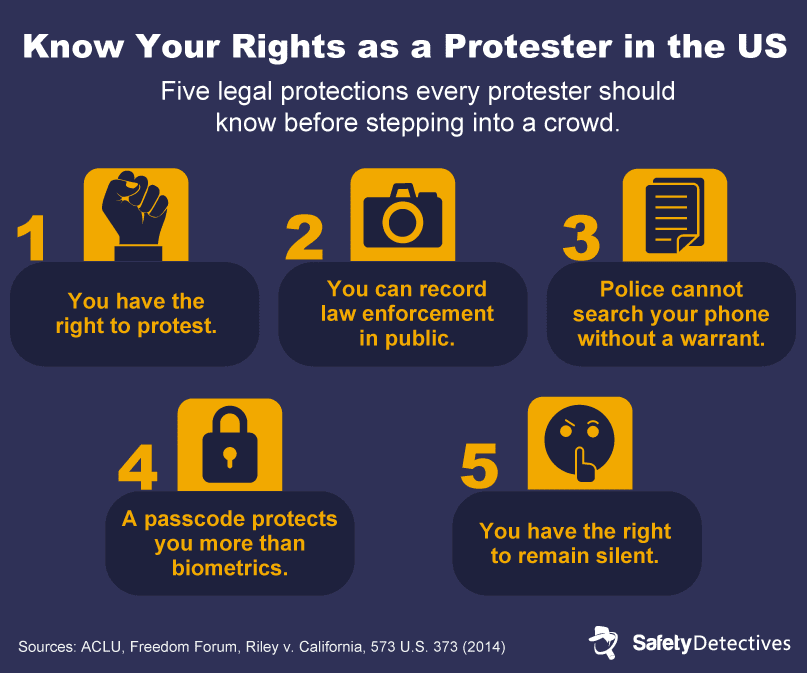
- You have the right to peacefully assemble and protest in the US: The First Amendment protects this, although local governments can enforce permit requirements or specific protest areas.
- You can record law enforcement in public: Federal courts have consistently upheld this as a First Amendment right, as long as you don’t physically interfere with officers’ duties.
- Police can’t search your phone without a warrant: In Riley v. California, the Supreme Court ruled that a phone seized during arrest still requires a warrant to search. Officers also can’t order you to delete photos, video, or audio.
- A passcode offers more (legal) protection than biometrics: US courts generally hold that you can be compelled to unlock your phone with your face or fingerprint, but not to reveal a passcode. Use a PIN or passphrase to be safe.
- You have the right to remain silent: You don’t have to answer questions from law enforcement, nor consent to a search of your device. In most circumstances, you only have to give your name if the officers can articulate that a crime has happened or suspect that a crime is about to happen.
While peaceful protests are not illegal, if a crime happens during a protest — such as vandalism, assault, or theft — police may need to gather evidence. This can include the names and information of people who may have been involved in or witness to the crime.
Even in this situation, police are legally obligated to abide by the Fourth Amendment — they can gather your name and contact information, but cannot submit you to an illegal search of your person or electronic devices. They also cannot compel your testimony without a subpoena.
The Types of Digital Risks at Protests
Authorities and other actors use technology in several ways to track, identify, and detain protesters. Understanding these methods will help you decide what to bring, disable, and avoid.
Device Seizures or Losses
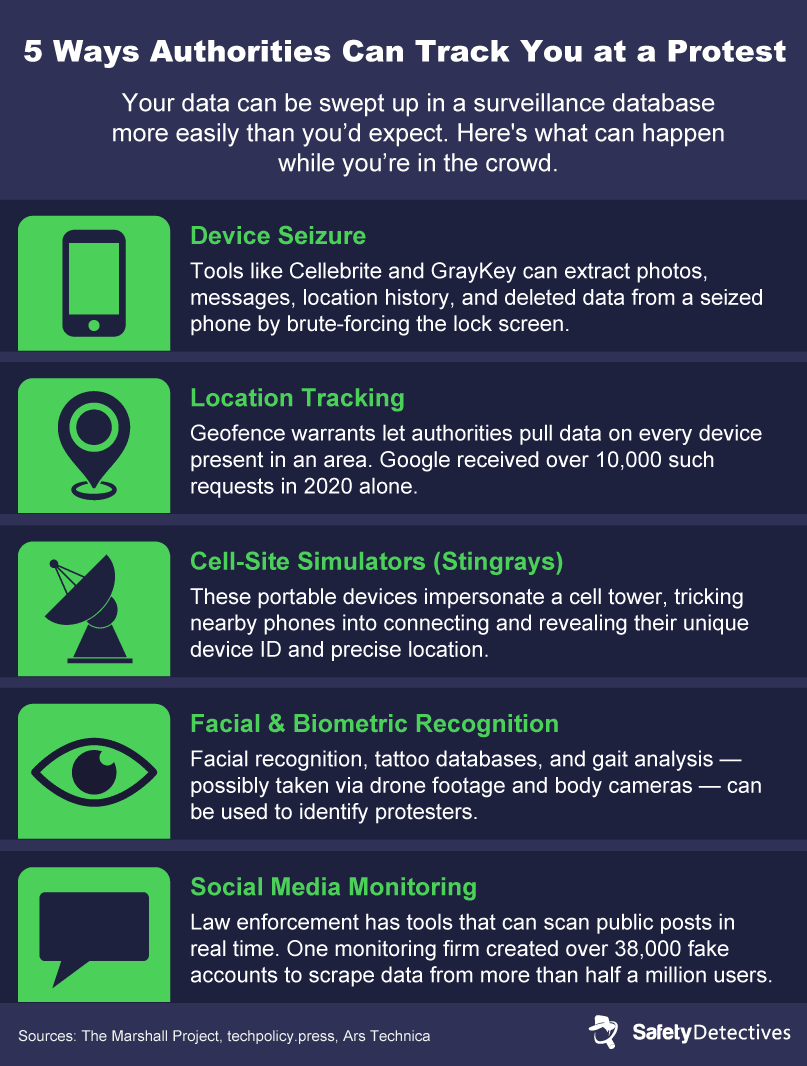
If your phone is confiscated during an arrest, stolen in a crowd, or simply lost, whoever ends up with it can potentially access everything on it. Law enforcement agencies use mobile phone extraction tools — software like Cellebrite and GrayKey — to bypass locks and pull data from devices. These tools can brute-force PINs and then extract photos, messages, emails, call logs, location history, and even deleted content.
How effective they are depends on your device and how you’ve secured it. A short numeric PIN can be cracked relatively quickly, while a long alphanumeric passphrase is significantly harder. Biometric locks (face ID, fingerprint) are convenient, but present a different problem. Since officers are trained to use them quickly, they may hold your phone up to your face or press your finger to the sensor before you can react.
Your device can also be compromised without leaving your hands. Governments have used spyware like Pegasus (which exploits vulnerabilities to access a phone remotely) against activists and journalists. Sometimes this doesn’t require any interaction at all. Rogue Wi-Fi networks near protest sites can also intercept traffic or push malware to connecting devices, and Chinese authorities have cracked Apple’s AirDrop protocol to unmask protesters.
Location Tracking
Your phone is constantly broadcasting signals that reveal where you are — cell towers, GPS, Wi-Fi networks, and Bluetooth all contribute. Unfortunately, this data doesn’t just disappear. Instead, carriers store it, apps log it, and data brokers sell it.
Law enforcement can use this in a few ways. With geofence warrants, authorities can demand data on every device that was within an area during a specific time window. Google received over 10,000 geofence warrant requests in 2020 alone, and they’ve been used to identify protesters in Kenosha, Wisconsin, and at the University of North Carolina. These warrants don’t target a specific suspect, but vacuum up everyone who was nearby.
Some federal agencies have also purchased bulk location data from commercial brokers like Penlink and Babel Street, avoiding warrant requirements entirely. With this data, ICE (United States Immigration and Customs Enforcement) can search an area for every phone present during a given time period, show device routes, and cross-reference which devices appeared at multiple locations.
Automated license plate readers add another layer of surveillance. Cameras with this capability are installed across most major US cities and along many interstates, and can log every plate that passes. If you drive to a protest, your vehicle’s location and route can be reconstructed after the fact.
Data Interception
Even without physically touching your device, authorities can intercept your communications using rogue Wi-Fi and cell-site simulators — also known as Stingrays or IMSI catchers. These portable devices pretend to be a cell tower, thereby tricking nearby phones into connecting to them. Once connected, a Stingray can collect your phone’s unique ID, intercept unencrypted SMS messages, and log your precise location.
Since Stingrays can capture data from every phone in an area, they’re particularly useful to law enforcement for building a picture of who was present at a protest.
Even so, intercepting and processing data from thousands of devices isn’t logistically simple. In a protest context, this means identifying who attended, who they were with, and building profiles for later monitoring, rather than reading specific texts in real time.
Apple and Google have also begun blocking phones from falling back to less secure 2G networks, which Stingrays rely on, though this protection is far from universal at this time.
Biometric Identification
Your phone is far from the only way for you to be identified. Facial recognition technology (usually combined with AI) can pick out individuals in a crowd using street cameras, police body cameras, private CCTV, drones, and even images pulled from social media.
ICE began deploying facial recognition for in-the-field identifications in 2025 through an app called Mobile Fortify. Agents can photograph someone and run an instant scan against federal databases.
The New York Times documented over half a dozen activists in Minnesota who were reportedly subjected to these scans in early 2026. The app has been criticized by security experts for returning single matches without confidence ratings (giving agents no ranked alternatives or indication of certainty). This, along with using facial recognition as the only basis for enforcement, goes directly against the Department of Homeland Security’s (DHS) guidelines.
Facial recognition isn’t the only biometric concern. Gait recognition — analyzing how a person walks — can identify someone even with their face fully covered. While automated gait recognition primarily operates in China, US forensic teams have used manual gait analysis to aid investigations.
Software can even match your visible tattoos against law enforcement databases containing over a million booking photos.
Social Media Monitoring
Social media gives law enforcement an easy overview of how protests are organized, who’s involved, and how participants are connected to each other. Companies like Dataminr and Babel Street even sell tools that help agencies analyze public posts. The FBI has purchased thousands of licenses for these monitoring platforms.
The problem doesn’t only affect public posts. One social media monitoring firm created over 38,000 fake Facebook accounts to scrape data from the public and private posts of more than half a million real users. And even if your profile is locked down, your photos and videos carry embedded metadata: the device model, exact time, GPS coordinates, and sometimes your name (although several platforms now strip this data upon upload).
If you post from a protest, tag a location, or share a photo with identifiable faces, you give anyone monitoring the platform a direct thread to pull. That thread can lead back to you, to other protesters, and to the organizers behind the event.
Before the Protest: How to Digitally Prepare Yourself
The single most effective thing you can do to protect your digital safety at a protest is to leave your phone at home. If your device never enters the area, it can’t be seized, tracked, or used to identify you. Unfortunately, for many people that isn’t realistic; instead, if you’re bringing a device, lock it down before you leave.
Securing Your Devices
More than your smartphone, you need to secure all of your smartwatches, fitness trackers, tablets, laptops — anything with a wireless connection that can share your location or store data that could be used against you or others later. If you don’t absolutely need it at the protest, leave it behind.
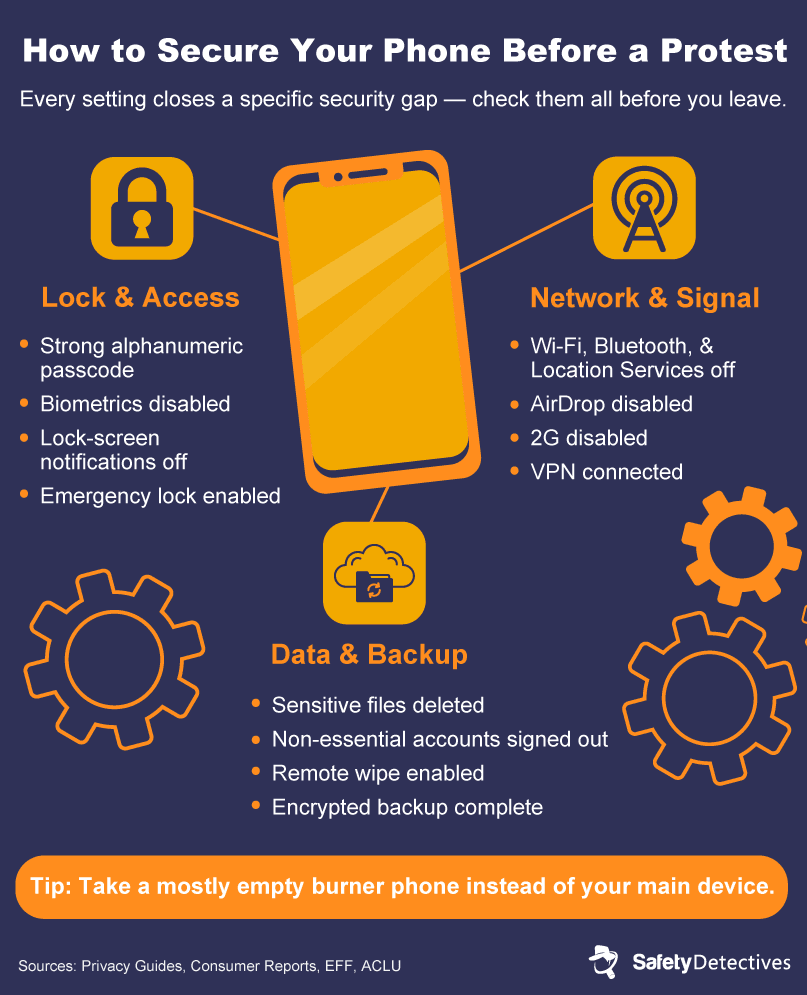
For whatever you do bring, work through this checklist. Each step addresses a specific vulnerability covered in the previous section:
- Update your operating system and apps: Security patches close the exploits that extraction tools rely on.
- Enable full-device encryption: Confirm encryption is active and tied to your passcode.
- Disable biometric unlock and use a strong passcode: Remove face and fingerprint unlock, and preferably use a long alphanumeric passphrase instead of a short PIN.
- Learn emergency lock actions: On iPhone, hold the side and volume buttons to reach the shutdown screen; on Android, use Lockdown mode to temporarily disable biometric authentication.
- Disable lock-screen notifications and actions: Hide previews and lock-screen controls so private details aren’t visible if your phone is grabbed.
- Lock down your network: Disable 2G on Android to reduce the risk of Stingray interception.
- Disable location services, Wi-Fi, Bluetooth, and AirDrop on iOS: These all leak location signals. Re-check during the day because some phones auto-reactivate radios.
- Tighten app tracking permissions: Revoke unnecessary access to location, microphone, contacts, and background activity. If possible, turn off metadata in your camera app (such as location capture).
- Reset or disable advertising ID: Ad IDs help brokers correlate your app activity and movement across datasets.
- Create strong account passwords: Use unique credentials for all your important accounts (including email and social media). Using a password manager is a great way to create secure passwords and remember them.
- Secure social media accounts: Remove location sharing and switch to app-based (non-SMS) two-factor authentication, such as Google Authenticator. Ensure your 2FA app also has a PIN or biometric lock turned on.
- Sign out of nonessential accounts: If a phone is taken while it’s unlocked, signed-in apps can give direct access to your accounts.
- Minimize stored data and remove unnecessary apps: Delete sensitive photos, documents, and old chat media before you go.
- Back up your data: Use encrypted backups so you can recover quickly if your phone is damaged or seized.
- Enable remote wipe: Set up Find My (for Apple) or the Find Hub (for Android) so you can lock or erase a missing phone.
- Install and connect to a VPN: Use a provider with a credible no-logs policy.
- Use airplane mode and power off strategically: Airplane mode helps, but even better is to turn your phone fully off whenever you don’t actively need it (or once again, not to take it with you at all).
- Carry emergency contacts offline: Write key numbers on paper or on your arm in case your phone is unavailable. The National Lawyers Guild runs a mass defense hotline (and hotlines for some local chapters) for protesters who need legal support.
- Charge fully and bring a power bank: If you do need your phone, battery life is a safety issue.
If you need to carry a phone, consider a burner phone. This should be a separate phone with minimal personal data and separate accounts. However, just because it’s less risky in and of itself, it’s still worth keeping turned off whenever you don’t actively need it.
Implementing Digital Operational Security
If you’re a protest organizer, the stakes are higher. A single compromised device can expose member identities, confidential documents, and partner organizations.
Ensure all communication goes through encrypted channels with disappearing messages, compartmentalize details on a need-to-know basis, vet new members before granting access to group chats, and set fallback plans in case a key organizer is detained or loses a device.
Run a drill with your team before an event. Confirm who handles public messaging, who handles legal updates, where evidence is stored, and how account access gets revoked if someone is arrested.
At the Protest: Keeping Yourself, Your Data, and Your Devices Safe
Protecting your data at a protest isn’t only about managing your phone. You also need to think about the cameras, drones, and recognition software pointed at you — none of which require access to your device.
Power Off and Airplane Mode On
If you have to bring your device to a protest, try to keep it off as much as possible, since a powered-off phone can neither connect to a cell tower (whether real or fake like a Stingray) nor log your GPS coordinates. Airplane mode is the next-best thing, though some devices may still communicate via Bluetooth or Wi-Fi depending on the manufacturer, so confirm that those are off too.
If you need to use your phone, turn it on briefly, do what you need to do, and switch it back off or into airplane mode. Every minute it’s active and connected, your phone is generating data about your location and activity.
Consider using a privacy screen protector. If your phone is on and you’re using it, a privacy filter makes the display unreadable to anyone looking from an angle, reducing the chance of someone nearby seeing what you’re up to.
Be Sensible About Capturing the Action
Photos and videos are some of the most powerful tools you can use to hold authorities accountable and document protests, but they also create a trail that can be used against you and others.
If you do record anything, use your phone’s camera from the lock screen without unlocking the device. This way, if your phone is grabbed mid-shot, all the rest of your footage stays locked. Here’s how:
- On iPhones: Firmly press and release the camera icon on the lock screen (iPhone X and later), or swipe up and select the camera app (on older iPhones).
- On (most) Android phones: Double-press the power button.
Frame your shots to avoid capturing other protesters’ faces, tattoos, or distinctive clothing. If you plan to share anything later, blur identifying features first. Don’t livestream — it not only gives away your location in real-time and can help incriminate you, but it also broadcasts other people’s faces with no way to edit them out. And don’t post anything while you’re still at or near the protest; wait until you’re somewhere else entirely.
Avoid Biometric Recognition
With facial recognition common in many countries, and tattoo or gait recognition becoming more widespread, there are a few things you can do to prevent easy identification:
- Dress to minimize what’s visible by wearing sunglasses, a hat, and a face covering (if legal).
- Cover distinctive tattoos.
- Choose plain, common clothing that doesn’t stand out in a crowd.
- Leave your car at home if you can, to avoid your plate tying directly back to your identity.
- Walk, bike, or take public transit, though keep in mind that some transit payment methods can also be tracked.
Set Up a Buddy System
Go to protests with people you trust and make a plan before you arrive. Set check-in times and agree on meeting points so you can regroup if things get chaotic or if someone gets separated.
Make sure at least one person who isn’t at the protest knows where you are, who you’re with, and when to expect you back. If you’re detained or your phone is taken, that person can reach out to someone you’ve specified or even contact a lawyer.
Carry your emergency information on you physically — a phone number for a lawyer or trusted contact written on paper or on your arm. This way, if your device is dead, confiscated, or locked, you’ll still be able to reach someone.
After the Protest: Double-Check Your Digital Identity
Once you’re home, the risks aren’t over. How you handle footage you captured and respond to a missing device matters as much as what you did while at the protest.
Share Smartly
If you took photos or video at the protest, don’t upload them directly from your photo gallery. Every image your phone captures has related metadata (so-called EXIF data) that records the device model, the exact time, and GPS coordinates where the photo was taken. If anyone receives the original, unprocessed file, they can extract this information.
As such, before sharing anything, strip the metadata. The private messaging app Signal automatically removes most metadata when you send a photo through it. You can also use dedicated metadata removal tools for computers and mobile phones. Or, you can transfer the image to a computer and use built-in metadata removal options (or dedicated metadata removal software to process many files at once).
Blur or crop out the faces, tattoos, and distinctive clothing of other protesters before posting, and get consent from anyone who’s still identifiable. Even posts with good intentions could expose people to investigation if their identity is visible.
Defend Your Device
If your phone was confiscated, stolen, or lost, there are a few steps you should quickly take:
- Use remote wipe: Open Find My (iPhone) or the Find Hub (Android) from another device and erase your phone. Keep in mind that this won’t work if the phone is off or disconnected, but will execute the next time it connects to a network.
- Change your passwords: Update logins for every account that was accessible on the device — email, social media, cloud storage, banking. Changing a password should also force a remote sign-out on the missing device.
- Alert your contacts: Let people know your phone is potentially compromised so they know to be cautious about unusual messages from you (or others).
- Monitor your accounts: Keep an eye out for login alerts on email, social media, and other services (these are turned on by default for many services but it’s a good idea to verify). This is primarily only an issue if you had accessible login details saved on the phone that could be used to log in on a different device.
If a confiscated device is returned to you, treat it as compromised — factory reset it and restore from your encrypted backup before using it again.
Digital Safety Tools for Protesters
All the steps discussed above become a lot easier with the right tools. Here’s a look at some of the software and services that can help you protect your data, communications, and identity.
Strong Passwords and Two-Factor Authentication
A strong password is the single most important barrier between your data and anyone trying to extract it. Phone data extraction tools like Cellebrite and GrayKey work by brute-forcing your passcode (running through combinations until one works). A four-digit PIN can be cracked in minutes, while a six-digit PIN takes longer but is still vulnerable. Meanwhile, complex alphanumeric passcodes can take years to break.
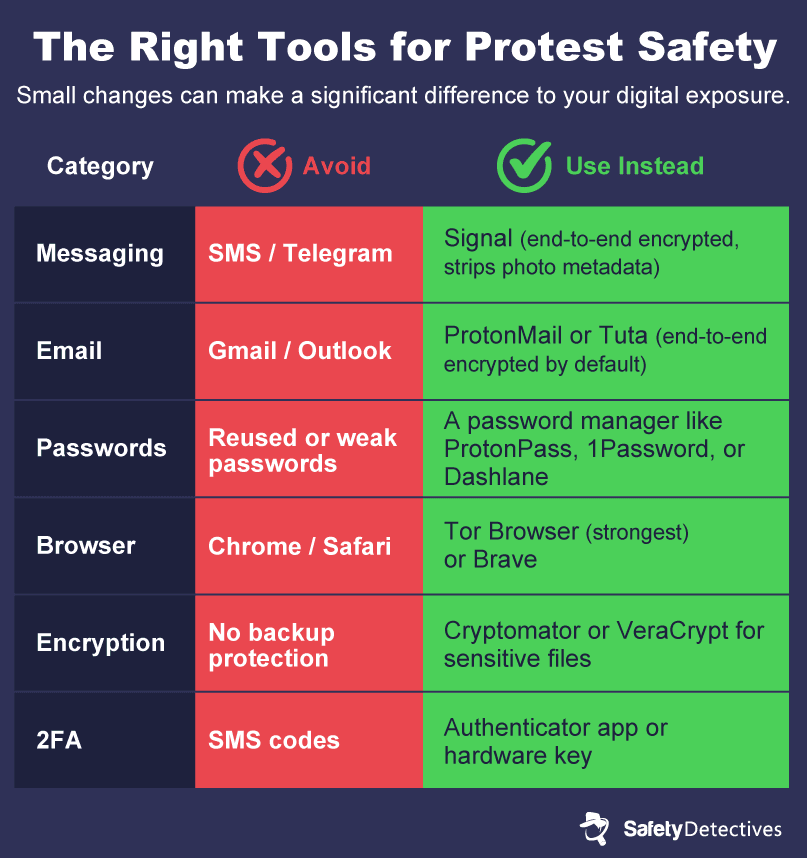
However, remembering strong, unique passwords for every account can be challenging. Password managers solve this by generating and storing complex passwords behind one master passphrase, so you only need to remember one. Reputable options include ProtonPass, 1Password, and Dashlane.
Two-factor authentication (2FA) adds a second step when logging into an account. This is typically a code from an authenticator app, SMS, or a physical security key. Even if someone gets hold of an account password, they can’t log in without that second factor. Use app-based or hardware 2FA, not SMS codes, since text messages can be intercepted by cell-site simulators or your number can be acquired via social engineering.
Encryption
Modern iPhones and Android devices encrypt your data by default when you set a passcode, but that protection has limits — particularly when it comes to cloud backups and external storage.
On iPhone, enable Advanced Data Protection for iCloud, which ensures your backups are end-to-end encrypted and only accessible using your login details. Unfortunately, Google offers no equivalent for its Android cloud photo storage.
Tools like Cryptomator let you encrypt files before they reach a cloud service. You create an encrypted vault on your device, add files to it, and only the encrypted versions sync to the cloud. The provider never sees the unencrypted data. You can also use VeraCrypt to encrypt a computer’s entire drive or create encrypted containers for sensitive files.
Both are free and open-source but require manually unlocking vaults to access your files. That trade-off may be well worth it if you’re dealing with particularly sensitive files.
Finally, VPNs add encryption at a different layer — your internet traffic. This makes it harder for network operators or surveillance tools to see what you’re doing online. A VPN won’t make you anonymous, but essentially shifts trust from your ISP to the VPN provider, so look for a service with a verified no-logs policy and independent audits. ExpressVPN and ProtonVPN are well-regarded options. For more details, see our guide to how VPNs protect you.
Remote Wipe Tools
If your phone is taken, remote wipe lets you erase everything on it from another device. Both major platforms offer this: Find My on iOS and Find Hub on Android. You can locate your phone on a map, remotely lock it with a message, or wipe it entirely.
Connectivity is by far the main limitation. If the phone is off, in airplane mode, or has no network connection, the wipe command queues and executes the next time the device connects. But if the phone doesn’t go online again, all that data is potentially up for grabs. iPhones have one additional layer of protection with their auto-erase option that wipes the device after ten failed login attempts — useful if someone is trying to brute-force your passcode.
Secure Messaging Apps
Signal is recommended by numerous security organizations, and for good reason. It’s open-source, has been independently audited, and uses end-to-end encryption for all messages and calls by default. Signal also supports disappearing messages, meaning you can set conversations to auto-delete after a set period of time. And as we discussed above, when you send a photo through Signal, it automatically removes most metadata.
WhatsApp uses the same underlying encryption as Signal, but collects significantly more metadata, such as who you message, when, and from where. Telegram is also not recommended for sensitive communications, as messages aren’t end-to-end encrypted by default.
Avoid standard SMS and MMS entirely — they’re unencrypted and easily intercepted. The same applies to any app that logs your data and can be subpoenaed.
Encrypted Email Providers
Standard email providers like Gmail, Outlook, and Yahoo don’t encrypt messages end-to-end by default. This means they can easily comply with data requests from law enforcement.
On the other hand, encrypted email services like ProtonMail and Tuta offer end-to-end encryption and are based in privacy-friendly jurisdictions. Emails between users of the same encrypted provider are automatically protected. If you send an email to an address outside of these services, most of them offer password-protected message options.
If you’re sticking with Gmail, consider enrolling in Google’s Advanced Protection Program. It’s designed for journalists, activists, and other high-risk users, and requires a physical security key to log in and adds extra defenses against phishing and unauthorized access.
For protest-related communications, consider using a separate encrypted email address that isn’t tied to your real name. For more on this, see our guide to sending anonymous emails.
Secure Web Browsers
Your browsing history reveals what you’ve been researching and planning. If your device is seized, searches about sensitive information surrounding protest locations, legal rights, or organizing tools could be used to build a profile of your activity. Besides history, websites and advertisers also use browser fingerprinting, which collects details like your screen resolution, installed fonts, and browser settings to identify you across sites, even without cookies.
Some good options for secure browsers include:
- Tor Browser: Routes your traffic through multiple encrypted relays, making it extremely difficult to trace browsing back to you. The strongest option for anonymity, though noticeably slower.
- Brave: Blocks trackers and ads by default with no configuration needed.
- Firefox: Can be hardened with privacy extensions like uBlock Origin to reduce fingerprinting and tracking.
For a deeper comparison, see our guide to the most secure web browsers.
Social Media Safety
Social media is one of the easiest ways for anyone to establish an overview of your digital footprint, giving them insight into what you get up to, where you go, and who you communicate with.
Before a protest (ideally, permanently), tighten your privacy settings across all platforms. Restrict who can see your posts, your friends list, and your profile information. Switch to non-SMS two-factor authentication. Turn off location tagging. Avoid posting anything that reveals protest plans, timing, routes, or meeting points. And don’t accept new friend requests unless you’re completely sure you know and trust them.
Consider using a pseudonym for any accounts tied to activism, and keep those accounts separate from your personal accounts. If you want to go further, log out of social media entirely before and during the protest to reduce the risk of monitoring.
Lock Down and March On
Perfect digital safety at a protest is nearly impossible — but you don’t need perfection. Every action you take, from setting a stronger passcode to leaving your phone at home, reduces the amount of data available to anyone trying to identify, track, or build a case against you. These measures protect not just you, but everyone around you, including the people in your photos, the contacts on your phone, and the organizers behind the event.
The right to protest is fundamental. If this guide helped you, send it to the people you’re going with. The more people who lock down their devices, the safer everyone is.
Important: SafetyDetectives owns the content and visuals in this article. We encourage you to share our content and visuals, provided you include a mention of SafetyDetectives with a link to the original article as the source. We appreciate your help in protecting our copyrights and enabling us to continue providing accurate and valuable information about cybersecurity.