

F-Secure Review: Quick Expert Summary
F-Secure is a simple antivirus program that uses an advanced, cloud-based anti-malware engine. The antivirus scanner scored really well in my malware and ransomware tests, identifying nearly all of my test files without slowing down my system. F-Secure also provides excellent web protection and a handful of pretty good additional features, such as:
- Parental controls.
- Virtual private network (VPN).
- Password manager.
- Data breach monitoring.
- Scam protection.
I like F-Secure’s parental controls — they work well, they’re easy to set up and manage, and they don’t block safe sites or slow down your devices like some parental controls do. The VPN is pretty good, too, but it’s not available in restrictive regions like Bahrain, China, Iran, Kuwait, Oman, Qatar, Russia, Saudi Arabia, and the UAE.
The password manager and data breach monitoring are pretty decent, although not as advanced as top competitors like Norton, TotalAV or McAfee — the data breach monitor lacks credit score monitoring, ID theft coverage, and identity restoration services.
That said, F-Secure is very easy to use and manage, with an intuitive online dashboard and desktop application. There’s also a mobile app that works well without causing any lag, and it doesn’t take up much room on your phone. The mobile app also comes with device tracking features, letting you remotely lock or wipe your phone if it’s lost or stolen. Should you have any problems or questions, F-Secure’s 24/7 live chat and phone support across 13 countries is timely and effective.
Overall, F-Secure antivirus is a secure, affordable internet security program, but it lacks many of the additional features included with the top antivirus programs of 2026.
F-Secure Full Review— Simple Antivirus Program With Excellent Web Protections

F-Secure is an effective anti-malware program with great web protection and some pretty good additional features. The malware scanner has near-perfect malware detection rates, and the web protection accurately blocks online threats like phishing sites.
In terms of pricing, there are 2 bundles on offer: Internet Security and Total. The Internet Security plan includes malware protection, scam protection, parental controls, and web protection. The Total plan adds a decent VPN and identity theft protection tools (with a password manager). The VPN, scam protection, and ID theft protection are available as standalone purchases as well.
All of F-Secure’s plans are available for 1, 3, or 5 devices, and all purchases are backed by a risk-free 30-day money-back guarantee.
F-Secure Plans & Pricing — Decent Plans (No Credit Card Needed for the Free Trial)
F-Secure offers 2 bundles on 1-year and 2-year subscriptions — Total and Internet Security. There’s also a standalone VPN subscription, Scam Protection, and ID Protection package. All products are available on Windows, macOS, Android, and iOS, cover up to 5 devices, and come with a 30-day money-back guarantee. I tested the refund policy and can confirm that F-Secure will return your money hassle-free within 5 to 7 business days.
Internet Security (starting at $49.99 / year for 1 device on the 1-year plan) and Total (starting at $69.99 / year for 1 device on the 1-year plan) both include F-Secure’s antivirus. The difference is that Total also gets you a password manager, unlimited-data VPN, and the ID Monitoring service. The VPN is also available as a standalone product for $49.99 / year for 1 device on the 1-year plan. You can also get the ID monitoring tools and password manager separately for 1 year from $49.99 / year for 1 device. While you can buy Scam Protection as a standalone product, it’s already included in both the Internet Security and Total packages.
F-Secure doesn’t offer a free version, but there’s a 30-day free trial of its Total package — no credit card is required, and it includes all of F-Secure’s features. A 30-day free trial of the Internet Security plan is also available, but I recommend trying Total as it gets you more.
Here’s a quick overview of F-Secure’s plans:
F-Secure Internet Security — Entry-Level Plan (Good for Basic Protection)
F-Secure Internet Security starts at $49.99 for 1 device on the 1-year plan and includes the following features:
- Antivirus.
- Ransomware protection.
- Browsing protection.
- Scam protection.
- Banking protection.
- Parental controls.
- Gaming mode.
- Customer support.
This plan is hardly a bargain: TotalAV and Norton offer better packages at similar (or better) prices. Plus, it doesn’t come with a VPN or password manager.
F-Secure Total — Premium Plan With All Features
F-Secure Total is the premium package, and it starts at $69.99 / year for 1 device on the 1-year plan. It includes all of the features of the Internet Security plan, plus:
- VPN.
- Wi-Fi network monitor.
- Tracking protection.
- Password manager.
- Data breach monitoring.
- Identity theft help.
F-Secure Total is priced similarly to the top-tier packages of competitors like McAfee, but while it does include a VPN, password manager, and other ID protections, it still lacks some features that those competitors offer, like cloud storage and a firewall.
Between the 2 plans, I’d recommend purchasing F-Secure Total. For a slight increase in price, you’ll get a VPN, a password manager, and ID monitoring tools. That said, there are other internet security suites that bundle even more comprehensive features for a similar price.
F-Secure Security Features — Good Range of Security Features + Great Web Protections
Antivirus Scanner — Near-Perfect Malware Detection Rates (+ Negligible Impact on System Performance)
F-Secure’s cloud-based anti-malware scanner performed really well in my testing. The scanner uses a massive malware database to detect known malware files based on their code. It also performs real-time behavior analysis with its machine learning engine to detect newer malware variants and zero-day threats.
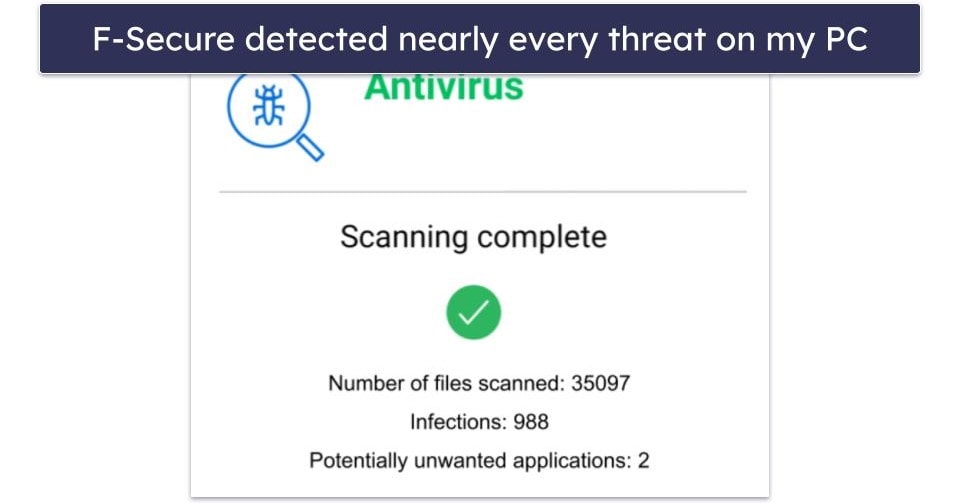
F-Secure only offers 2 types of scan — a full computer scan and a quick scan that targets the locations where viruses are most often found. You can also adjust your scan settings manually, only to scan file types that commonly include harmful code, to scan inside compressed files, or to exclude specific folders from future scans.
F-Secure’s anti-malware scan results were great. I downloaded and hid 1,000 test files all over my device, which included trojans, ransomware, spyware, keylogging malware, and rootkits. F-Secure detected nearly all of my test files (97.8%) and either deleted the files or placed them into quarantine.
The first scan I ran on F-Secure took 22 minutes to complete. This is quite quick in comparison to other full system scans, like Bitdefender’s, which can take up to an hour. Interestingly, I noticed that my next full disk scan took less than 5 minutes to complete (which is incredibly fast). F-Secure marks files that are safe to skip in subsequent scans. This feature can be turned off in Tools if you prefer the scanner to look everywhere, but I really appreciated the amount of time it saved.

F-Secure’s impact on system performance was negligible. I didn’t notice any changes to my computer speed throughout the scanning process, and I could browse the web and work on several documents and spreadsheets without any issues. This is great, as many other antivirus programs can put a significant strain on the system.
F-Secure also offers daily, weekly, and monthly scans that can be scheduled in Scanning Settings. Again, you can decide if you only want to scan file types that are considered harmful and whether you would like compressed files to be scanned or not.
The real-time scanning worked really well, too. I tried to download the same cache of test malware files, and F-Secure identified all of the samples, preventing me from saving them to my computer.
I also ran a ransomware simulator and was very happy with the results. F-Secure detected all 900 ransomware samples before they could be downloaded onto my device.
Finally, I tested DeepGuard, another element in F-Secure’s real-time protection toolkit. It blocks harmful applications from running on your computer and monitors device processes to ensure that nothing is interfering with critical settings — an important layer of defense against trojans and other threats. It’s easy to set up, works well, and I liked how I could select different security levels to determine how strict it is. I left DeepGuard on the default setting, but more advanced users can choose between a Classic or Strict mode depending on their needs.
Overall, in terms of disk scanning and real-time malware protection, F-Secure is comparable to market leaders like TotalAV and Norton in consistently providing excellent malware scanning results.
Secure Browsing — Great Set of Tools to Protect You on the Web
F-Secure provides a handful of tools to keep you safe online. Under the banner of Secure Browsing, you get Browsing Protection, Banking Protection, Trusted Shopping, and an ad blocker. Browsing Protection blocks your devices from accessing suspicious websites, and Banking Protection adds extra safety measures during banking sessions. Trusted Shopping warns you about shady e-commerce sites.

F-Secure’s Browsing Protection combines the ad blocker, a cookie blocker, and other web protections in a single extension. It worked really well. I tested it against a series of common web-based exploits, and it identified and blocked pages containing exploits for Firefox, Chrome, Adobe Flash, JavaScript, and more. I also attempted to access 20 known phishing websites and was blocked from accessing all but 1 of them. This is a great result, especially in comparison to Systweak, which didn’t stop me from accessing any malicious websites.
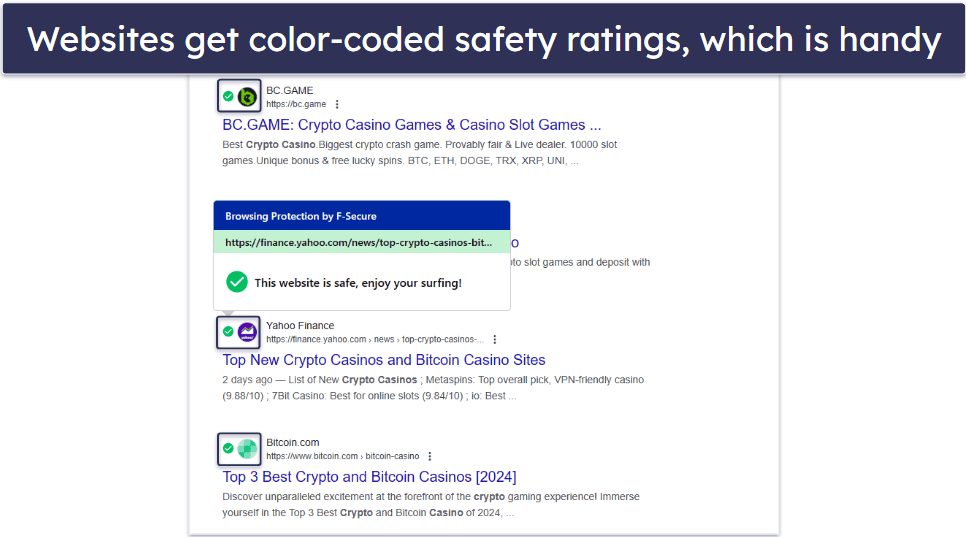
F-Secure’s color coding for search results is really handy, too. It works similarly to Norton’s and McAfee’s color coding systems: when you’re searching on Google, Bing, Yahoo, or DuckDuckGo, each link on the results page displays a color-coded icon. Green for safe, yellow for suspicious, and red for harmful. This makes it really easy to know which links you can click on and which you shouldn’t.
I also really like F-Secure’s Banking Protection. Once F-Secure detects that you’re on a banking or financial website (like PayPal), Banking Protection is activated. It checks websites for unsafe behaviors, blocking you from accessing those sites until your banking session is completed.
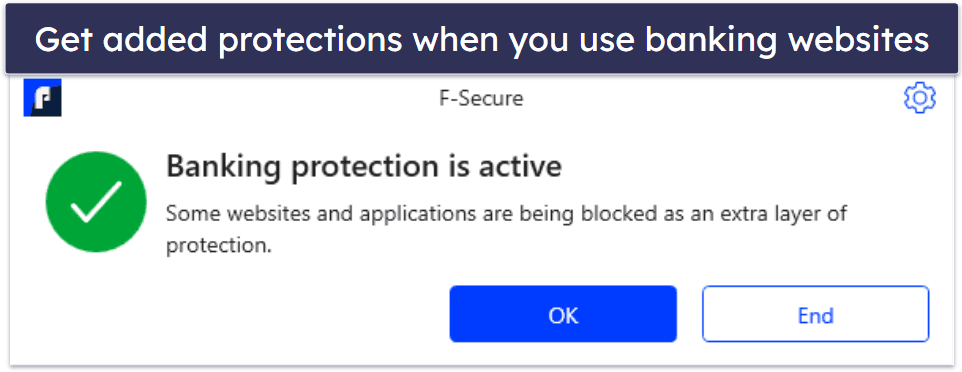
It also incorporates a feature called Remote Access Blocker, which prevents third parties from accessing your computer remotely while you’re banking online. Given that phone scams involving fraudsters wanting remote access to your computer are on the rise, I’d say Remote Access Blocker is a good extra safety measure to implement.
Banking Protection is excellent if you want to add a layer of protection to your online finances, too. I attempted to navigate to some potentially unsafe websites (e.g. pornographic and gambling sites), and I was blocked from entering them while Banking Protection was on. Still, F-Secure’s Banking Protection is not quite as secure a solution as Bitdefender’s Safepay, which is an isolated browser that offers full protection against keyloggers and screen capture tools.
Banking Protection is only available with the Browsing Protection extension (which is available for Google Chrome, Safari, Firefox, Internet Explorer, and Microsoft Edge). However, F-Secure’s anti-phishing and exploit protection runs automatically after you install F-Secure on your computer.
The Trusted Shopping feature is an extension of the Browsing Protection and Scam Protection features. It warned me when I tried to visit sketchy e-commerce sites and confirmed that safe sites like Amazon weren’t risky — but that’s about it.

As for the ad blocker, it’s fairly disappointing. It blocked most ads on some sites, but elsewhere, I couldn’t tell any difference when the ad blocker was on or off. On the whole, it only blocked about half of the ads, which isn’t great.
F-Secure’s secure browsing is pretty solid all around. It detected and blocked access to sites containing web exploits and suspicious phishing threats. And the Banking Protection is a nice extra benefit to ensure that your banking details stay private and safe. Trusted Shopping is a nice extra, while the ad blocker doesn’t add much to the table.
Scam Protection — Safeguarding Against Online and Mobile Threats
F-Secure’s Scam Protection is a valuable addition included by default in both Internet Security and Total plans, with a standalone option at $4.99 / month. This feature leverages real-time detection to shield users from phishing emails, text messages, and unsafe websites. The mobile app adds automatic SMS scam filtering and alerts for unsecured Wi-Fi networks, making it particularly useful for travelers or those on public hotspots.
Unlike basic antivirus protection, it emphasizes proactive scam avoidance. A key tool is the free Scamometer, which assesses risk levels (scored 1–6) for activities like banking, shopping, and dating, helping users identify high-probability threats based on expert data and surveys.
In testing, Scam Protection benefited from the antivirus’s strong web protection, which blocked 19 out of 20 phishing sites. The mobile SMS filtering was also effective, flagging malicious texts before I could interact with them. It also warns you about sketchy e-commerce sites via the Trusted Shopping feature, though its scope is limited compared to more advanced tools. I found it easy to manage through the intuitive dashboard or mobile app, requiring minimal setup.
However, Scam Protection lacks the depth of competitors like Norton, which offers financial scam recovery and identity protection. F-Secure’s version is solid for basic needs but doesn’t include advanced tools like credit monitoring or scam loss reimbursement. For users prioritizing scam defense on a budget, the standalone plan or trial (no credit card required) is worth exploring, especially given its multi-device coverage and recent enhancements.
Family Rules (Parental Controls) — Simple Parental Controls That Work Well
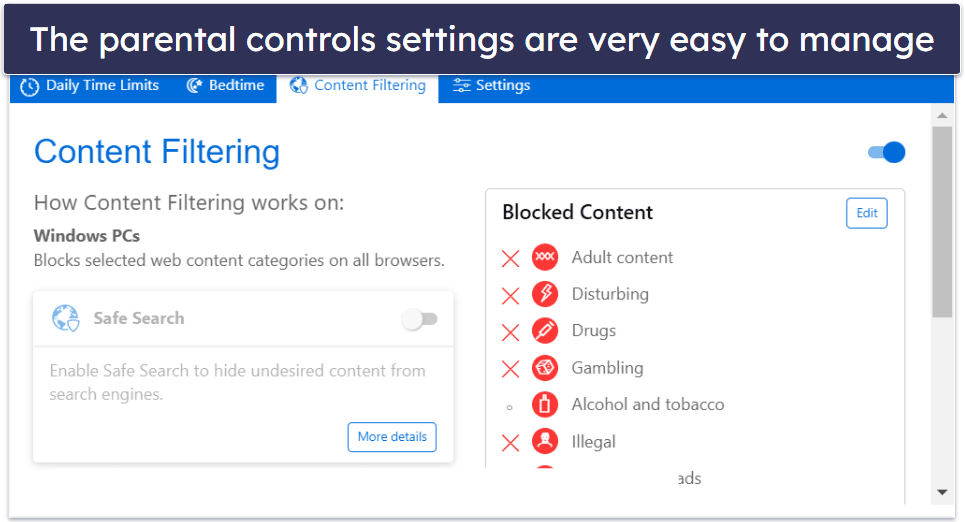
F-Secure’s parental controls are simple, intuitive, and effective. They allow parents to set up a separate profile for their children and:
- Block certain web content categories.
- Set a “bedtime” for when the internet can’t be accessed.
- Restrict the amount of daily internet usage.
- Restrict or block specific apps.
Family Rules are easily managed through F-Secure’s web portal. The portal is very simple to use, and setting up a profile for a child is also quick and hassle-free. All you need to do is click on “Add device,” send the installation link to your kid’s device, and then use the link to download and set up F-Secure on that device.

The bedtime feature is limited — it only works for non-system apps on Android, and only includes F-Secure’s SAFE Browser on iOS. So it’s not a comprehensive shutdown like it is on Windows and Mac devices.
On my Android phone, all the parental control features worked very well. Any harmful websites I tried accessing were blocked, and a notification counted down how much internet time I had remaining in the day. I tried to access websites with porn, violence, and even cult propaganda, and I was blocked from accessing all of them. This was a great result, but I like how Norton Family lets your kids send your phone a notification asking permission if they want to access a blocked site.
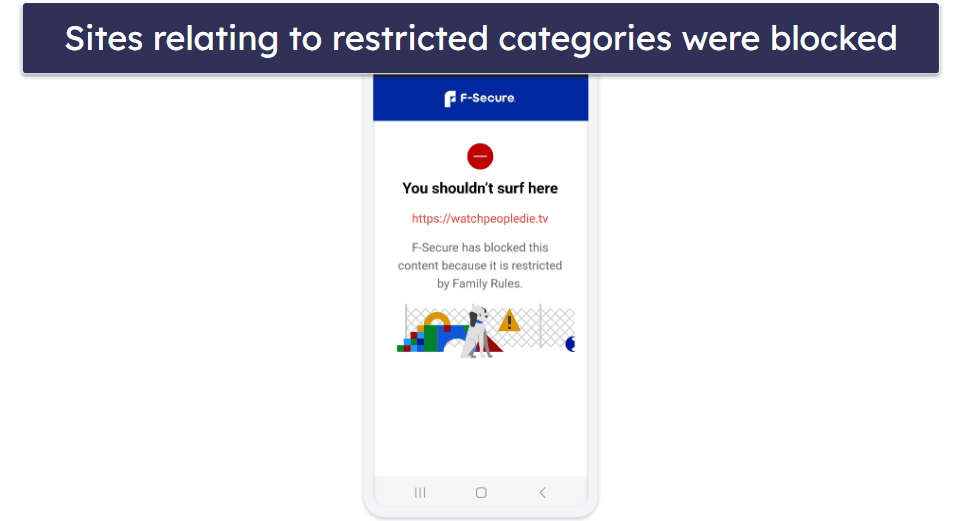
The content filters cover the majority of websites that could be considered harmful, but they’re pretty basic. Other antivirus programs allow for much more granular restriction of content — for example, Norton Family offers a whopping 47 categories. However, I liked how easy it was to whitelist specific sites if I wanted to allow them, and to block sites that the content filters hadn’t picked up.
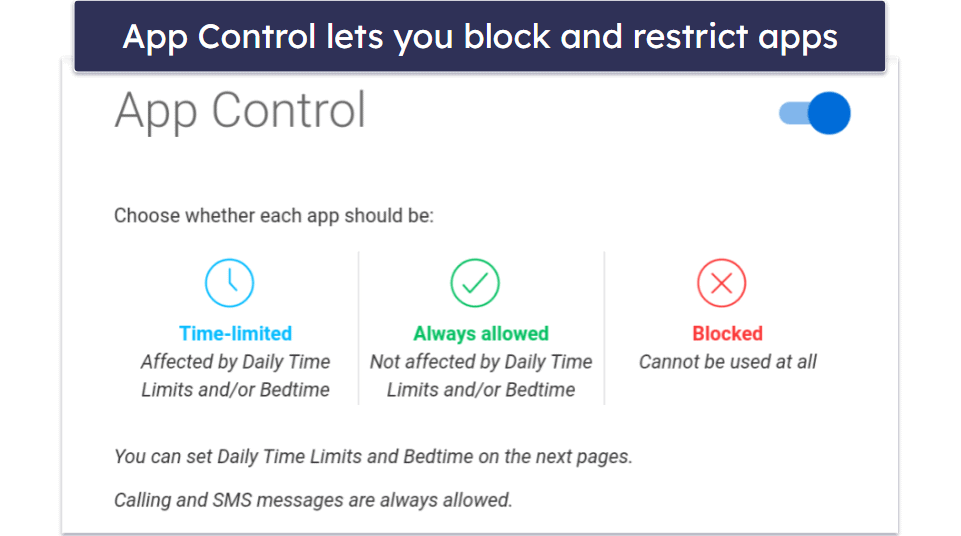
There is also an App Control feature (not available for iOS) that allows parents to restrict or block access to particular apps. With App Control, you can view all the apps installed on your child’s device and decide whether each one should be fully allowed, time-limited, or blocked entirely. This is a particularly handy feature if you want to restrict the amount of time your kids spend on social media, or if you don’t want them to have access at all. And you can choose what restrictions to place on each new app your kid installs.
Unfortunately, F-Secure requires device administrator permissions for parental controls on Android. This means that F-Secure can delete the data from a device without warning, change the lock screen, and set rules for passwords. It’s understandable that for an app to block websites and place time restrictions on other applications, it would require extensive access to your phone. However, it’s important to be aware of this, especially if you’re privacy-oriented.
Overall, F-Secure’s parental controls are good — they’re easy to set up, use, and adjust. But in comparison to parental control features in other antivirus programs, F-Secure is quite basic. The content filtering works well, but the categories could be more detailed. Also, F-Secure doesn’t have the device location tracking or geo-fencing abilities of Bitdefender, which alerts parents when their kids have left a restricted area.
F-Secure VPN — Pretty Good VPN With Fast Speeds (Works With Top Streaming Services)
F-Secure VPN gives you access to 32 servers in 27 countries spanning North America, Europe, Asia, and Oceania. This is a very limited number of servers, especially in comparison to ExpressVPN, which offers servers in 105 countries.
That said, F-Secure VPN does offer excellent security features, including:
- 256-bit AES encryption.
- Secure IKEv2, OpenVPN, and OpenVPN (TCP) protocols.
- No-logs policy.
- Kill switch (available on macOS, Windows, and Android).
- Split-tunneling.

I performed a few speed tests on my system. For one test, I used the VPN to access a server close to my location in Europe, and for another, I accessed a distant VPN server in Australia.
When I accessed the nearby server, my ping rate increased slightly, and my upload and download speeds slowed somewhat. The differences were pretty negligible, and I didn’t notice any slowdown when I was browsing online and streaming.
When I connected to a distant server, my ping time drastically increased (from 3 ms to 319 ms). However, neither my download nor my upload speeds suffered much, dropping by about a third. I didn’t notice any slowdowns while browsing or loading HD videos.
F-Secure VPN is pretty good for streaming and torrenting. It works with top streaming services, including Netflix, Amazon Prime, and Disney+. I was able to download torrents using popular torrenting clients, including uTorrent, BitTorrent, and Vuze. Just note that the kill switch isn’t turned on by default.
Unfortunately, F-Secure VPN doesn’t work in restricted countries, such as China, Russia, and the UAE. If you need a reliable VPN in a censorship-heavy country, check out our top picks here.
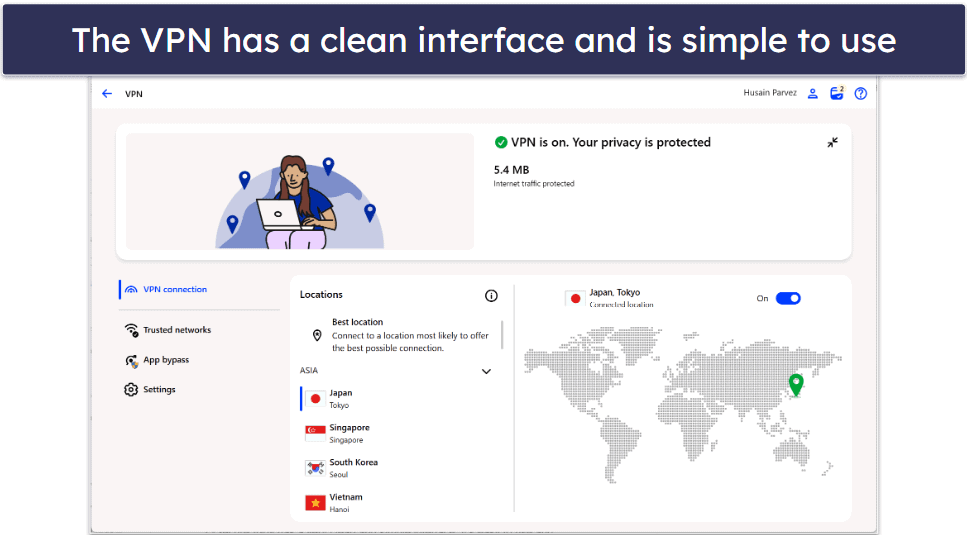
F-Secure VPN has a very clean and simple interface. It’s easy to use and understand, and there’s a Best location feature that connects you to the fastest server based on your location. In my tests, I was always connected to the fastest server.
Overall, F-Secure VPN performed pretty well — it didn’t have any noticeable performance issues, works with top streaming sites, and supports torrenting. However, it offers a small server network, lacks details about each server, and doesn’t work in restricted countries, making it generally worse than our top-ranking VPNs.
ID Monitoring — Basic Data Breach Monitoring Tool
F-Secure’s ID monitoring is a versatile service. It tracks data breaches and scans the dark web to see whether any of your information has been leaked. I was impressed by the types of monitoring F-Secure offers. In addition to email addresses, you can see whether usernames, credit cards, phone numbers, bank account details, and social security numbers have been leaked — as well as other types of sensitive personal information.
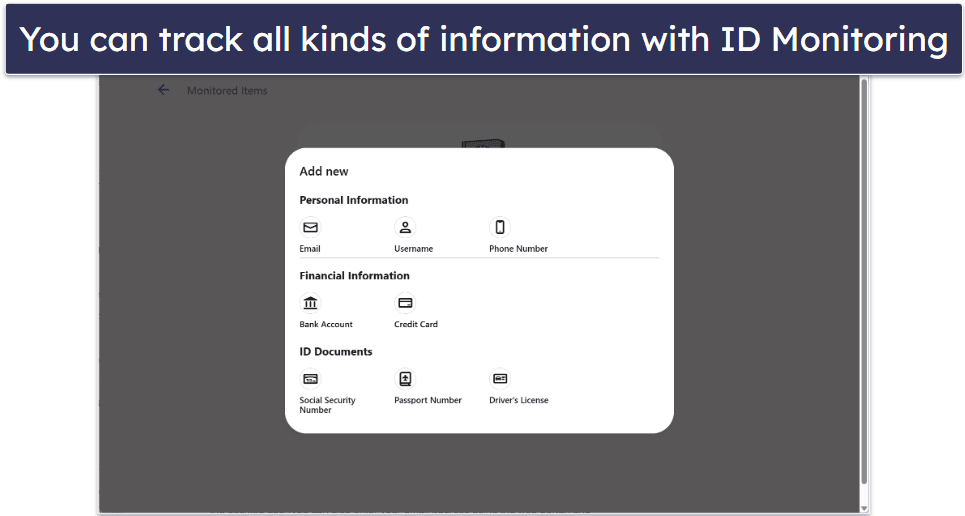
I added 2 of my email addresses and my phone number to ID Monitoring through the desktop app (you can also enter your email address using the web portal) and found out that they were involved in quite a few data breaches during the last decade. My phone number had been leaked on a number of occasions, which explained all the spam calls I’d been getting!
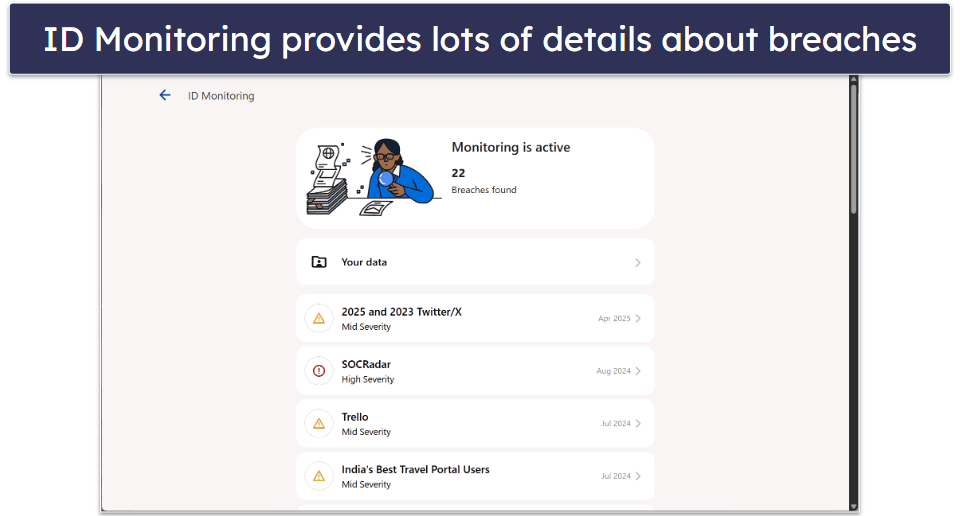
I rather liked the ID Monitoring interface: it’s minimalist, and yet, it provides you with everything you need to know about a specific data breach, including the most important thing — what to do next to secure your compromised accounts.
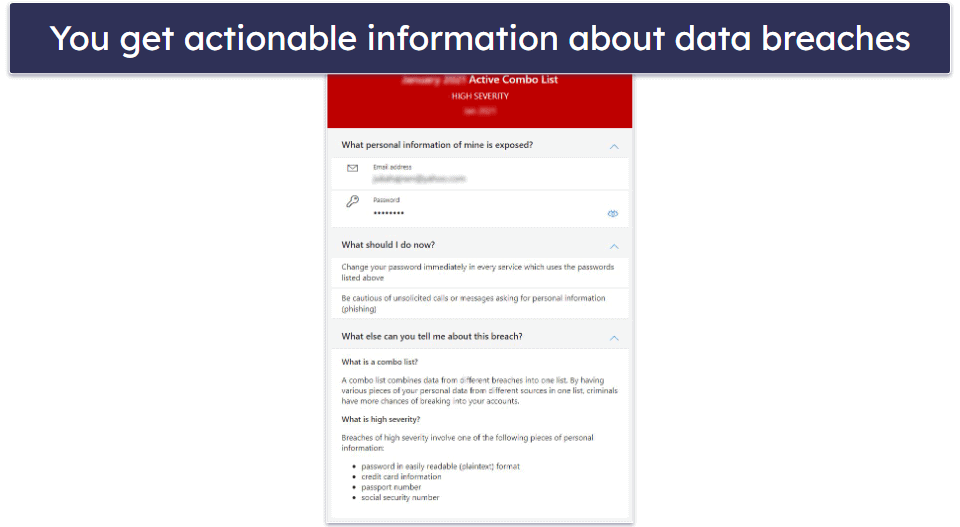
Overall, F-Secure’s ID Monitoring is a decent data breach monitoring tool. That said, it’s pretty basic compared to competitors like Avira and Norton. Both of those products provide more comprehensive data breach protections, but F-Secure’s offering is still an ok option.
F-Secure Password Vault — Well-Designed Tool, Perfect Auto-Fill & Simple Password Importing
F-Secure’s Password Vault is a handy, well-designed tool. A master password is created at the beginning of the setup process, and you are asked to download a QR recovery code to use if you should ever forget your master password. I think this is a clever solution to a forgotten master password. However, the QR code is also a potential security risk since it’s like writing your master password in a notepad, which is why I think that 1Password, with its secure recovery code feature, is still the best on the market.

The first thing I tested after setting up my master password was import options. F-Secure gave me the option to import passwords from a variety of other password managers and browsers, including:
- Dashlane.
- LastPass.
- TrueKey.
- KeePassX V2.
- Mozilla Firefox.
- Microsoft Edge.
- Google Chrome.
For each option, F-Secure provides you with clear instructions on how to import your passwords. In most cases, you’ll have to create a CSV file of your passwords and then drag and drop the file into the F-Secure desktop app. I found the process to be fairly intuitive.
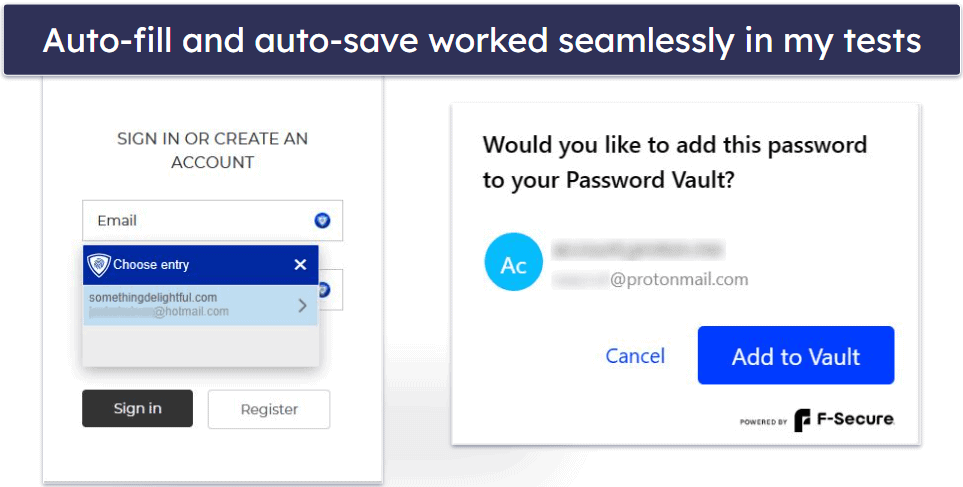
After I set up my vault, I could install the F-Secure browser extension on all browsers on my PC. To test it, I chose Microsoft Edge. I could autofill usernames and passwords from my vault with a single click. And whenever I signed up for a new service or logged into an account for the first time, F-Secure would offer to auto-save my credentials.
F-Secure’s password generator offers an easy way to generate strong passwords. It’s pretty decent — it can create passwords up to 32 characters long, with lowercase and uppercase letters, numbers, and symbols. This is enough to create strong passwords, but there’s no passphrase option or passkey support like you get with top standalone password managers like 1Password, and the 32-character limit is pretty small compared to RoboForm’s 512 characters. And it’s not built into the browser extension, so you’ll have to open the desktop app every time you need a new password.

Overall, F-Secure offers a good password manager with flawless auto-save and auto-fill, simple importing, and a decent password generator. It doesn’t have some of the advanced features of standalone apps like 1Password or Dashlane, but it’s still a decent solution that will satisfy the password security needs of most users.
F-Secure Ease of Use & Setup — Excellent + Intuitive Design on Every Platform

F-Secure is incredibly easy to set up and use. The tools and controls are clearly laid out, making it easy to use features and change settings. Like the app, the web portal is very intuitive. I didn’t have any issues managing my subscription.
How to Install F-Secure (Just 3 Simple Steps):
- Visit F-Secure’s website to buy a subscription. Choose the plan that suits you the best, fill out your payment details, and confirm the purchase.
- Create an account. Provide your email address and set a password. You’ll need to verify the account from a link that will be sent to that email address.
- Log into your account and download the software. Choose whether you want to set F-Secure up on your, your child’s, or another user’s device, and follow the steps to download and install the program.
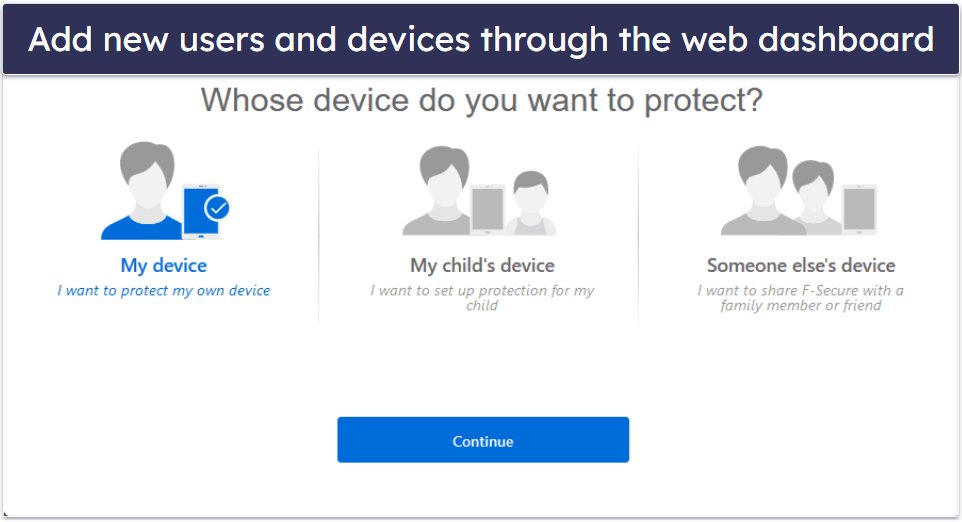
The web portal is also where Family Rules are controlled, although you can control them on the device in question as well. You can also tailor the features for different users in your household if you wish.
F-Secure Antivirus has a great design for every platform. It’s a straightforward antivirus program, which won’t cause problems for even new or inexperienced users.
F-Secure Mobile App — Decent Mobile App (Similar Performance to PC Version)
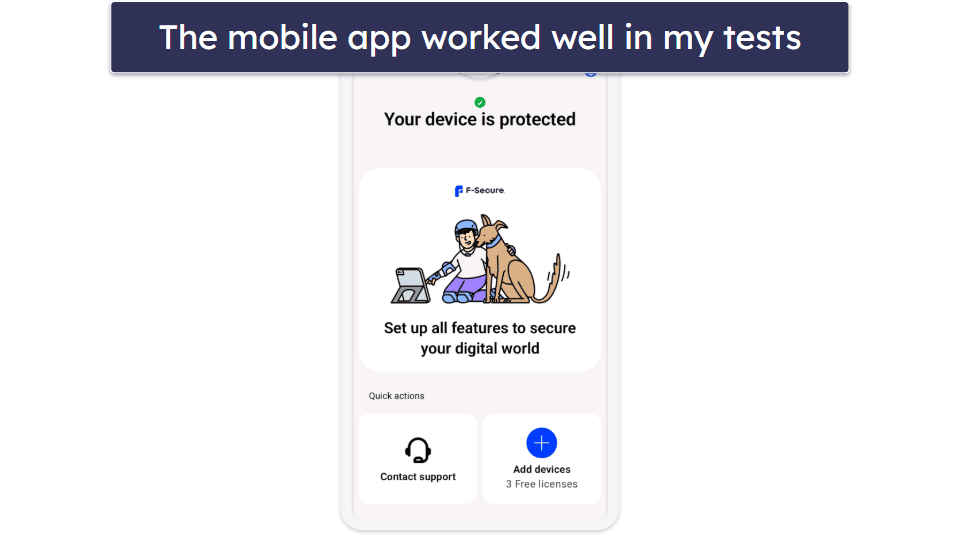
The mobile app’s features include:
- Antivirus scan (Android only).
- Real-time browsing protection.
- Banking protection.
- Parental controls.
- Secure browser app.
- Password manager.
I tested F-Secure’s mobile app on my Android phone, and it worked fairly similarly to the PC platform. For my testing, I downloaded a huge cache of Android-specific malware files, including .apks, rootkits, and .jar files. The mobile scan detected nearly all of the samples — great result! The anti-malware scan took 16 minutes and didn’t slow down my phone (or excessively drain my battery like some Android scanners).
The parental controls worked in the same way on my phone as they did on my PC. I was pretty happy with their usability on the mobile app — very easy to navigate and manage. You can jump up to the parental controls section of this article for a more thorough rundown of F-Secure’s offering for parents.
The mobile app also includes automatic SMS scam filtering and alerts for unsafe Wi-Fi networks. This means it can detect and block malicious text messages before you click on them, and it will warn you if you connect to a public hotspot that could expose your data. These protections are particularly useful when traveling or using free Wi-Fi in places like airports, hotels, or cafés, where scams and unsecured networks are common.
You also get device tracking features, letting you remotely lock or wipe your phone if it’s lost or stolen. This anti-theft protection makes it more competitive with rivals that offer similar safeguards. I also like how F-Secure includes its antivirus, password manager, VPN, and ID protection in one app, similar to TotalAV. That said, its VPN is not quite on par with TotalAV in terms of speed.
Overall, F-Secure’s mobile app performs well. It has mostly the same features and functionality as the PC version and is effective at protecting your device.
F-Secure Customer Support — Effective Customer Support, 24/7 Live Chat
F-Secure provides a few options for customer support:
- Live chat.
- Telephone.
- Community forum.
- User guides.
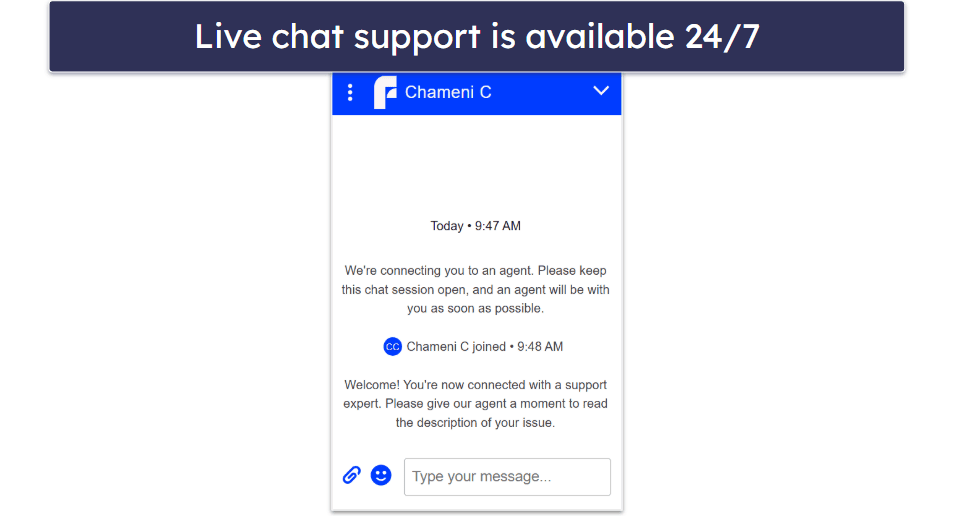
I tested F-Secure’s live chat, and it works 24/7 — I was able to get through at different times of the day without any issues. The agents were quick to respond, friendly, and clear in their instructions. Phone support is still limited to business hours, depending on the country, and there’s no email support, but the round-the-clock live chat makes it easy to get help whenever you need it. If necessary, the team can also set up a remote session to troubleshoot directly on your device.
F-Secure provides country-specific telephone support to 13 countries. There is also an Asia/Pacific and international number. The phone lines are open Monday–Friday from 9:00am to 6:00pm in most countries, with a few exceptions.
Country-specific phone support is available in the following countries:
- Canada.
- Deutschland.
- Denmark.
- Suomi.
- France.
- United Kingdom.
- Hong Kong.
- Japan.
- Malaysia.
- Nederland.
- Polska.
- Sverige.
- United States.
I had a pretty decent experience with F-Secure’s phone support. I didn’t have to wait on hold for more than 10 minutes and their directions were crystal clear. What’s not so great is the absence of 24/7 phone support. It’s usually much simpler to untangle technical glitches over a call than through live chat.
F-Secure’s Community Forum is active and responsive. When I posed a question, an F-Secure moderator promptly replied the next day. I also noticed that both users and moderators are pretty quick to respond to questions on the forum, in general.
There are in-depth user manuals on the F-Secure website, which I discovered to be very useful. The search feature of the site functioned efficiently, letting me easily locate answers to numerous queries about the product.
However, no email support is available. This is a bit annoying, as email is the preferred method of communication for many users, and many other antivirus companies, such as TotalAV and Norton, do offer this channel of communication. Still, the Community Forum is a decent substitute.
Is F-Secure Antivirus a Good Antivirus in 2026?
Overall, I like F-Secure Antivirus — it provides excellent anti-malware and web protections, it’s easy to use, and its additional features are all decent. The virus scanning and online protections all performed really well. F-Secure caught most of the sample malware I hid on my device, and it blocked me from accessing nearly all suspicious or harmful websites during testing.
F-Secure’s Banking Protection is a nice extra that can provide confidence and an added sense of safety when managing your online finances. The parental controls, password manager, and VPN all provide intuitive interfaces and decent functionality.
However, F-Secure Antivirus is missing many features that most of its competitors have in their entry-level packages. For example, it doesn’t have a firewall (unlike McAfee), cloud storage backup (Norton offers 20 GB in its Standard package), or webcam protection, and it doesn’t offer system optimization tools on the level of TotalAV.
Overall, F-Secure is a decent, no-frills option for users looking for a simple antivirus with a few decent add-ons.
Frequently Asked Questions
Is F-Secure any good?
Yes, F-Secure is a decent antivirus with excellent malware protection. While it’s not the most feature-rich of internet security suites, it covers the basics well — and it’s right up there with the top brands on the market in terms of malware protection.
When it comes to extra features, F-Secure could use some improvement. Its VPN, password manager, and breach monitoring are fine, but can’t compete with top competitors’ offerings. My favorite antivirus, TotalAV, offers a much better VPN and fantastic system optimization tools. It also has excellent email support, which is something else F-Secure lacks.
Is there a free version of F-Secure?
No, there isn’t a free version of F-Secure. However, all F-Secure purchases are backed by a 30-day money-back guarantee. Also, there’s a 30-day free trial that doesn’t require a credit card.
Do I have to run virus scans manually with F-Secure?
No, with virus protection on, F-Secure will run scans automatically in the background. You can also schedule scans to occur daily, weekly, or monthly. The automatic real-time protection is really good, too. It detected all of the test malware files I tried to download and prevented me from accidentally downloading malware on my PC.
However, F-Secure’s scan options are slightly limited, especially compared to competitors like TotalAV.
Is F-Secure compatible with my system?
F-Secure is compatible with Windows, 8.1, 10, or 11, or macOS 12 (Monterey) or later. If you want to protect a mobile device, you need to be running either Android 10.0 or iOS 16.0 or later.
Will F-Secure slow down my device?
Not at all! During all testing and scans, F-Secure didn’t make a noticeable difference to the performance of my device. I was able to browse the internet, work on documents, and play music as usual, even when a scan was happening.
This is because F-Secure uses a cloud-based scanning engine to perform its scans. Cloud-based scanners are generally much faster and easier on a device’s resources.
Does F-Secure have a firewall?
No, F-Secure doesn’t have its own firewall. It’s designed to work with the Windows Firewall to control incoming traffic and keep your network separate from the public internet.
If you’re looking for an antivirus with its own firewall, I recommend Norton — its Smart Firewall had better detection rates than the Windows Firewall in my tests, and it offers a great range of customization options for advanced users too.