

Published on: December 29, 2022 Updated 8 times since publishing
- 🥇 ExpressVPN : It isn’t free, but it backs all of its plans with a 30-day money-back guarantee for first-time users, so you can try it out risk-free. You won’t find a better VPN for gaming in 2026, as it can access different in-game regions from anywhere, has lightning-fast speeds, and you can use it to play on virtually any gaming device — your PC, console, VR, and even cloud gaming services.
Free VPNs aren’t ideal for gaming. They often lack good server coverage, which means you might have to connect to an overcrowded or a faraway server (or both!) that’ll slow down your speeds and cause high ping. This is even worse with today’s cloud-gaming services, which need consistently low latency and plenty of bandwidth to run smoothly. Most are also missing essential gaming-related security features like anti-DDoS protection, and put limits on how much data you can use.
This is why I always recommend getting a premium VPN like ExpressVPN — it will save you time and headaches in the long run.
However, if you’re only in the market for a free VPN, there are a handful of good ones. We spent a couple of weeks researching and testing all the top free plans on the market, and we found the best ones for gaming. All of these VPNs provide fast speeds for lag-free gameplay, prevent packet loss caused by ISP issues or network congestion, include strong security features, and can be used to play on your PC, mobile, and console. Editor's Note: ExpressVPN and this site are in the same ownership group.
Quick Summary of the Best Free VPNs for Gaming in 2026


🥇1. ExpressVPN — Best Paid VPN for Gaming in 2026

Basic 12-Months plan: $3.99 / month
1-month plan: $12.99 / month

ExpressVPN is my favorite VPN for gaming in 2026. It doesn’t have a free plan, but it backs all purchases with a 30-day money-back guarantee, which lets you try it out risk-free.
- Unlimited data
- Really fast speeds
- Supports cloud gaming
- Router app for consoles
- No free plan
It has the fastest gaming speeds on the market thanks to its Lightway protocol. The protocol is very lightweight because it has fewer code lines than most VPN protocols. This gets you super-fast connections with lower latency, which is perfect for online gaming. On Windows, the new Lightway Turbo variant delivers even lower latency for smoother online gaming. In our tests, we barely noticed we were connected to a VPN during LoL games (with a ping of 12ms!).
It has minimal impact on your PC’s performance (whether a gaming PC or a regular one), even during extended sessions. This also means it won’t cause your system to overheat as it uses resources more efficiently. Plus, it minimizes battery drain, which is great if you’re gaming on a laptop or phone.

If you want to reduce further load on your connection, you can use ExpressVPN’s split-tunneling feature. This tool lets you route only your game app via the VPN and send your Discord traffic outside, so your audio won’t lag while gaming.
ExpressVPN is great for accessing different in-game regions in multiplayer online games. It has servers in 105 countries, avoiding off-peak hours, bypassing regional congestion, and even dodging strict skill-based matchmaking by choosing less-populated regions.
I like that ExpressVPN has a dedicated router app. This makes it easier to connect to a VPN on consoles such as Xbox and PlayStation without performing a manual setup. I installed ExpressVPN’s router app in a little over 5 minutes. You can also purchase the provider’s own router (Aircove), which has the app preinstalled.

ExpressVPN is the only VPN on this list that supports cloud gaming services, which let you stream video games to any device. It works with all top cloud gaming services, including Xbox Cloud Gaming, Amazon Luna, and more.
Bottom Line:
ExpressVPN is the #1 VPN for gaming, though it’s not free. Its fast speeds are great for multiplayer and single-shooter games where every second counts. It has a dedicated router app for console gaming, provides split-tunneling, and is one of the few VPNs on the market that supports cloud gaming.
Read the full ExpressVPN review
🥈2. Proton VPN — Best Free VPN for Gaming in 2026


12-month plan: $3.49 / month
1-month plan: $4.99 / month
Proton VPN has the best free plan for gaming. It provides unlimited data, so you can game to your heart’s content — most free VPNs limit how much data you can use each day or month. However, as with all free VPNs, there are some limitations.
- Unlimited data
- Fast speeds without limits
- Supports router setup
- Excellent privacy
- Can’t choose server location
- Game on 1 device only
The free plan limits you to servers in 8 locations, including the US, the Netherlands, Japan, Romania, and Poland. These are strategic gaming locations that cover major regions and popular game servers, but you can’t pick a server location. Proton VPN automatically connects you to the server that’s closest to your location and is the least overcrowded — this is great for getting fast speeds, but prevents you from manually choosing your desired location.
While you only get 1 simultaneous connection, Proton VPN lets you configure it on your router, so any device connected to your network will be protected by the VPN.

Proton VPN’s free version provides really fast speeds for gaming, even on mobile, so we never experienced lag or high ping while gaming with it. This makes it one of the best free VPNs for PUBG or Call of Duty Mobile, letting you enjoy smooth matches on the go. That said, it’s no match for ExpressVPN, which has super-fast speeds, even on distant server locations.
If you still want to connect to a specific server location on the free plan to access the ideal in-game region for you, the best way to try and do this is to disconnect and reconnect until Proton VPN picks your preferred location. The app also shows how busy each server is, so you can check the load and keep reconnecting until you hit one that’s less crowded.
Proton keeps your gaming private and secure. Based in Switzerland, it’s protected by strong privacy laws, and all its apps are open source, so you can trust what’s running. Plus, with Proton Pass, you can securely store your passwords and logins.
Proton VPN’s premium plans include the use of servers across 148 countries, and access to VPN Accelerator, which boosts speeds on distant servers for better ping.
Bottom Line:
Proton VPN is my favorite truly free VPN for gaming in 2026. It provides unlimited bandwidth, it has pretty fast speeds for gaming, and it provides instant access to the fastest server for low ping and minimal packet loss when playing games online.
Read the full Proton VPN review
🥉3. hide.me — Multiple Free & Fast Server Locations

12-month plan: $4.58 / month
1-month plan: $11.99 / month
hide.me’s free plan provides decent speeds and access to 7 countries (8 locations): the US (2), the UK, the Netherlands, Germany, Switzerland, France, and Finland — this is great for joining European lobbies. You also get unlimited ad-free data, so you can play as long as you want to.
- Unlimited data
- High speeds via SoftEther
- Allows split-tunneling
- Customizable connection settings
- Speed limits
- 1 connection
I like that it offers good speeds for gaming, despite the VPN saying the free plan limits speeds. In our tests, we mostly had low ping when we played multiplayer games, with no lag or random disconnects, which makes it one of the best free VPNs for Fortnite. This is mainly because the free plan lets you use the SoftEther VPN protocol, which is as fast as the WireGuard protocol (WireGuard is only available on the paid plans, though — if you want WireGuard, Proton VPN lets you use it for free).
I like that hide.me’s free plan lets you customize your connections. It allows you to adjust the MTU size, which can reduce packet loss caused by your ISP’s congested network. You can also reduce reconnect intervals — this way, the VPN reconnects quickly if the connection is dropped. Plus, it disables UDP acceleration, which helps prevent issues like lag or dropped connections, especially when the network is unstable.
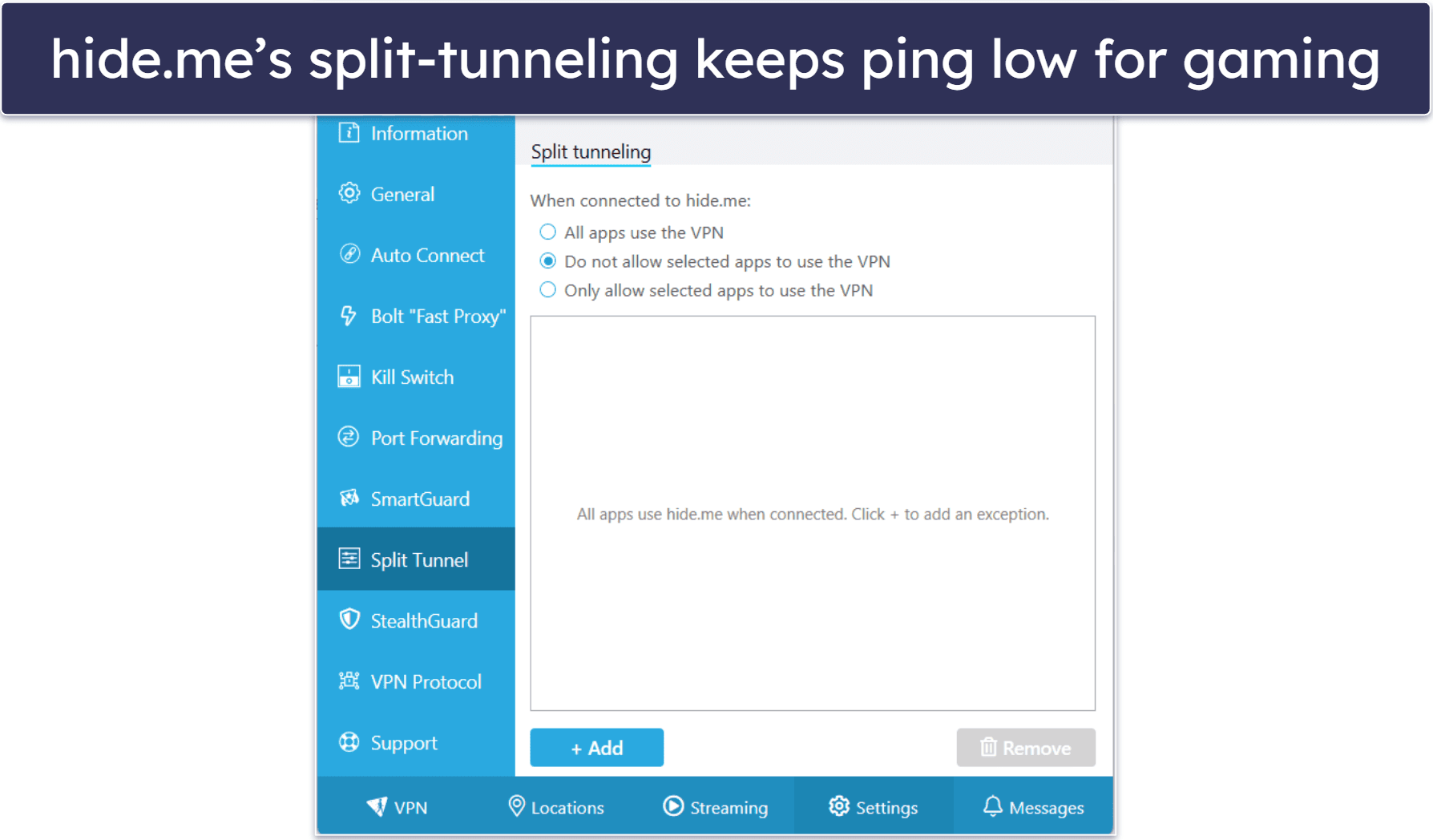
hide.me’s free plan includes split-tunneling, which ensures only your game traffic goes through the VPN, keeping your ping low.
hide.me’s paid plans provide access to servers in 91 countries, port forwarding, and allow 10 simultaneous connections.
.
Bottom Line:
hide.me’s free version allows unlimited data and provides access to free servers in 5+ countries, most of which are in Europe. It also maintains fast speeds via the SoftEther protocol, and it lets you optimize VPN speeds with highly customizable settings. Plus, it comes with split-tunneling.
4. Hotspot Shield — Great for Gaming on Desktop & Has Fast Gaming Speeds

1-month plan: $12.99 / month
Hotspot Shield’s free plan is great for gaming on desktop. I don’t recommend using its free plan to game on mobile since it logs your IP address, and it also forces you to watch a 30-second ad every 15 minutes.
- Unlimited data
- Fast Hydra protocol
- Anti-phishing protection
- Only 3 countries
- Ad-heavy on mobile
The free version provides unlimited data and access to 5 server locations in 3 countries: the US, UK, and Singapore (though Proton VPN offers free servers in 8 locations). This is great since it essentially accesses lobbies in Europe, America, and Asia. In the US, you can even choose between a server in New York or Los Angeles for better performance.
Hotspot Shield maintains very good speeds for gaming on desktop. In our speed tests, we had low ping when we played a couple of rounds of Hearthstone, and we also didn’t experience any lag. In my experience, it’s also one of the best free VPNs for Apex Legends on PC, providing stable connections for fast-paced matches. However, if you decide to play on mobile, you’re limited to 2 Mbps and 500 MB per day, unless you watch ads to lift the daily cap.

Plus, the free version gives you access to its fast proprietary Hydra protocol. WireGuard is also available on the free plan.
Hotspot Shield’s paid plans add access to all of Hotspot Shield’s servers in 80 countries, including gaming-optimized servers.
Bottom Line:
Hotspot Shield’s free version is good for gaming on desktop, as it provides unlimited data, really fast speeds for gaming, and access to its proprietary protocol and WireGuard, so you have options for gaming on different networks.
Read the full Hotspot Shield review
5. Windscribe — User-Friendly Free VPN for Gaming

1-month plan: $9.00 / month
Build A Plan: $3.00 / month
Windscribe comes with beginner-friendly apps for all major platforms. All settings and features have helpful explanations, so you won’t feel lost when trying to customize your connection to improve ping or get a stable connection. And the VPN also allows unlimited connections, so you won’t have to log out of your PC to game on your laptop.
- Unlimited connections
- Port forwarding
- Servers in 10 countries
- Up to 15 GB data cap
It also has servers in 10 countries and allows up to 15 GB per month, but I don’t like how you have to jump through a few hoops to get it (you get 2 GB by default, 8 GB extra for providing your email address, and 5 more GB for participating in its Twitter campaign). For reference, the most data-intensive games like Counter-Strike: Global Offensive only use approximately 250 MB of data per hour, so 15 GB gets you about 60 hours of playtime each month. If you need more data, though, just get Proton VPN or hide.me since they don’t have limitations in that regard.

I like how Windscribe doesn’t throttle the connection speeds of free users. I was able to maintain a low in-game ping while connected to Windscribe’s servers, and I didn’t experience any random lag spikes.
Moreover, the free plan includes port forwarding, allowing you to open specific ports so that friends can connect directly to your game server. This means you can host a private Minecraft realm or an ARK server without random players joining.
Windscribe plans provide access to servers in 69 countries.
Bottom Line:
Windscribe is a really user-friendly VPN for gaming. It provides unlimited simultaneous connections, up to 15 GB of data per month, access to servers in 10+ countries, port forwarding, and maintains low latency for gaming.
Read the full Windscribe review
Comparison Table (Paid vs Free VPNs for Gaming)
Editor's Note: ExpressVPN and this site are in the same ownership group.
Our Testing & Ranking Criteria
I used our proven testing methodology to pick and rank the VPNs on this list. I used different relevant metrics, like data caps, gaming speeds, security features, and ease of use. Here’s a closer look at the exact criteria I used to rank these providers:
- I only picked free VPNs with good data allowances. Free VPNs usually limit daily or monthly data usage, so I only picked providers whose free versions offer at least 15 GB per month (this should allow you to enjoy a decent number of gaming hours). Plus, most of my top picks, like Proton VPN, for example, even allow unlimited data.

- I prioritized free VPNs with fast gaming speeds. When you use a VPN, your original speeds will always take a hit due to the added layer of encryption, and free VPNs tend to be slower than paid providers. But we tested all of the free services on this list to ensure they all provide fast connections, stable ping, and a lag-free experience.
- I only ranked VPNs that are secure. I made sure to only include VPNs that come with all industry-standard security features, including 256-bit AES encryption, a kill switch to prevent traffic leaks, and a no-logs policy. Plus, most of the VPNs on my list have protection against Distributed-Denial-of-Service (DDoS) attacks on their servers, meaning nobody can DDoS your VPN connection to disconnect you from the server.
- I only added user-friendly free VPNs to my list. I ranked VPNs that come with really user-friendly apps. On average, it won’t take you more than 2 minutes to download and install the VPN on your device, and it also won’t take you more than 5–7 seconds to find and connect to a server to start gaming.

- I only included VPNs that provide good value via their paid plans. If you plan to upgrade to the paid version, I made sure to only include VPNs with paid plans that provide access to useful additional perks, like split-tunneling. Also, all of my top picks have affordable plans, and they all also come with a money-back guarantee.
How to Get a Free VPN Trial for Gaming
- Choose a good gaming VPN. I recommend ExpressVPN because it’s the fastest VPN on the market, has excellent security for gaming, and comes with a 30-day money-back guarantee.
 Editor's Note: ExpressVPN and this site are in the same ownership group.
 - Choose a plan that best fits your needs. ExpressVPN’s longest-term purchase offers the best value.
 Editor's Note: ExpressVPN and this site are in the same ownership group.
 - Create an account. Once you pick a plan, you’ll need to provide an email address and select a payment method. All VPNs on my list offer multiple payment methods, including credit cards and PayPal.
 Editor's Note: ExpressVPN and this site are in the same ownership group.
 - Download & install the VPN app. ExpressVPN takes you directly to a page where you can download the app onto your device. You’ll also need to copy the activation code to sign into your account.
 Editor's Note: ExpressVPN and this site are in the same ownership group.
 - Log into your account. With ExpressVPN, you’ll either have to paste the activation code or ask ExpressVPN to send you a sign-in link via email.
 Editor's Note: ExpressVPN and this site are in the same ownership group.
 - Download the app on your other devices. You can then go to the official website and download the apps for your other devices.
 Editor's Note: ExpressVPN and this site are in the same ownership group.
 - Connect to a server. For the fastest speed possible, pick a nearby server. You can now game safely on all of your devices.
 Editor's Note: ExpressVPN and this site are in the same ownership group.
Risks & Disadvantages of Using a Free VPN For Gaming
- Bad security. Free VPNs often fail to provide adequate protection for online gaming. For example, some free VPNs lack full leak protection, which renders you vulnerable to DDoS attacks and other privacy risks. However, all the VPNs on my list can be trusted to safeguard your privacy and security.
- Malware. Some free VPNs are simply scams and can expose you to malware and spyware. This can potentially lead to identity theft, which can cause financial loss. Luckily, all the VPNs on my list are safe.
- Sells your data. Some free VPNs sell user data to third-party advertisers, which companies use to target you with ads. This is why getting a VPN with a strict no-logs policy (especially one that’s been independently audited and confirmed) is very important to protect your privacy.
Free vs. Paid VPNs for Gaming
Most free VPNs come with limitations such as throttled speeds and data caps, which can seriously hinder your gaming performance. They also typically don’t have DDoS protection, making you vulnerable to attacks that can disrupt gameplay and compromise your gaming experience.
The free VPNs I recommend on the list have standard security features like 256-bit AES encryption, a kill switch, and a no-logs policy, which will ensure your gaming sessions remain private. However, most of them don’t have the features that paid VPNs offer. For example, Proton VPN’s free plan has unlimited data and good speeds for gaming, but it limits you to servers in 8 locations and doesn’t let you pick which server you connect to. On the other hand, Hotspot Shield provides fast speeds and unlimited bandwidth, but it only lets you connect 1 device and forces you to watch ads on mobile.
Ping Optimization Tips With a Free VPN for Gaming
Even the best free VPN for gaming can add lag, but these tips help improve speeds and keep your ping low, so you can game smoothly with no interruptions.
- Use split-tunneling. Route only your game traffic through the VPN while leaving other apps (like updates or browsers) on your regular connection. ExpressVPN makes this easy with its simple split-tunneling feature on desktop and mobile.
- Pick the nearest server. Connect to a server closest to the game’s servers to shorten the data path.
- Use auto-connect or the fastest server option. Let the VPN automatically pick the quickest option if you’re unsure.
- Check server load. If your free VPN shows server load, choose one with the lowest congestion to avoid lag. Windscribe’s free plan includes servers in 10 countries, giving you plenty of low-traffic choices.
- Reconnect if speeds drop. Disconnect and reconnect to find a less crowded server when latency spikes.
- Use a wired connection. Ethernet beats Wi-Fi for lower ping and fewer disconnects.
- Close background apps. Shut down downloads, updates, and streaming services that can steal bandwidth.
- Choose the fastest protocol. If your free VPN offers different protocols (like WireGuard or Lightway), test which gives the lowest latency.
- Play during off-peak hours. Less internet traffic means lower congestion on both your ISP and the VPN.
Free VPNs for Gaming to Avoid
- TouchVPN. TouchVPN has a very large server network (larger than some premium VPNs!), but it logs your IP address and your online activities. Also, it has a data cap of 500 MB/day, which is really not enough for any serious gaming.
- Hola VPN. Hola VPN is very risky because it’s a peer-to-peer VPN. This means it doesn’t use a typical server network but rather assigns users the IP addresses of other users. Someone could do illegal things online with your IP address, which could land you in trouble.
- HoxxVPN. HoxxVPN keeps logs of a large amount of your personal information, such as your IP address, location, device identifying info, and your online activities. It may even keep all that data after you delete your account.
- SuperVPN. SuperVPN also logs a lot of your data, such as your IP address, operating system, or browser type. It also fails to protect that data — it suffered a massive data breach that covered 133 GB of users’ information.
Free Gaming VPNs That Didn’t Make the Cut
- TunnelBear. TunnelBear’s free plan is great for beginners, allows unlimited simultaneous connections, and provides access to all of its servers in 47 countries, which is incredibly generous compared to many of its peers. However, its 2 GB per month data usage limit is not enough if you game with any kind of regularity.
- Avira Phantom VPN. Avira Phantom VPN is fast, offers unlimited simultaneous connections, and provides free users with access to servers in over 35 countries on mobile. However, this comes at a cost of a 500 MB per month data usage limit. Additionally, the PC and macOS versions of its free app don’t allow you to select a server manually — it automatically connects to the nearest location.
- PrivadoVPN. Privado VPN’s free plan is user-friendly and has servers in 10 countries, but it’s not as fast as the others on my list and limits you to 10 GB of data per month.
Frequently Asked Questions
Are there any 100% free VPNs that are good for gaming?
Yes, there are some completely free VPNs that are decent for gaming. Proton VPN is a particularly good one, as it provides great speeds, unlimited data, and very easy-to-use apps.
That said, free VPNs come with many downsides compared to a good paid VPN, with limited speeds and server locations being big ones for gaming. So if budget allows, I would strongly recommend getting an affordable paid VPN instead.
Which free VPN is best for gaming?
Proton VPN is the best free VPN for gaming in 2026. Its free plan provides unlimited data and access to servers in 8 locations. Proton VPN’s free version also provides very fast gaming speeds.
Will a VPN lower my ping?
Probably not. Most of the time, using a VPN will actually increase your ping slightly. This is because your traffic is routed through an additional server owned by your VPN provider. Most times, you’re actually increasing the distance your data needs to travel to reach its original destination. A VPN also takes some extra time to encrypt your traffic in order to safeguard your privacy and security.
All of the free VPNs I recommend are able to maintain decent speeds. However, if you’re a hardcore gamer, you should consider going for an affordable paid VPN instead, as those will always provide faster speeds and are better choices for multiplayer games where a millisecond difference might be all that separates victory from defeat.
What is the fastest VPN for gaming?
ExpressVPN is the fastest VPN on the market, which makes it my top pick for gaming. During our tests, we were able to maintain good ping across all servers. We never experienced any lag spikes or disconnects, and we could download large game updates very quickly.
Why use a VPN for gaming?
The main reason to use a VPN while gaming is to secure your privacy and security. VPNs encrypt your traffic, which makes it unreadable, and the top VPNs for gaming also protect you from DDoS attacks. A gaming VPN can also access gaming servers in all regions in the world from anywhere and get around IP bans. Finally, a VPN can sometimes increase your speeds. For example, if your internet service provider (ISP) is throttling your bandwidth (slowing down your internet), a VPN can help you get around it.
Can I use a free VPN to play games from other countries?
Yes, a free VPN can gain access to games from anywhere — whether it’s region-locked games or different in-game lobbies and servers. For example, a VPN connected to a European server can enter European lobbies on games like Call of Duty: Warzone. A VPN connected to a server in Asia can access a game that’s only available there.
However, free VPNs give access to a very limited number of server locations, and if a specific country isn’t on that list, then you’re out of luck. That’s why I always recommend upgrading to a paid plan or getting an affordable alternative like ExpressVPN.
Will a free VPN work with Steam?
Yes, a free VPN can work with Steam — all you’ll have to do is connect to a server and join the game. However, I recommend making sure that the game you’re playing allows players to use a VPN. Steam doesn’t say it prohibits VPN usage, but many games on Steam do, so it’s best to check first.
I tested all of the VPNs on my list with Steam, and I never experienced any issues. I was always able to log into my account once I connected to the VPN and join any of the games in my library.
Can I use a free VPN on my PlayStation?
Yes, but it’s more complicated than using a VPN on a PC. PlayStation consoles don’t natively support VPNs, so you’ll need to configure the VPN on your router or use your PC as a hotspot. This can get a little technical, but every VPN on my list that offers router support offers easy-to-follow step-by-step instructions on how to set up the VPN on your router.
I think ExpressVPN is the best for gaming on a PlayStation because it has a dedicated router app that only took me about 15 minutes to set up.
Are free VPNs safe for cloud gaming services?
Free VPNs can be used for cloud gaming, but most struggle with the high bandwidth and low latency these services require.
That’s why a premium VPN like ExpressVPN is the best option. Even though it’s not free, it’s the only VPN on this list that reliably supports cloud gaming. ExpressVPN works with all top services, including Xbox Cloud Gaming, Amazon Luna, and NVIDIA GeForce NOW, so you can play titles like Cyberpunk 2077 or Fortnite without interruptions.
Editor's Note: ExpressVPN and this site are in the same ownership group.


