
Published on: March 17, 2025 Updated 2 times since publishing
Only 3 Steps (Quick + Easy) to Watch YouTube TV From Anywhere in 2026:
- Download and install a VPN that works with YouTube TV. I recommend ExpressVPN because it works reliably with the platform and has excellent speeds across all its US servers.
- Connect to a server. Launch the VPN app and connect to a server. You should pick a server as close to your real location as possible for the best connection speeds and stability.
- Log into YouTube TV. Open the YouTube TV website or app, and that’s it! You’re all set to start streaming.
YouTube TV is only available to users in the US. It blocks anyone outside of the US from accessing the platform because it has to comply with the broadcasting regulations of all the channels it streams. One of the ways YouTube TV can check your location is through your IP address.
The best way to watch YouTube TV is with a VPN, which is an online app that has servers located all over the world. It replaces your real IP address with the IP address of the server you connect to. So, when you connect to a US server, it will give you a US IP address, allowing you to access YouTube TV.
I tested many VPNs to find the best ones for watching YouTube TV securely, and my top recommendation is ExpressVPN. It has excellent security and speeds on all US servers, and it works with YouTube TV 100% of the time.
Editor’s Note: The VPNs I discuss here all maintain a strict no-logs policy. This means they don’t monitor or record what you do online. You alone are responsible for how you use a VPN, so please keep yourself well informed on all applicable laws and regulations. Neither I nor anyone at SafetyDetectives condones copyright infringement.
Editor's Note: ExpressVPN and this site are in the same ownership group.
How to Watch YouTube TV Content on Any Device
1. Pick a quality VPN that works reliably with YouTube TV.
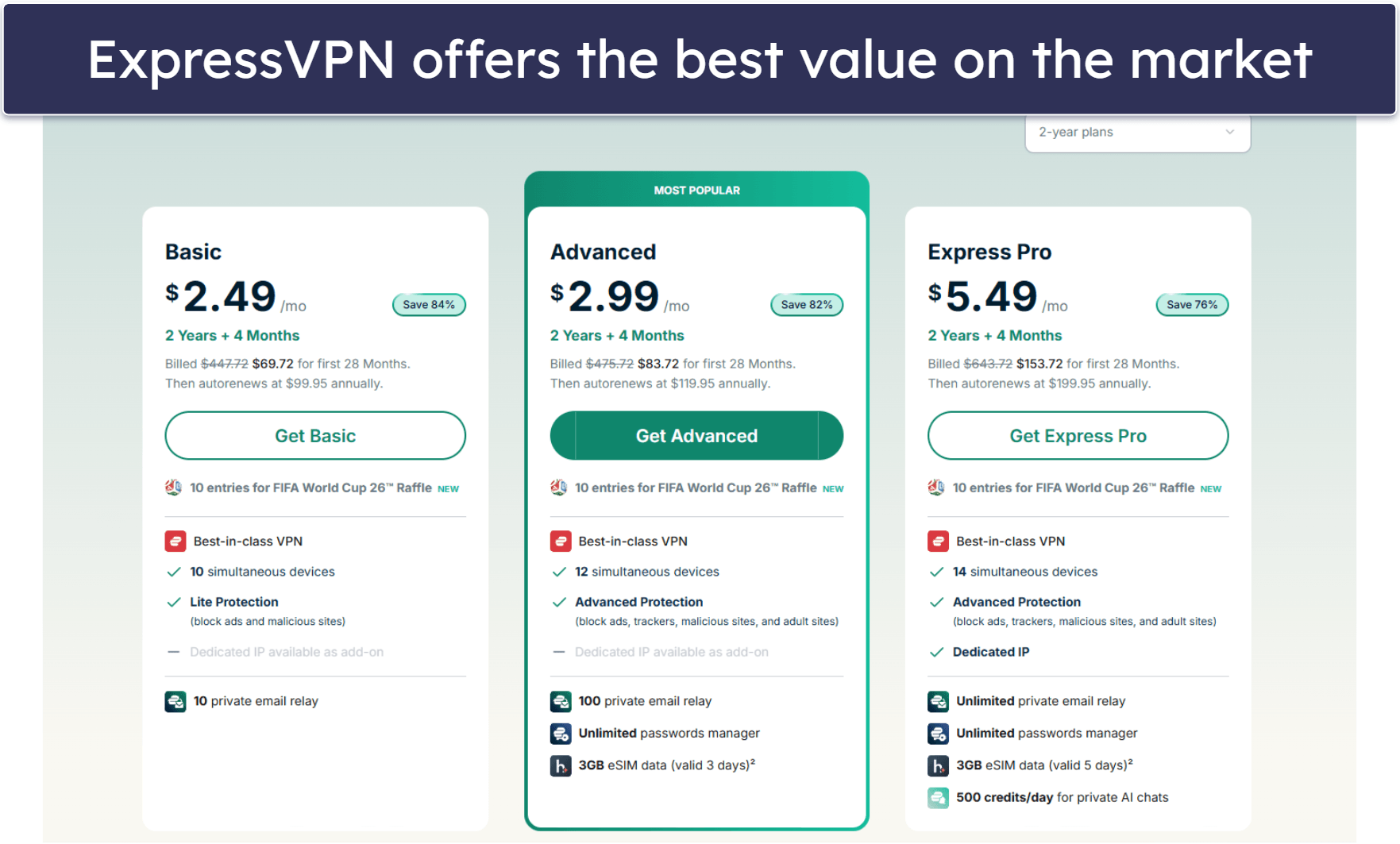
My top recommendation is ExpressVPN. It works with YouTube TV 100% of the time, and it has blazing-fast speeds for streaming without lagging or buffering.
2. Download the VPN and install it on your device.
Go to the VPN provider’s website or to your device’s app store and download the VPN app. Follow the on-screen instructions and you’ll finish the installation in only a few minutes.

3. Open the VPN app, connect to a server, and start watching YouTube TV.
Once your device connects to the VPN server, you’re all set to start streaming on YouTube TV securely.

Quick Summary of the Best VPNs for Watching YouTube TV in 2026


🥇1. ExpressVPN — Best VPN for Watching YouTube TV in 2026

Basic 12-Months plan: $3.99 / month
1-month plan: $12.99 / month

ExpressVPN is my top recommendation for a YouTube TV VPN (and our top pick for 2026 VPNs in general). It works with YouTube TV 100% of the time, and it has lightning-fast speeds on all servers — it’s the fastest VPN currently out there — so you’ll be able to watch your favorite shows with minimal loading times and buffering.
What makes it stand out from its competitors is features like Smart DNS and a native router app. With Smart DNS, you can use ExpressVPN on devices that don’t support VPNs, such as some smart TVs and gaming consoles. Or, you can configure your router with the VPN using its intuitive and feature-rich router app — this way, you can connect all of the devices in your home to the VPN.
Read our full ExpressVPN review
🥈2. Private Internet Access — Great VPN for YouTube TV With Servers in All 50 States

6-month plan: $7.50 / month
1-month plan: $11.95 / month
Private Internet Access (PIA) has servers spread across all 50 states, so it has excellent server coverage coast-to-coast. Aside from this large network, it also has 2 specialized streaming servers in the US (labeled US Streaming East and US Streaming West), which are great for streaming YouTube US.
PIA has a really good split-tunneling feature. It lets you set it up so that only traffic for the YouTube TV site or app goes through the VPN connection, while your other apps use your normal internet connection. This is great if you’re multitasking and doing something else online while watching YouTube TV in the background because the VPN won’t slow down any other sites and apps you’re using.
Read our full Private Internet Access review
🥉3. CyberGhost VPN — Optimized VPN Servers for Streaming YouTube TV


6-month plan: $6.99 / month
1-month plan: $12.99 / month
CyberGhost VPN has dedicated servers optimized for streaming on YouTube TV US. These servers refresh their IP addresses often, and the VPN service continually verifies their connection so they work with YouTube TV 100% of the time.
It also has a great customization feature called Smart Rules, which lets you fine-tune your VPN connection. For example, you can set it up to automatically connect to the YouTube TV optimized streaming server when you launch the VPN app. Also, you can make it launch the YouTube TV app immediately after you connect to a server, so you can start streaming quickly.
Read our full CyberGhost VPN review
Editor's Note: Intego ONE, Private Internet Access, CyberGhost and ExpressVPN are owned by Kape Technologies, our parent company.
Quick Comparison Table
Editor's Note: Intego ONE, Private Internet Access, CyberGhost and ExpressVPN are owned by Kape Technologies, our parent company.
Testing Methodology: Comparison & Ranking Criteria
I compiled this list of top VPNs for watching YouTube TV by testing and evaluating VPNs through the SafetyDetectives testing methodology. I focused on points such as speeds, security, compatibility with YouTube TV, etc. Here are some of the main criteria I used to select and rank these VPNs:
- I looked for VPNs that work with YouTube TV. The VPNs I discuss here all reliably work with YouTube TV 100% of the time.
- I searched for VPNs with multiple server locations across the US. All the VPNs on my list have 10+ server locations evenly spread across the US. This means that you’ll always be able to find a server nearby for stable connections.

- I measured VPN connection speeds. VPNs somewhat slow down your internet connection speed because of the encryption process which keeps your traffic secure. Among the VPNs I tested, ExpressVPN was consistently the fastest.
- I checked VPN security and privacy features. I only recommend VPNs with industry-standard security features, such as 256-bit AES encryption (military-grade, makes your data completely unreadable), IP leak protection, and a kill switch (disconnects you from the internet if your VPN connection drops). These VPNs also all maintain a strict no-logging policy.

- I evaluated each VPN’s value. The VPNs I recommend on this list all have plenty of useful extra features like split-tunneling (lets you isolate only YouTube TV traffic through the VPN), allowing multiple simultaneously connected devices, and back all plans with a money-back guarantee.
Frequently Asked Questions
What’s the best VPN for watching YouTube TV?
My No. 1 recommendation is ExpressVPN. It has 10+ server locations across the US, and all these servers reliably work with YouTube TV. It’s also super fast, so your streaming will be smooth, and it has apps for all popular operating systems. It backs all plans with a 30-day money-back guarantee, so you can try it out without risk.
Could I use a free VPN to watch YouTube TV?
You can, but I wouldn’t recommend it. Plenty of free VPNs out there aren’t suitable for streaming on YouTube TV because they have data caps that run out quickly, are too slow, or don’t even work with the platform at all. You’re better off with a premium VPN, such as ExpressVPN, because it works with YouTube TV at all times and it has excellent speeds for smooth streaming.
Where is YouTube TV available?
Currently, YouTube TV is available only to users in the US. This means that if a user physically located in the US connected to a VPN server outside of the country, they wouldn’t be able to stream on YouTube TV. The VPNs on my list all have 10+ server locations in the US, so you’ll always be able to watch YouTube TV securely.
What do I do if I have a VPN but still can’t watch YouTube TV?
Here are some quick and simple fixes if your VPN isn’t working with YouTube TV:
- Clear your cache and cookies. If you were previously connected to a location where YouTube TV isn’t available, you may be getting blocked because YouTube still thinks you’re outside the US.
- Try another server. Servers can fail due to slow connections, overcrowding, and IP bans. If your current server isn’t working, try another one.
- Try a premium VPN. Free VPNs usually don’t support any type of streaming. Only the best VPNs, like the ones I discuss here, work with YouTube TV all the time.
Editor's Note: ExpressVPN and this site are in the same ownership group.