
Published on: June 8, 2023 Updated 4 times since publishing
Only 3 Steps (Quick + Easy) to Watch NCAA College Football From Anywhere in 2026:
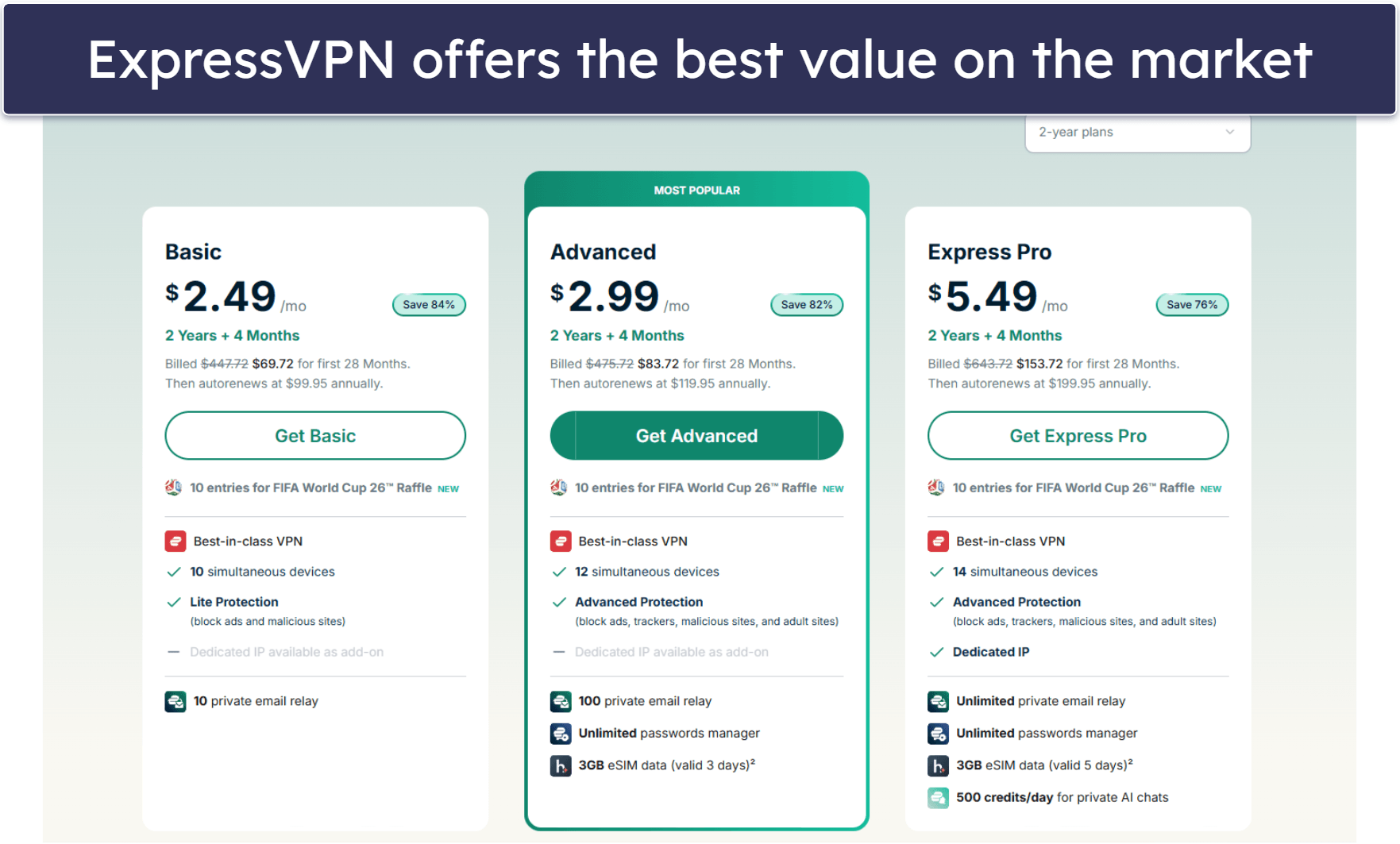
- Sign up for a VPN that works with college football platforms. ExpressVPN is my top pick, as it has blazing-fast speeds, comes with easy-to-use apps, and works with platforms that stream NCAA college football 100% of the time.
- Connect to a VPN server. Launch the VPN app, go to the server menu, and pick a server.
- Log into the platform that carries college football games. Now, select your game and see all the action!
If you want to watch live-streamed college football games, I recommend using a VPN. VPNs not only provide greater security and online anonymity by encrypting your internet traffic, but they can also stop your ISP from throttling your internet speeds.
A VPN can change your IP address to one from any region in the world. This makes it possible for the VPN to access different platforms that live-stream college football games from anywhere.
I have handpicked a few VPNs that are excellent for securely watching college football. My top choice is ExpressVPN, as it works with 100+ streaming platforms, is super fast, and is very easy to use.
Editor’s Note: All VPNs on this list have no-logging policies, so they don’t monitor or keep any logs about your online activities. This means you’re solely responsible for how you use the VPN. My colleagues and I at SafetyDetectives do not condone copyright infringement.
Editor's Note: ExpressVPN and this site are in the same ownership group.
How to Watch NCAA College Football on Any Device
1. Choose a VPN that works with sites showing NCAA college football games.
My top recommendation is ExpressVPN — it’s compatible with 100+ streaming sites (many of which stream NCAA college football games), and it’s also super-fast and easy to use.
2. Install the VPN on your device.
Download the provider’s app from its site or your device’s app store. Then, just follow the on-screen instructions to install and set up the VPN client.

3. Launch the VPN and connect to a server.
That’s it — you can now secure all of your NCAA college football streams.

What Streaming Services Show College Football?
Quick Summary of the Best VPNs for Watching NCAA College Football in 2026


🥇1. ExpressVPN — Best VPN for Watching College Football in 2026

Basic 12-Months plan: $3.99 / month
1-month plan: $12.99 / month

ExpressVPN is my top pick for streaming college football. Its US server network spreads across 20+ locations, ensuring that you can always find a nearby server for the fastest possible speeds. Furthermore, it is compatible with 100+ streaming platforms, including major ones that carry college football games, such as ESPN+, Sling TV, DirecTV Stream, Hulu, Fubo, YouTube TV, and Peacock Premium.
ExpressVPN also incorporates split-tunneling, a feature that allows users to specify which apps use the VPN and which don’t. For example, you could set the VPN to only route ESPN+ traffic through its servers, which will increase your streaming speeds for your gridiron games.
User-friendliness is another strength of ExpressVPN. With an intuitive interface and the Shortcuts feature, it’s easy to directly launch your favorite streaming apps such as ESPN+ or Sling from the app’s main screen.
Read our full ExpressVPN review
🥈2. Private Internet Access — User-Friendly Mobile Apps for Watching College Football

6-month plan: $7.50 / month
1-month plan: $11.95 / month
Private Internet Access (PIA) is good for watching college football on the go. Its mobile apps allow users to automate their VPN to connect to a server whenever it detects unsecured networks — like when you’re at the airport or a coffee shop. It’s also possible to change encryption levels and protocols based on your needs, and even utilize Siri for quick VPN commands on iOS devices.
Another cool thing about PIA is it has a server location in all 50 US states. This way, you can connect to the closest server to get the fastest speeds.
PIA also has great streaming support since it works with 30+ streaming platforms, including ones that broadcast college football action (like YouTube TV).
Read our full Private Internet Access review
🥉3. CyberGhost VPN — Dedicated Servers for Streaming College Football


6-month plan: $6.99 / month
1-month plan: $12.99 / month
CyberGhost VPN offers streaming-optimized servers for watching NCAA matches on platforms like ESPN+, Sling, Hulu, and YouTube TV. These servers provide fast speeds for a smooth streaming experience and are tested frequently to ensure that they work.
The VPN is also easy to use and suitable for beginners. Its intuitive interface makes it very simple to find and connect to the streaming servers that support college football. Also, with the Smart Rules feature, you’re able to automatically connect to a streaming server when you launch CyberGhost’s app. And, if you want, it’s possible to even configure the VPN to automatically launch your desired streaming app too.
Read our full CyberGhost VPN review
Editor's Note: Intego ONE, Private Internet Access, CyberGhost and ExpressVPN are owned by Kape Technologies, our parent company.
Quick Comparison Table
Editor's Note: Intego ONE, Private Internet Access, CyberGhost and ExpressVPN are owned by Kape Technologies, our parent company.
How to Choose the Best VPN for Watching NCAA College Football in 2026
- Choose a VPN that works with streaming services for college football games. All the VPNs I recommend work seamlessly with popular channels and platforms like YouTube TV, ESPN+, Sling TV, Fubo, or Hulu.
- Find a VPN that provides fast enough speeds for smooth streaming. While all VPNs potentially slow down your connections due to the encryption process, the best VPNs won’t cause noticeable latency or buffering. In my tests, ExpressVPN proved to be the fastest provider
- Select a VPN that’s user-friendly. Go for a VPN with intuitive apps for all major devices, so that it’s easy for you to start watching college football games on whatever platform you want.
- Pick a VPN that has a smart DNS feature. With it, you’ll be able to use the VPN on devices that don’t directly support VPNs, such as certain smart TVs and gaming consoles.
- Look for a VPN that offers strong security features. All the VPNs on my list include industry-standard security features like 256-bit AES encryption, a kill switch that automatically cuts off internet access if the VPN connection drops, and a no-logs policy.
- Ensure the VPN offers good-value plans. Look for additional features like split-tunneling, affordable pricing, a money-back guarantee, and the ability to connect multiple devices simultaneously.
Frequently Asked Questions
What is the best VPN for watching college football?
My top pick for watching college football is ExpressVPN. When I tested it, it delivered the fastest speeds, and I got a smooth and secure streaming experience. On top of that, it offers an extensive network of servers in the US and very user-friendly apps.
Can I watch college football games using a free VPN?
Maybe, but I don’t really recommend it. Most free VPNs don’t work with platforms that stream college football games. And out of the ones that do, many come with annoying limitations, including daily or monthly data caps, buggy apps, or very slow speeds.
For these reasons, a premium VPN (such as ExpressVPN) is usually the better option. With a paid top VPN, you get a service that works 100% of the time with streaming platforms that show NCAA college football games, unlimited data, and very good streaming speeds.
Do all VPNs work with all streaming services that have college football?
No, not all do, but ExpressVPN works with 100+ streaming platforms, including many that work with college football such as ESPN+, Sling TV, Hulu + Live TV, Fubo, DirecTV Stream, Peacock Premium, and YouTube TV.
Where can I watch NCAA college football?
You can watch college football games on these streaming platforms: ESPN+, SlingTV, FuboTV, and Hulu + Live TV. All of the VPNs I recommend can access these platforms hassle-free, but my favorite is ExpressVPN — it offers the fastest speeds for buffer-free streaming.
Editor's Note: ExpressVPN and this site are in the same ownership group.