

Published on: January 15, 2025 Updated 2 times since publishing
Only 4 Steps (Quick + Easy) to Unblock Sites at School in 2026:
- Download and install a VPN: The best VPN for accessing blocked sites at school is ExpressVPN. It works on all major devices, including Chromebooks, and it even has browser extensions that unblock websites.
- Enable server obfuscation: Obfuscation hides that you’re using a VPN, making it look like normal internet activity. You only need this if your school blocks VPN traffic.
- Connect to a VPN server: Open the VPN app and select a nearby server for the fastest speeds.
- Access the blocked site(s): Once connected, you can visit blocked sites.
A virtual private network (VPN) is the easiest and most reliable way to access blocked sites at school. Even better, it’s the best way to make sure your teachers and other staff won’t see what you’re doing online.
A VPN creates a secure tunnel for your internet traffic, making it invisible to anyone on the school network. It routes your connection through private servers, allowing you to bypass web filters, IP blocks, and DNS restrictions, so you can access any content you want. The VPNs I recommend also include obfuscation, which hides your VPN use — in case your school blocks VPN traffic, too.
After testing dozens of VPNs, ExpressVPN is best choice for accessing blocked sites. It bypasses common school site-blocking methods, works with all major streaming platforms, and effectively hides VPN traffic from network administrators. Editor's Note: ExpressVPN and this site are in the same ownership group.
How to Unblock Sites at School From Any Device
1. Get a VPN that consistently gets around school blocks.
My top pick for unblocking sites at school is ExpressVPN. It’s very good at bypassing content filters, firewall rules, DNS blocks, and other methods that your school uses to restrict access to sites on the school network.
2. Download and install the VPN on your device.
Download the app for your device from the VPN’s website. If you’re on mobile, you can get the app App Store or Google Play Store.
If you’re on a device given to you by your school, and it’s blocking the VPN site or won’t let you download a VPN to the device itself, try installing the VPN’s browser extension from your browser’s extension store. Every VPN I recommend has a browser extension for Google Chrome, which works on Chromebooks and other devices.

If the network is preventing you from getting the browser extension, try setting up a mobile hotspot from your phone and connecting to it. This will help you bypass any network-based blocks since your wireless carrier isn’t imposing the same network blocks as your school. You can also try downloading and using the Tor browser to download your VPN of choice.
3. Launch the app, select a server, and start accessing blocked sites.
And you’re done! Once you’re connected, you can access any site you want privately, without having to worry about your school and teachers seeing what you’re up to.

Quick Summary of the Best VPNs for Unblocking Sites at School in 2026


🥇1. ExpressVPN — Best VPN for Unblocking Sites at School in 2026

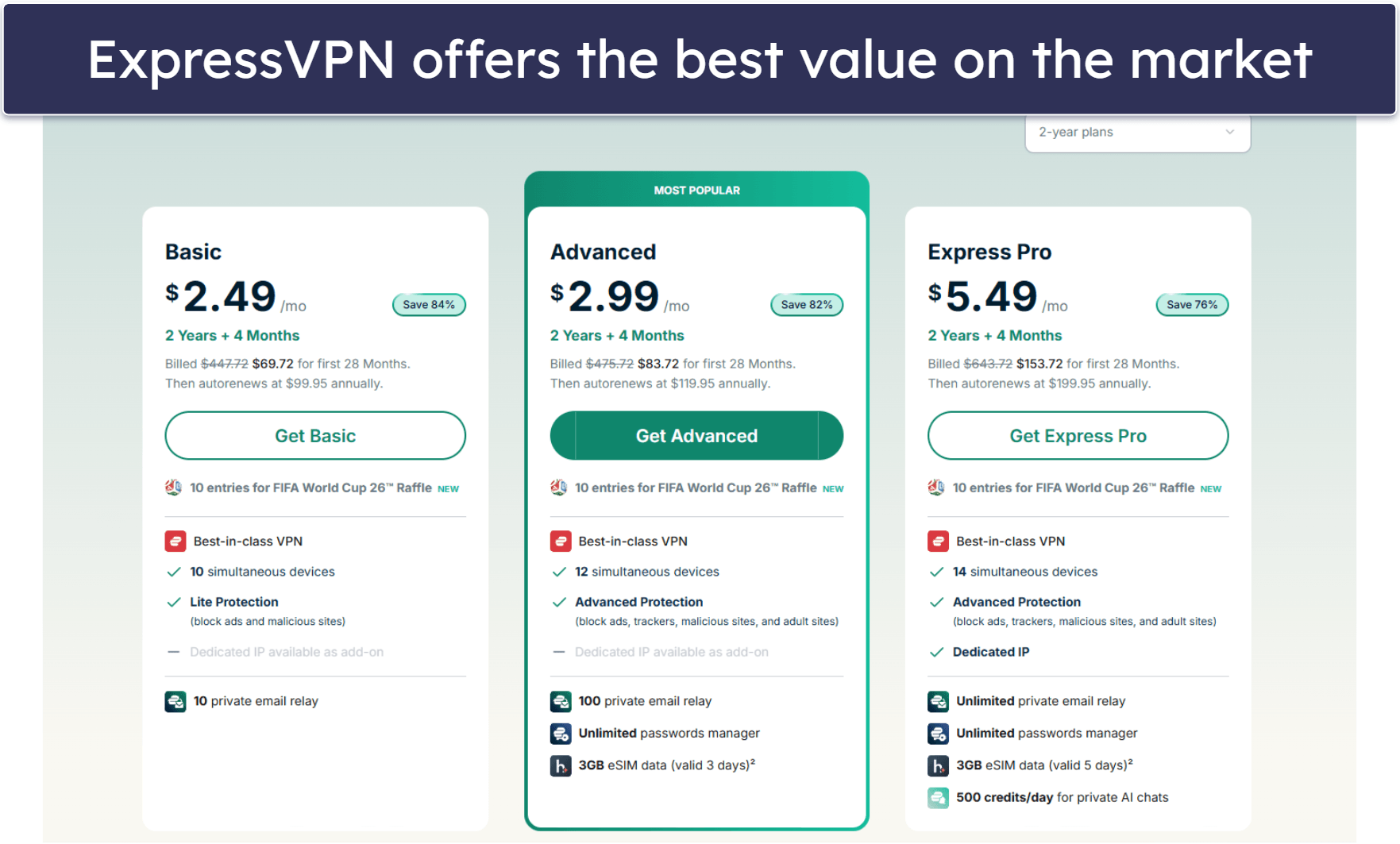
Basic 12-Months plan: $3.99 / month
1-month plan: $12.99 / month

ExpressVPN is my top choice for accessing blocked sites at school. It bypasses all the usual methods that schools use to block access to websites, like URL and keyword filtering, DNS blocks, and firewall rules. It also automatically obfuscates your traffic when it detects VPN blocks on your school’s network, so the school won’t know you’re using a VPN.
It’s the best VPN for streaming because it accesses 100+ streaming sites, including Netflix, Hulu, Disney+, Amazon Prime Video, and Crunchyroll. When it comes to performance, ExpressVPN delivers excellent speeds. When I ran speed tests, ExpressVPN’s servers provided speeds as fast as browsing and streaming without a VPN.
ExpressVPN has apps for any device you might use at school, including your iPhone, Android, Mac, Windows, and Chromebooks. It even has a browser extension that lets you control the app directly from your browser and take advantage of its location spoofing feature, which overrides GPS and browser location data. This ensures you’ll be able to unblock sites that rely on more precise location tracking, too (and not just your IP address).
Read our full ExpressVPN review
🥈2. Private Internet Access — Customizable VPN That Unblocks Sites at School
6-month plan: $7.50 / month
1-month plan: $11.95 / month
Private Internet Access (PIA) offers many options for accessing blocked sites at schools. It bypasses IP, web, and keyword filtering, and gets around DNS blocks and firewall rules by default. If you still can’t access a certain site, PIA lets you manually choose port 443 to get around restrictions. This port is very hard for schools to block, as it’s used for secure traffic.
PIA avoids VPN blocks, too, via Shadowsocks servers in 5+ countries that hide your VPN traffic from the school administration. It works with 30+ streaming sites like Disney+ and Netflix, too, which is great but falls short of the 100+ streaming services that ExpressVPN can access.
I like how you can use PIA on your school-issued Chromebook or school’s PC, which may not allow you to install a VPN app. This is possible via PIA’s browser extension, which gives you access to all servers, plus lots of privacy extras that prevent tracking.
Read our full Private Internet Access review
🥉3. NordVPN — User-Friendly VPN That Unblocks Sites at School
Plus 24-month plan: $3.59 / month
Complete 24-month plan: $3.99 / month
Prime 24-month plan: $6.99 / month
NordVPN is a great option for accessing blocked sites at school for VPN beginners. Its apps come with a convenient interactive map that lets you click on a country pin to connect to a VPN in that location. NordVPN keeps its obfuscated servers in a separate VPN tab, so they’re very easy to find and connect to.
If you’re looking to stream at school, NordVPN accesses 10+ streaming services hassle-free, but it’s not as may as ExpressVPN and Private Internet Access. NordVPN has a great browser extension as well — configure it to auto-connect you to a server when you open the browser, so you’re immediately protected. The browser extension has a location spoofing feature as well.
Editor's Note: Intego ONE, Private Internet Access, CyberGhost and ExpressVPN are owned by Kape Technologies, our parent company.
Quick Comparison Table
Editor's Note: Intego ONE, Private Internet Access, CyberGhost and ExpressVPN are owned by Kape Technologies, our parent company.
Testing Methodology: Comparisons & Ranking Criteria
I used our proven testing methodology to make sure I only recommend VPNs that access blocked sites at school. I tested each VPN against common types of blocks that schools use and looked at their ease of use, connection speeds, security, and more. Here’s a more detailed overview of how I tested and ranked each VPN:
- I tested each VPN’s ability to bypass school firewalls. The VPNs I chose gets past all common methods that schools use to block access to sites, like URL and keyword blocks, IP blacklisting, DNS-level blocks, and firewall rules.
- I checked every VPN’s speeds. Using a VPN will slow down your internet because of the encryption that hides your online activities. But the VPNs I recommend offer very fast speeds that you’ll barely notice. especially on restricted networks. ExpressVPN was consistently the fastest in my tests.

- I confirmed each VPN offers obfuscation. Each VPN on my list provides obfuscation to avoid any restrictions that may prevent your VPN from working on the school network.
- I considered device compatibility. Every VPN I recommend has apps for all major devices, including Android, iOS, Windows, macOS, and ChromeOS. They even offer browser extensions in case you can’t download the VPN to your school-issued laptop or tablet.

- I looked at each VPN’s value for money. The VPNs I picked offer plans and deals that are worth the price, extra features like split-tunneling, and a money-back guarantee, so you can try them risk-free.
What Is a VPN & How Does It Help You Unblock Sites?
A VPN is a tool that encrypts what you do online from third parties, like your Internet Service Provider (ISP) and your school network administrator. If someone were to intercept or spy on it, all they’ll see is a bunch of unintelligible symbols.
This is also how it bypasses school restrictions. Schools often use firewalls and content filters to block websites by inspecting traffic for specific domains or IP addresses. Since a VPN encrypts your traffic, the firewall or filter can’t see which websites you’re trying to visit, so it can’t block them. It’s like sending a locked box through a scanner — the scanner detects the box but can’t see what’s inside.
In addition to firewalls, some schools use DNS filtering. This method blocks access to websites by intercepting your attempts to resolve domain names (like “www.example.com”) into IP addresses. A VPN gets around this by encrypting DNS queries or using its own DNS servers, making it impossible for the school’s network to know which sites you’re trying to reach.
A VPN also routes your traffic through one of its secure servers and changes your IP address to match the server you’re connected to. This doesn’t just help bypass restrictions but also hides your general location from the sites you visit, adding another layer of privacy.
Other Ways to Unblock Sites at School
If you’re looking to bypass your school’s network restrictions without using a VPN, there are several alternatives you can try. Here are some methods:
- Use mobile data or mobile hotspots instead of Wi-Fi. If your school’s Wi-Fi blocks certain sites, you can use your phone’s mobile data or a hotspot to bypass restrictions. A hotspot uses your phone’s data, so it works independently of the school’s network. However, this won’t work on devices connected via ethernet or with Wi-Fi turned off.
- Proxy servers. Proxy servers act as intermediaries between you and the websites you visit. By masking your IP address and making requests on your behalf, proxies can allow you to access restricted sites. However, they don’t encrypt your data like a VPN does, and they’re far more cumbersome and complicated to use.
- Smart DNS. A smart DNS redirects your traffic through a different server to make it appear as if you’re accessing the web from a different location. It doesn’t encrypt your data like a VPN, but it can be effective for bypassing geo-blocked sites without slowing your internet speed.
- Tor network. Tor is a free, open-source network that anonymizes your internet traffic by routing it through multiple nodes. While it can bypass restrictions, it tends to be slower due to the extra layers of encryption and the network’s design.
- URL shortener. By converting a long URL into a shorter, more generic link, these services might avoid being flagged by filters that target specific domain names. For example, a link to a blocked website might be converted into a shortened version, allowing you to access it without triggering the school’s filtering system. However, keep in mind that some schools may also block the use of URL shorteners, so it isn’t always reliable.
Frequently Asked Questions
How do I unblock a website at school?
The most reliable method is to use a VPN. A VPN encrypts your internet traffic and routes it through a secure server, bypassing school restrictions like URL and keyword blocking, DNS-level blocks, and firewall rules. Alternatively, you can use mobile data or a personal hotspot to avoid the school’s network entirely.
How do I unblock a website that is blocked by an administrator?
A VPN is the best option to bypass restrictions set by an administrator, as it encrypts your traffic and hides your IP address, so they won’t be able to see what site you want to visit. There are other methods you can try, too, though, they’re not as reliable. If available, mobile data or a hotspot can help you access blocked sites without relying on the restricted network.
How do I access blocked sites on Chrome at school?
Using a VPN is an effective way to access blocked sites on Chrome, as it reroutes your traffic through a secure server. If you can’t download a VPN on the device you’re using, the VPNs I recommend offer Chrome extensions that get around web blocks.
How do you unblock websites to play games at school?
To unblock gaming websites at school, a VPN is your best bet. It encrypts and reroutes your connection, making it harder for the network to detect and block your activity. It’s best to pick from my list of VPNs, as they all offer super-fast speeds that are ideal for gaming.
