
Published on: October 7, 2024 Updated 2 times since publishing
- 🥇 ExpressVPN : It maintains super-fast speeds for Starlink, works with 100+ streaming services, and supports torrenting on all of its servers. It also has high-end security features to keep your satellite traffic safe and private. Plus, it comes with a 30-day money-back guarantee for first-time users.
Satellite internet providers, like Starlink, offer many benefits but also come with some downsides. For example, Starlink uses CGNAT IP addresses, which may sometimes be blocked by certain websites, and satellite traffic can be easier to intercept than traditional wired connections.
Using a VPN can help with many of these issues. A VPN encrypts your traffic, which scrambles the data, ensuring that nobody else can read it even if it’s intercepted. It also assigns you a virtual IP address, so you can access any websites and services that might not normally work with Starlink.
After extensive research and testing, I put together a list of the best VPNs for Starlink. My #1 pick is ExpressVPN due to its lightning-fast speeds and top-notch security. It also works with all major operating systems and is easy to set up and use. Editor's Note: ExpressVPN and this site are in the same ownership group.
Quick Summary of the Best VPNs for Starlink


🥇1. ExpressVPN — Best Overall VPN for Starlink in 2026

Basic 12-Months plan: $3.99 / month
1-month plan: $12.99 / month

ExpressVPN is my top VPN for Starlink. It has a massive server network spread out across 105 countries, so you have a ton of connection options, and it offers blazing-fast speeds. Its proprietary Lightway protocol outperformed the fastest common VPN protocol, WireGuard, in all of my tests. This lets you browse, stream, torrent, and game without any lag.
It also has dedicated IPs in 22+ countries — they’re available for a reasonable small cost. Starlink and VPNs both assign you IP addresses that you share with other users, which means that you might sometimes be blocked by websites for suspicious activity or due to the bad behavior of other users. Getting a dedicated IP address solves these issues.

This provider works with 100+ streaming services, including popular platforms like Netflix, Amazon Prime Video, Disney+, Hulu, and BBC iPlayer. It also allows P2P file sharing on all of its servers (some VPNs limit you to dedicated P2P servers) and comes with port forwarding, which lets you connect to more peers for faster downloads. Starlink doesn’t normally support port forwarding, so this is a great benefit if you download lots of torrents.

It also comes with a ton of extra features. Its split-tunneling feature lets you choose which app traffic goes through the VPN tunnel and which use your regular Starlink connection. This way, you can use the VPN alongside apps that require your real geolocation, such as food delivery services. Its Advanced Protection feature protects you against ads, trackers, and malicious websites. It can also be configured to block adult websites. And its ShuffleIP feature assigns you a new IP address whenever you visit a new website or open a new app. This makes it very difficult for trackers to follow you, providing an extra layer of privacy.
Bottom Line:
ExpressVPN has a massive server network and is the fastest VPN on the market for Starlink. It also has dedicated IPs, provides top-notch streaming and torrenting support (it works with 100+ streaming services), supports port forwarding, and comes with a ton of extra features, such as split-tunneling, an ad, tracker, and malware blocker, ShuffleIP, and more.
Read the full ExpressVPN review
🥈2. Private Internet Access — P2P-Friendly VPN for Starlink

6-month plan: $7.50 / month
1-month plan: $11.95 / month
Private Internet Access (PIA) is a great choice for Starlink users who frequently torrent. It allows P2P file sharing on all of its servers in 50 countries, and it includes some great P2P-specific features. It has SOCKS5 proxy servers, which change your IP address without encrypting your traffic. This can be handy if you want faster download speeds and don’t mind the decreased security. Like ExpressVPN, it also supports port forwarding.

This VPN is decent for streaming, too. It supports streaming on dedicated servers in 5+ countries, including the US, the UK, Japan, Finland, Sweden, Denmark, and Italy, and it works with 30+ streaming services. That said, I prefer ExpressVPN for streaming because it works with 100+ streaming services and supports streaming on all of its servers.
It comes with the best VPN ad, tracker, and malware blocker, PIA MACE, which successfully prevented all ads from loading on the ad-heavy torrent sites and stopped me from visiting known phishing pages.

I like that it offers dedicated IP addresses for a small extra charge. Dedicated IPs are available in 10 countries, including Australia, Canada, Switzerland, Germany, the UK, Japan, Belgium, Sweden, Singapore, and the US.
Bottom Line:
Private Internet Access is a great choice for Starlink users who do a lot of torrenting because it allows P2P file sharing on all of its servers, has a SOCKS5 proxy server, and supports port forwarding. It also comes with the best VPN ad blocker and offers dedicated IP addresses that get around some of the issues you might encounter from the shared IP addresses you get from Starlink.
Read the full Private Internet Access review
🥉3. CyberGhost VPN — Great for Streaming on Starlink (Dedicated Streaming Servers)


6-month plan: $6.99 / month
1-month plan: $12.99 / month
CyberGhost VPN is a top VPN for streaming on Starlink. It has 100+ dedicated streaming servers located in 20+ countries, including the US, the UK, Japan, Germany, and France, which are optimized for specific streaming services — they’re tested frequently to ensure that they work as intended. I like how CyberGhost puts its streaming servers in a separate tab and clearly labels which service each one is optimized for.

Unlike ExpressVPN and Private Internet Access, it only allows torrenting on dedicated P2P servers. But it has dedicated P2P servers in 85+ countries, so it’s still a pretty good VPN for torrenting on Starlink. That said, it doesn’t come with any special P2P features, like port forwarding or a SOCKS5 proxy server.

In terms of extra features, I really like CyberGhost’s Smart Rules feature, which can automate your VPN connections. You can, for example, set it up so that it automatically connects to one of its dedicated streaming servers for Netflix when you open the Netflix app. CyberGhost also lets you purchase dedicated IP addresses in 10+ countries, including the US, Canada, and the UK.
Bottom Line:
CyberGhost VPN is a good VPN for streaming on Starlink thanks to its dedicated streaming servers, which are optimized for specific streaming platforms. It also allows torrenting on dedicated P2P servers, has great automation tools, and offers dedicated IPs in 10+ countries.
Read the full CyberGhost VPN review
4. NordVPN — Good for Securely Downloading & Sharing Files

Plus 24-month plan: $3.59 / month
Complete 24-month plan: $3.99 / month
Prime 24-month plan: $6.99 / month
NordVPN provides an extra layer of security when downloading and sharing files on Starlink. Its Threat Protection Pro feature is not only an ad, tracker, and malware blocker, it also scans the files you download for malware and removes any malicious files that it detects. Most other VPN ad blockers don’t include a malware scanner. Note that this isn’t a replacement for a good antivirus software, but it’s still very useful to have. However, I had better results blocking ads with Private Internet Access‘s MACE and ExpressVPN‘s Advanced Protection.
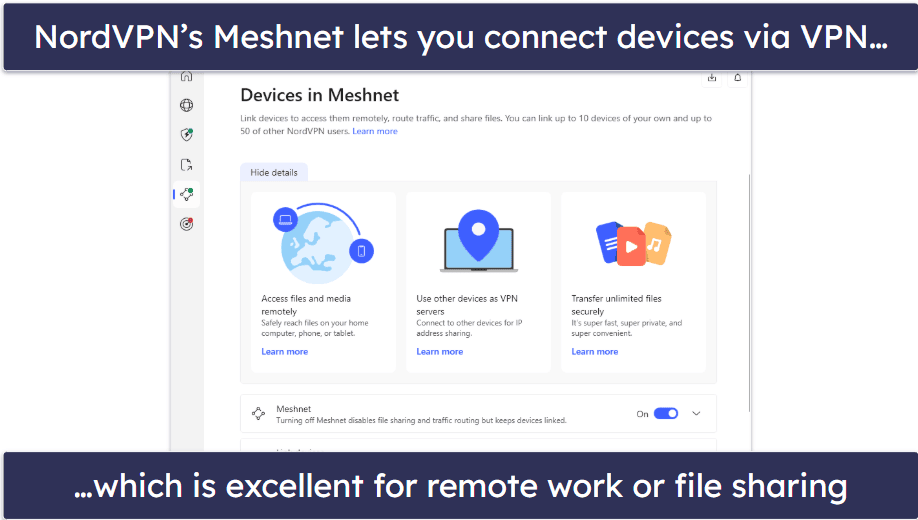
This provider has a very unique feature called Meshnet that lets you set up a secure, private network for up to 60 devices. You can use Meshnet to transfer files easily and safely between devices on the network, to remotely access files on linked devices, or even to host a virtual Local Area Network (LAN) for gaming
It provides pretty good support for streaming and torrenting, too. It’s compatible with 10+ popular streaming platforms and allows P2P file sharing on dedicated servers in 110+ countries. Like PIA, it has SOCKS5 proxy servers but doesn’t offer port forwarding.
Bottom Line:
NordVPN is great for securely downloading and sharing files on Starlink. Its ad blocker doubles as a malware scanner, and its Meshnet feature lets you create a secure, private network that lets you transfer files quickly and securely between linked devices. NordVPN also works with major streaming services and allows P2P file sharing on dedicated torrenting servers.
5. Surfshark — Easy-to-Use & Affordable VPN for Starlink


One 24-month plan: $2.49 / month
One+ 24-month plan: $4.19 / month
Surfshark has intuitive apps, so it’s a great pick for Starlink users who are new to VPNs. You can get it up and running in just 2–3 minutes and connect to the fastest nearby server with a single click. I’m also a fan of how you can favorite servers, which pins it to the home screen for quick access. In addition, you can customize its quick-connect feature so that it connects to a specific server of your choosing from Surfshark’s servers in 100 countries.

This VPN is a solid pick for streaming and a decent pick for torrenting on Starlink — it works with 50+ streaming services, including Netflix, Amazon Prime, Disney+, and more. But, unlike ExpressVPN and Private Internet Access, it doesn’t allow torrenting on all of its servers (only half of them). And it doesn’t have any extra torrenting features, like port forwarding or SOCKS5 proxy support.
Bottom Line:
Surfshark is a highly intuitive VPN for Starlink. It’s quick and easy to set up, has user-friendly features like server favoriting and a customizable quick-connect, and offers good support for streaming and torrenting.
Read the full Surfshark review
Editor's Note: Intego ONE, Private Internet Access, CyberGhost and ExpressVPN are owned by Kape Technologies, our parent company.
Quick Comparison Table
Editor's Note: Intego ONE, Private Internet Access, CyberGhost and ExpressVPN are owned by Kape Technologies, our parent company.
Testing Methodology: Comparison & Ranking Criteria
To find out which VPNs are the best for Starlink, I researched and tested all the top VPNs on the market following our tried-and-tested VPN testing methodology. I focused especially on each VPN’s speeds, security, and whether or not they support streaming and torrenting. But I also looked for VPNs that are easy to use and provide good overall value. You can learn more about the criteria I used to rank and compare the VPNs on my list below:
- I looked for VPNs that are compatible with most common devices. Since Starlink is a bit of a hassle to set up on a router, I made sure the VPNs on my list have good and easy-to-use apps for all major operating systems, including Android, iOS, Windows, and macOS.

- I tested each VPN’s speeds. Using any VPN will reduce your connection speeds slightly due to the time it takes to encrypt your data, so I only chose VPNs that are able to maintain super-fast speeds for Starlink. ExpressVPN had the fastest speeds in my tests.
- I picked VPNs with strong security features. Starlink internet traffic is easier to intercept than traditional wired connections, so I made sure that every VPN on my list comes with industry-standard security features. These include military-grade 256-bit AES encryption, a strict no-logs policy (the provider doesn’t keep track of your online activities), and a kill switch to prevent accidental data leaks in case your VPN connection drops.

- I chose VPNs that have good streaming and torrenting support. All of the VPNs I recommend work with popular streaming platforms, like Netflix, Amazon Prime Video, Disney+, and more, and they all allow P2P file sharing.
- I assessed each VPN for overall value. The VPNs I picked all have reasonably-priced plans and deals, allow a minimum of 7 simultaneous connections, and come with a ton of extra features, like an ad blocker. Plus, they back subscriptions with a money-back guarantee.
Top Brands That Didn’t Make the Cut
- PrivateVPN. This provider is a great VPN for restrictive countries, like China, but its server network is relatively small compared to other top VPNs, and it lacks some advanced security features.
- Proton VPN. It has an excellent free plan with unlimited data and no speed limits. But its free plan doesn’t support streaming or torrenting. I don’t like that its money-back guarantee is prorated either. This means that even if you cancel it within the money-back guarantee period, you’ll still be charged for every day that you were subscribed for.
- IPVanish. This VPN is great for torrenting and offers unlimited simultaneous connections. But it only has servers in 112 countries (most top VPNs offer 90+), it has no WebRTC leak protection, and its DNS leak protection only works on Windows.
Frequently Asked Questions
Do VPNs work with Starlink?
Yes, the VPNs I recommend all work with Starlink. Simply install the VPN app onto the device(s) you want to protect and connect to a VPN server, and all of the internet traffic coming and going from that device will be protected by the VPN.
Can I install a VPN on my Starlink router?
There are certain Starlink plans that allow you to install a VPN on the router directly, but Starlink Standard doesn’t support VPNs. However, you can just download and install a good Starlink VPN onto the device(s) you want to protect instead of putting it on the Starlink router.
Which VPN works best with Starlink?
I recommend using ExpressVPN with Starlink. It has servers in 105 countries, the fastest speeds in the industry, and high-end privacy and security features. It also has excellent streaming and torrenting support and is very easy to set up and use.
How do I get a VPN to work with Starlink?
Getting a VPN to work with Starlink is really simple, just follow these 3 simple steps:
- Download and install a good VPN onto the device(s) you want to protect. ExpressVPN is my #1 choice. It offers super-fast speeds, top-notch security features, and is really easy to use.
- Connect to a VPN server. Connecting to a nearby location will get you faster speeds.
- Start surfing the web. You’re all set! All of your Starlink traffic on those devices are now protected by the VPN.
Editor's Note: ExpressVPN and this site are in the same ownership group.