
Published on: April 7, 2025 Updated 2 times since publishing
- 🥇 ExpressVPN : Its Linux app is compatible with many Raspberry Pi models, and it’s one of the only VPNs for Raspberry Pi with a graphical user interface (GUI). It’s also very easy to install with detailed step-by-step instructions and a convenient list of commands. Additionally, it has a vast server network, lightning-fast speeds, and top-notch security features. Every ExpressVPN subscription is backed by a 30-day money-back guarantee (for new users).
Few VPNs work on Raspberry Pi, as they must have a compatible Linux app or support manual VPN configurations using the OpenVPN or WireGuard protocols.
So, I put together this list of the best VPNs for Raspberry Pi to save you time. The VPNs I recommend work with multiple popular models of Raspberry Pi and come with clear and easy-to-follow setup guides to make the whole process quick and painless.
My #1 VPN for Raspberry Pi is ExpressVPN. It has an excellent Linux app that works on Raspberry Pi and is one of the only VPNs out there that lets you control the app with a graphical user interface (GUI). It also provides lightning-fast speeds, top-notch security, and great streaming support. Editor's Note: ExpressVPN and this site are in the same ownership group.
Quick Summary of the Best VPNs for Raspberry Pi


Editor's Note: Intego ONE, Private Internet Access, CyberGhost and ExpressVPN are owned by Kape Technologies, our parent company.
🥇1. ExpressVPN — Best Overall VPN for Raspberry Pi

Basic 12-Months plan: $3.99 / month
1-month plan: $12.99 / month

ExpressVPN is my top pick for Raspberry Pi. Its Linux app is compatible with 8 Raspberry Pi models, and it provides a comprehensive setup guide.
If you aren’t comfortable with command-line interfaces (CLI), it also allows you to control the app with a GUI via its browser extension for Chrome or Firefox — very few VPNs have a GUI for Linux.
This VPN is also one of the best VPNs on the market for streaming, so it’s a great pick if you plan to use your Raspberry Pi as a media center. It works flawlessly with Kodi, supports streaming on all servers in 105 countries, and can reliably access 100+ streaming apps, including Netflix, Amazon Prime, Disney+, Hulu, and BBC iPlayer.

It’s a good VPN for a Raspberry Pi that you plan to set up as a torrent box because it’s P2P-friendly. It allows torrenting on all servers and works with popular torrent clients, like Transmission and qBittorrent. Additionally, it’s highly secure, offering full built-in leak protection (stops DNS, IPv6, and WebRTC leaks) and a strict no-logs policy that’s been verified by multiple independent audits.
Bottom Line:
ExpressVPN is the best VPN for Raspberry Pi. Its Linux app is compatible with 8 Raspberry Pi models, and it offers a GUI via its Chrome and Firefox extensions. On top of that, it’s the best VPN for streaming and torrenting, so it’s a great choice if you want to use your Raspberry Pi as a media center or a torrent box.
Read the full ExpressVPN review
🥈2. Private Internet Access — Highly Customizable + Great P2P Support


6-month plan: $7.50 / month
1-month plan: $11.95 / month
Private Internet Access (PIA) is an excellent VPN for Raspberry Pi. Its Linux app is compatible with 9 Raspberry Pi models, and it’s easy to set up. In addition, it provides a full GUI for its Linux app like ExpressVPN.
Advanced users will also be very happy with how customizable PIA is. For example, it’s one of the only VPNs that lets you choose between 128 and 256-bit AES encryption, depending on whether you want faster speeds or stronger security. Its split-tunneling feature works with apps, IP addresses, and even DNS (useful if you’re running Pi-hole or are using Raspberry Pi as a VPN router).

Another great thing about PIA is its P2P support. You can torrent on any of its servers in 91 countries. It supports port forwarding (allows you to connect to more peers for faster downloads), and it has SOCKS5 proxy support, which lets you change your IP address without encrypting your traffic to increase your speeds.
Bottom Line:
Private Internet Access’s Linux app can be installed on 9 Raspberry Pi models and has a full GUI. It’s also super versatile and includes many torrent-friendly features.
Read the full Private Internet Access review
Editor's Note: Private Internet Access and this site are in the same ownership group.
🥉3. NordVPN — Good for Remotely Accessing Your Raspberry Pi

Plus 24-month plan: $3.59 / month
Complete 24-month plan: $3.99 / month
Prime 24-month plan: $6.99 / month
NordVPN’s Linux app is compatible with 12 Raspberry Pi models. Do note that the Raspberry Pi Zero line only works with Debian Linux distributions. Unlike ExpressVPN and Private Internet Access, its Linux app doesn’t have GUI.
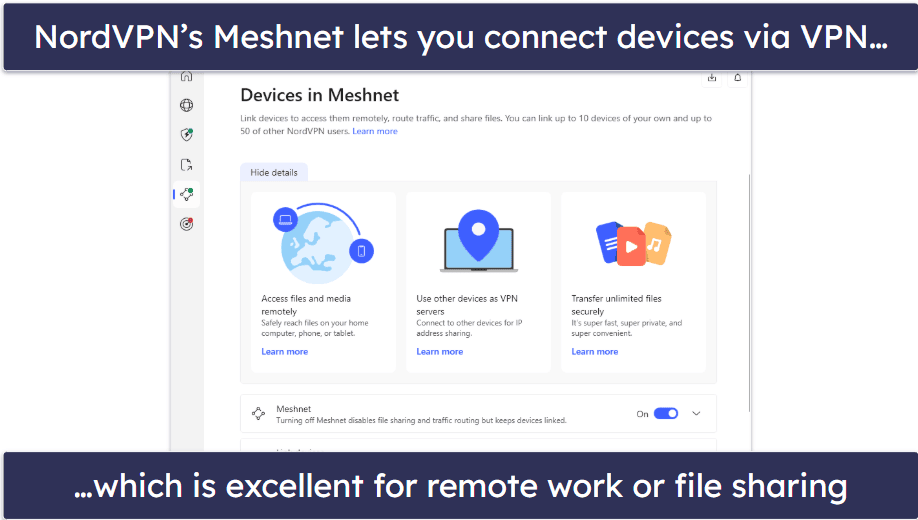
A standout of NordVPN for Raspberry Pi is its Meshnet feature, which can create a private network of up to 60 devices. There are many possible applications for this. For example, it lets you set up your Raspberry Pi as a VPN server, allowing other devices to access the internet through its IP address, remotely access files on your Raspberry Pi, and set up network protections with Pi-hole.
This VPN also works with 10+ popular streaming platforms and supports P2P file sharing on its servers in 110+ countries.
Bottom Line:
NordVPN’s Linux app works with a lot of Raspberry Pi models. It also has a unique feature called Meshnet that can greatly expand the functionality of your Raspberry Pi, allowing you to surf the web using its IP address while abroad, to remotely access files on it, and more. Additionally, it’s pretty good for streaming and torrenting.
4. CyberGhost VPN — Good for Streaming on Raspberry Pi


6-month plan: $6.99 / month
1-month plan: $12.99 / month
CyberGhost VPN supports manually configuring OpenVPN on Raspberry Pi, but its Linux app isn’t compatible. This means it has a more involved setup process compared to the VPNs above — getting ExpressVPN set up on Raspberry Pi takes no more than 5 minutes.
Fortunately, CyberGhost has a pretty good guide on its website to help you through the setup process.

This VPN is a very solid choice for streaming on Raspberry Pi, as its regular servers work consistently with 50+ streaming services, including popular platforms, like Netflix and Amazon Prime, as well as smaller platforms, like Sling TV, Fubo, and ESPN+. That said, you won’t be able to access its dedicated streaming servers with a manual configuration.
Bottom Line:
CyberGhost VPN can be set up on Raspberry Pi via a manual OpenVPN configuration. It’s also good for streaming on Raspberry Pi because it works with 50+ streaming apps, including popular streaming platforms, like Netflix and Amazon Prime.
Read the full CyberGhost VPN review
Editor's Note: CyberGhost and this site are in the same ownership group.
5. Surfshark — Low-Cost VPN + Easy Setup Guide


One 24-month plan: $2.49 / month
One+ 24-month plan: $4.19 / month
Surfshark VPN supports manually configuring OpenVPN on 5 Raspberry Pi models. Its Linux app unfortunately doesn’t work on Raspberry Pi.
Performing a manual configuration can be quite technical, but Surfshark makes the setup process super simple. It has both a written and a video guide to walk you through it step by step. I appreciate the video as a visually-inclined learner.

This VPN also works with 50+ streaming services and allows P2P file sharing on approximately half of its servers (out of 100 countries total). However, ExpressVPN offers more variety for streaming, and Private Internet Access has more torrent-friendly features.
Bottom Line:
Surfshark supports manual setups using OpenVPN on 5 Raspberry models, and it makes the setup process very simple thanks to its comprehensive guides (including a video guide). It also works with 50+ streaming services and allows torrenting on half of its servers.
Read the full Surfshark review
Quick Comparison Table
Editor's Note: Intego ONE, Private Internet Access, CyberGhost and ExpressVPN are owned by Kape Technologies, our parent company.
Testing Methodology: Comparison & Ranking Criteria
To decide which VPNs to include in this article, I evaluated all of the top VPNs on the market using our proven testing methodology. I paid particular attention to each VPN’s compatibility with Raspberry Pi and its ease of use/setup. I also took into account other factors, such as speeds, security, and bonus features (e.g. streaming and torrenting support). Find out more about the criteria I used to rank and compare the VPNs on my list below:
- I made sure each VPN is compatible with Raspberry Pi. I prioritized VPNs with Linux apps that work on Raspberry Pi, since it’s easier to set up than manually configuring a VPN using OpenVPN.

- I picked VPNs with great setup guides. Since the process of installing a VPN on Raspberry Pi can be pretty technical, I only recommend VPNs with good step-by-step guides, complete with visuals.
- I tested each VPN’s speeds. The VPNs on my list minimize the speed loss you get from encryption, allowing you to browse, stream, and torrent on your Raspberry Pi without any lag or disconnects.
- I checked for strong security features. I looked for VPNs with industry-standard security features, including unbreakable 256-bit AES encryption, a strict no-logs policy (the VPN doesn’t log your online activities), and a kill switch to prevent accidental data leaks.

- I selected VPNs that provide good overall value. Every VPN I recommend has affordable plans and deals and allows multiple simultaneous connections. Additionally, they all back subscriptions with a money-back guarantee, so you can try them out risk-free.
How to Install a VPN on Raspberry Pi

The process for installing a VPN on Raspberry Pi is different for every VPN, so it’s best to look for a guide on the VPN’s official website. But here’s a quick overview:
- Get a VPN that’s compatible with Raspberry Pi. I recommend ExpressVPN. Its Linux app works on several popular models of Raspberry Pi, and it’s really easy to set up.
- Download the VPN. Choose the Linux app.
- Install the VPN. Run the installation command on the terminal.
- Configure the VPN & connect to a server. You can find the list of commands on the official website to tweak the VPN’s settings and connect to a specific server.
Editor's Note: ExpressVPN and this site are in the same ownership group.
Top Brands That Didn’t Make the Cut
- PrivateVPN. It’s a highly affordable VPN with easy-to-use apps. But it’s not officially compatible with Raspberry Pi and therefore doesn’t have a setup guide.
- Proton VPN. It has excellent privacy and security features, but like PrivateVPN, it doesn’t officially support Raspberry Pi.
- IPVanish. Installing IPVanish on Raspberry Pi requires a manual OpenVPN configuration. Plus, it’s not as secure as the VPNs on my list.
Frequently Asked Questions
What is PiVPN?
PiVPN is a free tool that lets you set up your own VPN server on a Raspberry Pi. It’s good for securely accessing home devices from anywhere and encrypting your connection on public Wi-Fi using your home network. However, there are many places where it falls short of the VPNs I recommend. It doesn’t hide your IP address or change your location. It’s also not good for streaming and lacks advanced security features.
Is there a good free VPN for Raspberry Pi?
I wouldn’t recommend using a free VPN for Raspberry Pi. Few free VPNs have official support for Raspberry Pi, and configuring a VPN on the device without a setup guide can be pretty tricky. Free VPNs also come with a lot of downsides, such as strict data caps, speed limits, poor server selection, and more. If you aren’t careful, you might also get a free VPN that collects and sells user data to third parties. For those with a tight budget, I would consider an affordable paid VPN for Raspberry Pi, like Private Internet Access.
Can a Raspberry Pi run a VPN?
Yes, there are some top VPNs that are compatible with Raspberry Pi. Some of them have compatible Linux apps, others require you to perform a manual configuration using OpenVPN. You can check the VPN’s official website to find out which Raspberry Pi models are supported. My favorite VPN for Raspberry Pi is ExpressVPN. It has a compatible Linux app and a GUI. It’s also easy to install, has super-fast speeds, and is great for streaming.
Can I use a Raspberry Pi as a VPN server?
Yes, you can use a Raspberry Pi to create a secure VPN server by installing software like OpenVPN or WireGuard. However, an easier and more reliable option is to use NordVPN combined with Meshnet, which eliminates the complexity of configuring OpenVPN or WireGuard manually and gets you bonus features, like the ability to change your location.
Editor's Note: Intego ONE, Private Internet Access, CyberGhost and ExpressVPN are owned by Kape Technologies, our parent company.