
Published on: May 22, 2025 Updated 2 times since publishing
- 🥇 ExpressVPN : It has top-of-the-line privacy features, including an ad and tracker blocker for an untraceable online experience on public Wi-Fi networks, as well as a malicious site blocker, which makes it harder to fall for online scams. It also has the best speeds on the market for all online activities and works with 100+ streaming apps.
I always use a VPN when I’m on public Wi-Fi, whether I’m answering emails at the airport, streaming on hotel Wi-Fi, or relaxing on a beach. These networks are convenient, but they’re also easy targets for hackers and snooping, and they’re usually super slow. A good VPN keeps your personal data and online activities anonymous and can get you the best speeds if there’s speed throttling involved.
My top pick is ExpressVPN, thanks to its lightweight Lightway protocol, which is easy on battery life and delivers blazing-fast speeds and high-end security features. Editor's Note: ExpressVPN and this site are in the same ownership group.
Quick Summary of the Best VPNs for Public Wi-Fi


Editor's Note: Intego ONE, Private Internet Access, CyberGhost and ExpressVPN are owned by Kape Technologies, our parent company.
🥇1. ExpressVPN — Best VPN for Public Wi-Fi in 2026

Basic 12-Months plan: $3.99 / month
1-month plan: $12.99 / month

ExpressVPN is my favorite VPN to use when connected to public Wi-Fi networks. You can set it to automatically connect to a server in any of its 105 countries when it detects an untrusted Wi-Fi, get privacy protection on any public Wi-Fi, and maintains the best speeds.
- Auto-secures Wi-Fi connections
- Lightway minimizes battery drain
- Blocks malicious sites
- Excellent server coverage
- Identity Defender is US-only
- No auto-connect on iOS
The key advantage ExpressVPN has over its competitors is its proprietary Lightway protocol, which is one of the fastest I’ve tested. I also really like how it minimizes battery drain — I barely even noticed I was connected to the VPN (other popular protocols, like OpenVPN, drain my battery a lot quicker).
If you stream on public Wi-Fi, ExpressVPN is a great choice for securely catching up on your favorite episodes and shows on the go. It works with 100+ streaming platforms, including several Netflix and Amazon Prime libraries, as well as Hulu and BBC iPlayer — which is why it’s one of the best VPNs for streaming. I’m also a big fan of its easy-to-use mobile apps.

I also like that it has an ad, tracker, and malicious site blocker (called Advanced Protection in the app). I’ve connected to plenty of sketchy public Wi-Fi networks where pop-ups or shady redirects are everywhere. This feature worked really well in my tests, and I felt more at ease online.
If you’re worried about tracking, ExpressVPN’s Shuffle IP dynamically changes your IP every time you visit a site or open an app. Plus, if you’re in the US, you get access to Identity Defender, which can help scrub your stolen personal data from people-search and data broker sites — it will even provide ID theft insurance up to $1 million.
Bottom Line:
ExpressVPN is the best VPN for public Wi-Fi usage. It offers a large server network so you can connect to a nearby server for buffer-free speeds, it offers the fastest speeds on the market, and it works with 100+ streaming sites. I also really like how its Lightway protocol minimizes battery drain, so you can stay online longer while on the go.
Read our full ExpressVPN review
🥈2. Private Internet Access — Excellent Mobile Wi-Fi Security

6-month plan: $7.50 / month
1-month plan: $11.95 / month
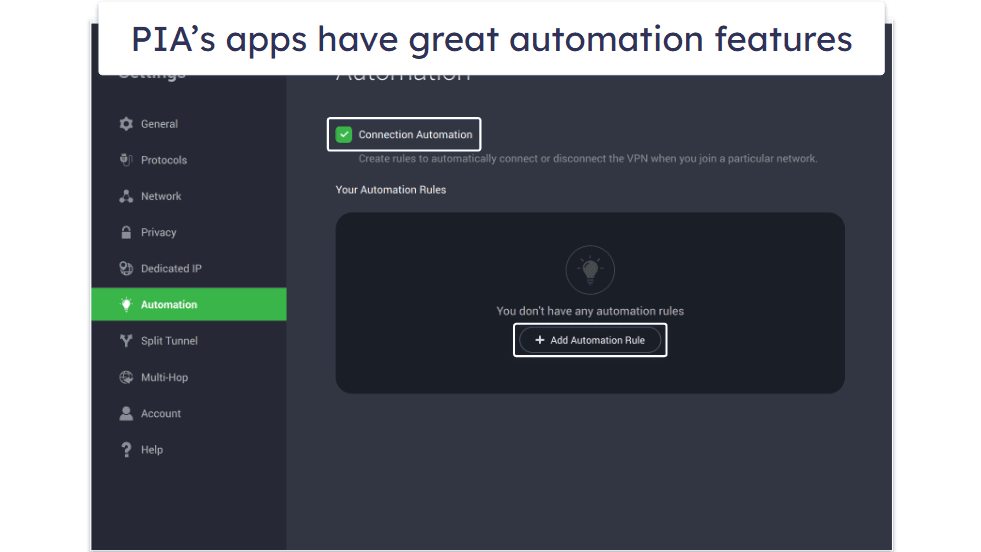
Private Internet Access (PIA) is great if you’re a frequent traveler who stays connected on mobile. On iOS, you can set up Siri shortcuts to quickly connect or disconnect, or use “Connect on Demand” to automatically activate the VPN when joining a new network. On Android, the Trusted Networks feature turns on the VPN whenever you connect to unsecured public Wi-Fi — so you’re always protected without having to think about it.
- Android & iOS auto Wi-Fi protection
- Highly configurable apps
- Great ad & malicious site blocker
- Limited number of streaming servers
- Buffering issues on some servers
There’s automation on desktop, too, and PIA has a decent-sized network in 50 countries, so you’ll likely be able to auto-connect to a nearby server for the best possible speeds no matter where you travel.
If you like streaming on the go, the VPN accesses 30+ streaming apps consistently, including top sites like Netflix. It’s still a lot fewer than ExpressVPN, which is compatible with 100+ streaming sites.
Another perk of PIA is that you can adjust the encryption level to improve speed on overwhelmed public Wi-Fi networks. For example, switching to 128-bit encryption can give you faster streaming and browsing. This is useful when you’re on hotel Wi-Fi or just want better performance.
Last but not least, PIA has the best ad blocker on the market, called PIA MACE, which also blocks trackers and malicious sites. It blocked all ads on ad-heavy sites instantly and allowed them to load a lot faster, which is especially useful on slow or unsecured public Wi-Fi.
Bottom Line:
Private Internet Access is great for travelers who use their mobile devices to stay connected. Its mobile apps have great auto-connect options for unsecured Wi-Fi networks, the VPN works with a good number of streaming sites, and it’s got an excellent ad blocker that helps sites load faster on overwhelmed public Wi-Fis.
Read our full Private Internet Access review
Editor's Note: Private Internet Access and this site are in the same ownership group.
🥉3. CyberGhost VPN — Great for Streaming on Public Wi-Fi

6-month plan: $6.99 / month
1-month plan: $12.99 / month
CyberGhost VPN’s specialized servers are ideal for streaming on public Wi-Fi networks. You get access to servers that work with 50+ streaming sites, like several Netflix and Amazon Prime libraries, as well as Hulu and ESPN+.
- Streaming servers for 50+ apps
- NoSpy servers offer extra privacy
- Customizable automation for Wi-Fi
- The ad blocker doesn’t block all ads
- Mobile apps lack automation features
The dedicated servers also mean you’ll get the best possible performance out of each, which is especially handy on slow public Wi-Fi networks at airports or public schools. If the public Wi-Fi you’re connected to is slow, CyberGhost has servers in 100 countries, so you’ll easily find nearby servers for the best connections.

CyberGhost also has NoSpy servers if you’re a journalist or activist in Europe and regularly share sensitive files over the internet on public Wi-Fi. They’re located in the VPN’s headquarters and can only be accessed by CyberGhost staff, making it even less likely that someone can access your data.
If you’re bringing a laptop on your travels, CyberGhost’s Smart Rules lets you set useful automation rules, such as automatically connecting to the VPN every time it detects a new Wi-Fi connection. There is also an ad and tracker blocker called Content Blocker, which works on all major platforms, including Android and iOS phones.
Bottom Line:
CyberGhost VPN is a great pick for streaming on slow public Wi-Fi networks. It has dedicated streaming servers for 50+ streaming apps and great automation rules to protect yourself from accidentally going online without connecting to the VPN first. Its NoSpy servers are great for journalists and activities, too.
Read our full CyberGhost review
Editor's Note: CyberGhost and this site are in the same ownership group.
4. NordVPN — Excellent Ad & Tracker Protection on Public Wi-Fi

Plus 24-month plan: $3.59 / month
Complete 24-month plan: $3.99 / month
Prime 24-month plan: $6.99 / month
NordVPN protects you from annoying ads, tracking, and malicious downloads on unsecured public Wi-Fi networks. Its Threat Protection Pro can also block downloads from suspicious websites or detect malware in already downloaded files. It works even when you’re not connected to the VPN, but it’s not available on mobile devices.
- Prevents malicious downloads
- Allows secure remote desktop access
- Large server network
- Malware scanner costs extra
- Has 2 different macOS apps
It’s still great if you take your laptop with you on a trip and want to ensure you haven’t picked up any malicious files or trackers from unsecured public Wi-Fi networks, even in those brief moments when you weren’t connected to NordVPN’s servers.
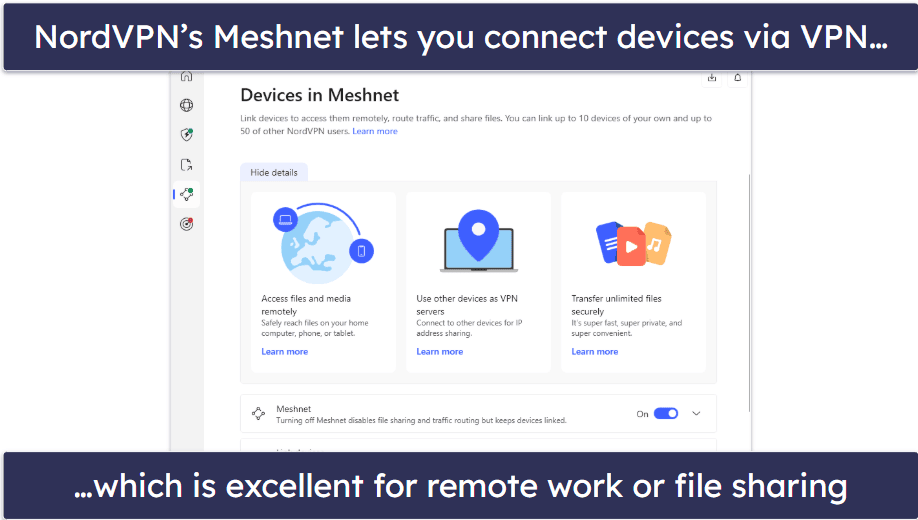
You can also use a feature called Meshnet to establish a secure remote connection to your home PC and work from it directly or send any files you’ve forgotten to transfer to your laptop easily. NordVPN has servers in 149 countries, and it works with 10+ streaming sites, which is fewer than ExpressVPN.
NordVPN offers excellent automation features on both desktop and mobile apps. You can set up rules for automatic VPN connection on startup or have it auto-connect whenever it detects an unsafe public Wi-Fi network.
Bottom Line:
NordVPN is a good pick for a safe online experience on public Wi-Fi. It blocks ads, trackers, and malicious sites, and on desktop, it can even prevent malicious downloads from getting onto your device. It allows secure remote access to your PC from anywhere on public Wi-Fi, and it has great streaming support, as well as great automation options.
5. Surfshark — Great for Finding Accommodation on Public Wi-Fi


One 24-month plan: $2.49 / month
One+ 24-month plan: $4.19 / month
Surfshark is great if you need to find affordable accommodation while travelling. Its Override GPS feature syncs your device’s GPS with the VPN server’s IP. This helps you access better hotel and motel deals, especially for last-minute bookings on public Wi-Fi, where some sites offer region-specific pricing.
- Hides GPS data
- Can create a fake persona
- Works with 50+ streaming apps
- Override GPS is not available on iOS
- Alternative ID options in 6 countries
Surfshark’s Alternative ID feature lets you create a new online persona with a fake email. This is perfect for frequent business travelers who want to stay under the radar and protect themselves from identity theft. It also has Rotator IP, which changes your IP address without changing your location for better privacy. However, I think ExpressVPN’s similar feature, Shuffle IP, is better as it gives you a new IP every time you open an app or website.

Surfshark has servers in 100 countries, which can mean great browsing speeds globally, and it works with 50+ streaming platforms, including Netflix, Max, and ESPN+. Surfshark also includes CleanWeb, an effective ad, tracker, and malicious download blocker that performed well in tests.
Bottom line:
Surfshark is a top-tier choice for frequent travellers looking for the best accommodation deals or business-minded frequent fliers who want to work remotely without worrying about their privacy on public Wi-Fi. It hides your GPS data on Android, can give you a fake email address for better privacy, and it works with 50+ streaming sites.
Read our full Surfshark review
Quick Comparison Table
Editor's Note: Intego ONE, Private Internet Access, CyberGhost and ExpressVPN are owned by Kape Technologies, our parent company.
Testing Methodology: Comparison & Ranking Criteria
I relied on our proven testing methodology to pick the top VPN providers on the market for public Wi-Fi use. I tested speeds and checked automation features and privacy tools, among other things. Here’s a more detailed look at how I picked and ranked each VPN:
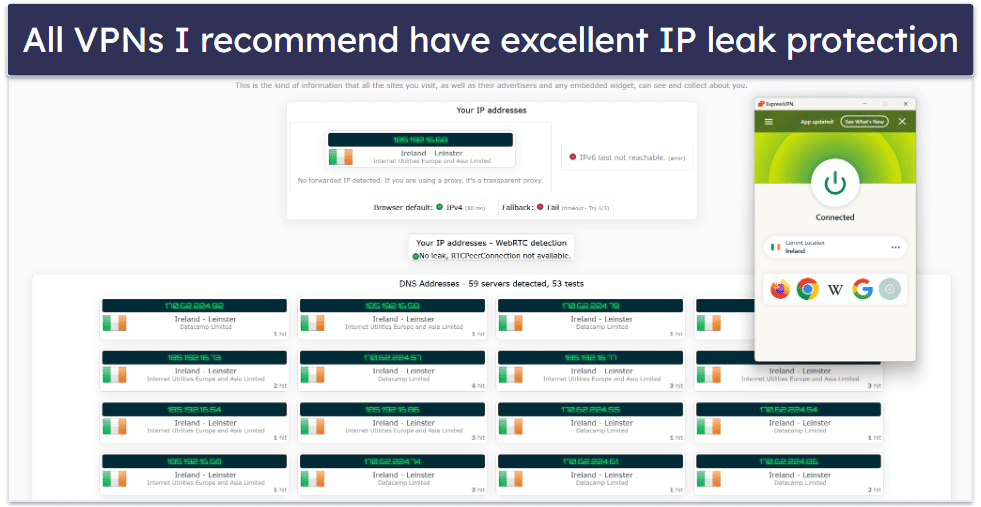
- I prioritized VPNs with top-of-the-line privacy features. Public networks are often poorly secured, leaving users vulnerable to data theft, like login credentials or banking details. I selected VPNs that provide privacy protection tools, including leak prevention, 256-bit AES encryption, a reliable kill switch, and a strict no-logs policy.
- I chose VPNs that offer widespread server networks with good speeds. Public Wi-Fi is often slow, and a VPN can make it worse, especially with distant servers. That’s why I chose VPNs with servers around the world, so you can find nearby servers for a safe connection without further slowing down your already limited speed.
- I picked VPNs that can access a variety of content reliably. The VPNs I recommend work with popular streaming platforms like Netflix and Max, and support P2P file sharing on some or all servers.

- I needed my VPNs to work reliably on a range of devices. When traveling frequently, you’ll likely use multiple devices, such as a work laptop, smartphone, or tablet. To ensure a seamless experience, I selected VPNs with well-designed apps for iOS, Android, Windows, macOS, and even Linux.
- I selected only VPNs that offer excellent value for money. Every VPN I recommend offers affordable deals, and they’re all backed by a money-back guarantee, letting you try out the service risk-free and decide if it meets your needs.
Top Brands That Didn’t Make the Cut
- Proton VPN. Proton VPN is excellent on the security and privacy fronts. That said, it lags behind my top picks in terms of speed, which can be a deal-breaker on already-slow public Wi-Fi networks.
- TunnelBear. TunnelBear is another great choice for privacy and even has a limited free plan with access to all features and servers. However, it has a fairly small server network.
- PrivateVPN. PrivateVPN is very secure, fast, and even works in restrictive countries. My complaint is that the iOS app doesn’t have a kill switch, which can be a serious security risk.
Frequently Asked Questions
How do you protect yourself on public Wi-Fi?
I recommend getting a privacy-friendly VPN, such as ExpressVPN. A VPN encrypts your internet traffic, making it unreadable to hackers or anyone else on the same network. This is especially crucial on unsecured networks like those found in airports, at cafes, or in hotels.
Is a VPN good for public Wi-Fi?
Yes, absolutely. A VPN is one of the best tools for securing your connection on public Wi-Fi networks. Without one, your data can be intercepted by others sharing the same network, or private info such as banking details or logins can be stolen by malicious third parties. A trusted VPN like one of the ones I recommend encrypts all your traffic, protecting your personal information, logins, and browsing activity.
Can a VPN be tracked by Wi-Fi?
While the Wi-Fi network can see that you’re connected and using data, it can’t see what you’re doing when you’re connected through a VPN. Your activity is encrypted and routed through secure servers, so the network owner won’t be able to track your websites, searches, or apps. This level of privacy is exactly why I recommend using ExpressVPN or one of the other trusted options whenever you’re on public Wi-Fi.
Is ExpressVPN good for public WiFi?
Absolutely. ExpressVPN is one of the best choices for securing your connection on public Wi-Fi. It offers strong encryption, fast speeds, and a rock-solid no-logs policy, making it ideal for safely browsing, streaming, or working on unsecured networks. It connects quickly, works seamlessly on phones and laptops, and is my top pick among the VPNs I recommend for public Wi-Fi use.
Can public Wi-Fi see your history with VPN?
No, if you’re connected to a VPN, the public Wi-Fi network can’t see your browsing history. A VPN encrypts your traffic, hiding it from the router, internet provider, and any other potential snoopers, whether it be hackers, scammers, or even people connecting to the same public Wi-Fi network. To ensure complete privacy, it’s best to use a trusted VPN service like ExpressVPN.
Editor's Note: ExpressVPN and this site are in the same ownership group.