

StrongVPN Review: Quick Expert Summary
StrongVPN is secure, has fast speeds for browsing and streaming, and provides easy-to-use apps across all platforms. While this is a good start, it does lack a number of features I expect from top VPNs in 2026, so ultimately I feel that there are other options that offer a much better value — such as ExpressVPN, which is the best VPN on the market.
StrongVPN protects your data with industry-standard VPN security features like 256-bit AES encryption, a no-logs policy, and a kill switch. It also comes with extras like split-tunneling (but only on Android) and a smart DNS service called StrongDNS. In addition, it works with some top streaming sites, including Netflix, Hulu, Disney+, and Amazon Prime, but it’s not compatible with BBC iPlayer. It also supports torrenting on all of its servers, and it has an obfuscation tool called Scramble for restrictive networks and countries (but it doesn’t reliably work in China).
However, StrongVPN does have some flaws — it lacks advanced security features like RAM-only servers, WebRTC and IPv6 leak protection, and perfect forward secrecy. Its no-logs policy hasn’t been independently audited, it’s missing useful extras like an ad blocker, and it has a much smaller server network than most top competitors (servers across 42 countries).
StrongVPN allows up to 12 simultaneous connections with a single account, offers monthly and yearly plans, and comes with a 30-day money-back guarantee — but only on its annual plan.
StrongVPN Full Review — A Decent VPN (But Lacking in Advanced Features)
I spent the last couple of weeks testing and researching StrongVPN to see how it compares to the top VPNs on the market in 2026.
StrongVPN is a decent VPN — it has fast speeds, particularly for streaming, and works with most of the top streaming sites. It also allows P2P sharing on servers in all 42 countries, but it’s missing some advanced security features that I would expect from a top VPN, such as perfect forward secrecy, WebRTC and IPv6 leak protection, an audited no-logs policy, and RAM-only servers (which store user data on memory instead of a hard drive, meaning all user information is wiped each time the system is rebooted).
Overall, StrongVPN is pretty good for streaming and torrenting, but I feel that it falls well short of being a top VPN.
StrongVPN Plans & Pricing — Monthly & Yearly Plans (Money-Back Guarantee Only Applies to the Yearly Option)
StrongVPN offers a monthly and yearly subscription plan, starting at $3.97 / month for the yearly option. Both plans have the same features and allow up to 12 simultaneous connections.
However, StrongVPN doesn’t provide as much value as other top VPNs like ExpressVPN, Private Internet Access, or CyberGhost VPN — all of these come with better security features, offer more (or better) extra features, maintain faster speeds, and have larger server networks spread across more countries.
StrongVPN accepts payment via credit and debit cards, PayPal, and AliPay, but it doesn’t accept cryptocurrencies. It also offers a 30-day money-back guarantee, but only on its yearly plan.
Overall, StrongVPN doesn’t offer as much value as many top VPNs, but it’s still not a bad option thanks to its fast speeds and compatibility with most top streaming sites, such as Netflix, Hulu, Amazon Prime, and Disney+.
StrongVPN Features — Covers the Basics Well
StrongVPN has the following industry-standard VPN security features:
- 256-bit AES encryption. StrongVPN uses bank-grade encryption to make your internet traffic unreadable.
- Kill switch. This feature automatically shuts down your internet access if you’re disconnected from the VPN server, to protect your data from leaking onto the internet.
- No-logs policy. StrongVPN doesn’t store any logs of the websites you visit or the files you download.
StrongVPN also has DNS leak protection, but it doesn’t yet offer WebRTC or IPv6 leak protection which I was surprised by. That said, I ran multiple IPv6, DNS, and WebRTC leak tests while connected to servers in 10+ countries and didn’t find any leaks.
StrongVPN allows you to choose from a variety of protocols, including WireGuard, IKEv2, OpenVPN, IPSec, as well as older ones like SSTP and L2TP — which is convenient if you’re on a very restricted network or using a device that doesn’t support the more modern protocols. I was able to achieve the best speeds while using WireGuard, which is one of the fastest protocols out there.
StrongVPN also includes extra features like:
- Split-tunneling (Android only). This feature allows you to exclude certain apps from your VPN connection. In my tests, StrongVPN’s split-tunneling feature worked seamlessly and was easy to use. I streamed a movie while connected to my local network, while also using Strong’s VPN connection to download a file from one of its Canadian servers. However, I’d like to see split-tunneling available on more operating systems, as is available with top competitors like Private Internet Access.
- StrongDNS. StrongVPN’s smart DNS service provides access to a smart DNS that works on devices that don’t natively support VPN apps, like certain smart TV models or gaming consoles.
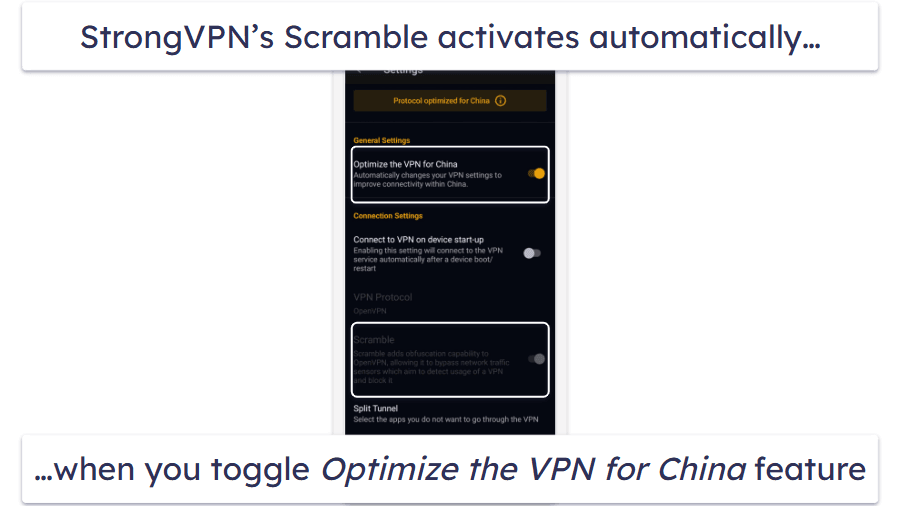
- Scramble. Scramble is StrongVPN’s obfuscation feature. In the app’s settings, there’s an option to Optimize the VPN for China — when toggled on, it automatically enables Scramble to boost connection reliability in heavily censored environments. If you’re giving StrongVPN a go in China, make sure you use the older version, though (the latest version of the app has encountered recent blockages).
StrongVPN Privacy & Security — Strict No-Logs Policy, but It’s US-Based
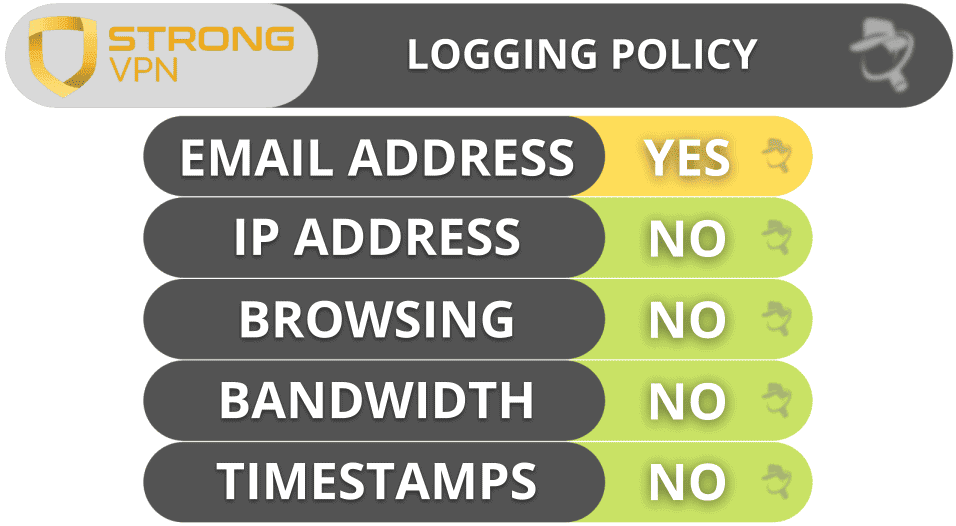
StrongVPN has a strict privacy policy — it doesn’t log your IP address, your bandwidth, your timestamps, or your online traffic. The only personal information that StrongVPN collects is your email address and payment information, when setting up your account.
However, I’m disappointed that StrongVPN hasn’t conducted an independent audit to confirm its no-logs policy. I’d like to see StrongVPN take this action so it’s more aligned with top VPNs like NordVPN, which has conducted multiple audits.
StrongVPN is based in the US, which is a member of the 5/9/14 Eyes Alliance (a group of countries that share surveillance data with each other). This means that StrongVPN is required to hand over user info if requested by the US government, which could put your privacy at risk. However, given its no-logs policy, this shouldn’t be an issue as it shouldn’t have any data to hand over.
Overall, StrongVPN is headquartered in the US, which isn’t as tight on privacy laws as many other nations, but it has a strict no-logs policy that should keep your privacy completely safe.
StrongVPN Speed & Performance — Decent Speeds, Even on Faraway Servers
I conducted speed tests on servers in all 42 countries where StrongVPN has a server to determine its average speeds. While I saw quite a drop in speeds compared to my local server, I still enjoyed decent speeds on all the servers I tested, including distant servers.
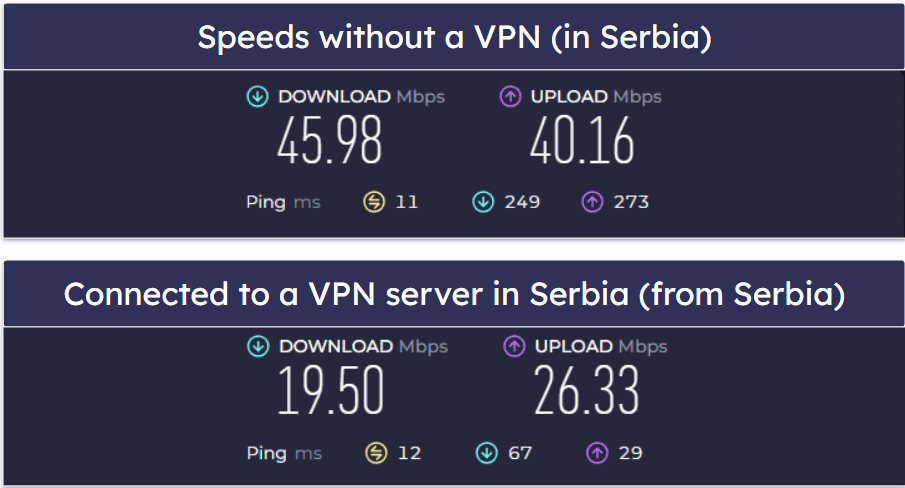
First, I ran a speed test without being connected to a VPN server to get a baseline for my internet connection speeds. Then, I used StrongVPN’s Best Available feature, which connects you to the fastest server based on your location — I was connected to a local server in Serbia. Here are my speeds:
Now, here are my speeds when connected to a distant server in Australia:
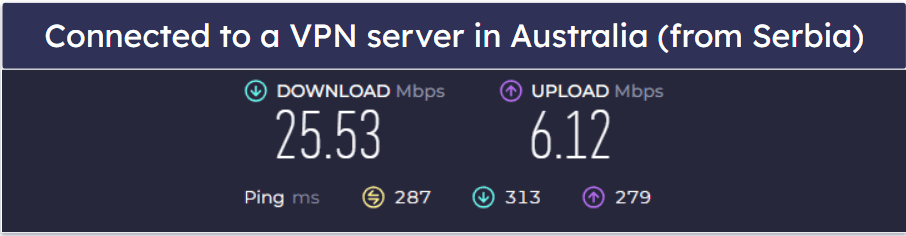
My speeds dropped by 58% and 45%, respectively, when connected to a local server in Serbia and a more distant server in Australia. This sounds like a lot, but my baseline speed was very good, which can make speed drops look much worse than they are. The actual speeds while connected to StrongVPN’s servers were still good enough to load websites and HD videos almost instantly, and I experienced little to no lag or buffering while streaming or browsing the web — even on the distant servers I tested.
Overall, StrongVPN’s server speeds are pretty decent, even on distant servers.
StrongVPN Servers & IP Addresses — Small Network, but It Includes Smart DNS Servers
StrongVPN has 950+ servers in 42 countries, which are evenly spread all over the world, including in the Middle East, Asia, and Australia. However, many users around the world may not have access to a server in their country, which will cause them to experience slower speeds. Other top VPN providers have much larger server networks — ExpressVPN has servers in 105 countries, and CyberGhost VPN has servers in 100 countries.
I really like that StrongVPN allows torrenting on all of its servers. Some VPNs like Cactus VPN only allow P2P sharing on a few select servers, but these can get overloaded as a result.
I also like that StrongVPN has its own smart DNS servers (called StrongDNS). These servers work on devices that don’t support a standard VPN connection. Plus, they also provide very fast speeds by connecting to the endpoint servers without encrypting your traffic (which is what causes slowdown).
Overall, StrongVPN’s server network is smaller than many other top VPNs, but it’s well distributed around the world, has its own smart DNS servers, and supports torrenting on every server.
StrongVPN Streaming & Torrenting — Good for Torrenting, Decent for Streaming
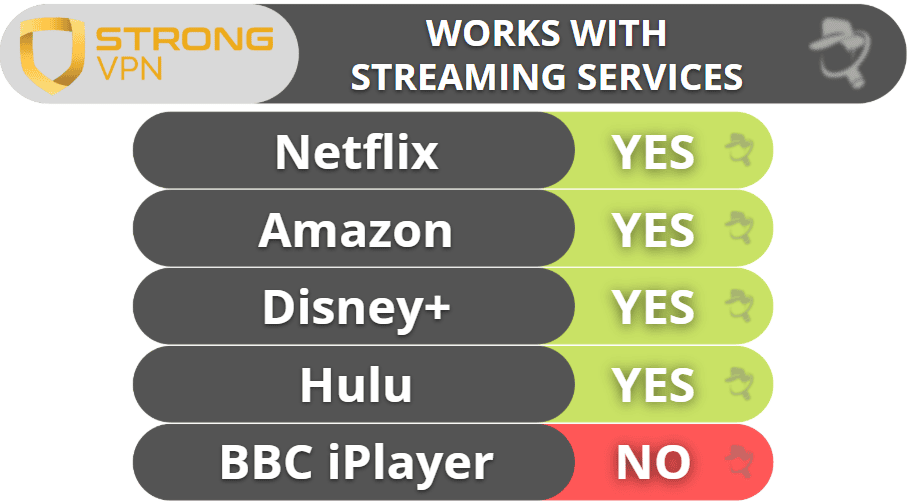
StrongVPN is a decent VPN for streaming — it accesses top sites like Netflix, Hulu, Disney+, and Amazon Prime, along with smaller sites like Peacock, Crunchyroll, and Max. However, it doesn’t work with BBC iPlayer.
If you’re looking for the best streaming VPN, I recommend ExpressVPN — it’s ranked #1 on our list of the best VPNs for watching Netflix, it works with 100+ streaming sites, it has lightning-fast speeds across all servers, and it’s very user-friendly.
StrongVPN is good for torrenting. Along with supporting P2P traffic on all of its servers, it works with all of the top torrenting clients like BitTorrent and Vuze.
However, there are still better VPNs for torrenting — my favorite is ExpressVPN because it allows torrenting on all of its servers in 105 countries, has lightning-fast speeds, and its no-logs policy has been independently verified multiple times.
Overall, StrongVPN is a solid option for streaming content on most platforms, including Netflix, Amazon Prime, Hulu, and Disney+, and it supports P2P traffic on all of its servers. However, it doesn’t work with BBC iPlayer.
StrongVPN Ease of Use: Mobile & Desktop Apps — Easy to Install & Use
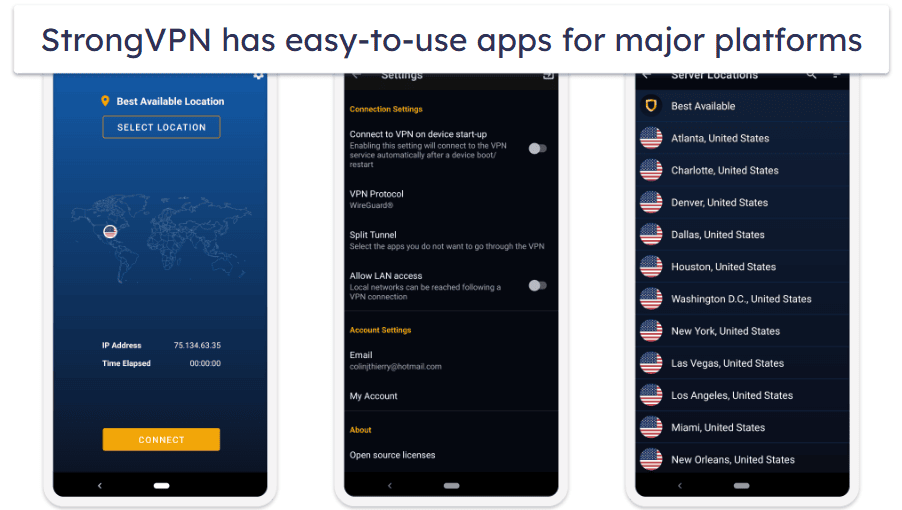
StrongVPN has easy-to-use apps for iOS, Android, Windows, macOS, Amazon FireTV, and Chrome, and it supports installation on routers and manual setup for Linux, Amazon Kindle, Kodi, and other platforms. However, it doesn’t offer browser extensions. It only has a Chrome proxy extension that hides your IP address but doesn’t encrypt your traffic.
It’s very quick and easy to set up. I installed StrongVPN’s app on my Android smartphone, iPhone, Windows laptop, and MacBook Pro, and each one took just a minute or two to install.
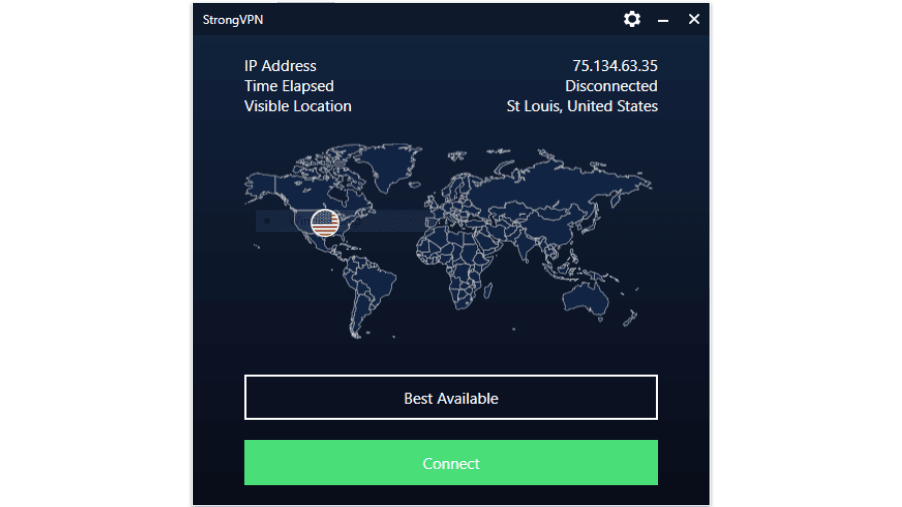
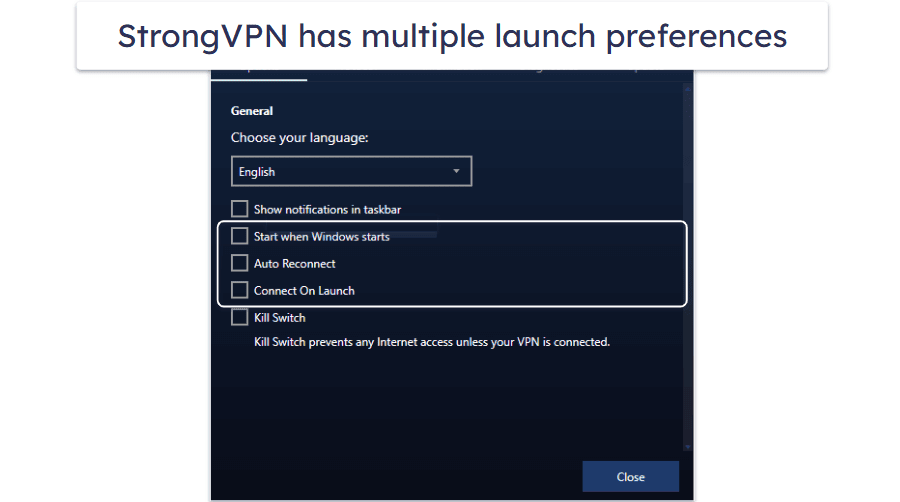
StrongVPN’s mobile and desktop apps are all very intuitive and user-friendly. I like that SmartVPN has a “Best Available” server feature, which allows you to automatically connect to the fastest available server (usually the one closest to you) with just one click. I also like how simple StrongVPN makes it to manually connect to a server — countries are listed in alphabetical order and there’s a search bar. I was also impressed with how easily I was able to enable the kill switch and connect on launch features, along with changing protocols.
StrongVPN’s apps come with an obfuscation feature called “Scramble.” It’s available on Windows, macOS, and Android, but not iOS. That’s because Scramble only works with the OpenVPN protocol, which isn’t available on the iOS app. You can set up Scramble via a third-party VPN client app, but it might take a few extra steps. StrongVPN’s split-tunneling feature is only available on its Android app.
Overall, StrongVPN has easy-to-use mobile and desktop apps, but they only really come with basic VPN features. They’re intuitive, easy to set up and use, and have quick and easy connection options. However, most top competitors like Surfshark also have very intuitive apps, but they come with far more features across all platforms.
StrongVPN Customer Support — Excellent (Helpful & Responsive)
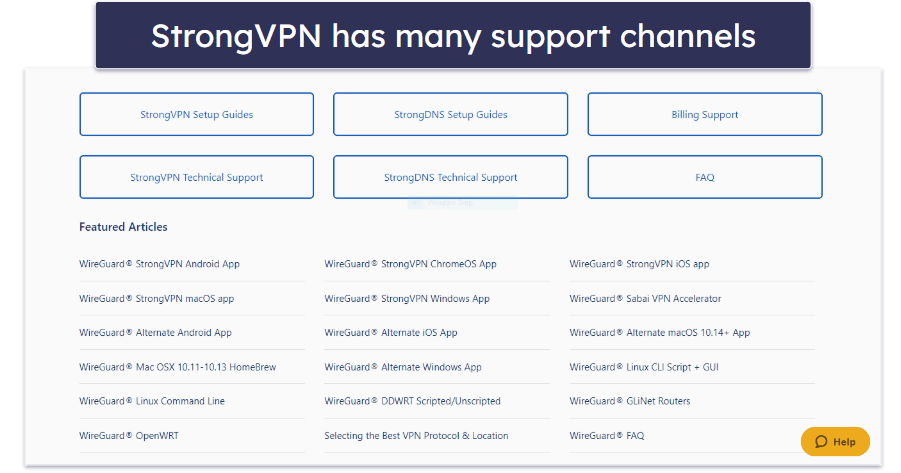
StrongVPN has great customer support — it offers a decent chatbot service, helpful and responsive live chat and email support representatives, as well as a knowledge base that includes setup/troubleshooting guides and frequently asked questions (FAQs). StrongVPN is also one of the few VPNs to offer phone support.
StrongVPN’s chatbot is pretty good. I found it to be very responsive and friendly, but not very accurate. It provides links to relevant articles, but in many cases, the information didn’t match what I got from live chat agents or email support, and the links it provided were incorrect.
There is also an option to connect to a support rep via live chat — this service is available 24/7. During my tests, I was connected to an agent within a minute or so every time, and they were able to quickly and extensively answer all technical questions that I had about the service.
StrongVPN also offers excellent email support via an online ticketing system. Whenever I emailed StrongVPN, I received a response to my question within less than 15 minutes (including outside of business hours), which is impressive. In comparison, other top VPNs like ExpressVPN and Private Internet Access typically take 3–5 hours to respond to email inquiries. As with the live chat, I found the email support teams to be very helpful and thorough in their replies.
StrongVPN is one of the rare VPNs to offer phone support. When I called, I found there was almost no wait time, and the rep was knowledgeable and able to answer my question immediately. The phone support is available Monday to Friday from 9am to 5pm CT.
StrongVPN’s online help center is extensive, and includes many useful troubleshooting/set up guides as well as FAQs, all of which answered most of my questions.
StrongVPN’s customer support impressed me with its helpful and responsive email, live chat, and phone support. The chatbot is very responsive but not very accurate. It also has an extensive help center that includes FAQs and troubleshooting guides for common problems.
Is StrongVPN a Good VPN in 2026?
StrongVPN is secure, fast, easy to use, and pretty good for streaming and web browsing. It protects users’ data with industry-standard VPN security features like 256-bit AES encryption, a kill switch, a strict no-logs policy, and DNS leak protection. It also comes with extra features like split-tunneling (although on Android only) and smart DNS servers.
StrongVPN works with popular streaming sites like Netflix, Amazon Prime, Hulu, and Disney+ (but not BBC iPlayer), it allows P2P traffic on all 950+ of its servers, and it offers obfuscation.
However, StrongVPN has some downsides that stop it from being a top VPN. For example, it lacks advanced features like RAM-only servers and perfect forward secrecy, it has a relatively small server network, its no-logs policy hasn’t been audited, and it’s missing some extras like an ad blocker and public Wi-Fi protections.
StrongVPN allows up to 12 simultaneous connections, offers monthly and yearly plans, and comes with a 30-day money-back guarantee on its yearly plan.
Frequently Asked Questions
Is StrongVPN safe?
Yes, StrongVPN has industry standard security features like 256-bit AES encryption, a kill switch, a strict no-logs policy, and DNS leak protection.
However, it’s missing advanced security features like RAM-only servers and perfect forward secrecy, it doesn’t have IPv6 or WebRTC leak protection, and its no-logs policy hasn’t been independently audited and verified.
If you’re looking for a VPN with the very best security, I recommend ExpressVPN, as it comes with industry-leading security features, including all essential VPN security features and advanced security tools.
Does StrongVPN offer a free VPN?
No, StrongVPN doesn’t offer a free VPN. But it comes with pretty affordable prices, and it also has a 30-day money-back guarantee on its annual plan.
I don’t recommend using free VPNs anyway — they usually lack key security features, are slow, limit how much data you can use, log user traffic, and have glitchy apps. Still, if you really want a free VPN, you should at least check out our list of the best free VPNs in 2026.
Does StrongVPN work with Netflix?
Yes, StrongVPN is compatible with Netflix. StrongVPN also works with other top streaming sites like Amazon Prime, Hulu, and Disney+, but doesn’t work with BBC iPlayer.
My favorite VPN for streaming is ExpressVPN — it maintains some of the fastest streaming speeds in the industry, offers servers in 105 countries, works with 100+ streaming sites, and has intuitive apps across all platforms.
Is StrongVPN good for torrenting?
Yes, StrongVPN is good for torrenting. It allows P2P traffic on all servers in 42 countries, works with top torrenting clients, and has fast download speeds. It also comes with extras like split tunneling (on Android only), a kill switch, and a strict no-logs policy.
However, there are still better options for torrenting out there — I recommend ExpressVPN because it has more servers in more countries (and also allows torrenting on them all), maintains faster server speeds, and offers advanced security features. What’s more, its no-logs policy has been independently verified.
Editor's Note: ExpressVPN and this site are in the same ownership group.