
Published on: May 28, 2025 Updated 2 times since publishing
- 🥇 ExpressVPN : Comes with top-tier security features to protect your privacy, plus delivers insanely fast speeds & stops ISP throttling. Plus, it has servers in 15+ US cities, so you’re likely to find a nearby server for the best speeds. It backs all first-time purchases with a 30-day money-back guarantee.
As a Comcast Xfinity user, you’ve probably noticed your internet slowing down at the worst times, especially when streaming, gaming, or torrenting. That’s because Comcast is known to throttle certain types of traffic, selectively reducing your speeds without warning. On top of that, they collect certain personal information, which raises serious privacy concerns.
The good news? A reliable VPN can fix both problems by hiding your activity and preventing Comcast from slowing you down based on what you’re doing online. That said, some VPNs don’t have router support and don’t have airtight security and privacy features, making them a poor choice for Comcast Xfinity.
I tested 20+ VPNs to determine the best picks for Comcast Xfinity users. The VPNs here all have good security and privacy features to anonymize your traffic, as well as great speeds for any sort of online activity. I recommend ExpressVPN as my top pick for Comcast Xfinity, thanks to its high-end security and blazing-fast speeds. Editor's Note: ExpressVPN and this site are in the same ownership group.
Quick Summary of the Best VPNs for Comcast Xfinity


Editor's Note: Intego ONE, Private Internet Access, CyberGhost and ExpressVPN are owned by Kape Technologies, our parent company.
🥇1. ExpressVPN — Best Overall VPN for Comcast Xfinity

Basic 12-Months plan: $3.99 / month
1-month plan: $12.99 / month

ExpressVPN is my no. 1 recommendation for Comcast Xfinity users. It increases your online privacy with advanced security features, such as ShuffleIP, which changes your VPN IP address every time you visit a new site so you can’t be tracked from webpage to webpage.
- Fastest on the market
- Works with 100+ streaming apps
- Supports P2P on all servers
- Native router app
- Somewhat pricier than other VPNs
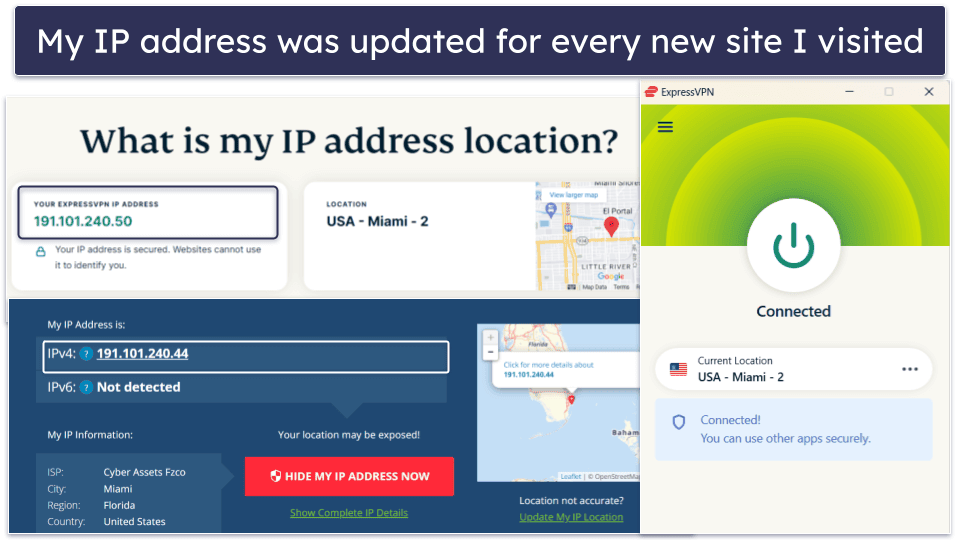
ExpressVPN has servers in 15+ US locations, spread evenly across the country, so you’ll always be able to find a nearby server for the best speeds. It also maintains excellent speeds thanks to its proprietary Lightway protocol, which is less resource-intensive on your device than other popular VPN protocols. All this makes ExpressVPN the fastest VPN out there.
ExpressVPN has excellent streaming support. It works with 100+ streaming platforms, including platforms available with Comcast Xfinity’s streaming plans, such as Peacock, Apple TV+, and Netflix. It also works with many other popular streaming apps like Hulu, Disney+, or HBO Max — it’s the best VPN for streaming currently on the market.
ExpressVPN also has good torrenting support. It allows P2P traffic on all its servers, including all its US server locations, and it works great with popular torrenting clients, like qBittorrent or uTorrent.
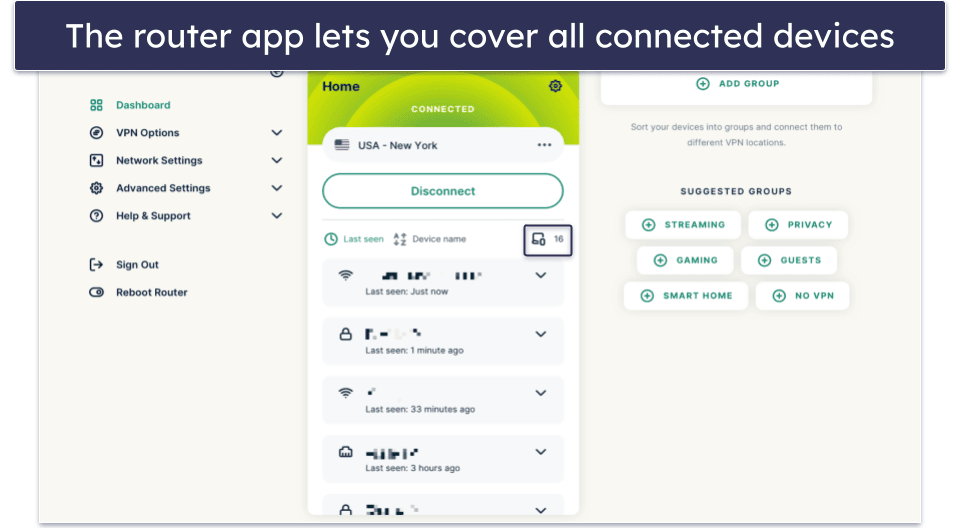
I also like ExpressVPN’s native router app, which is great if you’re using your own router instead of the Xfinity Wireless Gateway box. The router app is easy to configure, and it lets you protect all devices on your home network, including the ones without VPN support, such as gaming consoles or some smart TV models.
Bottom Line:
ExpressVPN is my top recommendation for Comcast Xfinity. It has strong privacy features, including ShuffleIP, and stops Xfinity from throttling your speeds or tracking your information. It has the best speeds on the market, excellent streaming and torrenting support, and a widespread server network across the US. It’s also one of the few VPNs with a native router app, which is great if you’re using your own router for Xfinity.
Read the full ExpressVPN review
🥈2. Private Internet Access — Servers in All 50 US States
6-month plan: $7.50 / month
1-month plan: $11.95 / month
Private Internet Access (PIA) has servers across all 50 US states. Because there’s at least one server in your state and each of the surrounding ones, you’ll always have plenty of options to choose from across the 40+ states with Comcast Xfinity coverage. I also really like how PIA shows every server’s ping in the server list, so you’ll be able to tell at a glance which server will get you a stable and fast connection.
- Servers in all 50 states
- 2 US streaming-optimized servers
- Port forwarding & SOCKS5 proxy
- US-based (bad privacy laws)
- No router app
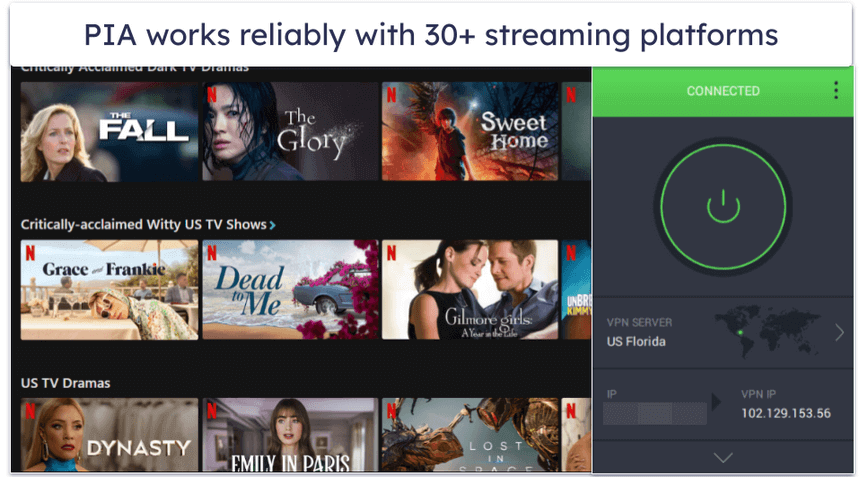
PIA has pretty good streaming support, as it works with 30+ streaming services. This includes platforms like Netflix, Hulu, Amazon Prime, HBO Max, and Disney+, among others. Moreover, PIA has two server locations (one on either coast) specifically optimized for reliable streaming.
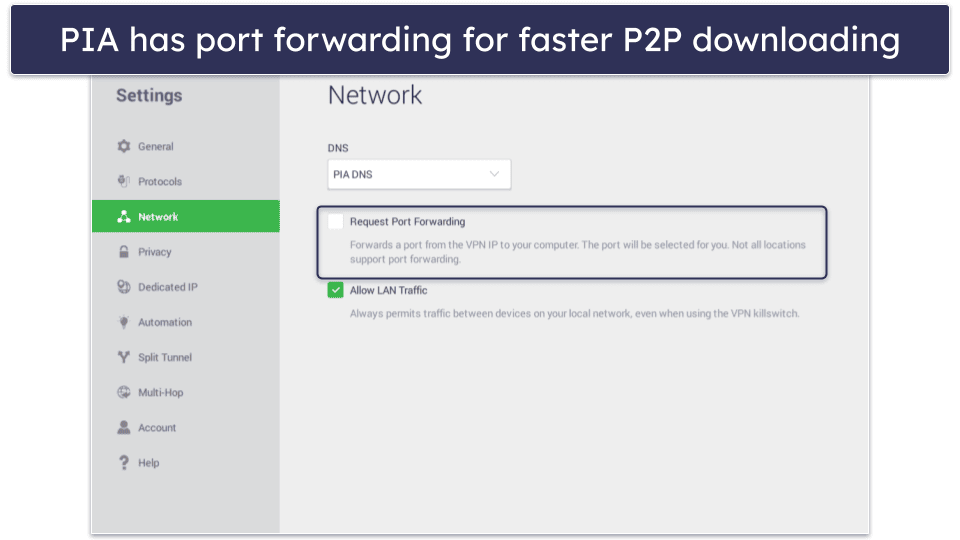
PIA is an excellent choice for torrenting, too — it’s among the best torrenting VPNs for Comcast Xfinity users. It allows torrenting on any server in its network and has multiple extras for torrenting, including port forwarding, which lets more peers connect to the swarm so you’ll have better downloading speeds, and SOCKS5 proxy support, which changes your IP but doesn’t use encryption, improving your download speeds.
It also has a great ad blocker called PIA MACE, which blocks trackers, ads, and connections to malicious websites. In my tests, it got rid of nearly all ads, which further improves your browsing speeds and page load times when using Xfinity.
Bottom Line:
Private Internet Access has servers in all 50 US states, so you can get the best speeds in any state with Comcast coverage while maintaining your privacy. It has great support for torrenting over Comcast Xfinity because it allows P2P traffic on all servers, and it even has port forwarding and SOCKS5 proxy support for better download speeds. It works with 30+ streaming platforms, and it has 2 streaming-optimized servers.
Read the full Private Internet Access review
Editor's Note: Private Internet Access and this site are in the same ownership group.
🥉3. CyberGhost VPN — Optimized Servers for Gaming with Comcast

6-month plan: $6.99 / month
1-month plan: $12.99 / month
CyberGhost VPN is an excellent VPN for gaming through Comcast Xfinity’s network. It has specialized servers that are optimized to provide low ping for gaming. They’re located in 4 countries, including the US.
- Optimized servers for gaming
- Automation features
- Good torrenting/streaming support
- Poor ad blocker
- Only 7 device connections
It also has optimized servers for torrenting across 85+ countries, including all of its servers in the US, so you can torrent without worrying Comcast will throttle your download speeds. It works with all popular P2P clients, but it doesn’t have other speed-boosting features like Private Internet Access. It’s also good for streaming with support for 50+ streaming platforms, such as Netflix, Hulu, and HBO Max.
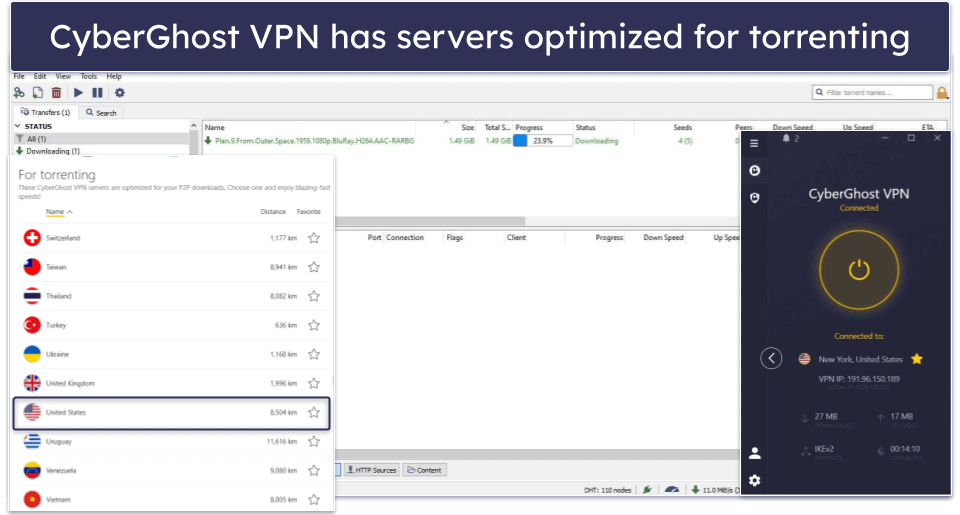
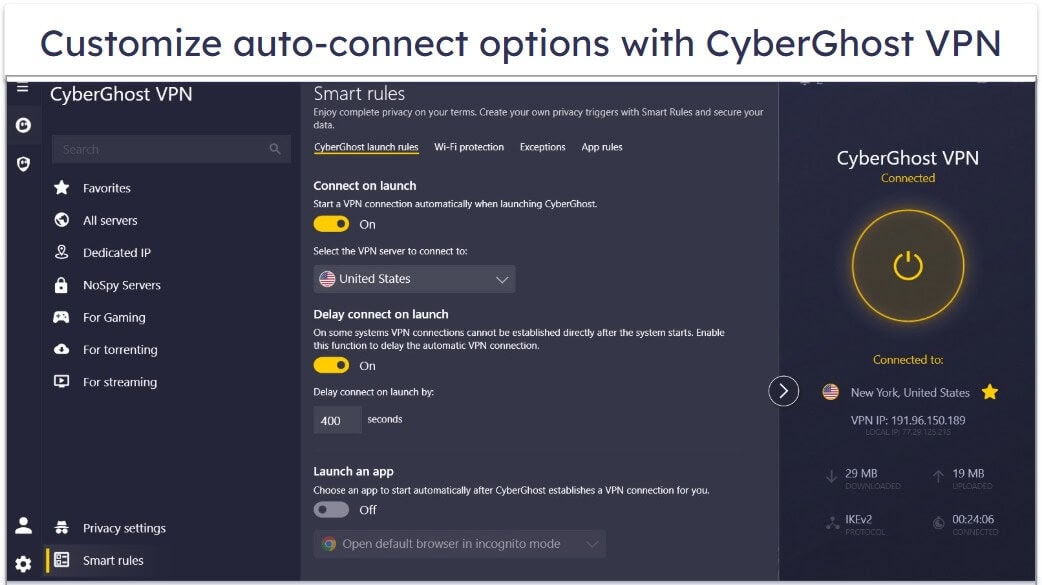
I really like CyberGhost VPN’s Smart Rules feature, which lets you set up automation rules for your connection. You can make CyberGhost VPN connect you to a server automatically when you launch the VPN app or another chosen app, such as your browser or torrenting client. This way, you can easily make sure that you don’t go online by accident without hiding your traffic from Comcast.
CyberGhost VPN has servers in 10+ locations across the US, including areas with a high degree of Comcast Xfinity cable coverage, such as Miami, New York, and San Francisco. Unfortunately, its ad blocker isn’t as good as Private Internet Access for blocking ads.
Bottom Line:
CyberGhost VPN has specialized servers for gaming, streaming, and torrenting securely and privately via Comcast Xfinity’s network. It also has a unique Smart Rules feature that automates your VPN connection and has 10+ server locations in the US for fast connections.
Read the full CyberGhost VPN review
Editor's Note: CyberGhost and this site are in the same ownership group.
4. NordVPN — Great for Remote Workers Using Comcast Xfinity
Plus 24-month plan: $3.59 / month
Complete 24-month plan: $3.99 / month
Prime 24-month plan: $6.99 / month
NordVPN is a great choice for remote workers using Comcast Xfinity thanks to Meshnet, a feature that lets you connect all your devices in a private, encrypted network. Meshnet makes it easy to share big files or a large number of files between your devices, and it also lets you remotely access connected devices. NordVPN encrypts this connection, so Comcast can’t monitor what you’re doing on these devices, which makes your work much more secure.
- Encrypts connection between devices
- Fast proprietary NordLynx protocol
- Good torrenting support
- Works with fewer streaming apps
- No port forwarding
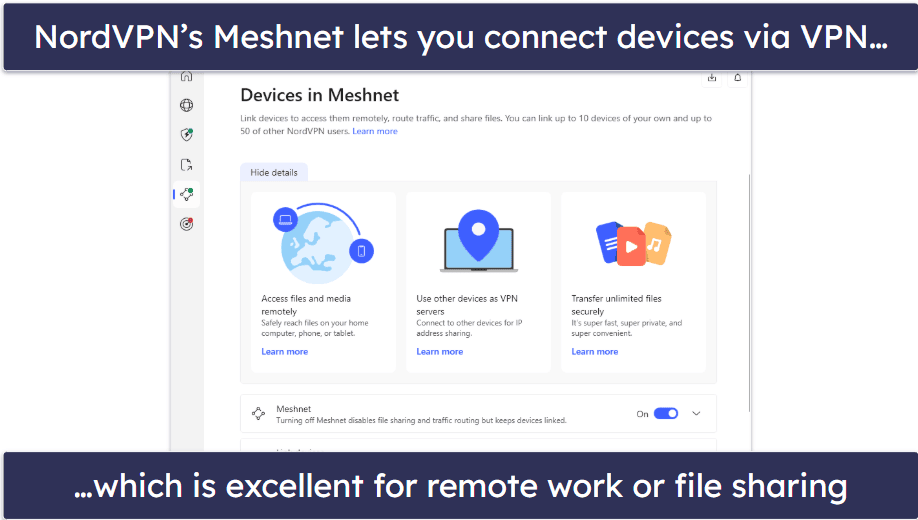
NordVPN has servers in 20 locations across the US, many of which are in places with high Comcast Xfinity coverage, like Atlanta, Denver, and the Northeast. Most users will have a nearby server for good speeds and stable connections. Moreover, NordVPN maintains high speeds thanks to its proprietary NordLynx protocol.
NordVPN has good streaming and torrenting support. It works great with 10+ streaming platforms, like Hulu, Tubi, or ESPN+, but this is nowhere near as good as ExpressVPN, which supports 100+ streaming platforms. It allows torrenting on almost all of its servers, and this includes every server it has in the US, but it doesn’t have port forwarding.
Bottom Line:
NordVPN lets you connect your devices to an encrypted network for private file transfer that Comcast can’t monitor. It’s also good for remote work, as it lets you remotely access files on connected devices. Its server network is well-spread across the US, and it has decent streaming support. It allows torrenting on all 20 of its US server locations.
5. Surfshark — Beginner-Friendly VPN for Comcast Xfinity

One 24-month plan: $2.49 / month
One+ 24-month plan: $4.19 / month
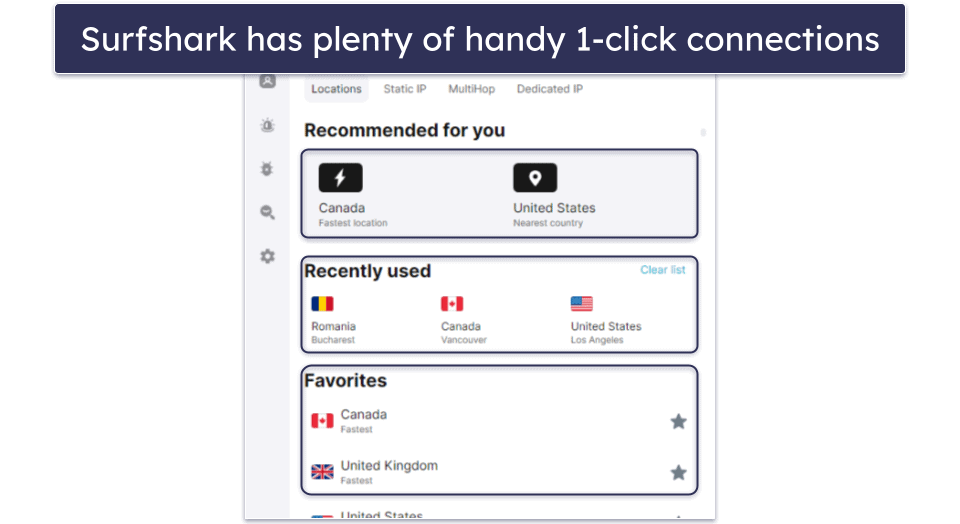
Surfshark is great for Comcast Xfinity users who don’t have a lot of experience with VPNs. I like how its apps have a lot of useful quick-connect options. For example, you can set it up to connect you to the fastest nearby server in 1 click. Also, it lets you set servers as Favorites, which pins them to the top of the server list for easy access. All of its features also have explanations, so you know how to use everything.
- Easy-to-use apps
- Works with 50+ streaming apps
- Decent US server coverage
- Doesn’t allow P2P on all US servers
- Only has DNS leak protection
Surfshark has pretty good streaming support. It works with 50+ streaming platforms, including Netflix, Disney+, and Hulu. It stops Comcast Xfinity from throttling your speeds while streaming, and it also has pretty decent speeds, especially on nearby US servers, but it’s not as fast as ExpressVPN.
It has good torrenting support, too. It allows torrenting on most of its 20+ US server locations, and it works with popular P2P clients. But Private Internet Access is way better for torrenting.
Bottom Line:
Surfshark has very intuitive, easy-to-use apps for Comcast Xfinity users without VPN experience. It has plenty of 1-click connections, and it has servers in 20+ US cities. It works with 50+ streaming apps, and it has decent streaming speeds. It works with popular P2P clients, and it allows torrenting on most of its US server locations.
Read the full Surfshark review
Quick Comparison Table
Editor's Note: Intego ONE, Private Internet Access, CyberGhost and ExpressVPN are owned by Kape Technologies, our parent company.
Testing Methodology: Comparison & Ranking Criteria
I followed the tried-and-true SafetyDetectives VPN testing methodology to pick the best VPNs for Comcast Xfinity in 2026. I looked at various important metrics to determine how good each VPN is for Comcast users, including speeds, security, ease of use, and server coverage. Here are the main criteria I used to rank the tested VPNs:
- I measured each VPN’s speeds. All VPNs inherently introduce some degree of slowdown into your connection because of the resource-intensive encryption process. All the VPNs I recommend here have good speeds on US servers, but ExpressVPN is the fastest one.
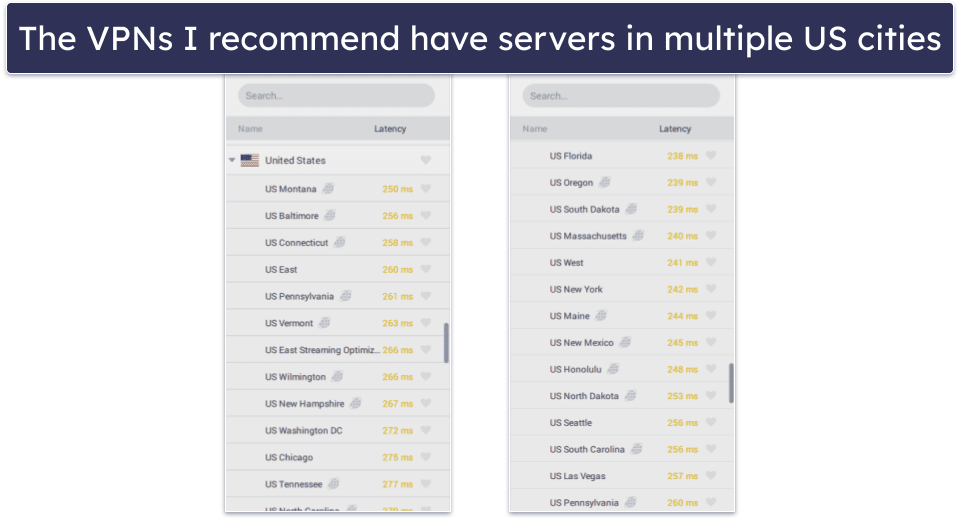
- I looked for VPNs with good server coverage in the US. The VPNs I recommend here have servers in multiple cities across the US, so you’re likely to have a server nearby for the fastest speeds and lowest latency.
- I picked VPNs with strong security. The VPNs I recommend here all have industry-standard security features, such as 256-bit AES (an encryption standard used by militaries), a kill switch to prevent data leaks, and a strict no-logs policy, so they don’t track what you do online.
- I looked for VPNs with great streaming support. The VPNs on this list reliably work with many US streaming platforms. They also prevent Comcast from throttling your speeds while streaming.
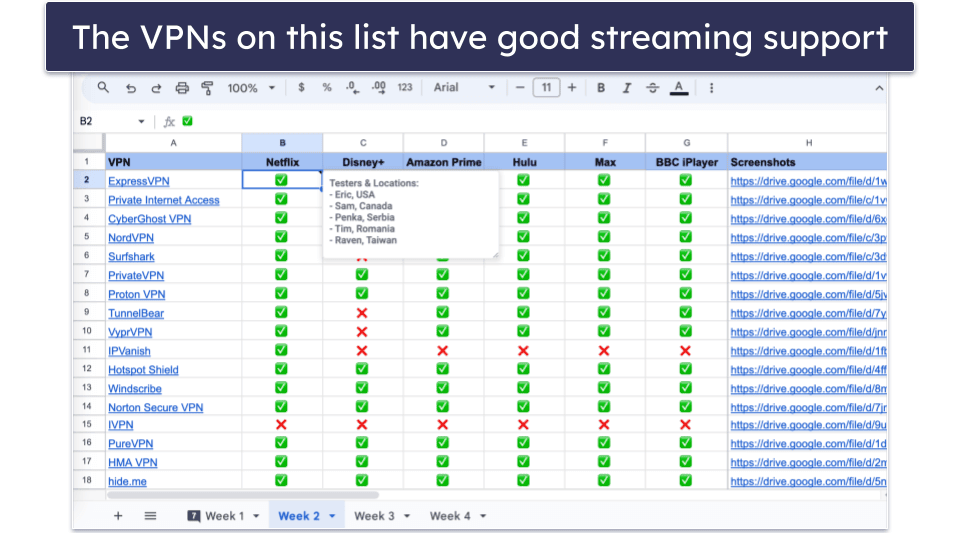
- I evaluated every VPN’s overall value. The VPNs I discuss here all allow multiple simultaneous connections, and come with plenty of extra features. Additionally, each of them backs subscriptions with a money-back guarantee.
Top Brands That Didn’t Make the Cut
- Mullvad VPN. Mullvad VPN has very strong security and privacy features to hide your online activities from Comcast, but it’s not very good for streaming and is more expensive.
- TunnelBear. It’s a user-friendly VPN with a fun interface, but it’s somewhat slower than the VPNs I recommend here. It also doesn’t have router support or a money-back guarantee.
- PrivateVPN. It’s an affordable and simple VPN, which is good if you want a no-frills option. But, that means it has fewer useful features for keeping your activities private than the VPNs I recommend here.
Frequently Asked Questions
Will using a VPN reduce my speeds via Comcast Xfinity?
All VPNs introduce a slowdown to your connection speeds because of the encryption process that keeps your online traffic private. However, the VPNs I discuss here all reduce this slowdown to a minimum and maintain very good speeds.
Taking into consideration Comcast Xfinity’s history with throttling user speeds, especially for activities like streaming or torrenting, you’ll likely have better speeds with a VPN than without one. This is because the encryption process stops Comcast from seeing that you’re engaging in online activities that it would typically throttle.
Does Comcast Xfinity block VPN traffic?
There’s no evidence that’d suggest Comcast is intentionally blocking VPNs, even if some users have issues with their VPNs on Comcast Xfinity. The top VPNs I recommend here should have no problems working with Comcast Xfinity’s network.
If you’re experiencing issues using a VPN on Comcast Xfinity’s network, the issue is likely with your local network or your device’s firewall settings.
Can I set up a VPN on my Xfinity Wireless Gateway?
No, because the router component of Xfinity’s wireless gateway box doesn’t support VPNs. You can, however, set it to Bridge mode and connect your own router with VPN support to it.
All the VPNs I recommend here can be configured on a router to protect all connected devices. ExpressVPN even has a native router app that’s super easy to set up and provides insanely fast speeds for all devices using the connection.
Can I use a free VPN for Comcast Xfinity?
You could, but I don’t recommend it. Many free VPNs are too limited — they typically have slow speeds, even if they stop Comcast from throttling your connection. They also often have weak security, data caps, and poor streaming support. You’re much better off with a premium VPN, like ExpressVPN, which has the best speeds on the market, high security, and excellent streaming support.
Editor's Note: ExpressVPN and this site are in the same ownership group.