

Published on: June 4, 2023 Updated 4 times since publishing
Only 3 Steps (Quick + Easy) to Watch Sky Go With a Free VPN in 2026:
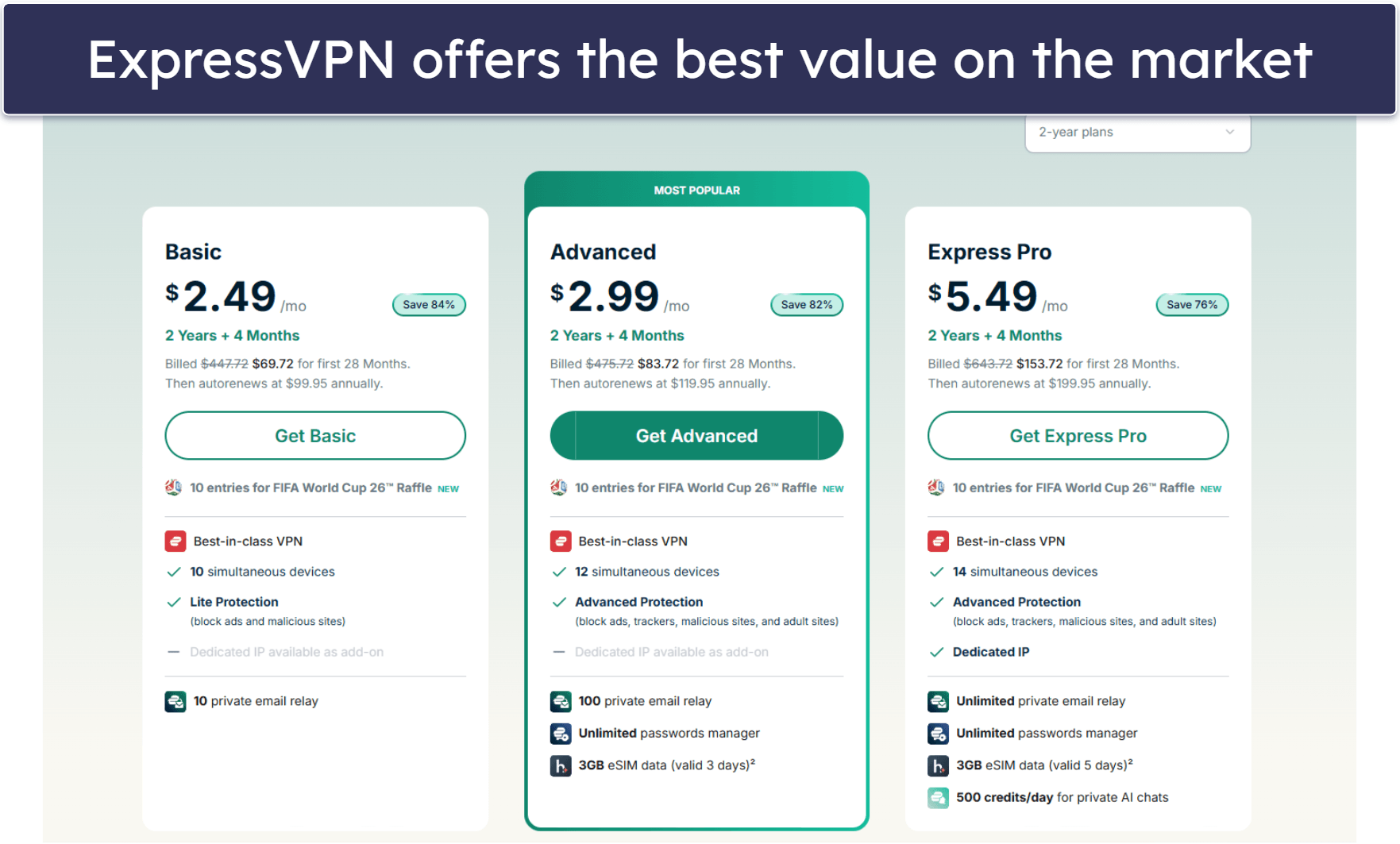
- Get a VPN that works with Sky Go. I recommend ExpressVPN — it’s not free, but it has a risk-free 30-day refund for first-time users and affordable prices. Also, it has lightning-fast speeds that are great for streaming.
- Connect to a server. Launch the VPN app and choose a nearby server for the fastest speeds.
- Log into your Sky Go account. That’s it! You can now watch your favorite channels on Sky Go securely.
There aren’t many good free VPNs for watching Sky Go. Most free VPNs don’t support streaming, and many of the ones that do don’t work with the streaming platform. On top of this, many free plans don’t offer servers in the UK, come with very restrictive data caps, throttle your speeds, and/or have poor security features.
The best VPN I’ve found for streaming Sky Go content is ExpressVPN. Although it doesn’t have a free plan, it has blazing-fast speeds, top-tier privacy and security features, and user-friendly apps for all major platforms. Additionally, every subscription comes with a 30-day money-back guarantee, so you can test it out and get a full refund if you find that it doesn’t suit your needs — no questions asked.
Editor’s Note: While all VPNs I recommend below don’t monitor or log your Sky Go activities, we urge you to follow all applicable rules and regulations and to use a VPN responsibly. My colleagues and I at SafetyDetectives do not condone copyright infringement.
Editor's Note: ExpressVPN and this site are in the same ownership group.
How to Watch Sky Go Content on Any Device
1. Select a VPN that supports Sky Go.
I think ExpressVPN is an excellent choice, as it can access Sky Go without issues and provides high-speed connections for smooth streaming without buffering.
2. Install the VPN on your preferred device.
Head over to the VPN provider’s website or your device’s app store to download the right app for your device. The installation process typically takes just a couple of minutes to complete.

3. Connect to a server in the VPN app and start watching Sky Go.
You’ll now be able to securely stream Sky Go’s vast selection of shows, movies, and live sports.

Quick Summary of the Best Free VPNs for Watching Sky Go Content in 2026


🥇1. ExpressVPN — Best Overall VPN for Watching Sky Go in 2026

Basic 12-Months plan: $3.99 / month
1-month plan: $12.99 / month

ExpressVPN is my favorite VPN for watching Sky Go. While it doesn’t have a free plan, it has reasonable prices and a 30-day money-back guarantee, so you can try it out risk-free. Not to mention, it’s currently ranked as the best VPN for streaming in 2026. Plus, it works with Sky Go 100% of the time.
This provider has 5 server locations in the UK, so you can easily find a server that’s closest to your location for the best possible speeds. ExpressVPN offers servers in London, East London, Wembley, Docklands, and Midlands.
ExpressVPN is one of the only VPNs with a dedicated router app, so you can also stream Sky Go content on devices such as Apple TV, PlayStation, and Xbox that don’t support VPNs. If you don’t want to go through the trouble of installing the VPN on your router, you can set up its smart DNS tool, called MediaStreamer, which allows you to use the VPN on devices that don’t natively support VPNs (like Apple TVs).
Read our full ExpressVPN review
🥈2. hide.me — Unlimited Data for Watching Sky Go

12-month plan: $4.58 / month
1-month plan: $11.99 / month
hide.me is the best totally free VPN for streaming Sky Go. It has unlimited data (with no ads!), so you can stream as many shows and movies as you want. Plus, it has a free server in the UK for accessing Sky Go that you can set as your default location.
Though it restricts its speeds on the free plan to “medium”, it’s still plenty fast enough for streaming in HD quality with hardly any buffering. Upgrading to the paid plan gives you Bolt, hide.me’s proprietary, super fast protocol.
The apps are really user-friendly with a clean interface and a simple settings menu that makes it easy to find, activate, and adjust any features and settings. I also really like that split-tunneling is included in the apps for free since it might give you faster speeds for streaming if only Sky Go is being routed through the VPN.
hide.me’s paid plans provide access to all servers and features and unlimited speeds.
🥉3. Windscribe — Great Free VPN for Watching Sky Go

1-month plan: $9.00 / month
Build A Plan: $3.00 / month
Windscribe is one of the few VPN providers that support streaming on its free plan, has free servers in the UK, and works with Sky Go. And, it offers up to 10 GB of data per month if you confirm your email address, which is good for about 10 hours of streaming in HD.
But, I like that Windscribe’s apps are user-friendly. You can easily find and connect to the UK server, and there’s a convenient option that allows you to configure the VPN to connect to the last used location when you launch the VPN app. On top of that, you get unlimited connections with the free plan, so you can use Windscribe on as many devices as you want without having to log out.
Windscribe’s premium plans get you access to servers in 69 countries, a customizable ad blocker, and unlimited data.
Read our full Windscribe review
Quick Comparison Table
How to Choose the Best Free VPN for Watching Sky Go in 2026
- Look for a VPN with servers in the UK. Free VPNs don’t always have servers in the UK. But all of the VPNs on my list come with servers in the UK.
- Get a VPN that works reliably with Sky Go. All of the VPNs on my list work all of the time with Sky Go.
- Search for a VPN with quick speeds. Due to the encryption process, all VPNs will inevitably slow down your connection speeds, and some free VPNs will throttle your speeds, too. The VPNs on my list deliver high speeds for uninterrupted streaming, with ExpressVPN being the quickest.
- Choose a VPN with strong security and privacy features. A good VPN should come with industry-standard security features, such as 256-bit AES encryption, a strict no-logs policy, and a kill switch that disconnects you from the internet if your VPN connection drops to prevent accidental data leaks.
- Pick a VPN with a high data cap. A lot of free VPNs limit how much data you can use per day or per month. Streaming in 720p can use up to 1 GB of data per hour, so you definitely want to pick a VPN with a generous data allowance.
- Select a VPN with user-friendly apps. The VPNs on my list have intuitive apps for all major platforms, including iOS, Android, Windows, and macOS. ExpressVPN even has a dedicated router app, which makes it easy to stream on devices without native VPN apps, such as gaming consoles and certain smart TVs.
- Consider getting a VPN that provides great value. I only recommend VPNs that support multiple simultaneous connections, work with other top streaming sites (like Netflix, Amazon Prime, and Disney+), and come with extra features, like split-tunneling. The VPNs on my list also have reasonably priced premium plans and deals and money-back guarantees.
Frequently Asked Questions
Can I watch Sky Go with a free VPN?
Yes, you can, but I don’t typically recommend free VPNs. Very few free VPNs support streaming and have servers in the UK. They also often come with restrictive data limits or speed limits, and I really don’t like that some lack basic security features and can even sell your data to third parties.
You’ll save yourself a lot of trouble by going with a paid VPN like ExpressVPN instead. It consistently works with Sky Go, is the fastest VPN on the market, provides high-end privacy and security features, and has no data limits.
Does ExpressVPN work with Sky Go?
Yes, ExpressVPN is the best VPN for watching Sky Go. It has 5 server locations in the UK, works consistently with Sky Go, maintains ultra-fast speeds that are excellent for streaming, and includes top-notch security and privacy features. On top of that, ExpressVPN has user-friendly apps for iOS, Android, Windows, and macOS, and is one of the only VPNs with a dedicated router app, which makes it easier to use a VPN on devices that don’t have native VPN apps, such as gaming consoles or certain smart TVs.
Is Sky Go free?
Not exactly. The Sky Go streaming platform is included for free as part of your Sky TV subscription, but you do have to pay for a Sky TV subscription.
Editor's Note: ExpressVPN and this site are in the same ownership group.
