Published on: April 13, 2023 Updated 6 times since publishing
Only 3 Steps (Quick + Easy) to Watch F1 From Anywhere in 2026:
- Get a VPN that works with F1 streaming platforms. I highly recommend ExpressVPN, as it ticks all the boxes: it has lightning-fast speeds for uninterrupted streams, a large server network, and easy-to-use apps.
- Connect to a VPN server. Open the VPN app and select a server location.
- Log into the platform that carries F1. Find the F1 stream and enjoy the Grand Prix live.
I love watching the F1 races, but unfortunately, the races aren’t available everywhere. Instead, the platforms that have licensing agreements to stream the races restrict where they can be viewed in different countries. They use your IP address to determine your location to find out if you can watch the races or not.
A VPN is an online tool that gives you another IP address from a new location, thereby hiding your actual location. This allows the VPN to access lots of different streaming platforms that show F1 races from anywhere.
If you want to use a VPN to protect your privacy while streaming F1 races, I found some good options. The below 3 providers consistently work with F1 streaming sites. My No. 1 pick is ExpressVPN because it’s super fast, user-friendly, and has a large server network.
Editor’s Note: The VPNs we suggest below follow no-logging policies, so they don’t record or see whether you’re watching F1 races. How you use a VPN is up to you, meaning you’re responsible for following all relevant rules and regulations. The team and I at SafetyDetectives stand firmly against copyright infringement.

Editor's Note: ExpressVPN and this site are in the same ownership group.
How to Watch F1 Content on Any Device
1. Pick a good VPN that works with sites that stream F1.
I think ExpressVPN is the best pick since it works with 100+ streaming platforms, including all of the ones that broadcast F1 races.
2. Download and install the VPN provider’s apps.
Get the VPN installer from the VPN’s website or download its app from your device’s app store. Then, follow the on-screen instructions to set up the VPN client.

3. Launch the VPN app and choose a VPN server.
Once connected, you can securely watch F1 races on all of your devices.

What Streaming Services Show F1?
Quick Summary of the Best VPNs for Watching F1 in 2026


🥇1. ExpressVPN — Best VPN for Watching F1 in 2026

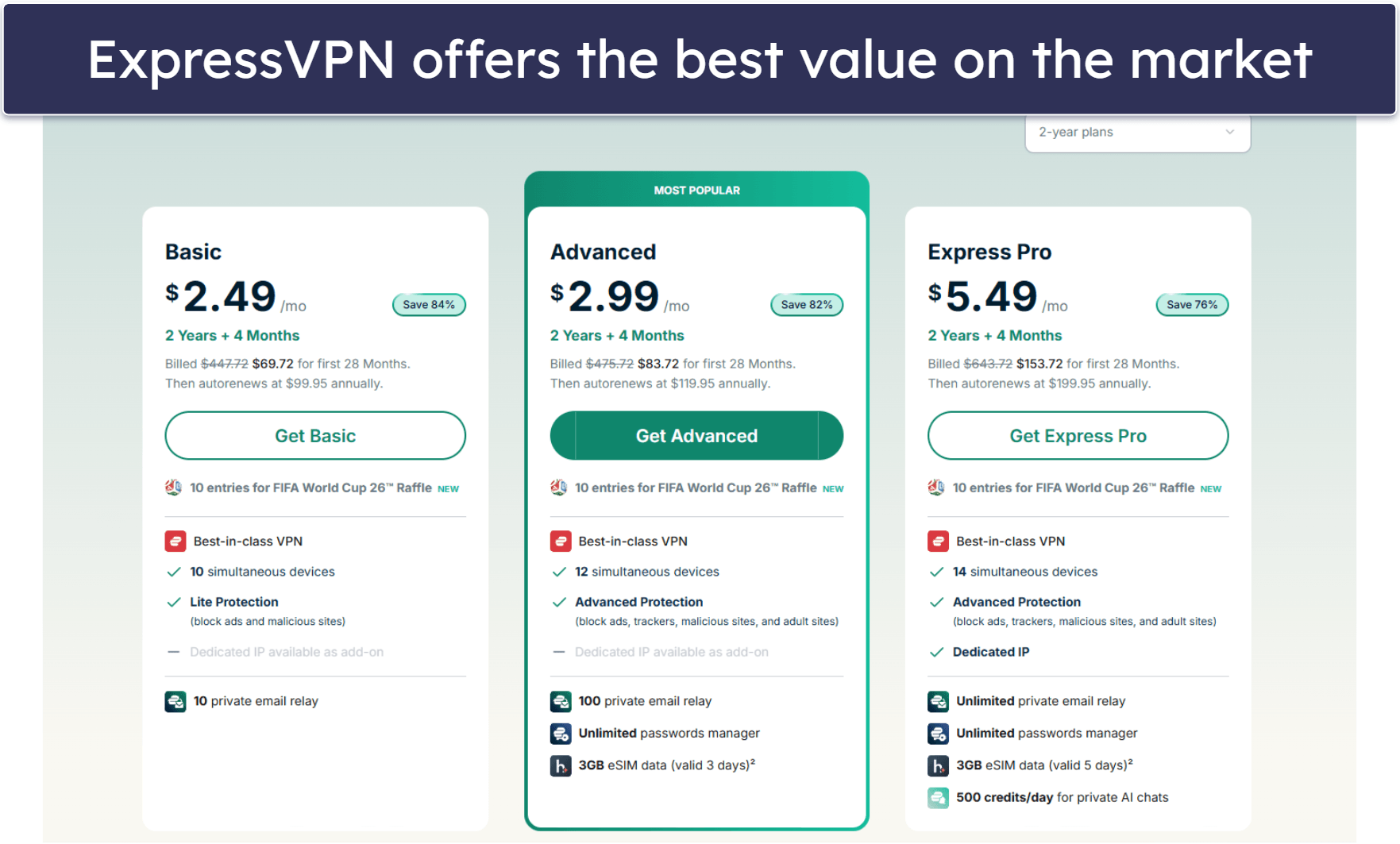
Basic 12-Months plan: $3.99 / month
1-month plan: $12.99 / month

ExpressVPN is the best VPN for streaming Formula 1 because it works with all channels and platforms that broadcast the Grand Prix weekends, including ESPN, Sky Sports, and F1 TV. Plus, it provides the best value — and it’s why it takes the no. 1 slot for the best VPNs in 2026.
It offers the fastest and most stable VPN servers on the market, thanks to its proprietary Lightway protocol, which means you won’t lose your connection mid-race. Plus, it constantly refreshes its IP addresses so it doesn’t get flagged by streaming services.
I really like that ExpressVPN has a smart DNS tool, called MediaStreamer, which lets you stream races on devices that don’t natively support VPNs, like some smart TVs and gaming consoles. Better still, it provides a native router app, so configuration is much easier compared to the manual setup you’d have to do with most other VPNs to watch races on a big screen.
Read our full ExpressVPN review
🥈2. Private Internet Access — Good for Streaming F1 on Your Mobile Devices

6-month plan: $7.50 / month
1-month plan: $11.95 / month
Private Internet Access (PIA) is a great option for streaming F1 on the go. It works with all platforms that show the F1 weekends, such as YouTube TV and Hulu. It has highly configurable apps and lets you enable “Use Small Packets” to reduce IP packet size, which will improve mobile network connection stability if you’re streaming F1 on the go.
Plus, its mobile apps sort the servers in order of latency, so the fastest ones are at the top. And I like that all PIA apps display color-coded ping metrics next to each server so you can decide which is the fastest server to connect to in any specific location.
Read our full Private Internet Access review
🥉3. CyberGhost VPN — Beginner-Friendly Apps + Streaming-Optimized Servers for Watching F1

6-month plan: $6.99 / month
1-month plan: $12.99 / month
CyberGhost VPN has streaming-optimized servers that offer fast and reliable F1 streams. These servers work with over 50 streaming apps, including those that carry the entire F1 season, such as YouTube TV, ESPN, and Channel 4. These servers regularly change their IP addresses, so it’s hard for streaming sites to detect and block them.
CyberGhost is a great VPN for beginners. I really like its Smart Rules feature, which is great for automating your connections. For example, it allows you to configure the VPN so that it automatically connects you to a specific streaming server and starts a streaming app for watching F1 on launch.
Read our full CyberGhost VPN review
Editor's Note: Intego ONE, Private Internet Access, CyberGhost and ExpressVPN are owned by Kape Technologies, our parent company.
Quick Comparison Table
Editor's Note: Intego ONE, Private Internet Access, CyberGhost and ExpressVPN are owned by Kape Technologies, our parent company.
Testing Methodology: Comparison & Ranking Criteria
I used our proven testing methodology to guarantee I only recommend the top VPNs for watching F1 races. I tested each one in several real-life scenarios to determine streaming support, connection speeds, ease of use, security and privacy, and overall value. Each VPN passed every criterion, and they each represent the best options currently on the market. Here are all of the testing criteria I employed:
- I looked for a VPN with top-notch F1 streaming support. All VPNs on my list work well with channels and platforms that broadcast F1 races, including ESPN, Sky Sports, and F1TV.
- I picked only VPNs that offer fast streaming speeds. All VPNs slow down connection speeds due to the encryption process. But with top VPNs, you won’t notice any latency. Every VPN I recommend is very fast, but ExpressVPN is the fastest on this list.

- I ensured that the VPNs are easy to use. Each VPN on my list is user-friendly and makes it very simple to find a server and connect to it.
- I checked for good security features. A great VPN comes with industry-standard security features, including a kill switch that automatically stops your internet connection if the VPN connection drops, a strict no-logs policy that ensures the VPN provider won’t collect, store, or track any user’s online activity or personal information, military-grade 256-bit AES encryption, and strong IP and DNS leak protection.
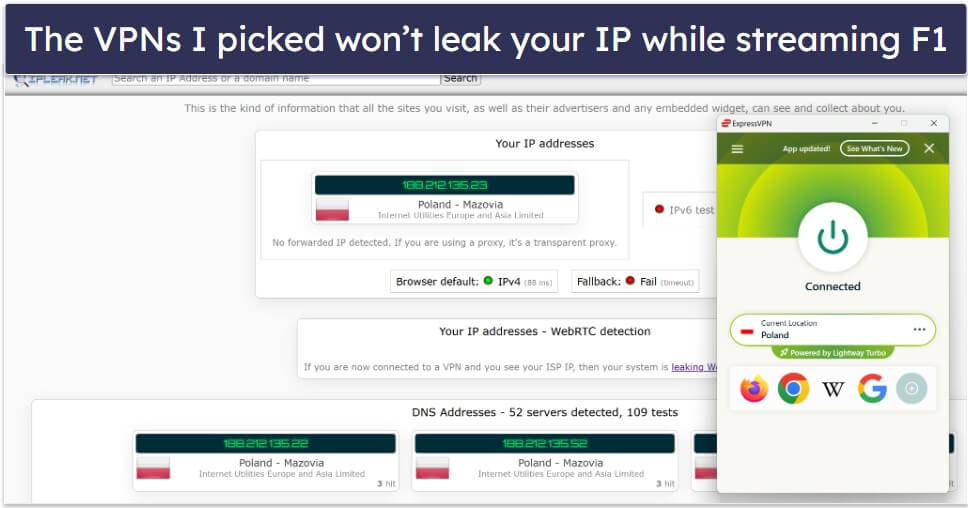
- I selected only VPNs that offer good value. I only recommend VPNs that come with extra features like split-tunneling, allow multiple simultaneous connections (Private Internet Access lets you connect an unlimited number of devices), are budget-friendly, and offer a money-back guarantee.
Troubleshooting & Tips for Streaming F1
If your chosen F1 stream isn’t performing at its best, here are a few quick solutions you may want to try.
- Improve connection stability. Use a wired Ethernet connection when possible, or move closer to your router to reduce interference. If you’re using a mobile connection, you can try turning off all unnecessary background apps or services.
- Adjust stream quality settings. Many platforms allow you to manually set the resolution; lowering it slightly can help prevent buffering during peak times.
- Use a high-performance VPN server. Connecting only to fast, nearby VPN servers can reduce congestion and improve connection quality, especially on public or crowded networks, which are already slow to start with.
- Restart your router & device. A simple reboot often fixes hidden connectivity issues and refreshes your Wi-Fi or wired connection.
- Limit background bandwidth use. Pause large downloads, cloud backups, or other high-bandwidth-using apps while streaming.
- Try different devices or apps. Sometimes switching from a browser to a dedicated F1 streaming app (or vice versa) will provide better streaming quality.
Formula 1 2026 Season Schedule
Frequently Asked Questions
What is the best VPN to watch F1?
My favorite VPN for watching F1 races is ExpressVPN. It works with all platforms and channels that broadcast the Grand Prix weekends, offers the fastest speeds, and has easy-to-use apps.
Is F1 included in ESPN+?
Yes, ESPN+ broadcasts F1 races, but you might not be able to watch all races during the season with an ESPN+ subscription. That said, you can watch all F1 practice and qualifying sessions, races, and additional F1 coverage (like post-race interviews) on the ESPN channel.
If you want to safely watch F1 with ESPN with a VPN, I recommend ExpressVPN because it includes high-end security features, it works with ESPN platforms, it has the fastest streaming speeds on the market, and it also comes with very intuitive apps for all platforms.
How can I watch F1 on Amazon Prime?
Unfortunately, Amazon Prime doesn’t air F1 races. This is because of strict licensing agreements. However, F1 is available on dozens of platforms like Sky, Viaplay, TSN+, Kayo, and many more.
Is there any way to watch F1 live for free?
A few services stream F1 for free, like RTBF, ServusTV On, and ORF ON. However, most streaming platforms that air the F1 races are paid services. Still, you might be able to watch a race or two with a free trial from one of the platforms streaming the races.
Will using a VPN affect my F1 streaming quality?
Not much, as long as you are using a fast VPN. All VPN connections inherently slow down your internet connection speed, as encryption takes time. That said, if you have a reasonably fast internet connection to start with, and you’re using one of my recommended VPNs, it shouldn’t affect your streaming speed enough to make a noticeable difference.
How can I improve streaming quality during peak F1 race times?
There are several things you can do to improve your F1 streaming quality, including using a wired Ethernet connection (if available) or reducing the resolution of the stream.
Alternatively, if you use a VPN to avoid ISP throttling, like ExpressVPN, you’ll get better streaming quality since it provides an incredibly fast Lightway protocol, unlimited bandwidth, and super-fast 10 Gbps servers.
Editor's Note: ExpressVPN and this site are in the same ownership group.