

AceVPN Review: Quick Expert Summary
AceVPN isn’t a good VPN, and I recommend that you avoid downloading this app. While it has 256-bit AES encryption and DNS and WebRTC leak protection, it’s missing a ton of essential and advanced security and privacy features I expect in a top-notch VPN.
For starters, it lacks a kill switch, which is a must-have security feature, it’s no-logs policy hasn’t been independently audited, and there are no advanced security features like RAM-only servers, IPv6 leak protection, and perfect forward secrecy. In addition, you don’t get any useful extra features like split-tunneling or an ad blocker.
AceVPN also doesn’t have dedicated apps, meaning you need to manually configure third-party apps, which is both time-consuming and inconvenient. AceVPN only has servers in 26 countries, it only has 1 dedicated P2P server, and it’s terrible for streaming. Full server access is only available on its (overly expensive) upgraded deal; users on the basic offer only have access to servers in 3 countries.
AceVPN also only lets you connect 1 device, which is terribly below the industry-standard of 5-10 devices, it’s expensive, and it only has a 7-day money-back guarantee (the industry standard is 30 days). Honestly, there are much better VPNs out there in 2026 that have excellent security features, very fast speeds, good streaming capabilities, and easy-to-use native apps.
AceVPN Full Review — Very Bad (Lacks Vital Features & Not User-Friendly)
I spent a couple of weeks using and testing AceVPN to see if it’s any good, and I can safely say it’s one of my least favorite VPNs out there.
It’s missing a kill switch, it doesn’t have native apps, it doesn’t work with streaming sites, and it only has 1 P2P server. It also has very slow speeds, lacks a bunch of other security features offered by other VPNs, and is overpriced.
Honestly, there are significantly better VPNs out there — for example, ExpressVPN and Private Internet Access come with native user-friendly apps, excellent security features, very fast speeds, excellent streaming and torrenting support, and a far more reasonable price tag.
AceVPN Plans & Pricing — Too Expensive & Very Short Money-Back Guarantee
AceVPN has 2 paid tier-based subscriptions starting at $3.89 / month for the 3-year deal. The 2 tiers, Premium VPN and Ultimate VPN, are available on a 1-month, 3-month, 6-month, 1-year, 2-year, or 3-year subscription. There’s also a free plan you have to apply for.
AceVPN doesn’t allow simultaneous connections, so you can only use the VPN on 1 device (most top VPNs allow 5–7 simultaneous connections).
The Premium VPN subscription comes with all of AceVPN’s standard features, but it only allows access to servers in 3 countries (the US, the UK, and France, totaling 26 locations), and it doesn’t include access to the 1 P2P server.
The Ultimate VPN subscription includes all the Premium VPN features, plus the full range of servers in 26 countries and 50+ locations, P2P support, and free remote installation.
AceVPN’s Ultimate VPN deal is considerably more expensive than other top VPNs like ExpressVPN, Private Internet Access, and CyberGhost VPN — which are not only much cheaper but much better.
AceVPN’s Premium VPN offer has a more comparable price to other top VPNs, but it’s a far worse value. Also, I was very unimpressed to see that the prices AceVPN promotes on its site aren’t accurate — I tested this a few times from different locations, and the price is always higher when you get to the checkout page.
The Free VPN plan comes with conditions: you have to apply for it and show that you’re either a journalist, activist, blogger, or webmaster. If you’re a blogger or webmaster, you have to create a backlink on your website — you basically write a review of AceVPN on your website and point a link in the review to AceVPN.com. I don’t know how you’re supposed to write a review when you don’t have access to the VPN yet. In any case, the free plan appears to use the same protocols and servers as the Premium VPN offer, meaning it’s available in only 3 countries, and it doesn’t support torrenting.
AceVPN only accepts payments via PayPal or mailed checks, which I find odd as well as inconvenient. Most top VPNs also accept credit cards and cryptocurrencies.
AceVPN backs all purchases with a 7-day money-back guarantee, which is far less than the industry standard of 30 days. What’s more, AceVPN charges an additional fee to process refunds, which is something I’ve never seen a VPN do!
Overall, AceVPN is too expensive, doesn’t provide a good value, and has a very short money-back guarantee. Other VPNs like ExpressVPN, Private Internet Access, and CyberGhost VPN are much more affordable, provide a far better value, and have generous refund policies.
Here’s a quick overview of AceVPN’s deals:
AceVPN Features — Some Decent Features, but It’s Missing a Kill Switch
AceVPN has these industry-standard security features:
- 256-bit AES encryption — Bank-grade encryption to secure your data.
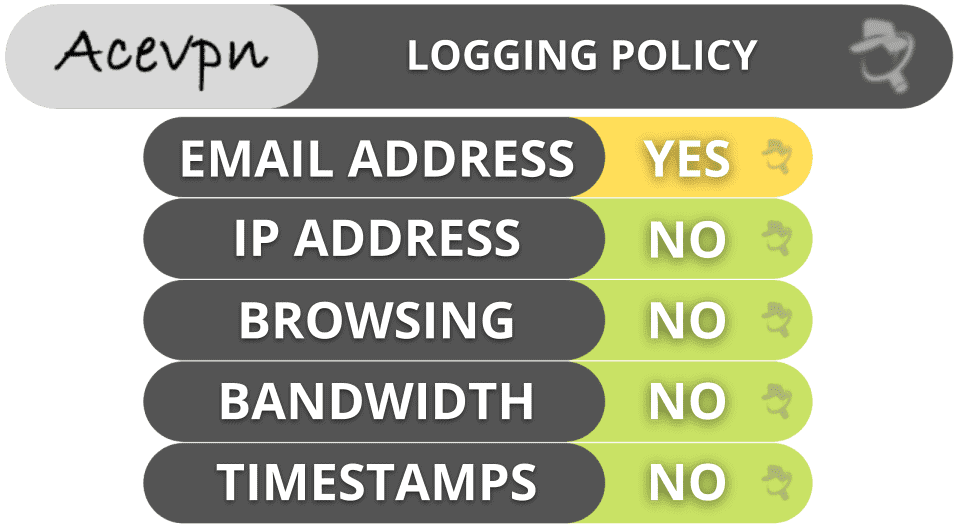
- No-logs policy — AceVPN doesn’t log your traffic (visited sites and downloaded files) or IP address.
However, AceVPN is missing a built-in kill switch, which is an essential security feature that protects you from accidental data leaks if you lose your connection to the VPN. You can manually set up a kill switch, but that’s extremely inconvenient.
AceVPN allows manual setups with multiple VPN protocols including OpenVPN, IKEv2/IPSec, PPTP, and L2TP/IPSec, but it doesn’t allow a WireGuard setup (which is faster than all the other protocols).
AceVPN also has a Stealth VPN — a protocol that provides obfuscation (hides your VPN traffic). However, I couldn’t test this protocol because I couldn’t perform the manual setup (I kept getting an error when I tried to download the “Stealth VPN” server files).
AceVPN does have DNS and WebRTC leak protection, but it’s missing IPv6 leak protection (you need to manually disable it). However, I ran 10+ leak tests and didn’t see any leaks.
Overall, AceVPN has some decent standard security features (encryption, no-logs policy, DNS and WebRTC leak protection), but the lack of a kill switch — which is an essential security feature — is a big problem for me. It’s also missing a number of other features that most top VPNs offer, including split-tunneling, Tor support, ad blockers, perfect forward secrecy, and more.
Other top VPNs like ExpressVPN and Private Internet Access come with all essential and industry-standard security features (including built-in kill switches) as well as advanced security features like RAM-only servers and full leak protection.
AceVPN Privacy & Security — US-Based, With a Very Basic No-Logs Policy
AceVPN has a very basic no-logs policy that says it doesn’t log your IP address or traffic (the websites you visit and the files you download). However, unlike ExpressVPN’s no-logs policy, this hasn’t been independently audited — and honestly, I’d have a much easier time trusting AceVPN’s no-logs policy if it had been audited.
AceVPN collects your email address and payment information (needed on signup), but I don’t like that it also asks for your physical address, a phone number, and full name. That said, I typed in fake information and AceVPN accepted it, so I didn’t ultimately need to provide these details.
AceVPN has a transparency report that discloses if it has received any government requests for user data. So far, it’s had 0 requests.
AceVPN is headquartered in the US, which is a member of the 5/9/14 Eyes Alliances (a group of countries that share surveillance data). Generally speaking, this is bad news for a VPN in terms of your privacy, but since AceVPN has a no-logs policy, it can’t hand over user data even if the authorities request it — assuming of course that the no-logs policy is reliable.
Overall, I’d say AceVPN’s privacy is only okay. It’s based in a 5/9/14 Eyes Alliances country, which is generally a bit of a concern for privacy. It does have a no-logs policy and a transparency report, but the no-logs policy is pretty basic and hasn’t been independently audited. Ultimately, there are other top VPNs with much better privacy features.
AceVPN Speed & Performance — Very Slow on Local & Distant Servers
I used my Windows PC to run speed tests on servers in all 26 countries where AceVPN has a server. The results were disappointing — my speeds on nearby servers weren’t great, and they slowed down considerably on all distant servers I tested.
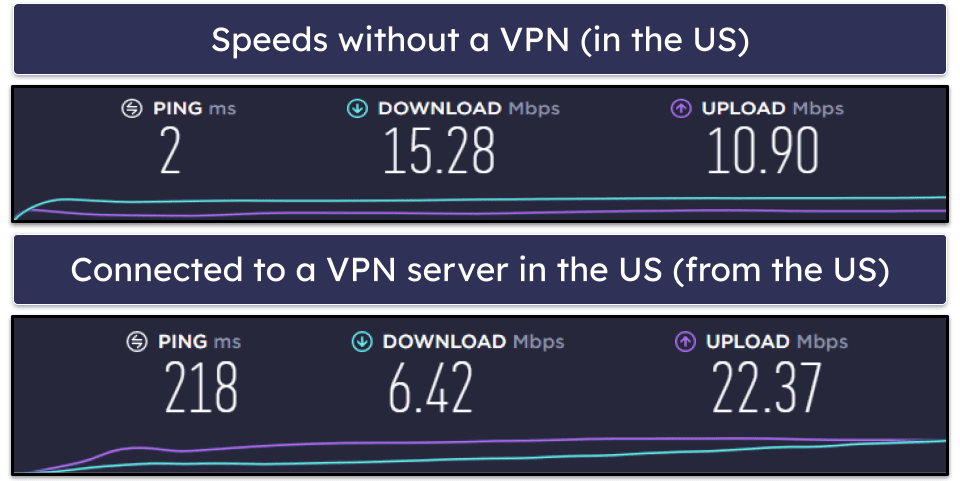
First, I ran a speed test without being connected to AceVPN to get a baseline for my speeds. AceVPN doesn’t have a quick-connect feature that automatically connects you to the fastest server, so you have to manually choose the closest server with the assumption that it will be the fastest. I’m based in the US, so I then manually connected to the nearest US server to test my speeds with it.
I then tested a distant server in Russia. Here are my speeds:
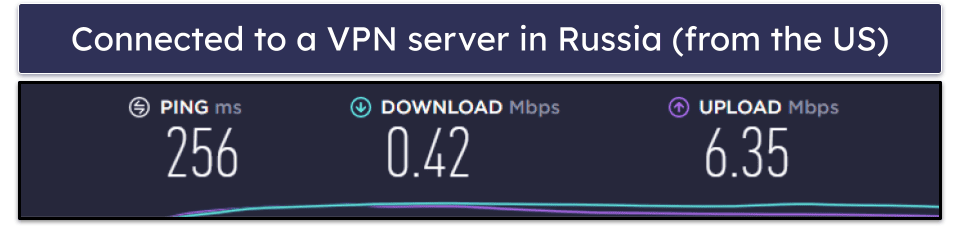
Overall, AceVPN is very slow — I experienced noticeable slowdowns even on nearby servers, and my speeds were extremely slow on the distant servers.
When I used a local server, I experienced a 60% slowdown, which is not good. Websites took 10+ seconds to load and HD videos on YouTube loaded in 5–10 seconds.
On distant servers, I experienced a 97% slowdown, which is really bad — HD videos on YouTube took 20+ seconds to load, I experienced continuous buffering while skipping through them, and my VPN connection dropped frequently.
However, the US has slower internet speeds than some other countries, so to be 100% sure I asked my colleague from Romania (a country with very fast internet) to run some speed tests too. He tested the same servers as me and reported the same slowdowns, which confirmed that AceVPN’s server speeds are simply not good.
Other top VPNs maintain very fast speeds across all servers, meaning you can browse, stream, and torrent without any annoying lagging, buffering, or lost connections. ExpressVPN is one of the fastest VPNs on the market — its speeds dropped by a maximum of 15% during our tests, even on distant servers. Other top VPNs like Private Internet Access, CyberGhost VPN, and NordVPN also have some of the fastest speeds around, with average slowdowns of between 10–35% in total across all servers.
AceVPN Servers & IP Addresses — Small Network & Only 1 P2P Server
AceVPN has servers in 26 countries, which is a pretty small network compared to top VPNs — ExpressVPN has servers in 105 countries and CyberGhost VPN has servers in 100 countries. AceVPN’s server locations are mostly in Europe, Asia, and North America, and it only has 1 server in all the other locations (Canada, Australia, Mexico, South Africa, Brazil, and Egypt).
AceVPN allows torrenting, but only on 1 dedicated P2P server (it blocks torrenting on other servers). ExpressVPN and Private Internet Access allow torrenting on all their servers, while other top VPNs like CyberGhost VPN have a large network of dedicated P2P servers that are optimized for torrenting.
Overall, AceVPN doesn’t have a large server network, isn’t transparent about its total server numbers or locations, and only has 1 P2P server. Other top VPNs have considerably more servers in many more countries and provide significantly better torrenting support.
AceVPN Streaming & Torrenting — Really Bad for Both
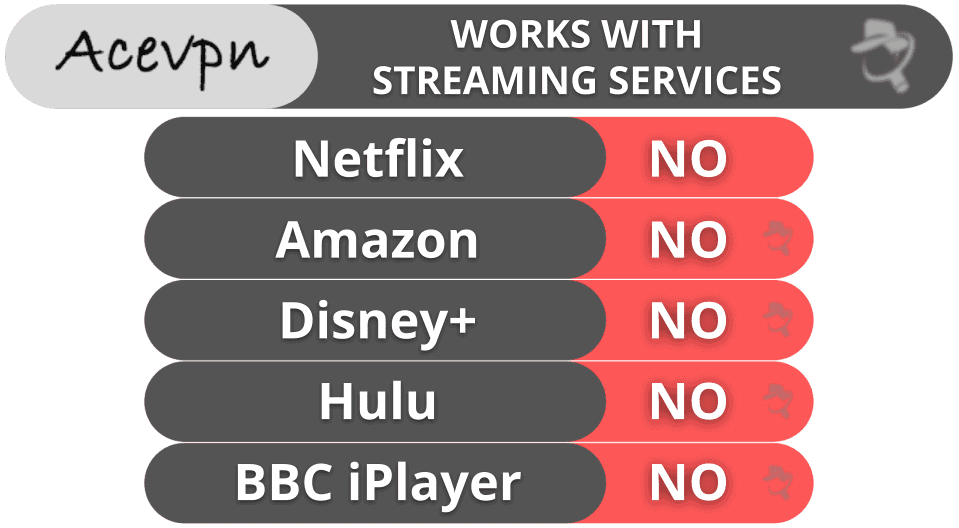
AceVPN is really bad for streaming — it doesn’t work with top sites like Netflix, Disney+, Hulu, or Amazon Prime. It works with smaller streaming sites like VRV and Crackle, but the speeds were painfully slow in my tests (it took 15+ seconds for the sites to load, and 30+ seconds for the videos to load).
AceVPN calls its streaming feature “Unblock TV / Smart DNS” and claims it’s a “free service” that will let you watch 115+ streaming channels without any speed losses or buffering. The “free service” is only included with the paid deals, however, so it’s not really a free, separate service, which I find a bit deceptive.
The Smart DNS part of the feature will let you use the VPN with devices that don’t normally support VPNs, such as gaming consoles. It’s a real pain to set up, however.
AceVPN is also really bad for torrenting — it works with top P2P apps like qBittorrent and Vuze, but it only allows torrenting on 1 server and has very slow download speeds (it took me 4+ hours to download a 1.23 GB file). Also, torrenting is only available on AceVPN’s Ultimate VPN offer (for a significantly higher price). Most other VPNs don’t charge extra for torrenting, so this is pretty poor of AceVPN, especially considering how bad their torrenting support is.
There are significantly better torrenting VPNs out there with lots of P2P servers, fast speeds, and no additional cost.
Overall, AceVPN is terrible for both streaming and torrenting. It doesn’t work with top streaming sites like Netflix and Amazon Prime, it only allows torrenting on 1 server, it has very slow download speeds, and it charges far too much for it.
AceVPN Ease of Use: Mobile & Desktop Apps — No Native Apps (Inconvenient Setup)
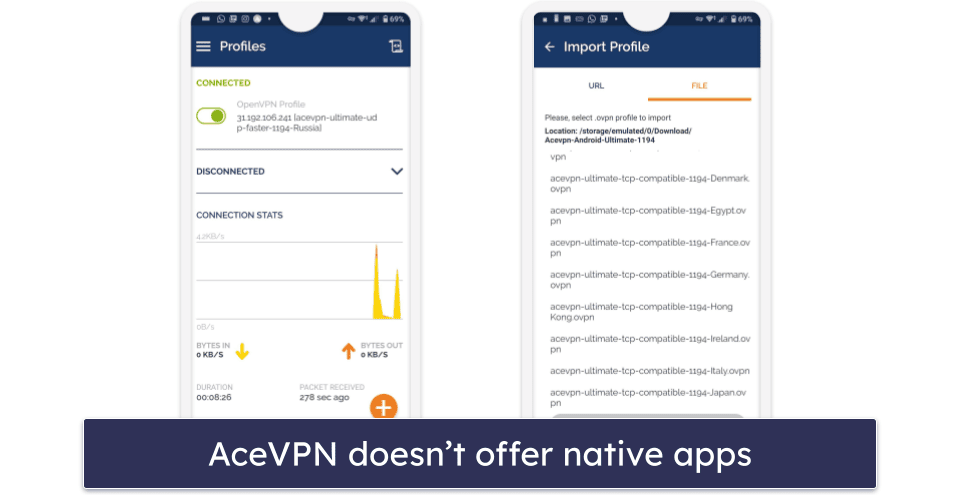
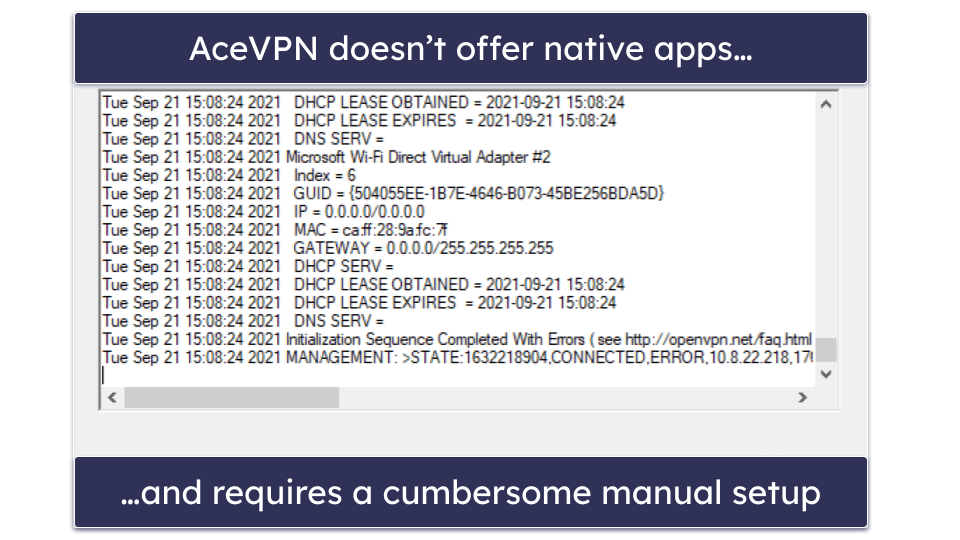
AceVPN doesn’t have native apps, so you have to manually set it up on Android, iOS, Windows, macOS, or Linux using third-party apps. While AceVPN provides step-by-step tutorials for each platform, this manual setup is still very inconvenient.
When I tested AceVPN on Android and iOS, I had to use a third-party app on Android and configure my phone’s settings on iOS. The process was difficult and very inconvenient, and once done, AceVPN was barely functional — many servers didn’t work at all and most servers required multiple attempts to connect. If you’re looking for a good Android VPN, check out our recommendations here. If you need a top-quality VPN for iOS, click here.
I also tested AceVPN on my Windows PC. Setting it up via a third-party app was once again very time consuming. Once set up, there’s no quick-connect feature and you can’t use a search field to find a particular server — the only option is to scroll through a list of servers. And like on the mobiles, the performance was really bad. I often had to reconnect 10+ times to a server before it worked. For our top-rated Windows VPNs, click here. To see our recommended Mac VPNs, go here.
AceVPN does have a smart DNS feature that will let you use it with devices that don’t normally support VPNs, such as gaming consoles. It’s a bit complicated and time-consuming to set up, so it’s not at all convenient.
Overall, AceVPN is highly un-user-friendly and very annoying to use — it doesn’t have native apps, the setup process is complicated, and I experienced frequent connectivity issues. Other VPNs (ExpressVPN, VyprVPN, and Private Internet Access) have dedicated apps for most platforms that are very easy to install and use.
AceVPN Customer Support — Pretty Useless Overall
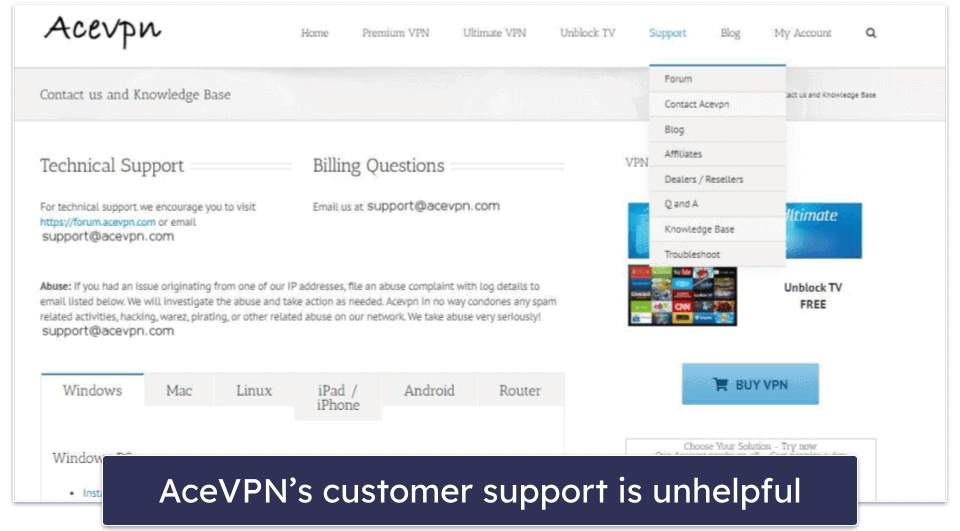
AceVPN’s customer support is not very good — while it has email support, setup tutorials (including video guides), frequently asked questions (FAQs), and troubleshooting guides, there’s no live chat and the support articles aren’t very helpful. Supposedly, there is also a help forum, but I could never connect to it after multiple attempts.
AceVPN has helpful setup guides. Unfortunately, their troubleshooting guides didn’t fix my connectivity issues. I also found that some of their FAQs provided outdated, incorrect information.
I tested AceVPN’s email support a few times, and it generally took a day or more to receive a response, which is pretty slow. Also, the support reps provided a number of vague, unhelpful answers that didn’t solve my connectivity issues. On other occasions, I didn’t receive a response at all.
Overall, AceVPN has poor customer support — there’s no live chat, the support section offers very limited help, and email support reps don’t respond fast (if at all) or provide very useful information. My favorite VPNs, like ExpressVPN, CyberGhost VPN, and Private Internet Access, have 24/7 live chat, helpful and responsive support reps, and in-depth support libraries.
Is AceVPN Any Good in 2026?
Honestly, no, AceVPN isn’t a good VPN — and I don’t recommend that you install it. Although it has 256-bit AES encryption and a no-logs policy, it lacks a kill switch (a feature included with the best VPNs), and it also doesn’t have native apps, so a manual setup via third-party apps is needed, which is both annoying and time-consuming.
While WebRTC and DNS leak protection are included, AceVPN is missing other advanced security features like IPv6 leak protection, perfect forward secrecy, and RAM-only servers (included with ExpressVPN). It also lacks extras like split-tunneling and an ad blocker, which most other top VPNs like Proton VPN and Private Internet Access include.
AceVPN doesn’t share its total number of servers, but it only has servers in 26 countries. It also only allows torrenting on 1 dedicated P2P server. Furthermore, AceVPN only iAlso, torrenting is only available on AceVPN’s Ultimate VPN offer (for a significantly higher price). Most other VPNs don’t charge extra for torrenting, so this is pretty poor of AceVPN, especially considering how bad their torrenting support is.
AceVPN doesn’t allow simultaneous connections (most VPNs allow 5–7 connections), it has overly expensive deals, and it only offers a 7-day money-back guarantee.
Frequently Asked Questions
Is AceVPN safe?
No, AceVPN isn’t safe — while it has 256-bit AES encryption and a no-logs policy, it lacks a kill switch, which is an essential security feature. It’s also missing advanced security features like perfect forward secrecy and RAM-only servers.
There are other, safer VPNs out there. For example, ExpressVPN comes with all industry-standard features (a kill switch, 256-bit AES encryption, and a no-logs policy that’s even been independently audited), plus advanced security features like full leak protection, RAM-only servers, and perfect forward secrecy.
Is AceVPN free?
AceVPN has a free plan, but you have to apply for it and show that you’re a journalist, activist, blogger, or webmaster. This is really inconvenient when so many other premium VPNs have free versions that you don’t have to apply for.
I generally don’t recommend using free VPNs anyway, because they often lack important security features, limit how much data you can use, and might log your data. It’s better to get a paid-for premium VPN like ExpressVPN or Private Internet Access — they’re affordable, secure, fast, and easy to use.
Does AceVPN work with Netflix?
No, AceVPN doesn’t work with Netflix. It also doesn’t work with other popular US sites in my area, like Amazon Prime US, Hulu, or Disney+.
If you want a good Netflix VPN, I recommend ExpressVPN because it consistently works with Netflix, has very fast speeds, and is very easy to use.
Is AceVPN good for torrenting?
No, AceVPN isn’t a good torrenting VPN — torrenting is only available on its (expensive) upgraded offer, yet it only has 1 P2P server, blocks torrenting on all other servers, and provides very slow download speeds. While it does have a kill switch for its P2P server, it doesn’t have dedicated apps (so using AceVPN to torrent is very frustrating).
Editor's Note: Intego ONE, Private Internet Access, CyberGhost and ExpressVPN are owned by Kape Technologies, our parent company.