mSpy Review: Quick Expert Summary
mSpy is more of a surveillance app than a true parental control app. While it does include some parental control features like a limited web filter and location tracking, it’s missing other essential features like screen time and app usage limits, which the top parental control apps like Qustodio offer.
On the other hand, mSpy has many powerful surveillance features, such as:
- Messaging app monitoring — Allows you to read all of your child’s messages on messaging and social media apps like WhatsApp, Snapchat, X (formerly Twitter), Facebook Messenger, LINE, and Google Chat.
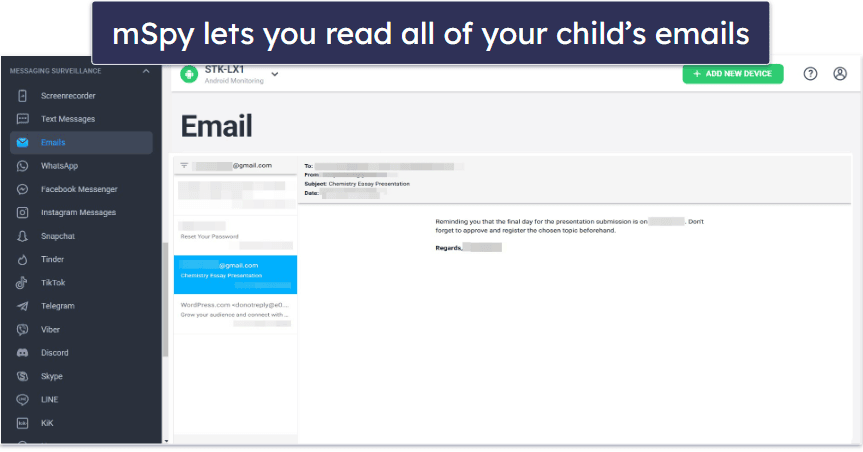
- Email monitoring — Allows you to read all of your child’s emails.
- Stealth Mode — Lets you monitor your child’s activities without them knowing.
- And more…
mSpy can monitor Android and iOS devices, including both smartphones and tablets (though its iOS app has some limitations). You can access the dashboard directly through mSpy’s website just by logging into your account, without needing to download or install anything. The dashboard is intuitive and easy to use, so you don’t have to worry even if you’ve never used a parental control app before.
Besides the lack of many advanced parental control features, mSpy has some other glaring issues. The biggest downside is that you need to root or jailbreak the target phone to use all of mSpy’s features. This isn’t just extremely challenging for non-tech-savvy users, but it can also compromise the device’s security, so I recommend that you grab a good mobile antivirus like Norton, which is the best antivirus for both Android and iOS.
mSpy has Premium, Extreme, Ultimate, and Family Kit plans of various subscription lengths that cover 1–3 devices. The Extreme plan is designed for Android, and the Ultimate plan is designed for iOS devices — and you have to contact mSpy’s customer support to buy a subscription. mSpy doesn’t have a free plan or free trial, and it doesn’t offer a money-back guarantee like most other top parental control apps.
mSpy Full Review — Worth Considering if You Have Serious Concerns, but It’s Missing Key Features
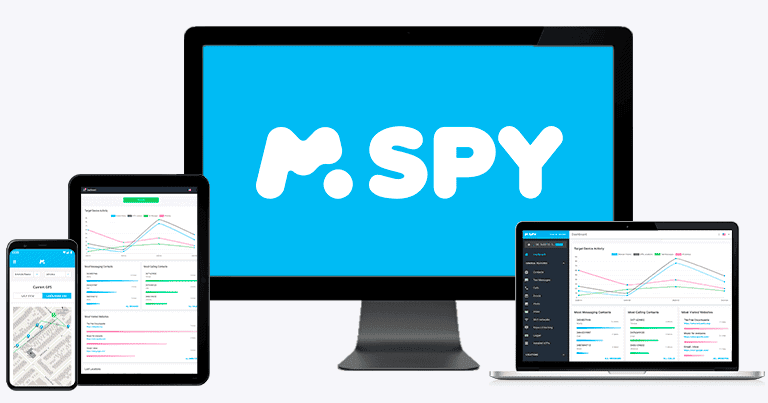
I spent the last couple of weeks running extensive tests on and researching mSpy and my conclusion is that unless you feel the need to read all of your child’s communications due to serious parental concerns, there are far better parental control apps on the market.
mSpy is simply missing too many features that I think are critical for parental control apps, such as the ability to filter websites by category, create schedules, or set device usage limits. It’s less an app built for monitoring your children and managing their device usage and more an app built to spy on them (which makes sense, given the name).
mSpy is also quite pricey, especially considering that it covers only 1–3 devices and has no free trial, no free plan, and no money-back guarantee.

mSpy Plans & Pricing — Complicated & Frustrating to Work Out
mSpy’s plans and pricing are extremely complicated. mSpy doesn’t make it easy for customers to find out what plans they offer, what features are included in each plan, and how much the plans cost, all of which is incredibly frustrating.
I also don’t like that you have to provide your email address to get pricing information (even the FAQ section doesn’t answer its own question, “How much does it cost?”). And strangely, its iOS plan (Ultimate) doesn’t appear anywhere on the website — you have to contact customer support to get a quote (or find out that it exists).
Here’s what I was able to gather after a lot of back-and-forth with mSpy’s customer support agents:
mSpy Premium — Best-Value Plan
The mSpy Premium plan starts at $11.67 / month for 12 months. If you don’t want to commit to that length of plan right away, you can choose from 1-month ($39.99 / month), 3-month ($19.99 / month), and 6-month ($15.99 / month) plans. It has all the device-monitoring features mSpy offers, such as geofencing, Keylogger, and Screenrecorder. It also includes social media, messaging, and call monitoring, and can block Wi-Fi connections, websites, and apps.
mSpy Family Kit — Family Plan With 3 Devices
The mSpy Family Kit has a 6-month subscription for $45.00 / month and a 12-month subscription for $34.00 / month, but you may have to ask a customer service rep to get these prices. It offers most of the same features of the Premium plan but distinguishes itself by allowing you to monitor 3 devices on one plan (all the others allow only 1 device). You have the option of adding additional plans to monitor more devices, but this could get very expensive very quickly. Family Kit also gives you the extra feature of getting keyword alerts on iOS devices.
mSpy Extreme — Super Strong Surveillance Features for Android
mSpy’s Extreme plan offers a 1-month ($100.00 / month), 3-month ($45.00 / month), 6-month ($33.99 / month), and 12-month ($23.99 / month) subscription. If you talk to one of mSpy’s live chat agents, you might be able to get a discount or add an extra device to your plan for free.
Extreme is designed for monitoring Android devices. It includes all the features of the Premium plan, plus a few more advanced features, including the ability to record phone calls and remotely access the camera and microphone.
mSpy Ultimate — Maximum Safety for Emergencies for iOS
The mSpy Ultimate plan is available only in 6-month ($51.66 / month) and 12-month ($40.83 / month) subscriptions. It’s designed mainly for iOS users who want access to more of mSpy’s features. Besides having most of the Extreme plan features, Ultimate adds more options for monitoring social media and messaging apps, it gives you access to the Keylogger and Screenrecorder tools, and it allows you to remotely access the camera and microphone on your kid’s iPhone. In addition, it supplies a panic button and the ability to record phone calls, features that the Premium and Extreme plans don’t offer.
Additional Considerations
Jailbreaking
The mSpy plans don’t require rooting (unlocking) to access most features on Android phones, except for social media and messaging app monitoring. For iOS devices, it’s better to already have a jailbroken (unlocked) phone to access most of mSpy’s features. If the iPhone you want to monitor isn’t unlocked, you’ll need to jailbreak it, which is a risky proposition.
That said, the more expensive Ultimate plan comes with free jailbreaking, in which a technical support agent will remotely jailbreak your phone for you in 3–5 minutes. A customer support rep told me there’s no risk when mSpy jailbreaks your phone, but I’m skeptical of that claim.
Alternatively, you can monitor an iPhone without jailbreaking it by syncing it to your iCloud account or to a Wi-Fi router you and your kid both use. However, you won’t get access to all of mSpy’s features, and if you use the Wi-Fi method, you’ll only get updates on your kid’s online activities when you’re both connected.
Refund Policy
Unlike most other parental control apps, mSpy doesn’t offer a free trial or a money-back guarantee. In fact, its refund policy is very strict. You’ll only be able to get a refund if you experience a technical problem that its support can’t solve. mSpy does have a demo on their website that you can use to get a general sense of how things work, but it’s no substitute for real, hands-on experience using the product.
Overall Value
mSpy is pretty pricey if you don’t get a long-term plan, especially considering that most of its plans cover only 1 device; only the Family Kit plan covers 3 devices. For comparison, Qustodio’s plans start at $4.37 / month and cover 5 or unlimited devices, whereas Norton Family ($49.99 / year) can monitor an unlimited number of devices. mSpy accepts all major credit/debit cards, Google Pay, Apple Pay, and several regional payment methods.
Overall, mSpy’s plans are exceedingly complicated and not well presented. It can be difficult to figure out which plan will work best for you without talking to a customer support agent. At a minimum, you have to supply your email address before you’ll get any pricing information at all. mSpy could be a lot more transparent and clear in showing all the features of each plan, whether they work with iOS or Android devices, and the plan’s prices. mSpy is also expensive compared to other parental control apps, and it offers no satisfactory way to try its features.
mSpy Features — A Good Range, but Many Require Jailbreaking Your Kid’s Phone
mSpy has these essential parental control features:
- Web and app filtering — Stops your kid from visiting specific websites and blocks apps on their phone.
- Location tracking — Keep track of your kid’s location and where they’ve been.
- Activity reports — Summarize and present information about your child’s device usage, including who they’ve messaged and called the most, which websites they’ve visited most frequently, and more.
Additionally, mSpy has a bunch of other useful features, including call and SMS monitoring, social media app monitoring, a keylogger, and a screen recorder.
A lot of mSpy’s features only work on Android and iPhone devices that have been rooted or jailbroken. This is a process that “unlocks” your phone and gives you the power to customize and take control of your phone in a way that the original manufacturers didn’t intend.
Rooting or jailbreaking your phone will void your warranty, can make your device more vulnerable to malware and hackers, and may cause you to lose access to certain apps that check to see if your device has been compromised, including most banking and payment apps like Google Pay, as well as other popular apps like Netflix and Pokemon Go. If you don’t know what you’re doing, you might even completely destroy your phone.
mSpy does assist with rooting and jailbreaking your device, but this isn’t a decision that you should make lightly.
If the idea of messing with your phone like this makes you anxious, consider getting Qustodio or Bark instead. Both are among the best parental controls apps on the market, and they’re designed to work without the need to root or jailbreak your phone.
App Monitoring & App Filtering — See What Your Kid Is Doing on Social Media
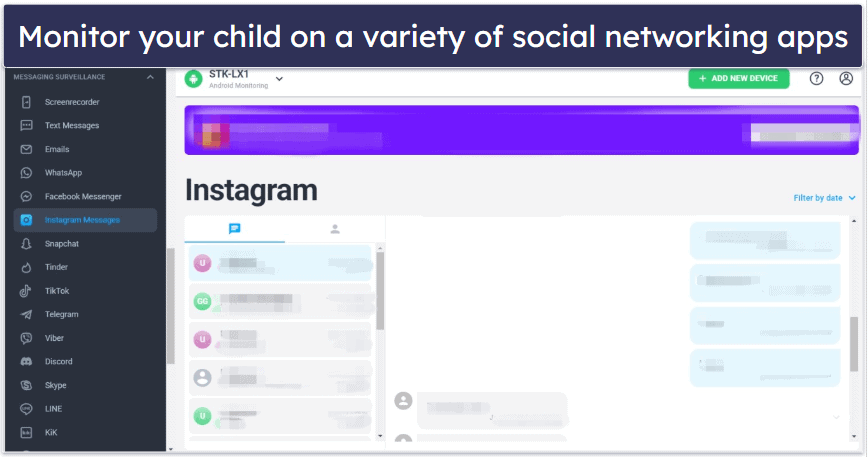
mSpy allows you to see your child’s messages, what images they send, and their contacts list on top and less popular social media apps. It’s an incredibly useful feature considering how much time kids spend on social media apps, and it sets mSpy apart from most other parental control apps, which can typically only monitor SMS messages — if that.
If you’d prefer not to sift through all your child’s social media chats and only want to be alerted to potentially inappropriate or dangerous conversations, Bark is a better choice. It only shows you messages that contain content that may require a conversation or intervention, such as bullying, violence, or suicidal ideation. Bark also supports monitoring for some major social media platforms that mSpy doesn’t cover, such as Reddit and Tumblr.
mSpy also lets you read all of your child’s emails, which is something few other parental control apps offer — Bark does, but it’ll only show you emails that trigger an alert. Seeing your child’s emails on iOS devices requires a separate setup (you’ll need to sync your iPhone to theirs, which means you’ll need their iCloud credentials and physical access to their device).
mSpy’s other app monitoring tools are much less impressive. For example, mSpy can only block apps on Android devices. In addition, it doesn’t let you set usage limits or tell you how much time your child spends using a particular app. In contrast, Qustodio has all of these features and detects and blocks 22,000+ iOS apps.

Overall, I like mSpy’s ability to monitor social media apps, but its other app supervision features leave a lot to be desired. So unless all you care about is seeing what your child sends and shares on social media apps, I strongly recommend checking out Qustodio, which is the best overall parental control app with excellent app supervision tools.
Calls & SMS Monitoring — See All Calls & Messages
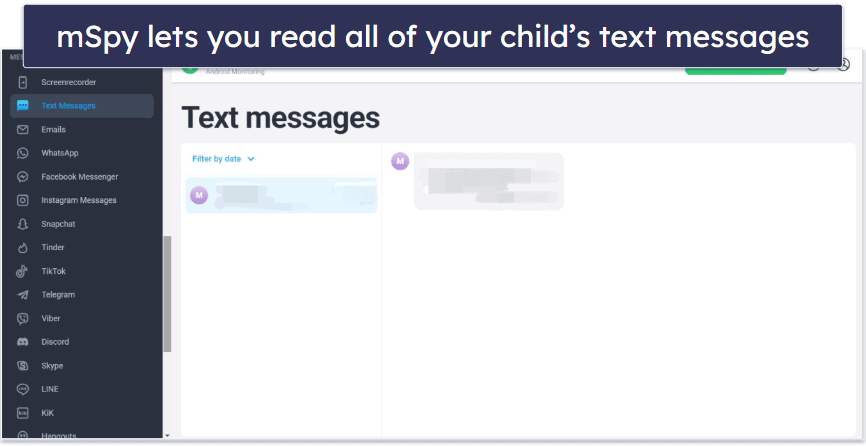
mSpy allows you to monitor all of your child’s calls and text messages on both Android and iOS devices. You can see all incoming and outgoing calls, call duration, the top 10 frequent contacts in your kid’s call history, all messages, and even the images they send. The feature worked flawlessly during my tests, making the records very easy to inspect.
mSpy’s call and SMS monitoring is really good — a lot more powerful than the SMS monitoring of many other top parental control apps. Net Nanny and Norton Family, for example, don’t have this feature, and Bark lacks call monitoring — plus, as previously mentioned, it won’t let you read every text message.

It’s handy, too, that you can block incoming calls if you see a number you don’t recognize or don’t want your child to pick up. The problem, however, is you can’t block outgoing calls or texts. Qustodio’s call blocking is better because you can create blacklists or whitelists to block incoming and outgoing calls and texts to help keep your child safe from bullies or potential predators.
Overall, mSpy’s call and SMS monitoring is pretty good for keeping tabs on your child’s communications. However, what you can do with the information is limited — you can only block incoming calls.
Location Tracking — Quick & Accurate With Excellent Geofencing

mSpy’s location tracking is pretty good and is available for both Android and iOS devices, but it requires installing a separate app on iPhones. During my tests, it was able to easily and accurately locate my child’s device.
The location timeline also let me quickly see all of the places they’ve been recently and when they were there. These features can be a great way to make sure your child is where they’re supposed to be and doubles as a way to find lost devices. I also like that the iPhone location tracking app (called “mSpy: Find My Friend’s Phone”) has an SOS feature that lets your kid send an emergency signal to trusted contacts if they run into trouble.
mSpy also offers a geofencing feature, which allows you to set up an unlimited number of “allowed” or “restricted” areas on the map covering up to approximately 6.21 miles or 9,999 meters — which is really good compared to Qustodio (0.12 miles or 200 meters) and Norton Family (2 miles or 3,200 meters). If your child enters or leaves any of these defined areas, you will receive an alert.
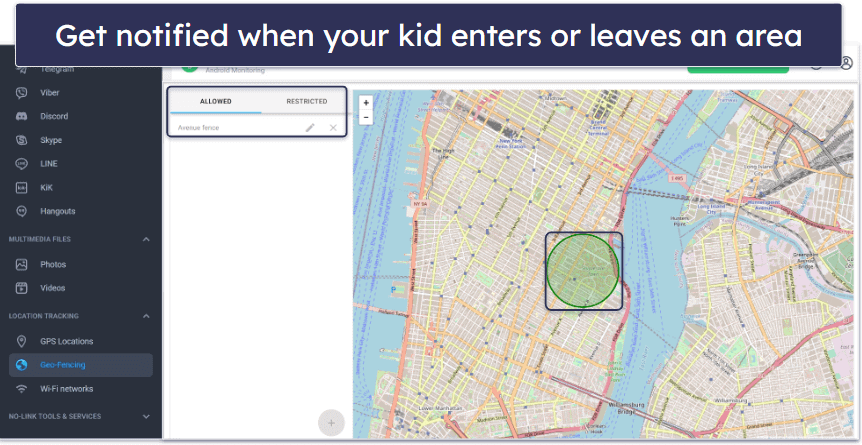
Some parental control apps offer more features than mSpy for location supervision. Norton Family, for example, which has one of the best location supervision features among parental control apps, lets you set up an alert that will notify you of your child’s location at scheduled times — which can be super handy for a busy parent. It also offers an optional, less invasive form of location tracking, where your child can perform a check-in on their kids app to share their current location with you.
Overall, I have few complaints about mSpy’s location monitoring. It’s quite accurate, and its location history and geofencing features will give you peace of mind. I only wish that it wasn’t necessary to install a separate app for it to work on iPhones.
Web Filtering & Supervision — Generally Subpar, but You Get Some Extras
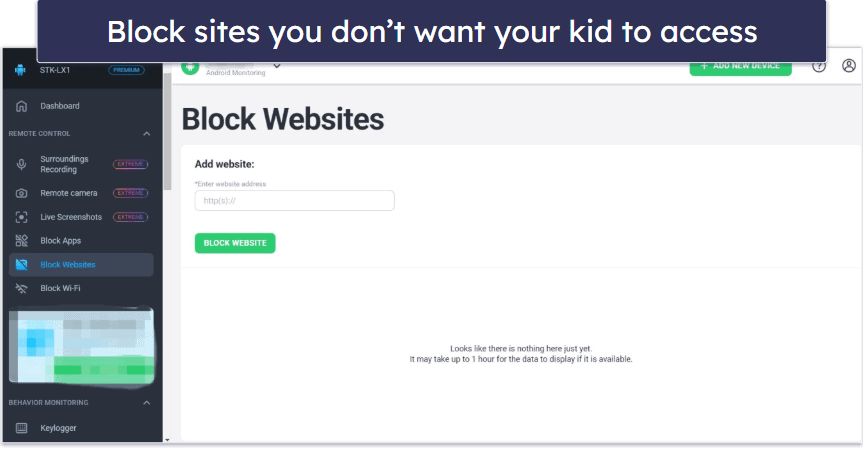
mSpy’s web filtering feature is pretty basic. It consists solely of a website blacklist, which is only available for Android.
This means you have to manually input every single website you want to block, and you have little control over search engine results. This stands in stark contrast with other parental control apps like Norton Family, which lets you block all websites in broad, predetermined categories like Death/Gore, Gambling, Nudity, etc.
However, mSpy makes up for its poor web filtering with a plethora of other web supervision features, which are available on both Android and iOS devices. You can easily track your child’s browsing history, which allows you to see which websites they visited and when. You can also block certain Wi-Fi networks and see which websites they bookmarked.
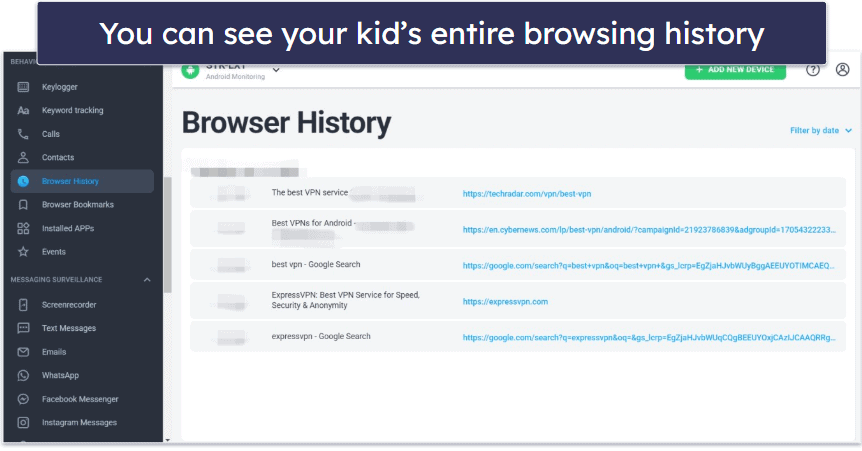
Overall, mSpy’s lack of good web filtering options is a tremendous downside for most parents. The ability to control website access and search engine results using broad filters is one of the most basic functions of a parental control app. But I like how it shows your child’s browser history and bookmarks.
Keylogger & Screenrecorder — Set Keywords to Trigger Alerts
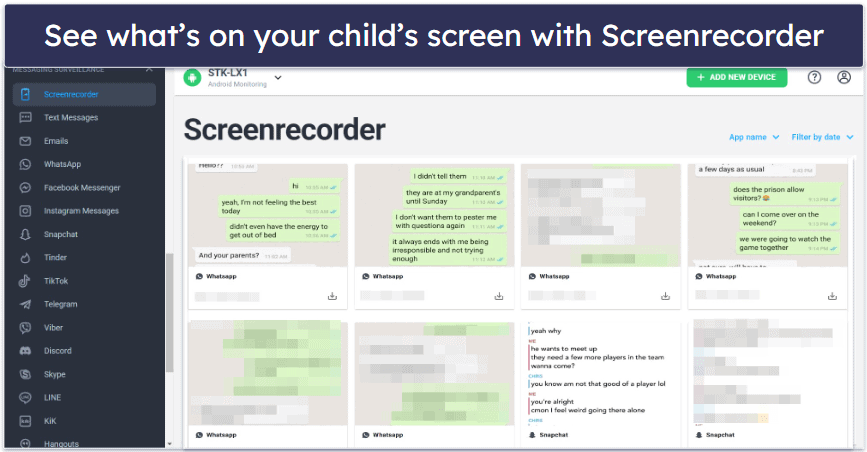
mSpy’s Keylogger and Screenrecorder features give you more ways to monitor your child’s chats and phone usage on Android devices (for iOS devices, Screenrecorder is available only on the Ultimate plan). Screenrecorder takes a screenshot of your child’s phone every time it detects a change in an app, such as when there’s a new message. That said, the list of compatible apps is fairly small. At the moment, it only includes TikTok, WhatsApp, Snapchat, Facebook Messenger, Instagram, and Telegram.
Keylogger, on the other hand, isn’t limited to specific apps. It tracks everything your child types on their phone, whether it’s in their messaging apps or in browser search bars.

You can even set up keyword tracking so that you’re alerted if a particular word or phrase is detected, which lets you get on top of a potential issue immediately. Compared to parental control apps with similar content monitoring features like Bark, mSpy gives you finer controls — you can’t specify what words or phrases will trigger an alert in Bark. That said, Bark is a lot better for general content monitoring as its machine-learning algorithms can detect potential issues in over 15 categories, including Anxiety, Bullying, and Depression, without any input from you.
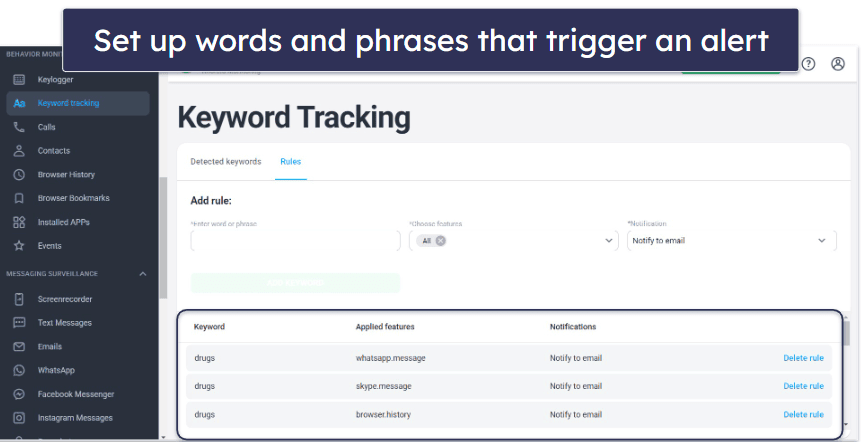
Overall, I like the keyword alerts feature, but most of the functions of Keylogger and Screenrecorder are already covered by mSpy’s app monitoring, SMS monitoring, and web supervision features. That said, Screenrecorder does make it easier to get the full picture of what your kids are doing on the apps it covers, without needing to visit several different tabs on the mSpy dashboard.
Activity Reports — Detailed & Well-Organized Information

mSpy provides detailed activity reports on all monitored activities in the Control Panel of its web app. The Control Panel neatly organizes all gathered information into one menu on the left-hand side. You can see everything from the content of your kid’s text messages and the time of their phone calls to the URLs of the websites they visited. This is also where you can block specific websites, apps, and Wi-Fi locations (Android only) — the mSpy Control Panel makes it easy to do that.
However, the activity reports have a few shortfalls. You can’t sort data into daily, weekly, or monthly summaries — it allows you to only sort by category. mSpy also lacks the option to email activity summaries, unlike Qustodio, which offers customizable daily or weekly reports. Additionally, mSpy’s Wi-Fi location report only provides coordinates, making it cumbersome to look up unclear router names.
The dashboard tab isn’t too helpful. It mostly shows details about the monitored device, like its name and whether it’s connected to Wi-Fi. There are 4 more cards that show location, most visited sites, and most called and messaged contacts.
Overall, mSpy’s activity reports are detailed and well-organized, but it would be helpful if you could customize the dashboard information and see it displayed by day, week, and month. I would also like to have the option of receiving activity reports by email.
Additional Features — Extras Include a Stealth Mode
mSpy also comes with the following additional features:
- Access multimedia files — This feature lets you browse the photos and videos stored on your child’s Android or iOS device, so you can check to make sure there’s nothing inappropriate in there.
- Remote camera & microphone access — mSpy allows you to remotely access your kid’s camera and microphone on Android to see where they are and listen to ambient sounds and conversations. But these tools are highly invasive, and I believe they’re only a good option if you truly believe that your kid’s in trouble.
- Live screenshots — Remotely capture screenshots of your child’s phone at any time of the day to see exactly what your child is doing at that moment.
- Anonymous IG (Instagram) viewer — Browse Instagram profiles, stories, and posts anonymously directly from your mSpy Control Panel (without needing to create or log into your own Instagram account). You can also download photos and videos from Instagram privately for offline use.
- Calendar & Contact Viewer — See any upcoming events they have saved on their calendar and your kid’s entire contact list.
- Scan Notes. mSpy lets you read the notes your kid saves on their iOS.
- Stealth Mode — mSpy is a great way to monitor your child without them knowing. Once it’s been installed on your child’s phone, it’s very difficult to detect. It creates no app icon, nor does it generate any alerts or notifications. In short, your child won’t have any idea that they’re being monitored. That said, if your child’s access to certain apps or websites is blocked using mSpy, they’ll inevitably suspect something is wrong with their phone, even if they don’t know exactly what.
mSpy Installation & Setup — Simple for Parents, But Kids’ Device Setup is Tricky
You don’t have to install anything and can access your dashboard from any device just by signing into your account on mSpy’s website. mSpy’s kids apps, on the other hand, can only be installed on Android and iOS phones and tablets — and unfortunately, the process is nowhere near as simple. You can’t just download mSpy from your device’s respective app store and follow the on-screen instructions as you can with most other parental control apps.
Parents who also need monitoring and filtering tools for laptops or desktop PCs should compare the best parental control apps for Windows, as many alternatives offer dedicated protection for Windows devices.
The installation process for mSpy differs significantly, depending on whether you’re installing it on an Android or iOS device and whether or not the iOS device is jailbroken (unlocked). Android devices don’t need to be rooted (unlocked) to access most features, but you’ll need to disable Google Play Protection before you can start the installation process.
On a non-jailbroken iOS phone, you’ll need to have your child’s Apple ID and password and enable iCloud backups on their phone. This will allow you to monitor their photos, videos, contacts, and events. Alternatively, you can connect your child’s iOS to your PC with a cable and get updates whenever you’re connected to the same Wi-Fi network. This lets you see their contacts, text messages, calls, notes, events, installed apps, browser history, and activity on apps like WhatsApp, Kik, and Line.
If you want to use all of mSpy’s features on iOS devices, you’ll need a device that’s already jailbroken, or you’ll have to jailbreak it. This is a complicated procedure that, at a minimum, will void your warranty, and at worst, possibly destroy your phone if you don’t do it properly. It’ll also compromise your phone’s security, so I would strongly recommend getting a good mobile antivirus like Norton to compensate. All of these things can make just starting to use mSpy a hurdle for non-tech-savvy parents.
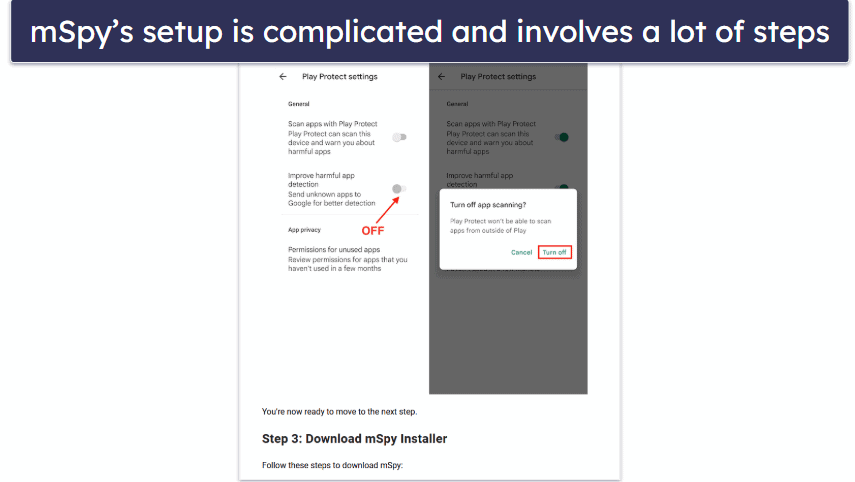
mSpy has installation guides for setting up the app on your child’s device, but the setup includes quite a bit of steps. Most of the steps are to give mSpy permissions to monitor the device, and they’re not always easy to figure out.
mSpy does offer installation assistance — but it comes at a price. You’ll have to buy the Ultimate plan to get help jailbreaking your iPhone and other advanced technical support. If you’re not getting this plan, you can pay separately for the mAssistance package, which includes remote installation assistance (including jailbreaking your phone), but it’s expensive. The fact that these are options at all speaks volumes about the difficulty of the installation process.
Overall, installing mSpy is likely to be challenging for many parents. And taking into account mSpy’s unforgiving refund policy, it may be a good reason to check out one of our other top parental control apps instead.
mSpy Ease of Use — An Intuitive & Straightforward Interface
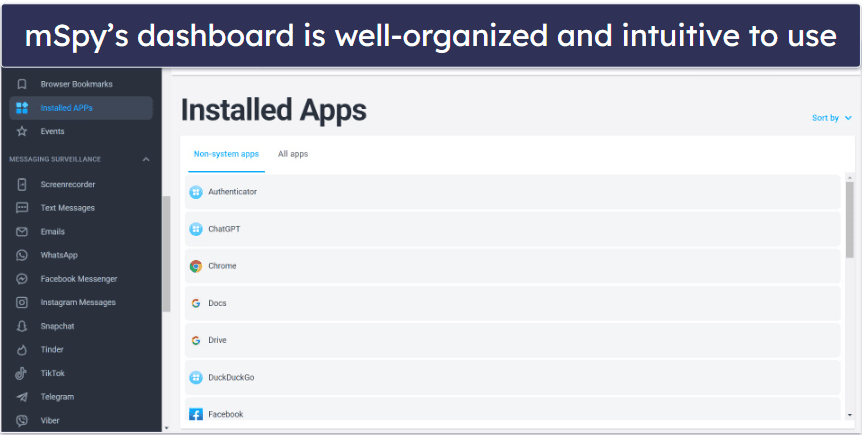
mSpy’s web app has a clean and intuitive interface. This makes it easy to navigate and to find all of the features you want. Most things are also clearly labeled, so even a beginner should have no trouble using them.
The activity reports on the home page could be more easily accessible, however. The expandable menus on the sidebar are also quite clunky despite being your primary means of navigating the dashboard. If you expand a menu with a lot of items underneath it (like the Messaging Surveillance menu), it pushes all the other menus down, forcing you to scroll if you want to access them. Finally, I feel like the interface overall could be a lot more compact. There’s a lot of wasted space on many of the pages that could be filled with useful information or cut to reduce the amount of scrolling required.
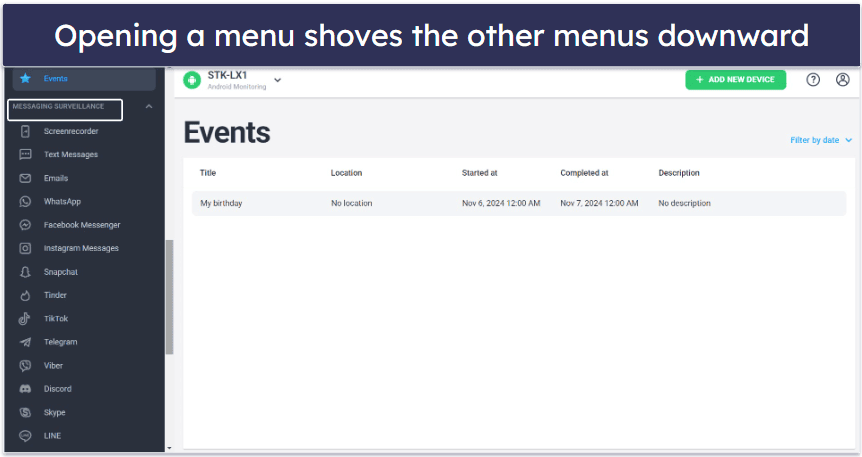
Overall, mSpy is straightforward to use, so long as you can get past the arduous installation process. At the same time, its design is certainly not as sleek or as modern as the apps for some of my favorite parental control apps like Qustodio or Net Nanny.
mSpy Customer Support — FAQs Are Out-Of-Date & Direct Support Is Hard to Find
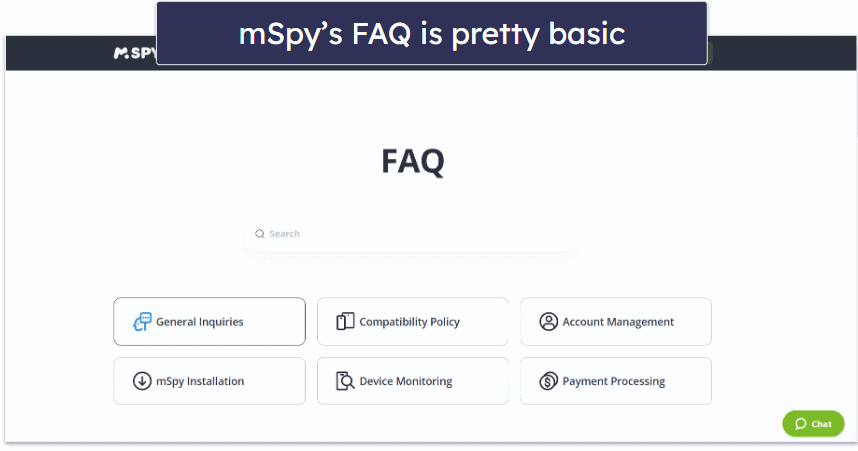
Finding answers to your questions on mSpy’s website is difficult. There’s no help center, so answers are scattered throughout the basic FAQ and the blog, and the button for the help chatbot is small and sneakily placed in the bottom-right corner of the page where it’s hard to notice.
A lot of information on mSpy’s site is missing, hard to find, or out of date. For example, all of the installation guides are on the mSpy YouTube channel, and the link to the channel is hidden away in the blog. There’s no clear pricing breakdown, either — you can get pricing information only by starting the sign-up process and supplying your email address, or by contacting customer support. Plus, mSpy isn’t transparent about features that require phone rooting or jailbreaking, and the very limited FAQ section is out of date.
Besides the YouTube channel, mSpy offers live chat, email, phone support, and a chatbot. Its best support solution is a paid add-on, called mAssistance, which costs a hefty amount but gets you a professional who will assist you in jailbreaking your iPhone and help you install mSpy remotely.
The live chat is only available during certain hours, which aren’t disclosed on the website. To get a live agent, you first have to talk to the chatbot to ask for one. Even though I did manage to get a hold of a live agent, they weren’t very helpful — 90% of the time, I got copy-pasted responses about plans and features that only partially answered my questions.
When I tried email support (only accessible from the Contact Us page), I only received 1 generic response to 1 of the 5 emails I sent. I also found some of the customer support reps on live chat and email to be pushy in promoting mSpy’s most expensive plans.
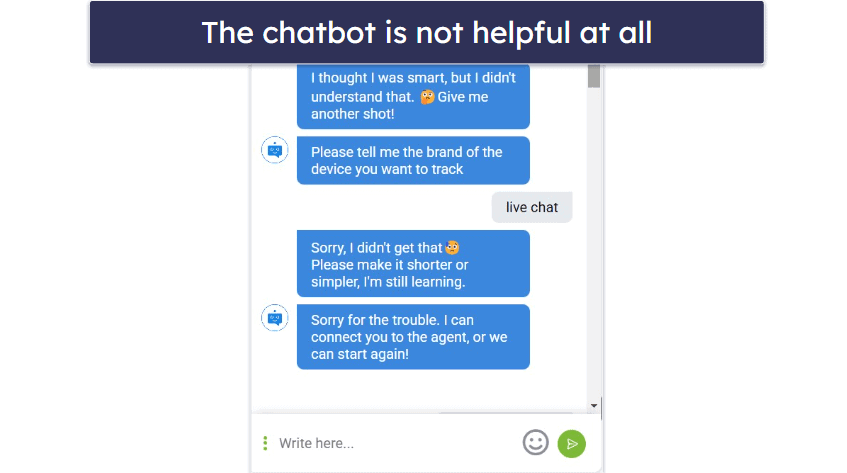
Finally, the chatbot is practically useless. It didn’t understand most of my queries, and the only information I could get out of it was the pricing for the Premium plans.
Overall, mSpy’s customer support could be improved. The website itself has an out-of-date FAQ section and no help center. The live chat, email support, and YouTube guides are generally pretty good, but they’re also very difficult to find, and I didn’t like how pushy some of the reps were. I’ve had a better experience with competitor parental control apps.
What mSpy Can Do Better — Simpler Plans, Better Filtering & App Limits
mSpy is more of a spying app, and as such, it’s missing key parental control features. It also has a number of compatibility issues that I wish it would address.
- No web filtering by category: Unlike other top parental control apps, mSpy doesn’t allow website filtering by category. It only offers a basic web filtering feature that consists of a website blacklist, primarily for Android devices. This is a significant limitation compared to apps like Qustodio and Norton Family, which provide many broad, predefined content categories for more nuanced web filtering.
- Compatibility and rooting/jailbreaking requirements: mSpy works only on mobile devices, and not on desktops, which seriously limits its usefulness. In addition, mSpy’s more advanced features, particularly for iOS devices, require the phone to be jailbroken, which can void warranties and increase vulnerability to malware. This process can be complex and might result in destroying the phone if not done correctly.
- Lack of app usage limits: mSpy doesn’t let you set usage limits or track the time your kids spend on individual apps, a feature most other parental control apps have. You can only block the use of apps outright, and only on Android devices.
- Limited social media monitoring on iOS: mSpy does a great job of monitoring social media apps on Android — I just wish it could do the same on iOS without having to buy the more expensive Ultimate plan. mSpy also doesn’t cover some key apps at all, including Reddit and Tumblr.
- Plans, pricing, and device coverage: mSpy’s website makes it difficult to figure out its plans and the features each plan has. In addition, mSpy is relatively expensive, with no free trial or plan or money-back guarantee.
Is mSpy Worth the Price in 2026?
mSpy is a good surveillance app and a poor parental control app. It’s excellent for monitoring SMS, messaging apps, and emails, but it’s missing many key parental control features.
mSpy allows you to see everything on your child’s phone, including text messages, social media chats and activity, browsing and call history, and visited locations. In addition, it lets you create geofenced zones, block specific apps and websites, and get alerts for certain predefined words or phrases.
However, mSpy doesn’t allow you to filter websites by category (so you have to manually block every website you don’t want your child to access), or set screen time or app usage limits.
Additionally, while mSpy is fairly intuitive to use, it can be very challenging to set up. Getting access to all of mSpy’s features requires that you jailbreak iOS devices, which is a long and risky process.
I’m also disappointed that mSpy doesn’t have a free trial, a free plan, or even a money-back guarantee. Instead, it has a very strict refund policy, which states that you’ll only get your money back if you run into an issue that mSpy’s tech support cannot solve.
Frequently Asked Questions
Is mSpy safe?
Yes, mSpy is a trusted company that’s been operating for 10+ years. The personal data it gathers from you is encrypted, and its privacy policy states that the data will not be shared with third parties unless it’s for the purpose of providing mSpy services or to comply with some legal obligation. However, some of the steps you’re required to take in order to install mSpy and to make use of all of its features can be risky to your device.
On Android devices, for example, you’re required to disable Google Play Protection in order to install and run mSpy. This will naturally make the target device more vulnerable to malicious apps. You’ll also need to root your device to get access to social media and messaging app monitoring. For iOS devices, you have to jailbreak them to access even more features, such as the keylogger, social media monitoring, and geofencing. This will void your phone’s warranty, make it easier for malware to breach your device’s security, and if done incorrectly, can render your phone completely unusable. For these reasons, if you’re using mSpy, you may want to consider getting a good antivirus.
Is mSpy legal?
It depends on what country you live in, who you’re trying to monitor, and what your relationship with them is. For example, it’s perfectly legal in the US to install mSpy on your children’s phones, so long as they’re under the age of 18. But it’s illegal to install mSpy on the phone of an adult such as a partner, spouse, or employee without their knowledge and consent.
Can I use mSpy without rooting or jailbreaking the target phone?
Yes, many of mSpy’s features work without rooting or jailbreaking the phone you wish to monitor. However, some of its more advanced features, including the keylogger, social media monitoring, and geofencing, won’t be available, especially on iOS devices.
If you don’t know how to root or jailbreak a phone, mSpy has an mAssistance package that you can purchase, which gets you remote installation assistance. But if the idea of rooting or jailbreaking a phone concerns you, you may want to look for alternatives. Qustodio is the best parental control app on the market and offers call and SMS monitoring, and Bark includes many of the same features as mSpy, such as the ability to monitor social media apps, without needing to root or jailbreak the target device.
Will my child know if I install mSpy on their phone?
No, mSpy’s app, once installed, will be undetectable to the average user — even most tech-savvy kids won’t notice anything has changed. This is because mSpy doesn’t show up in the apps list, generates no alerts or notifications on the target phone, and runs completely in the background. The only exception is if you want to avoid jailbreaking an iOS device and choose to monitor it by syncing it with your own iCloud account; in this case, your kid will get a notification that the syncing has occurred.
Can mSpy be installed remotely?
No, you’ll need physical access to the phone you wish to monitor in order to install mSpy. That said, installing mSpy should take only between 5–10 minutes, not counting the rooting or jailbreaking process (which could take significantly longer).
Can I see my child’s WhatsApp messages using mSpy?
Yes, both the Android and iOS versions of mSpy allow you to read all of your child’s messages on WhatsApp. You won’t even need to root or jailbreak the target device in order to do so. That said, in order to read your child’s messages on most other social media apps, such as Snapchat, Viber, Telegram, Skype, Facebook Messenger, and LINE, the target device must be rooted or jailbroken.
If you don’t want to root or jailbreak the target device and you’re mostly concerned about monitoring your child’s SMS messages, Qustodio is a great alternative. And if you’re OK with only being able to read messages that contain concerning or inappropriate content like bullying, violence, or suicidal ideation, Bark could cover all of your needs.
Is mSpy able to record calls?
Yes, but only on the more expensive Ultimate plan, and only on iOS devices. On the other plans, mSpy allows you to see your child’s contact list and logs all incoming and outgoing calls, so you can see who, when, and for how long your child talked to on the phone, but they don’t allow you to listen to the contents of their conversations.
Does mSpy offer a free trial?
No, mSpy doesn’t offer a free trial period or a free version. This is very unfortunate, given that mSpy also doesn’t offer a money-back guarantee like other top parental control apps including Qustodio and Norton Family, and has a very strict refund policy, making it difficult for customers to evaluate the product before they purchase. It does offer a demo version of the product on their website, which you can play around with, but this is a poor substitute for real, hands-on experience. There is a 1-day trial that costs $3.99, but 1 day is hardly enough time to try out all of mSpy’s features.