

iProVPN Review: Quick Expert Summary
iProVPN is secure, fast, and has good streaming support. It also allows torrenting on some of its servers. In my speed tests, I maintained fast speeds for streaming, gaming, browsing, and torrenting on both local and distant servers. In addition to industry-standard VPN security features like 256-bit AES encryption, a kill switch, and a no-logs policy, iProVPN also has:
- Full leak protection — Prevents DNS, IPv6, and WebRTC leaks.
- Ad blocker — Stops intrusive and malicious ads from loading and ad trackers from collecting information on your browsing habits.
- Malware protection — Prevents you from accessing malicious domains and URLs.
- Password manager — Every subscription comes with a free 1-year subscription to PassHulk.
That said, iProVPN has some issues that prevent it from being a top VPN — it’s missing advanced security features like perfect forward secrecy and RAM-only servers, split-tunneling is only available on Android and Windows (and it’s complicated to use), the apps have design issues, the support section isn’t that great, and some live chat reps aren’t very responsive. Competitors like ExpressVPN and Private Internet Access have both advanced and extra features, are easy to use, and provide stellar customer support.
iProVPN allows 10 simultaneous connections with 1 account, has affordable monthly and yearly plans, and comes with a 30-day money-back guarantee.
iProVPN Full Review — Pretty Good for Torrenting (But Poorly-Designed)
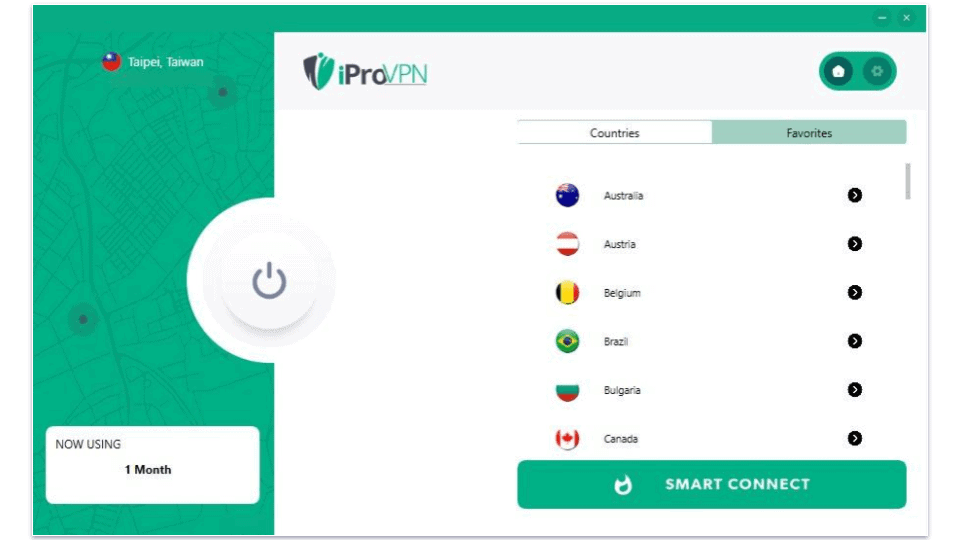
I spent a few weeks testing and researching iProVPN to see how it compares to other top VPNs on the market. While it’s not as good as top competitors like ExpressVPN, it’s highly affordable.
iProVPN protects your data with essential VPN security features, and is located in a privacy-friendly country. Plus, iProVPN has malware protection, which can protect you from downloading malicious files, and it’s pretty good for streaming (it works with Netflix and many other popular streaming services). Additionally, this VPN allows torrenting on some of its servers.
However, iProVPN lacks advanced security features, as well as many of the extra features that come with top VPNs in 2026. Its customer support is also not the best.
iProVPN Plans & Pricing — Decent, but Many Competitors Offer Better Value
iProVPN starts at $1.26 / month for the yearly plan. It has monthly and yearly subscriptions that include the same features and allow 10 simultaneous connections with 1 account, which is on the higher end of the industry average. iProVPN also has an option to add connections for an extra cost.
While iProVPN offers affordable plans, other low-cost VPNs like Private Internet Access and CyberGhost VPN offer a better value — they each have better security features, faster speeds, and larger server networks.
iProVPN accepts 6 credit cards, PayPal, and 4 cryptocurrencies (Bitcoin, Ethereum, Litecoin, and Bitcoin Cash), and it backs all plans with a 30-day money-back guarantee.
iProVPN Features — Industry Standard Features + a Few Extras
iProVPN has the following industry-standard VPN security features:
- 256-bit AES encryption — iProVPN uses bank-grade encryption to make your traffic unreadable.
- No-logs policy — iProVPN doesn’t log your IP address and internet traffic (what files you download and what sites you visit).
- Kill switch — This feature automatically shuts down your internet access if you’re disconnected from the VPN server to protect you from traffic leaks.
iProVPN uses the OpenVPN, IKEv2/IPSec, and WireGuard protocols, as well as PPTP and L2TP for router setups. I’m really glad it has WireGuard since it’s one of the fastest and is very secure. There’s also an Automatic protocol option that chooses the best protocol for you, which I found very convenient.
I like that iProVPN comes with full protection against IPv6, DNS, and WebRTC leaks. Some top VPNs don’t provide full leak protection (for example, VyprVPN makes you manually disable IPv6 and WebRTC). I ran leak tests on 10+ iProVPN servers and thankfully never had any leaks.
iProVPN also has extra features like split-tunneling, an ad blocker, and malware protection:
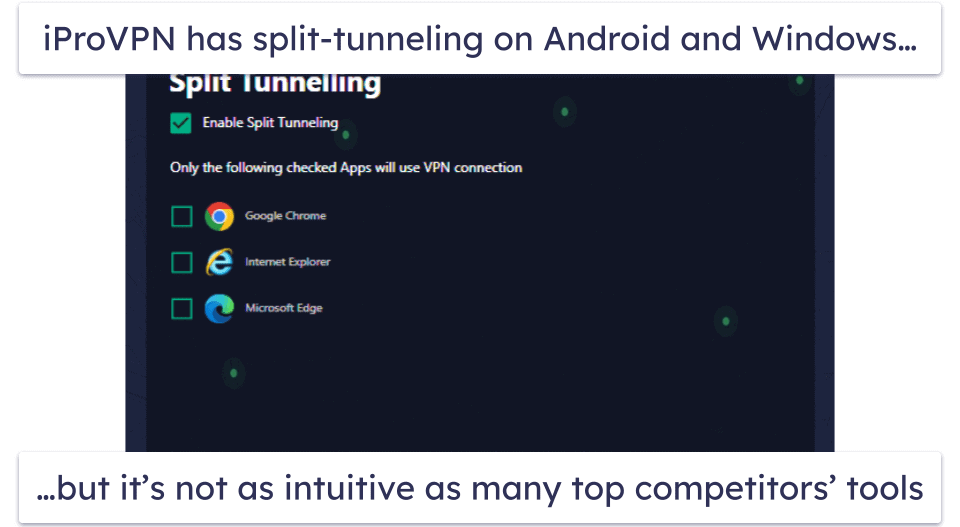
- Split-Tunneling. This feature lets you choose which apps use the VPN and which apps use your local network, but it’s only available on Android and Windows. On Windows, you can only choose which apps use the VPN, but on Android you can also choose which apps to exclude, which is more convenient. iProVPN’s split-tunneling on Android is a little annoying to use, though — instead of only displaying third-party apps like Facebook, CNN, and ESPN, it also shows system apps. This makes it harder to find the apps you want to split-tunnel. ExpressVPN‘s split-tunneling feature is much easier to use.
- Ad Blocker. iProVPN has an ad blocker that’s built into its servers, meaning that it’s always on when you connect to an iProVPN server. I tested the ad blocker on ad-heavy sites, and it blocked almost every single ad, allowing websites to load faster. iProVPN’s ad blocker is similar to good ad blockers from Private Internet Access (MACE) and Proton VPN (NetShield).
- Malware Protection. iProVPN’s built-in malware protection prevents you from accessing malicious domains and URLs. To test this, I attempted to visit some known malicious websites, and iProVPN prevented the pages from loading. Private Internet Access and Proton VPN have similar protections built into their ad blocker.
iProVPN Privacy & Security — Has a No-Logs Policy, but It Hasn’t Been Audited
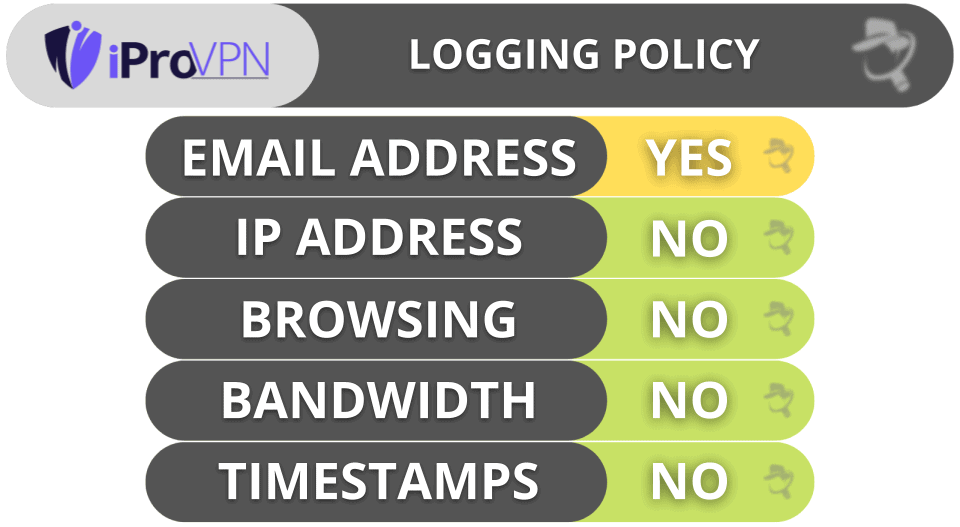
iProVPN has a strict no-logs policy — it doesn’t log your IP address and internet traffic (downloaded files and visited sites). iProVPN only collects your email address (for communication purposes) and payment details. But I’d have an easier time trusting iProVPN if it conducted an independent audit of its no-logs policy (like ExpressVPN and TunnelBear.
iProVPN is headquartered in the British Virgin Islands, which isn’t part of the 5/9/14 Eyes Alliances (a group of countries that share surveillance data).
Overall, iProVPN has a strict no-logs policy and is located in a country that’s outside the jurisdiction of the 5/9/14 Eyes Alliances.
iProVPN Speed & Performance — Pretty Good Speeds (But There Were Slowdowns)
I ran multiple speed tests on my Windows PC on servers in dozens of countries where iProVPN has servers to determine my average VPN speeds. I had the fastest speeds while using a local VPN server in my country (the US), but I also had fast speeds on distant servers in the UK, France, Singapore, and even Australia.
First, I ran a speed test without being connected to iProVPN to get a baseline of my internet service provider (ISP) speeds. Next, I used iProVPN’s Smart Connect feature, which connected me to the server with the smallest number of active users. I was connected to a server in California and had good speeds. Finally, I connected to a server in the UK to test my speeds on distant servers. Here are the results:
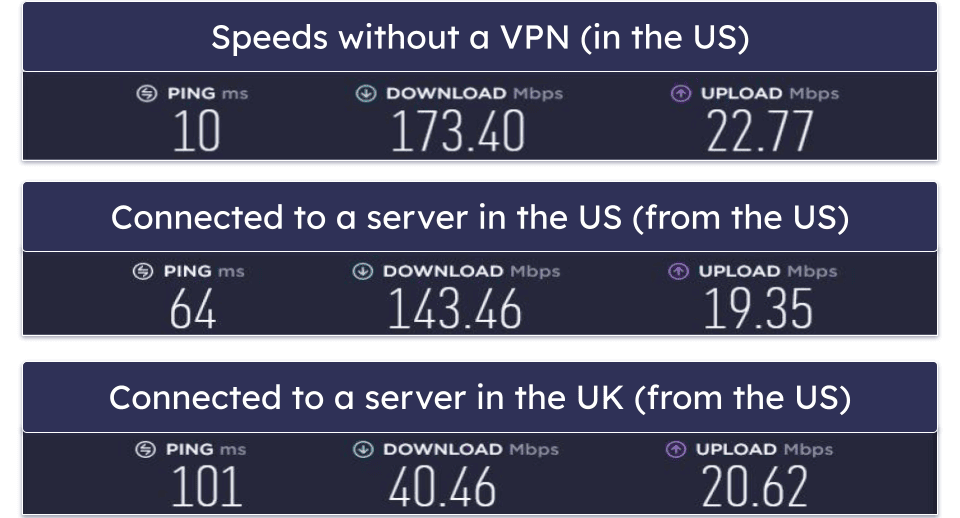
Overall, iProVPN maintained fast speeds on both local and distant servers.
When I tested a local server, my speeds only decreased by 17%, which is good. Sites instantly loaded, and I was able to watch HD and 4K videos without experiencing any buffering.
When I tested the UK server, my speeds decreased by 77%, which is more than I’d prefer, but I still had fast speeds — I downloaded a 20 GB file in 25–30 minutes (which is fast), played online games with no lag, and HD videos loaded in under 5 seconds.
iProVPN Servers & IP Addresses — Small but Reliable Server Network
iProVPN has servers in 47 countries. Other top VPNs have larger networks — CyberGhost VPN has servers in 100+ countries and ExpressVPN has servers in 105 countries. Still, the servers are spread out evenly around the globe, so everyone should be able to find a nearby server, even if it may not be in their country.
I don’t like that iProVPN only allows torrenting on some of its servers, though. Top VPNs, like ExpressVPN and Private Internet Access, allow torrenting on all of their servers, making it easier to find nearby server locations to get fast downloads.
Overall, iProVPN has a small server network, but its servers are located in most parts of the world. Some of its servers also support P2P traffic, but customer support couldn’t tell me how many or which ones.
iProVPN Streaming & Torrenting — Good for Streaming & Decent for Torrenting
iProVPN is good for streaming — it works with Netflix, Hulu, Amazon Prime, and Max, but it doesn’t work consistently with Disney+. It also works with less-popular sites like Peacock. I experienced video in high quality and virtually no buffering while streaming.
If you want the best VPN for streaming Netflix, I recommend ExpressVPN, which consistently works with Netflix and other streaming apps and has blazing-fast streaming speeds.
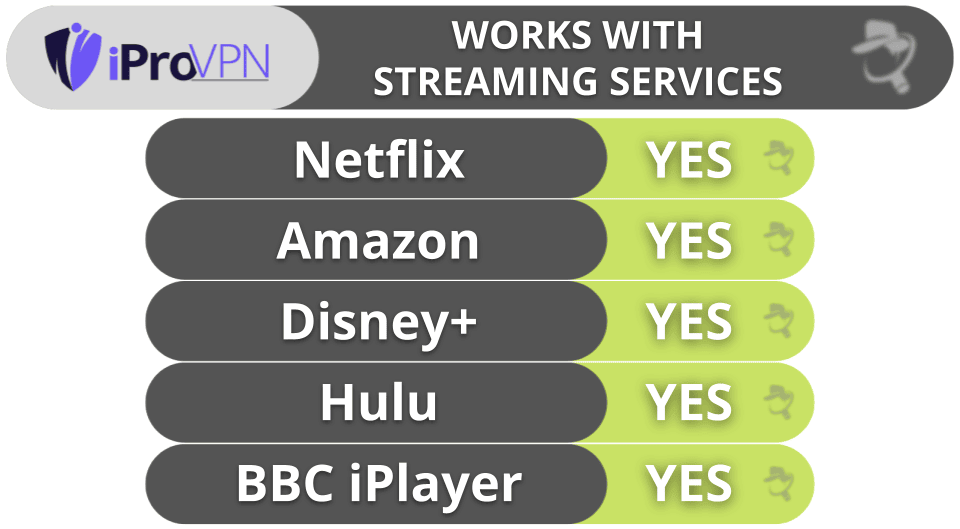
iProVPN is decent for torrenting. It works with top torrenting apps like qBittorrent, uTorrent, and Vuze, and it provides fast download speeds. However, it only supports P2P traffic on some of its servers — customer support couldn’t tell me which ones. In my tests, I was able to torrent on its servers in 10+ countries, including the US, Canada, Taiwan, India, Germany, and Switzerland. But my downloads stalled when connected to its servers in the UK and Japan. I wish iProVPN maintained a list of P2P-friendly servers, so users didn’t have to find out themselves through trial and error.
That said, there are better torrenting VPNs out there. My favorite VPN for sharing files is ExpressVPN because it allows torrenting on all of its servers in 105 countries, supports port forwarding on routers (lets you connect to more peers for faster speeds), and has an independently audited no-logs policy.
Overall, iProVPN is good for streaming and OK for torrenting. Although iProVPN doesn’t work with Disney+ consistently, it’s compatible with other popular streaming sites, and it allows P2P file sharing, but only on some of its servers.
iProVPN Ease of Use: Mobile & Desktop Apps — Pretty Good Apps (But They’re Not Perfect)
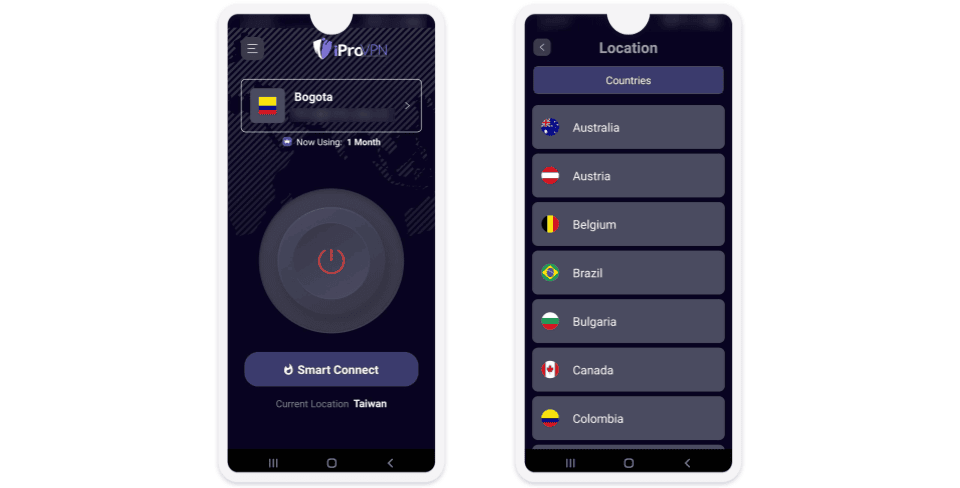
iProVPN has apps for iOS, Android, Windows, macOS, Linux, Fire TV Stick, Chromebook, and Apple TV. It also has browser extensions for Chrome and Firefox.
iProVPN’s apps are easy to install and use. I downloaded iProVPN on my Galaxy smartphone and iPhone in 1–2 minutes, and it took less than 5 minutes to install iProVPN on my Windows PC and MacBook Pro. All of the apps have 1-click connections, a Favorites option, and intuitive interfaces that are easy to navigate, but they’re pretty basic compared to top VPNs like Private Internet Access.
Its Android and iOS apps are very similar, but only the Android app has split-tunneling and only the iOS app has Smart Tunneling, a feature that lets you choose domains that are protected even without the VPN being active.
iProVPN’s desktop apps are also intuitive, but I don’t like a couple of features. First, the app sends you notifications when connecting and disconnecting to the VPN, as well as when the VPN connects. I find these pop-ups really annoying, and there’s no option to turn off notifications. Also, if you’re already connected to a server and select a new location, you’ll get a pop-up to confirm you want to switch. I appreciate the intent of this feature, but it seems like an unnecessary step. Plus, it’s very difficult to tell when you’re connected to the VPN — the button changes color, but it’s very subtle.
The desktop app provides more options compared to the mobile apps. You can set it up so that the VPN launches on startup, auto-connects after launch, and auto-reconnects if the connection drops.
Overall, the desktop and Android apps are decent, but they don’t come with many extra features and aren’t very customizable. That said, they’re generally easy to use and are good for beginners since they’re simple.
iProVPN Customer Support — Great Email Support + Okay Live Chat
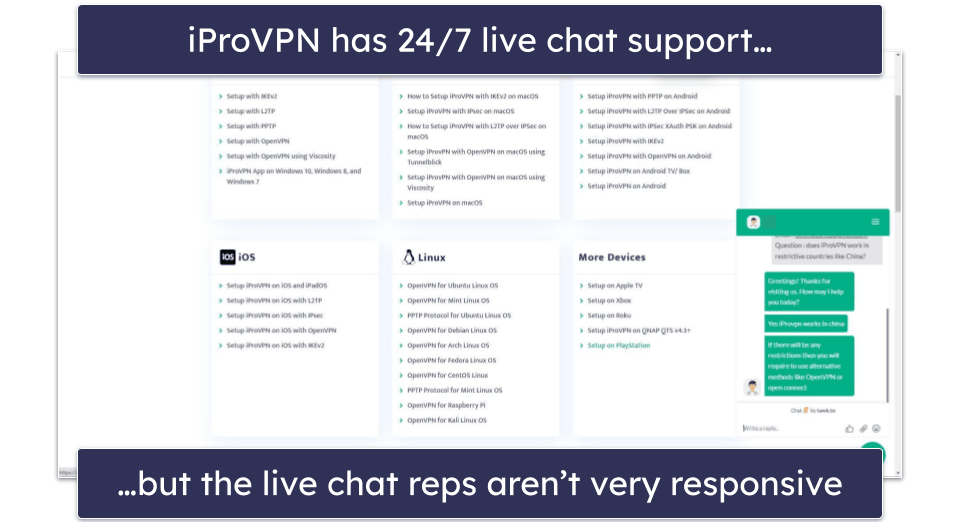
When I tested iProVPN’s live chat, I was usually connected to a support rep in less than 10 seconds. The reps I spoke to were able to answer most of my questions. However, I sometimes had to wait 5–10 minutes between responses, which was very frustrating. One time, the rep took so long to respond that the live chat session ended automatically due to “my inactivity”.
iProVPN’s email support is quite reliable. I contacted them 10+ times and usually received informative replies within a day — I never had to ask follow-up questions.
Overall, iProVPN’s customer support needs some upgrades. There are no troubleshooting guides and screenshots, the FAQ list is short, and its live chat reps aren’t very responsive, but I really like the email support.
Is iProVPN Any Good in 2026?
iProVPN provides good security, fast speeds, and works with most popular streaming sites, including Amazon Prime and Netflix. It also allows torrenting on some of its servers. In my tests, I had good speeds on local servers, and I also maintained fast streaming, gaming, browsing, and torrenting speeds on distant servers.
iProVPN has 256-bit AES encryption, a kill switch, a no-logs policy, and full leak protection against DNS, IPv6, and WebRTC leaks. Also, it has extra features like an ad blocker and malware protection.
However, iProVPN has some big flaws — it’s missing advanced security features like perfect forward secrecy and RAM-only servers, split-tunneling is only available on Android and Windows, it doesn’t come with many extra features, and its live chat reps aren’t very responsive.
iProVPN allows 10 simultaneous connections, offers affordable monthly and yearly plans, and provides a 30-day money-back guarantee.
Frequently Asked Questions
Is iProVPN safe?
Yes, iProVPN is a safe VPN. It protects your data with 256-bit AES encryption, a strict no-logs policy, a kill switch, and secure protocols (OpenVPN, WireGuard, and IKEv2/IPSec). In addition, iProVPN comes with a good ad blocker, malware protection, and full leak protection.
Is iProVPN free?
No, iProVPN doesn’t have a free plan. However, it backs all purchases with a 30-day money-back guarantee. I don’t recommend using a free VPN — they’re usually slow, are missing essential security features, limit how much data you can use, and log user traffic. Instead, it’s best to use a paid VPN like ExpressVPN.
Does iProVPN work with Netflix?
Yes, iProVPN works with Netflix. In my tests, I had no problem accessing Netflix, and I had fast streaming speeds. iProVPN also works with other top streaming sites including Hulu, BBC iPlayer, and Amazon Prime.
But my favorite Netflix VPN is ExpressVPN — it has very fast speeds, user-friendly apps, and works with 100+ streaming sites.
Is iProVPN good for torrenting?
iProVPN is decent for torrenting. It works with popular P2P apps, has very fast download speeds, and protects your traffic with industry-standard VPN security features. It even helps protect you from shady torrenting sites..
That said, it only allows torrenting on some of its servers, whereas top VPNs, like ExpressVPN and Private Internet Access, allow torrenting on all of their servers. They also come with more advanced security features and P2P-friendly features, like port forwarding.
Editor's Note: Intego ONE, Private Internet Access, CyberGhost and ExpressVPN are owned by Kape Technologies, our parent company.