

VPN Gate Review: Quick Expert Summary
VPN Gate is a student-run VPN project that’s based in the Japanese university of Tsukuba, where volunteers from around the world own and operate each VPN Gate VPN server — but what bothers me the most is you don’t know who owns each server, and each owner (and not VPN Gate) determines the server’s encryption, logging policy, P2P support, and even availability (owners can turn off a server at any time without any prior notice).
VPN Gate is free, but I honestly can’t recommend it. It’s missing a kill switch and server owners are allowed to log your data. It also has very slow speeds, and it doesn’t have native apps, which means you need to manually install it on your devices using third-party apps (this isn’t intuitive and can be very difficult for less tech-savvy users).
VPN Gate lacks advanced security features like perfect forward secrecy and RAM-only servers, it doesn’t have extra features like split-tunneling and an ad blocker, and it doesn’t work with top streaming sites like Netflix — or even less popular sites like Sony Crackle and VRV. And most of the server owners don’t support torrenting (I was unable to download files on 25+ servers in my tests). Finally, VPN Gate doesn’t even mention how many simultaneous connections it allows (but I was never able to use more than 1 connection at the same time).
Frankly, VPN Gate is one of the worst VPNs I’ve ever used. If you’re in the market for a secure and fast VPN, I recommend ExpressVPN — it has robust security features, the fastest speeds out there, easy-to-use apps for all of the major platforms, excellent streaming and torrenting support, affordable pricing, and a 30-day money-back guarantee for first-time users on all plans.
VPN Gate Full Review — It’s Terrible (Lacks Essential Features + Very Slow)
I spent a few weeks testing and researching VPN Gate to see if it’s any good, and I can honestly say it’s one of the worst VPNs I ever tested.
VPN Gate is a student project from a university in Japan where all of its servers are owned and operated by volunteers. While VPN Gate is free, I recommend that you completely avoid installing it on your devices.
VPN Gate lacks essential VPN security and privacy features, has extremely slow speeds, doesn’t work with streaming services, is terrible for torrenting, and is missing customer support channels like email and live chat. Plus, it doesn’t offer dedicated apps for any devices, meaning you have to manually set it up, which is time-consuming and complicated, especially for less tech-savvy users.
VPN Gate Plans & Pricing — Free, but It’s Not Worth Downloading
VPN Gate is completely free to use, but it’s still not worth downloading and installing on your PC or smartphone. If you’re looking only for a free VPN, there are much better options out there. Proton VPN is my favorite free VPN — it has unlimited data, provides access to servers in the Netherlands, the US, and Japan, allows 1 connection, includes high-end security features, maintains fast speeds, and has easy-to-use apps for all devices (but it doesn’t support streaming or torrenting).
VPN Gate doesn’t list how many simultaneous connections it allows, but I was never able to connect more than 1 device at once. Also, multiple server owners posted on VPN Gate’s forums that they limit users to 1 connection — Surfshark allows unlimited connections.
Overall, I recommend that you don’t use VPN Gate and instead consider a reasonably-priced premium VPN.
VPN Gate Features — Severely Lacking (Not Safe to Use)
VPN Gate server owners can choose any level of encryption, including 128-bit AES encryption and 256-bit AES encryption. Both levels of encryption are virtually unbreakable, and 256-bit AES is used by banks and militaries. However, you never know which encryption your server is using (or if there is any encryption at all), and the level of encryption can change from server to server — so I don’t like how you never really know how secure your data is connected to a VPN Gate server.
VPN Gate doesn’t have a kill switch, which disconnects you from the internet if your VPN connection drops. This means VPN Gate can’t protect your data from leaking onto the internet.
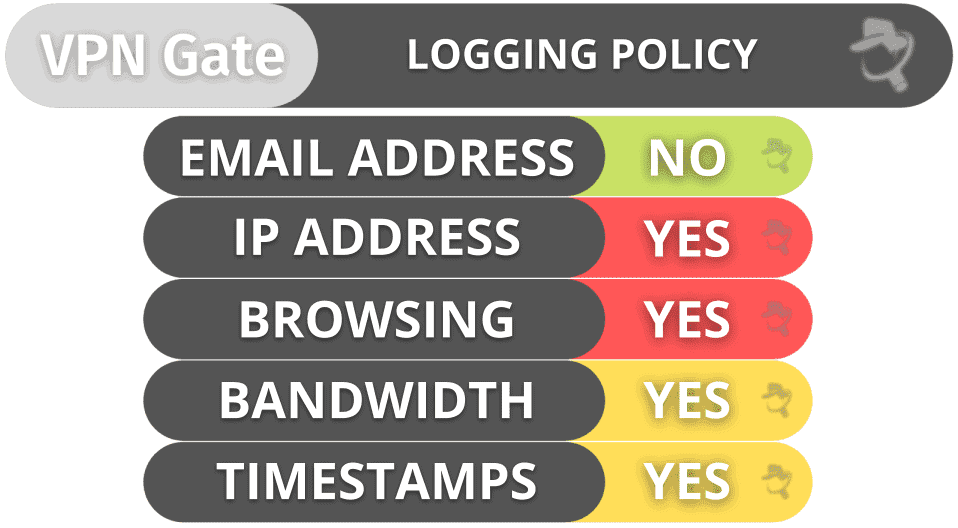
And VPN Gate doesn’t have a no-logs policy to prevent server owners from storing logs of your IP addresses, the websites you visit, and the files you download. VPN Gate leaves it up to each server owner to decide if they want to keep logs, which is a serious privacy flaw.
VPN Gate allows manual setups for OpenVPN, SoftEther, L2TP/IPSec, and SSTP protocols. While you get secure protocols, I really don’t like that you need to manually configure them because it’s very time-consuming — top brands provide built-in access to VPN protocols (and faster ones) inside their apps.
VPN Gate doesn’t say if it has protection against IPv6, DNS, and WebRTC leaks. I ran 10+ tests and never saw any leaks, but I still recommend disabling WebRTC and IPv6 and using secure third-party DNS servers (like Google Public DNS) to stay safe. Other top brands are fully transparent about what leak protection they provide.
Overall, VPN Gate may use bank-grade encryption, but it’s missing a kill switch and a no-logs policy, so it’s not safe to use.
VPN Gate Privacy & Security — Terrible (Collects Your Data & Will Share It With Authorities)
VPN Gate logs your IP address, bandwidth usage, and connection timestamps. Also, it’s possible for server owners to inspect your traffic to see what sites you’re browsing and what files you’re downloading (VPN Gate claims it doesn’t have access to this data, but this is still terrible for your privacy because server owners can monitor all of your internet traffic).
VPN Gate is headquartered in Japan, which isn’t part of the 5/9/14 Eyes Alliances (a group of countries that share surveillance data with each other). But VPN Gate’s server owners can be based anywhere in the world — including in 5/9/14 Eyes Alliances countries.And VPN Gate says it (and its server owners) will share user data with the authorities if they request it.
The best VPNs have strict no-logs policies — ExpressVPN and NordVPN have had their no-logs policies independently audited and verified multiple times.
Overall, VPN Gate is terrible for privacy. It doesn’t have a no-logs policy, its server owners can monitor and store user data, and it complies with user data requests from governments.
VPN Gate Speed & Performance — Extremely Slow & Frustrating
I ran speed tests on my Windows 11 PC on servers in all countries where VPN Gate has a server to determine my average VPN speeds. I experienced huge slowdowns on all servers, but I had slightly faster speeds on servers in Japan, South Korea, and Hong Kong.
First, I ran a speed test without the VPN to get a baseline for my internet service provider (ISP) speeds:
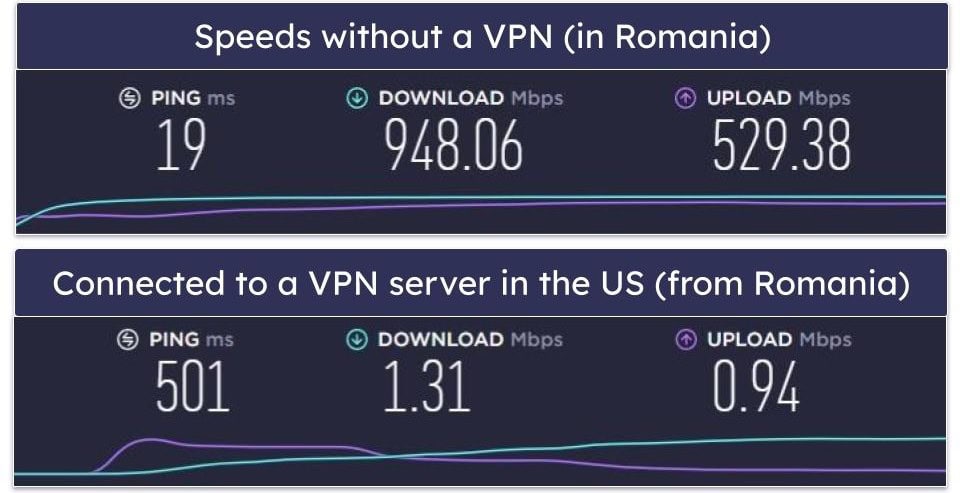
Next, I tested its speeds on the closest server in my location. VPN Gate doesn’t have a quick-connect feature that automatically connects you to the fastest VPN server. It also doesn’t have servers in my country (Romania) or nearby countries in Europe. So, I manually connected to the closest server to me, which was in the US.
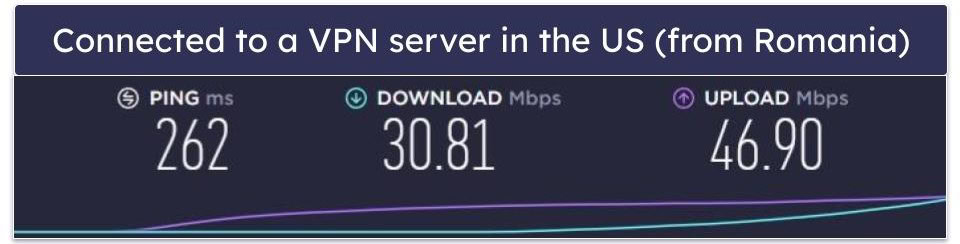
Overall, VPN Gate is one of the slowest VPNs I’ve ever used — I experienced significant slowdowns on just about every single server.
When I tested a distant server in the US, I experienced a huge 99% slowdown — websites loaded in 20–25 seconds and HD videos took 10–15 seconds to load and buffered frequently.
When I tested a distant server in Japan, I experienced a 96% slowdown, and I still had very slow speeds — websites loaded in 10–15 seconds and HD videos loaded in 5–10 seconds (and I experienced noticeable buffering).
Overall, VPN Gate provided me with terrible speeds that made it frustratingly slow to browse and stream videos.
VPN Gate Servers & IP Addresses — Large Server Count (But Only in 10 Countries)
VPN Gate has 5,500+ servers in 10+ countries. Most of VPN Gate’s servers are located in North America and Asia, so users in Europe, the Middle East, Africa, and South America won’t find nearby servers to get even decent speeds.
On top of that, VPN Gate’s servers aren’t available 24/7. This is because VPN Gate’s servers randomly disappear and go offline when the server owners shut down their computers.
VPN Gate supports torrenting, but it’s up to each server owner to decide whether they allow P2P traffic on their server. In my tests, none of the servers allowed me to download files.
Overall, VPN Gate has a large server count, but many server locations aren’t available 24/7, and VPN Gate only has servers in 10+ countries, preventing most users from connecting to nearby servers for fast speeds. Also, most server owners block torrenting. Other top VPNs have larger networks that are online all the time, have servers located in most parts of the world, and have better P2P support.
VPN Gate Streaming & Torrenting — Awful for Both Activities
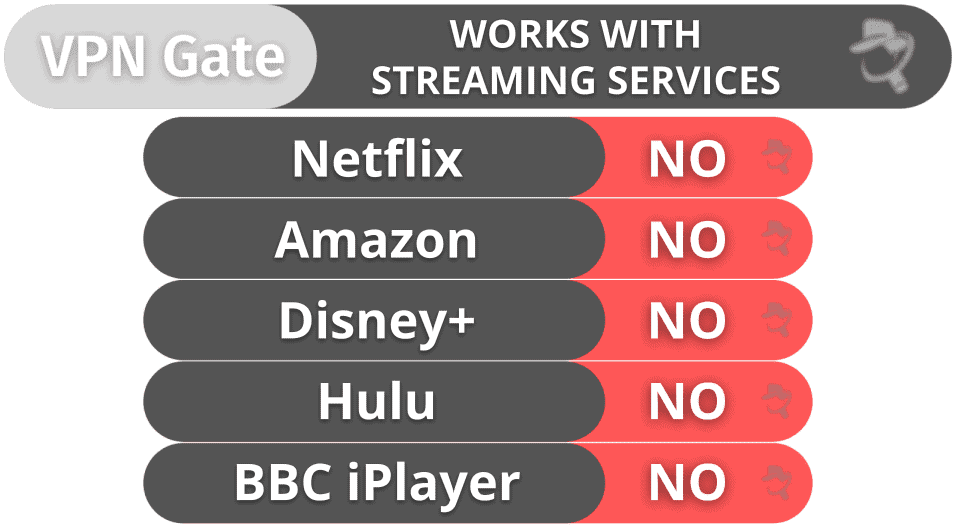
VPN Gate is terrible for streaming — it doesn’t work with popular streaming sites like Netflix, Amazon Prime, BBC iPlayer, Hulu, or Disney+. It’s also incompatible with smaller sites, such as Sony Crackle, VRV, and Crunchyroll.
If you want a good streaming VPN that reliably works with Netflix and other top streaming sites, VPN Gate is not for you.
VPN Gate is also awful for torrenting — server owners can block P2P traffic, and in my testing, all of them did block me from torrenting. I tested 25+ servers and was never able to download torrents. There are much better torrenting VPNs out there, which allow torrenting on all servers, work with all of the top torrent clients, and have fast downloading speeds.
VPN Gate Ease of Use: Mobile & Desktop Apps — No Dedicated Apps (Difficult to Set Up)
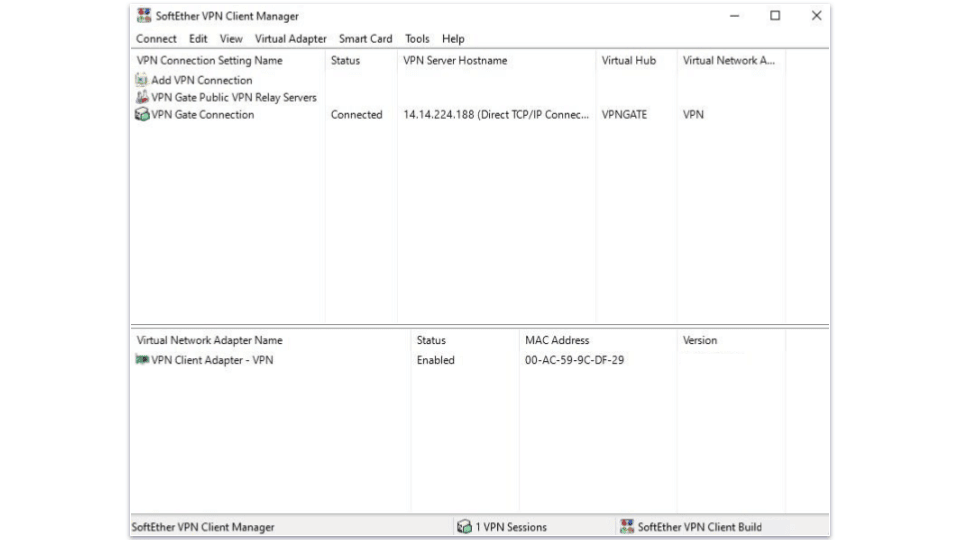
VPN Gate doesn’t have dedicated apps for smartphones and desktops, so you have to manually install it on iOS, Android, macOS, and Windows using third-party apps. I like how VPN Gate has step-by-step tutorials, but the setup process is still difficult (especially for people new to VPNs).
For example, to install VPN Gate on my Android smartphone, I had to download and install a third-party app, and then I had to download and import server files into the third-party app — the process was very inconvenient and took about 15 minutes. Top VPNs have built-in native apps for all of the major platforms.
And when I finally set up VPN Gate on my Android phone, I found it very challenging to use. For example, VPN Gate doesn’t provide a list of servers. Instead, I had to import a VPN Gate server file for each server I wanted to use, which was tedious. Plus, the server files had confusing names (like “vpngate_vpn710983170.opengw.net_udp_1320”), so I had no idea what country the server was located in. I prefer user-friendly Android and iOS apps from VPNs that have easy 1-click connections and make it very easy to manually find and connect to a specific server.
I also tested VPN Gate on my Windows PC. The setup process was easier than on Android, but using the third-party app was still inconvenient — I really dislike that there are many complicated terms inside the app that are not explained. Most users won’t understand terms like “DDNS Hostname”, “VPN Sessions”, and “Uptime”. All of the top VPNs in 2026 offer native Windows and macOS apps that are simple to install and very easy to use.
Overall, VPN Gate doesn’t have native apps for Android, iOS, Windows, and macOS, it’s very difficult to install VPN Gate on your devices, and the apps are not intuitive. Other top VPNs have dedicated apps for all platforms that are very easy to install, navigate, and use.
VPN Gate Customer Support — Unhelpful FAQs & No Direct Support

VPN Gate falls short when it comes to customer support. While it offers tutorials, FAQs, and a forum, it lacks essential support options such as live chat, email support, and troubleshooting guides.
There are multiple FAQs, but they’re not very helpful — some answers are hard to understand and important FAQs are missing (like how many simultaneous connections VPN Gate allows or if VPN Gate supports P2P traffic). The best VPNs provide more in-depth and informative FAQs that are easy to understand.
VPN Gate’s tutorials are pretty easy to follow, and I like that they include screenshots. That said, other top brands VPN have better tutorials that include higher-quality screenshots, better instructions, and even come with video guides.
VPN Gate’s forum is basically useless — it’s active with users posting questions that are answered by other users, but not from anyone from VPN Gate or volunteers that run the servers. I posted multiple questions and never received a reply. Also, not all posts and replies are in English.
All things considered, VPN Gate’s customer service leaves a lot to be desired. The FAQs and guides lack depth, the forum doesn’t provide any substantial help, and there’s no way to contact VPN Gate or any of the server owners.
Is VPN Gate Safe & Secure in 2026?
No, VPN Gate isn’t a secure VPN in 2026. It’s a student project from a Japanese university that has its entire server network run by volunteers, who use their own devices as VPN servers. This allows each server owner to determine the server’s encryption level, data logging, P2P support, and even availability (not all servers are online 24/7).
VPN Gate is free, but I highly recommend avoiding it. It’s missing a kill switch, it doesn’t have a no-logs policy, it lacks native apps, and it has very slow speeds. What’s more, VPN Gate doesn’t have advanced security features like perfect forward secrecy and RAM-only servers, it doesn’t have extra features like split-tunneling, it doesn’t work with streaming services, and most server owners block P2P traffic. And VPN Gate doesn’t say how many simultaneous connections it allows.
I honestly think VPN Gate is one of the worst VPNs I ever tested, and I don’t recommend that you install it on any of your devices. Instead, I recommend downloading one of these top free VPNs or getting one of the top premium VPNs in 2026.
Frequently Asked Questions
Is VPN Gate safe?
No, VPN Gate isn’t safe to use. It’s missing a no-logs policy, which means VPN Gate is able to log your IP address, plus it says it will share user data with the authorities if requested. VPN Gate also lacks a kill switch, which disconnects you from the internet when your VPN connection drops, so VPN Gate doesn’t protect you from traffic leaks. And, VPN Gate doesn’t have advanced security features like perfect forward secrecy and RAM-only servers, or extra features like split-tunneling.
Is VPN Gate free?
Yes, VPN Gate is free to use, but I still don’t recommend that you install it on any of your devices — it’s not secure, it logs your data, and it doesn’t have dedicated apps, meaning that you have to manually install VPN Gate on each of your devices using a third-party app. There are better free VPNs out there — my favorite one is Proton VPN, which comes with high-end security and privacy features, unlimited data, fast speeds, and easy-to-use apps.
Does VPN Gate work with Netflix?
No, VPN Gate doesn’t work with Netflix. It also doesn’t work with other top streaming sites, such as Amazon Prime, Disney, and BBC iPlayer.
Is VPN Gate good for torrenting?
No, VPN Gate isn’t a good torrenting VPN — volunteers run its servers and each server owner decides if torrenting is allowed or not. Unfortunately, most server owners block P2P traffic. I tested 25+ servers and was never able to torrent. Also, VPN Gate doesn’t have a no-logs policy, so VPN Gate can log your IP address, and the server owners can log your online traffic, which puts your privacy in serious danger. And VPN Gate is missing a kill switch, so you can easily suffer leaks without even knowing it and your data will get exposed.