
Glarysoft Review: Quick Expert Summary
Glarysoft Malware Hunter is an antivirus with standard security features and some decent optimization tools. While I have a fair few complaints, I’ll start with what I really liked. The interface is very intuitive, providing you with a sleek design and more information during scans than you might expect.
Its extra features aren’t the worst, but they hardly justify the expensive price tag. The real-time protection caught most of the threats I attempted to download, but nowhere near the 100% detection rates of top competitors like Norton and Bitdefender.
Glarysoft also comes with a variety of extra tools, including:
- PC Cleanup.
- PC Speedup.
- USB Drive protection.
- Registry protection.
- Safe downloads.
Unfortunately, Glarysoft is missing most of the features you’d expect from a premium antivirus. While a top-rated option like Norton gives you a VPN, a password manager, parental controls, dark web monitoring, identity monitoring, a firewall, and advanced web protection, Glarysoft Malware Hunter has none of these features.
That said, it has a 30-day free trial and a 30-day money-back guarantee — so you can try it out for yourself before having to commit.
Glarysoft Malware Hunter Full Review — Average Security Tools in a Beginner-Friendly App
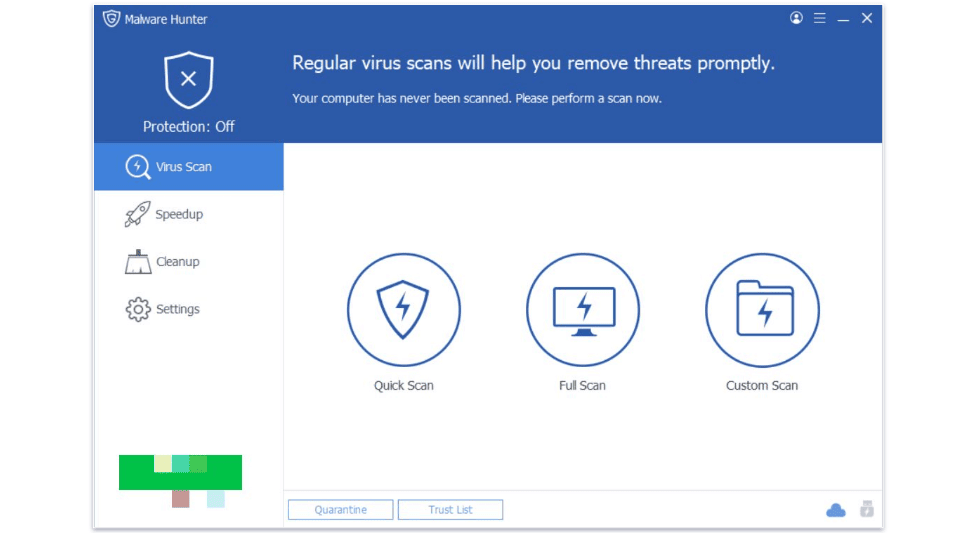
Glarysoft Malware Hunter is okay, but it doesn’t stand out from the crowd. The malware scanner is reliable and caught most of the malware samples I used during my tests, but it wasn’t as good as any of the top antiviruses in 2026. The real-time protection was the same — I got decent results, but it wasn’t good enough to give me peace of mind. The speedup and cleanup tools had a little bit of an impact but barely more than defragging my PC with Microsoft Defender.
Overall, Glarysoft isn’t bad, but it isn’t particularly good either. Based on my testing, I would say that it’s an average antivirus — I’ll explain why in more detail as we go.
Glarysoft Malware Hunter Plans & Pricing — 1 Free Plan & 1 Premium Plan (Not the Best Value)
Glarysoft Malware Hunter has a free plan and 1 premium annual plan: Glarysoft Malware Hunter Free and Glarysoft Malware Hunter Pro. Both plans only include coverage for 1 device and are only compatible with Windows.
The free plan is very limited — it just includes basic malware scanning and removal. While the malware scanner performed pretty well in my tests, this plan doesn’t offer any real-time protection for your device.
The premium plan includes a few extra security features like real-time protection and system optimization tools, but at $24.97 / year, I don’t think it offers great value when you compare it to similarly priced packages from Norton, Bitdefender, or TotalAV. All these brands offer far more features than Glarysoft and cover other operating systems as well as Windows.
That said, Glarysoft Malware Hunter Pro comes with a 30-day free trial, so you can try it out risk-free. There’s also a 30-day money-back guarantee, so you have time to decide if it’s right for you.
Here’s a quick overview of Glarysoft’s plans:
Glarysoft Malware Hunter Security Features — Reliable Malware Scanner & Real-Time Protection (But Not the Best)
Glarysoft comes with a decent malware scanner and a handful of security features. The malware scanner doesn’t have any independent lab results to back it up, nor does the company provide any details about the engine or database. So I only have my own tests to go on.
I found that the malware scanner was able to detect most of the threats on my device, and the scans were reasonably fast. Glarysoft lets you run quick scans, full scans, and custom scans. My first full scan took me about an hour, while quick scans only took a couple of minutes. This is slightly slower than Norton’s 45-minute full scan, but it’s on par with other top competitors like TotalAV.
Unfortunately, Glarysoft’s real-time protection is pretty average. During my tests, it gave me a few false flags, and it didn’t catch all the sample malware files I attempted to download (though it did catch most of them).
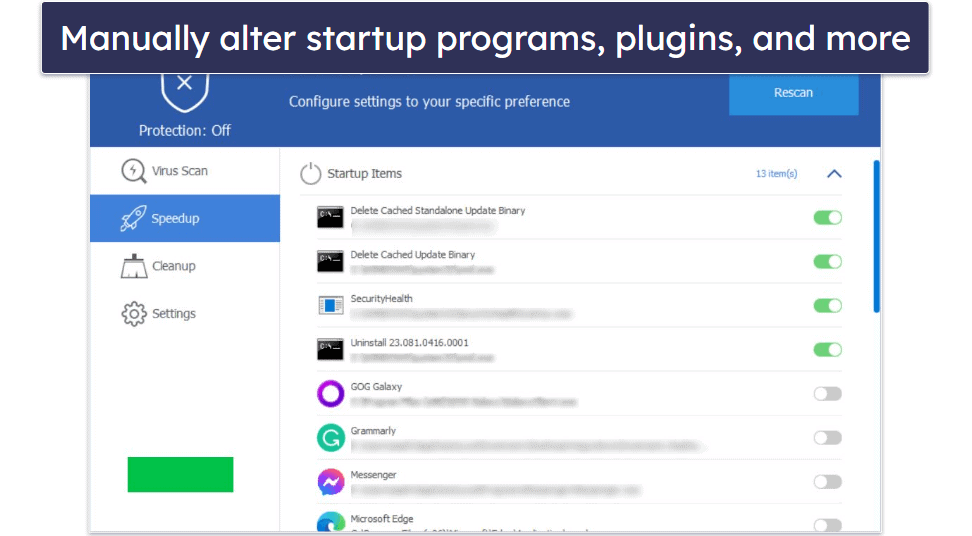
The Speedup tool is alright. Essentially, it optimizes your startup systems, scheduled tasks, plugins, and more to make sure that nothing is bogging down your PC. It lets you manually choose which of these processes are running, though honestly you can do a lot of these processes yourself from the Task Manager without needing an antivirus.
The Cleanup tool is a little better. With the click of a button, it scans your registry, junk files, and plugins for unnecessary files, so you can optimize and boost your system’s performance. You can also customize exactly what and where it’s scanning and defragmenting.
There are also a few extra features, like USB drive protection (which lets you plug your USB in and run antivirus scans on it), safe download scanning (scans downloads before you open them to make sure they’re safe), and registry protection (which protects your registry from being manipulated). These actually worked pretty well during my tests — while they don’t make up for the features it’s lacking, they’re at least worth having.
Overall, Glarysoft Malware Hunter offers some pretty good tools, but it’s missing a lot. Its malware engine and real-time protection are good, but they’re not the best. It’s missing a lot of extra features you’d expect from a premium antivirus, but what it does have works pretty well. The Speedup tool was a bit disappointing since you could accomplish almost every one of those tasks for free, but overall I think Glarysoft Malware Hunter’s features aren’t bad — it’s just not quite worth the price. That said, it offers a 30-day trial period, so feel free to try it out for yourself.
Glarysoft Malware Hunter Ease of Use & Setup — Easy-to-Use App (With Customizable Cleanup Tools)
Glarysoft Malware Hunter is very easy to use and beginner-friendly. The installation process only takes a few minutes, and the interface is really intuitive — anyone could use it! It has 4 tabs — Virus Scan, Cleanup, Speedup, and Settings — and they each do exactly what they say without any confusing language or clunky UI elements.
The malware scanner is very beginner-friendly. I especially like that it tells you exactly which areas of your PC it’s checked, rather than just saying you’re safe without showing you what it’s checked. It’s a nice quality-of-life feature that I want to see in every antivirus.
It’s pretty easy to customize the speedup and cleanup features, too. You can choose which parts of your PC you want to optimize, and all the settings are clearly laid out. Like the malware scanner, they provide you with a good amount of information about what it’s doing to your PC and where it’s cleaning up files — it’s overall really transparent about what it does. I always get worried when I run a new PC optimizer since so many can be simply fake, but Glarysoft Malware Hunter’s optimization tools were safe and easy to use.
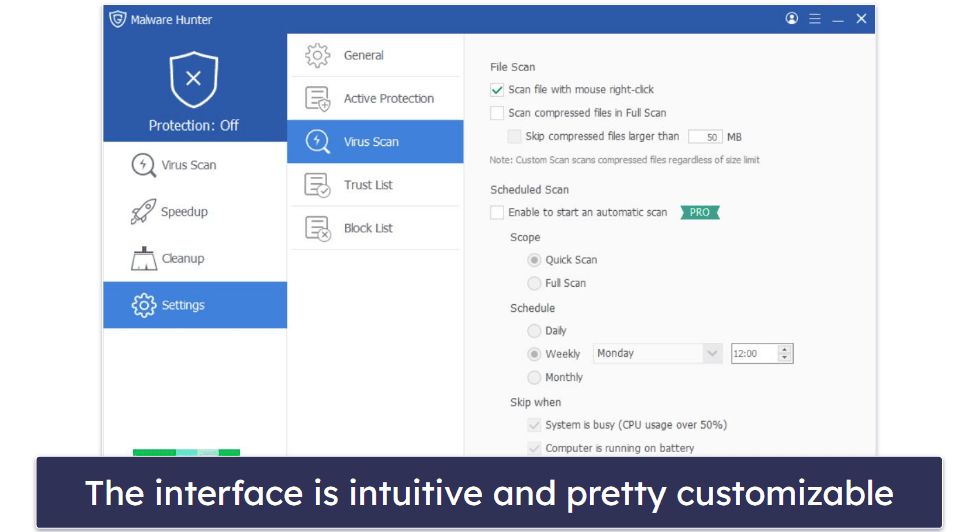
As far as settings go, it’s pretty simple stuff — you can manage application block lists, scan your USB drives, choose what files you want to be monitored by real-time protection, and change your language. There are a lot of helpful options and no overly technical language to confuse new users.
Now, I wouldn’t be a proper critic without a minor nitpick — Glarysoft has no mobile version. Its other premier product, Glary Utilities, has a mobile app, but Malware Hunter Pro doesn’t. This means if you want your phone protected, you’ll need to get a separate antivirus program with a good Android or iOS app.
Glarysoft Malware Hunter Customer Support — Not the Best Customer Support
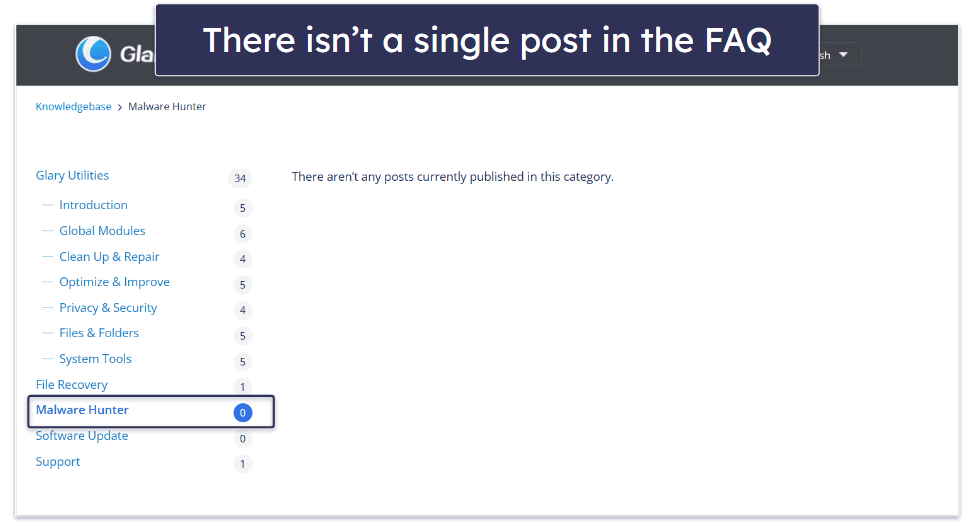
Glarysoft Malware Hunter Pro has virtually no customer support at all. When you go to the website and hover your mouse over Support, it provides you with a drop-down menu with 4 options: Lost License (which just helps you recover your license), Online Feedback (which directs you to email support), My Account, and FAQs. The FAQs provide instructions and information for various Glarysoft products and are almost exactly what you’d expect.
Here’s the kicker — there isn’t a single FAQ entry under the Malware Hunter tab. There’s information for every other one of Glarysoft’s products, but there’s nothing at all about its antivirus engine. If you have any questions regarding operating it, how to use its features, what terms mean, or any problems installing it — you’re out of luck here!
There is a very small FAQ section on the Store page, but that’s about it. It only takes you through the briefest possible walkthrough of how to use the product, and it’s easily missed because it’s not anywhere on the customer support page.
To make matters worse, email support provides warnings about how long responses can take. When I tested it out, it took about 2 full days to get a response to a very minor question that could have been answered by a basic FAQ section. At least the agent was cordial and helpful.
Overall, Glarysoft provides the bare minimum of customer support for its antivirus. So little, in fact, that if you experience any problems with Glarysoft, it could take days to hear back. If the problem is complex and can’t be solved easily, it could potentially take a week of waiting.
So, Is Glarysoft Malware Hunter Really Good at Hunting Malware?
It may not be my first choice, but Glarysoft isn’t the worst option out there. To be honest, Glarysoft Malware Hunter is a very average piece of antivirus software, with a pretty good (but not flawless) malware scanner and a handful of extra features.
The extra features work decently enough — the Speedup tool marginally improved my PC’s performance, and the Cleanup tool did help me find some junk files, but they’re not the best I’ve tested. On top of that, the real-time protection was about as good as you get with some free antiviruses (like Avira).
I wish there was more information available about the product. There’s no information in the FAQ, no independent lab results for its malware scanner, nor even just a little bit of information about its malware engine, the analysis it uses, or its database. While this isn’t a deal-breaker, it’s frustrating that it doesn’t provide that basic information to the public.
That said, Glarysoft is extremely easy to use, and despite my complaints about its features, it provides a great user experience. The simple interface makes it easy to control basic features, like what types of protection you have active, managing your blocklists and whitelists, or scheduling scans for set times.
I think Glarysoft is the epitome of the average antivirus, but it does have a decent free plan (same malware scanner, no real-time protection), and its premium plan comes with a 30-day free trial and a 30-day money-back guarantee — meaning you have plenty of time if you want to test it out and see if it works for you.
Frequently Asked Questions
Is Glarysoft Malware Hunter safe?
Yes, Glarysoft Malware Hunter Pro is completely safe to use. It doesn’t install third-party apps on your device without your permission, nor does it contain malware hidden inside. It can also keep you safe — to a degree. Its malware scanner is pretty good and caught most of my malware samples during testing. The real-time protection worked fine, but it’s not as good as most of its top competitors.
That said, besides a few system cleanup and optimization tools, it’s pretty light on features. There’s no firewall, VPN, password manager, parental controls, dark web monitoring, or any of the other features you’d see in a premium antivirus.
Does Glarysoft Malware Hunter have a free trial?
Yes! When you first install Glarysoft Malware Hunter, you get a 30-day free trial of the Pro version, which includes real-time protection, scheduled scans, and automatic scans. The free trial is pretty generous, giving you plenty of time to try it out. It can be a bit pricey compared to some of my favorite brands, but there’s no reason not to try it out and see if it works for you.
There’s also a free version of Glarysoft Malware Hunter, which isn’t bad. It offers a decent malware scanner, but it doesn’t have any real-time protection. There are only a few free antiviruses with real-time protection, like Avira’s free antivirus.
Why can’t I install Glarysoft Malware Hunter?
The first thing to do is deactivate and uninstall other antiviruses on your device. Multiple antiviruses running at once often have massive conflicts that can either damage your PC or simply prevent the new antivirus from running at all. If you’re using a third-party antivirus, uninstall it completely then try again. If you’re using Microsoft Defender, try turning it off while installing.
If this doesn’t work, your best course of action is to contact their email-only customer support and wait for feedback. Responses take about 1–2 days on average, according to their website (and from experience).
Does Glarysoft Malware Hunter come with a VPN?
No, unfortunately Glarysoft Malware Hunter doesn’t have a VPN. While Glarysoft offers other cybersecurity products, like a software updater and file recovery, the company doesn’t have its own VPN.
If you’re looking for a VPN in addition to Glarysoft Malware Hunter, there are plenty of affordable and quality options with military-grade encryption, massive server networks, and great speeds. While ExpressVPN is my favorite because of its excellent connection speeds and advanced security features (like obfuscation and split-tunneling), Surfshark VPN has very affordable plans, so it’s less of an investment to buy alongside a new antivirus.