

HitmanPro Review: Quick Expert Summary
HitmanPro is a Windows-only security tool with solid features and a passable malware scanner; catching around 92% of the malware samples I downloaded onto my Windows computer. Many of HitmanPro’s web protections were successful in my testing, blocking all browser-based exploit attacks, but HitmanPro doesn’t offer any protection against phishing sites.
HitmanPro isn’t an all-in-one antivirus solution. It lacks advanced features like a firewall, parental controls, a VPN, a password manager, and mobile apps. However, it’s meant to be used alongside another antivirus program like Norton or Bitdefender and not as a standalone app. You could use it to get a second opinion on scans or as an additional line of defense. It comes with the following features:
- Real-time malware detection.
- Password dumping protection.
- Remote session protection.
- Webcam protection.
- And more…
Compared to the top antiviruses on the market, HitmanPro isn’t a good value. But if you’re interested in a supplementary tool to add to your defenses, it works well alongside more robust security software. You can check out any HitmanPro product usings its 30-day free trial and decide for yourself if it’s worth your money in 2026.
HitmanPro Full Review — Ok Second-Opinion Antivirus (Adds Some Extra Features)
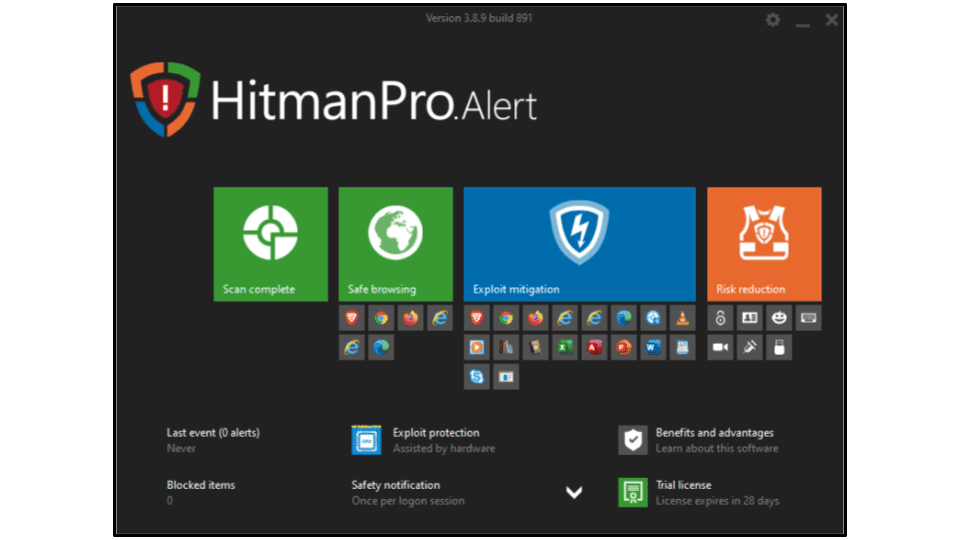
HitmanPro is a supplemental antivirus program with a good malware scanner but weak additional features. The vast majority of security tools conflict with each other and are meant to be used alone, but HitmanPro is an exception that works best when used alongside a full-fledged antivirus suite.
HitmanPro offers real-time malware scanning, as well as protection from browser-based exploits, USB attacks, remote session hacking, and password dumping. Unfortunately, HitmanPro’s real-time protection was really ineffective in my testing, detecting only 40% of my malware samples — which is pretty bad. I recommend running it alongside competitors like Norton, Bitdefender, or McAfee, which all caught 100% of the malware files in our real-time protection tests.
That said, I really like that both of HitmanPro’s products are available as 30-day free trials. You don’t even have to provide a payment method to take advantage of this. They’re also pretty affordable and backed by a 30-day money-back guarantee.
HitmanPro.Alert Plans & Pricing — 2 Windows-Only Plans (With a 30-Day Money-Back Guarantee)
There are 2 HitmanPro plans to choose between — both are available on 1- or 3-year subscriptions, and both only work on Windows devices. Each package is available as a 30-day free trial and comes with a 30-day money-back guarantee.
Here’s a quick overview of HitmanPro’s plans:
HitmanPro — On-Demand Virus Scanner (Windows Only)
HitmanPro is just a simple anti-malware scanner starting at $24.95 / year for 1 device on the 1-year plan — it’s pretty good but also very minimal, lacking real-time protection and other essential features.
However, Avira and Bitdefender both offer free anti-malware scanners, so you can just use one of those instead. Avira and Bitdefender’s free antivirus programs even offer free real-time protection — but HitmanPro is available with a 30-day free trial if you still want to give it a shot.
HitmanPro.Alert — Weak Real-Time Protection (Not Worth It)
HitmanPro.Alert is a more advanced package that starts at $34.95 / year for 1 device on the 1-year plan. It comes with the malware scanner as well as:
- Real-time protection.
- Web protection.
- Password dumping protection.
- Remote session protection.
- Webcam protection.
- Ransomware protection
There is plenty to like about HitmanPro.Alert, but there are honestly a few features that aren’t particularly useful. The real-time protection missed a lot of my malware samples, the web protection didn’t block phishing sites, and the password dumping protection isn’t needed for users on the latest Windows OS. While I like some features, including the remote session protection and the anti-malware sandbox, I’d recommend looking into a more comprehensive antivirus suite with better security features, like Norton.
HitmanPro.Alert is a bit pricey for what it offers, but there’s a free 30-day trial, so you can give it a try and decide for yourself if it’s worth your money.
HitmanPro Security Features — Decent Malware Scanner (But Not Much Else)
Virus Scanner — Super Fast Scans (But Not the Best Results)
HitmanPro’s virus scanner compares files on your computer with 4 databases of known malware threats, including SophosLabs. It also uses behavioral analysis to block malicious memory allocation. This allows HitmanPro to catch a really broad range of malware. Still, it wasn’t able to detect zero-day threats nearly as well as competitors like Norton and McAfee.
HitmanPro has 3 scan options:
- Full scan. Scans the entire disk for malware.
- Quick scan. Scans temporary files and critical folders for malware.
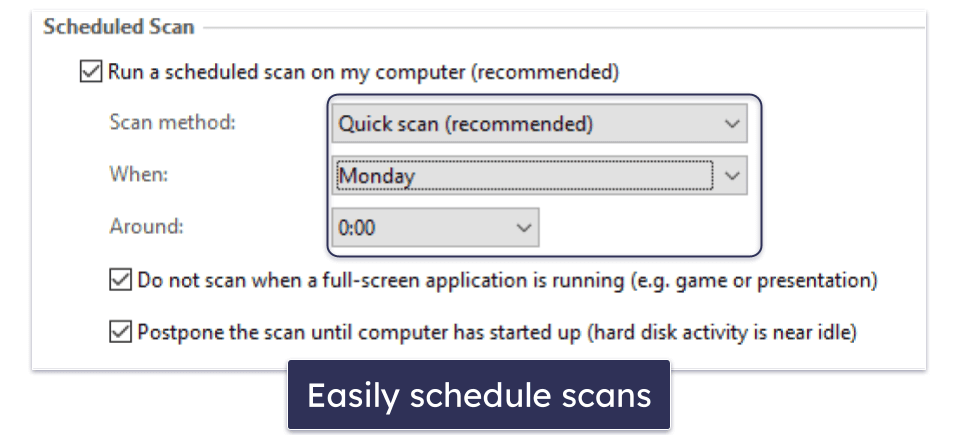
- Scheduled scan. Schedule a time and day to run a quick or full system scan.
I tested the scanner by downloading an archive containing nearly 1,000 malware samples, including viruses, computer worms, trojans, spyware, adware, ransomware, rootkits, and cryptojackers. I hid the samples in different locations across my hard drive, including hard-to-reach areas like system folders.
HitmanPro’s quick scan took 2 minutes to complete, which is better than most competitors — even top antiviruses like McAfee took 10 minutes to finish a quick scan of my system.
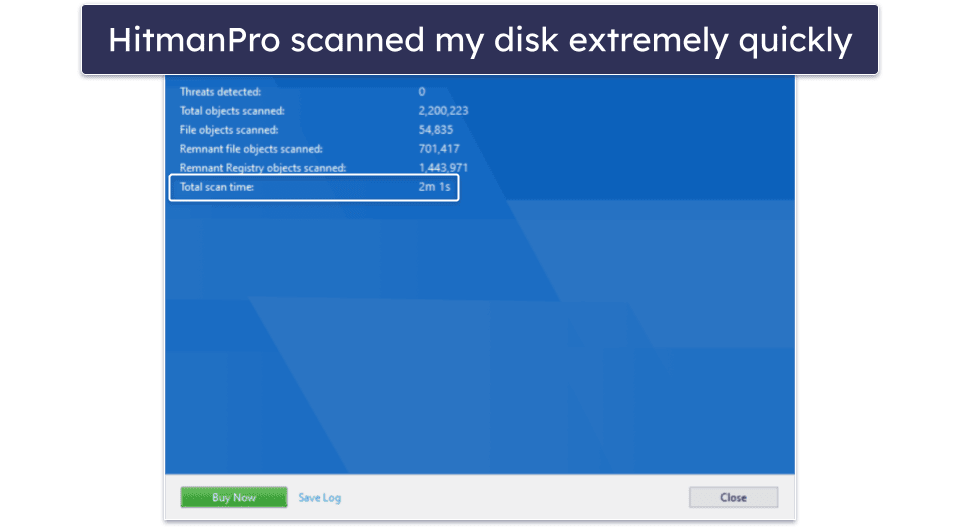
HitmanPro’s quick scanner found 90% of the malware on my system and also flagged some potentially unwanted programs that I didn’t know about — this is a great result from a quick scan.
The full scanner only took about 10 minutes to complete and found 92% of my test malware files. This is super fast, but the detection rate lags behind competitors like Norton and Bitdefender, which are able to detect 100% of malware during full system scans. Seeing as how HitmanPro’s full scans are much faster than its competitors, I can’t help but feel like it sacrifices effectiveness for speed. Which is a shame in my mind as I’d rather wait longer if it meant catching every threat.
One aspect of the scanner that I quite like is that it can cause malware to self-destruct. Since criminals don’t want their tactics to be studied, a lot of malware will self-destruct when it encounters a researcher’s computer. HitmanPro makes it appear as if your computer is always being used by researchers, prompting some malware to deactivate itself. It doesn’t conflict with most other antiviruses, which is great.
I didn’t notice any CPU drain when using HitmanPro’s scanner. I was able to stream HD video and even run CPU/GPU-intensive video games, which I was unable to do with some other antivirus programs.
HitmanPro’s scanner isn’t as effective as many competitors that make better use of machine learning to identify threats. Still, I like that it’s very lightweight and relies on multiple databases.
Real-Time Malware Protection — Great Exploit Protections
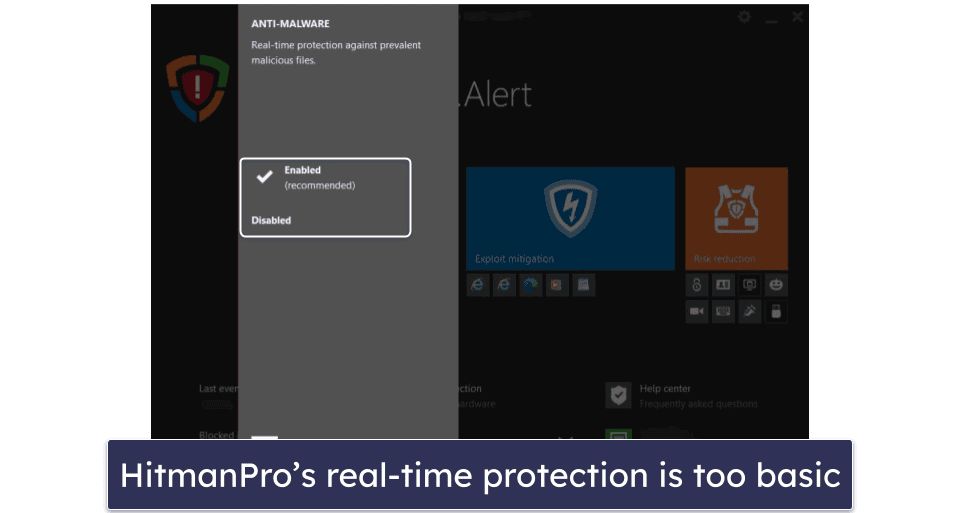
HitmanPro’s real-time protection doesn’t work very well. It has great exploit protection but otherwise isn’t very reliable. What’s more, you have to subscribe to the most expensive plan (HitmanPro.Alert) to get it.
I tried to download my malware cache of nearly 1,000 different files on a clean computer with HitmanPro running on it — but the real-time protection only detected around 40% of my malware test files, which is a really bad result.
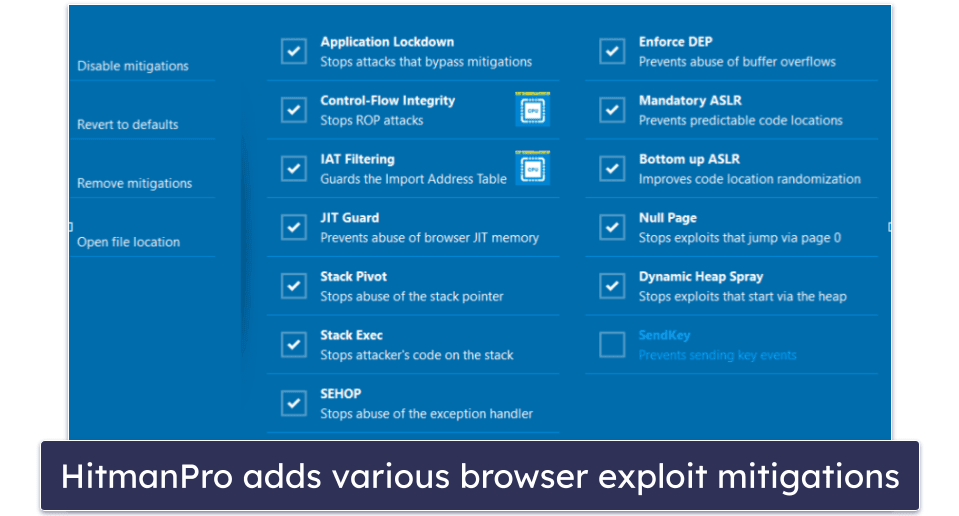
HitmanPro does have some decent real-time exploit protections, which can detect and block malware and exploits from attacking background processes. This is a useful feature for blocking malware that’s already running on your system, but I’d prefer a real-time protection feature that could more accurately stop malware from being downloaded and run in the first place, like the real-time protection offered by Norton.
While HitmanPro exploit protections are pretty impressive, they don’t make up for the ineffective real-time malware scanner. Until HitmanPro can improve this feature, I can’t recommend users rely on this program for real-time malware protection. If you are going to use it, you should pair HitmanPro with an antivirus that has effective real-time protection like Norton or Bitdefender.
Web Protections — Blocks Keyloggers (But Not Dangerous Websites)
The keystroke encryption worked very well in my tests. It disguises anything you type into your web browser, stopping hackers from using keyloggers to intercept and steal your personally identifiable information (PII), such as passwords and credit card details. I used a sample keylogging test tool on my Windows 11 computer, and the results were completely encrypted.
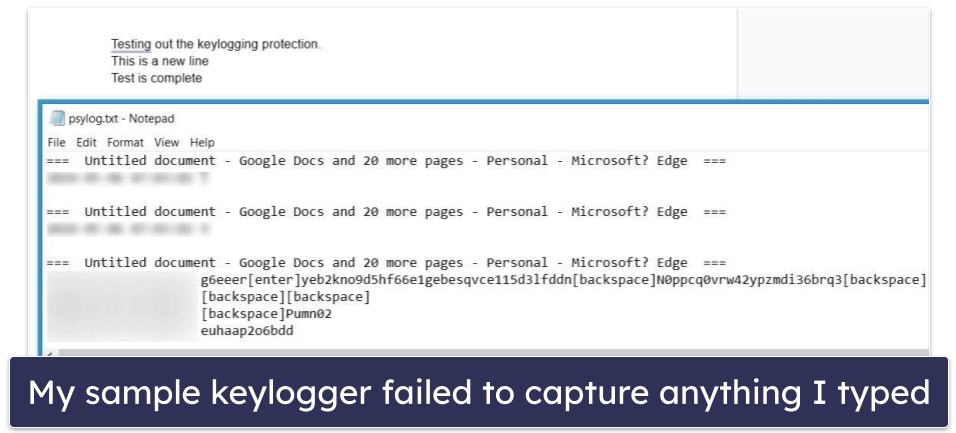
That said, it doesn’t block as much data as I’d like. The keylogging software was still able to capture the website I visited, how many tabs I had opened, exact times, and some general information, such as when I typed backspace. If you want an antivirus with total keylogging protection, you should check out our 5 best antiviruses with keylogger protection. Norton, for example, did a better job at masking important information during my tests.
The web exploit protection worked well, detecting and blocking all of the exploits in my testing. Browser-based exploits are a really common method of malware incursion, so I was happy to see that HitmanPro was able to block some exploits that even some advanced competitors missed in my testing.
Overall, HitmanPro’s web protections offer good defense against dangerous browser-based exploits, but not much else. I’d like to see HitmanPro add phishing detection, tracker blocking, and more effective keylogger protection to its web protections. However, if you’re looking to protect your devices from the latest exploit attacks and don’t mind using a separate anti-phishing tool, HitmanPro is a good choice.
Password Protection — Stops Mimkatz-Style Attacks (Not a Traditional Password Manager)
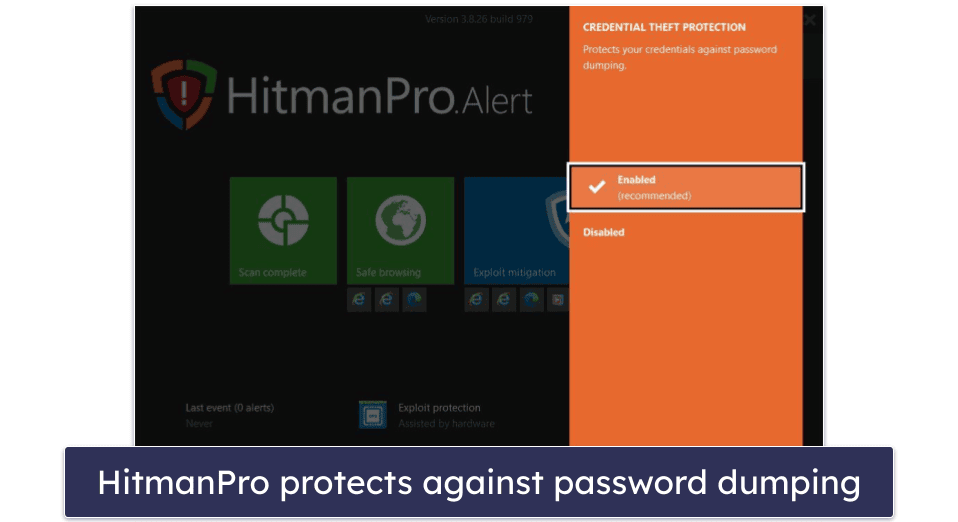
The password protection included in HitmanPro isn’t the best (and shouldn’t be confused with a password manager). It’s a specific tool to prevent Mimikatz-style password theft attacks — which aren’t very common at all in 2026. These are a type of exploit attack in which hackers take advantage of a Windows feature known as WDigest. This feature loads encrypted passwords into memory, which hackers can then dump and steal from.
However, in Windows 10 and 11, WDigest is turned off by default. Outside of very specific circumstances, there’s no reason to turn it on. So unless you run a very old copy of Windows that you’ve never updated, this feature really doesn’t amount to much.
Overall, the password protection on HitmanPro is a pretty useless passive protection. Especially if you consider that comprehensive password managers like Dashlane — which offer strong 256-bit AES encryption (the same banks use) — are available on the market for a cheap monthly subscription.
Remote Session Protection — Lockdown Applications & Administrative Permissions for Remote Sessions
HitmanPro’s Remote Session Protection is a pretty cool security feature to protect against hackers that could remotely access and hack your computer. When someone is accessing your computer remotely, HitmanPro stops them from running any applications they download onto your computer. It also removes all administrative permissions from applications, making it harder for them to make changes to your PC.
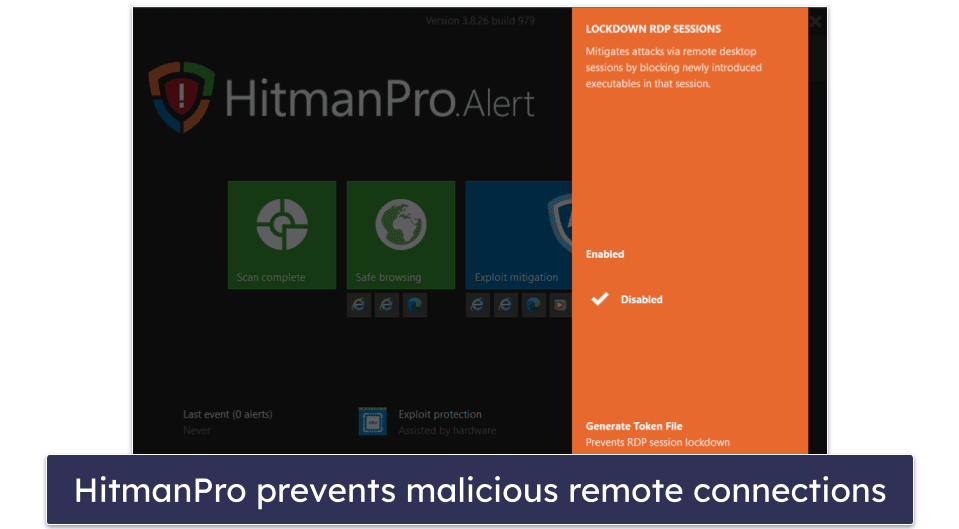
This is a great defense against rootkits and other viruses that allow hackers access to your PC without you knowing, and it worked really well in my testing. I tried a remote session on my PC and couldn’t access any executables or binary files that I tried to open.
The tool also allows you to create a 2-factor token file that can unlock a session should you trust the person remotely accessing your PC.
However, HitmanPro doesn’t include a firewall, which is a helpful tool that can keep hackers from initiating a connection with your device in the first place — competitors like Bitdefender include useful firewalls in their plans.
Overall, HitmanPro’s Remote Session Protection feature is a helpful tool for keeping your device safe from invasive hacking attempts and remote access tools like rootkits and cryptojackers.
Additional Features — Not the Best Range of Extras
HitmanPro isn’t a very feature-rich antivirus. However, the most expensive plan comes with a few decent extra features, including:
- Webcam protection.
- Ransomware protection.
- BadUSB protection.
- Sandbox-aware malware protection.
The webcam protection is pretty disappointing. When your camera is accessed, HitmanPro displays an alert saying your webcam is being monitored, but it doesn’t stop the actual monitoring. Competitors like Bitdefender have webcam protection that actively blocks unauthorized apps or computers from accessing your webcam.
However, the other additional features are pretty cool. BadUSB protection defends against the BadUSB exploit attack, which targets vulnerable USB software (it can even inject viruses into your PC and steal your data). HitmanPro can detect BadUSB and stop it from running.
The ransomware protection works by creating a backup of your files the moment it detects a ransomware attack on your device. After dealing with the threat, you can safely restore your files to their original state without worrying about lost data.
The sandbox-aware malware protection tricks malware files into thinking that your system is a virtual machine, which can trigger some advanced malware files (like rootkits) to remove themselves from your computer to avoid detection. It’s a clever tool that could be helpful against advanced malware files.
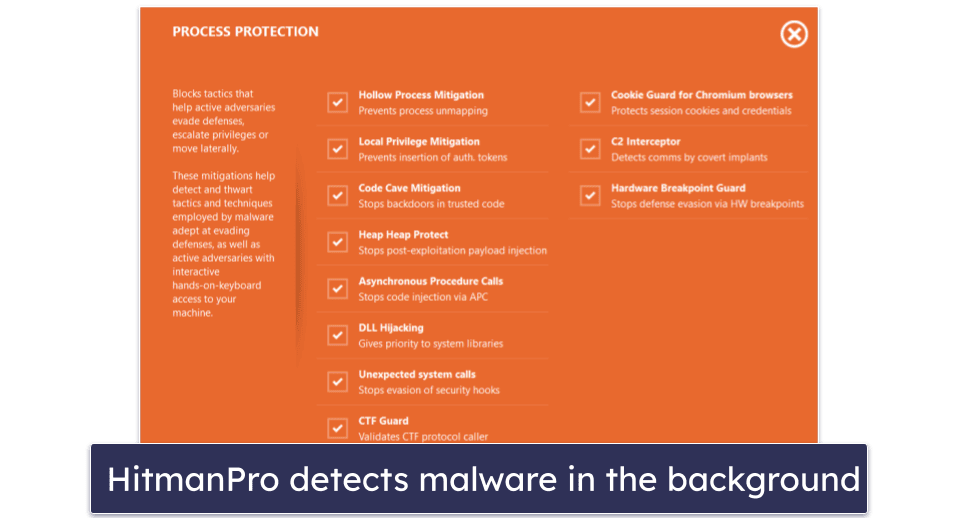
Process Protection provides an extra layer of defense against threats that attempt to obtain administrative privileges and move laterally through your computer. It comes with a ton of toggleable options to prevent dangerous activity like code injection, creating backdoors in trusted code, and process unmapping (I recommend leaving them all on). Though it’s no substitute for good real-time protection, it’s an excellent last line of defense.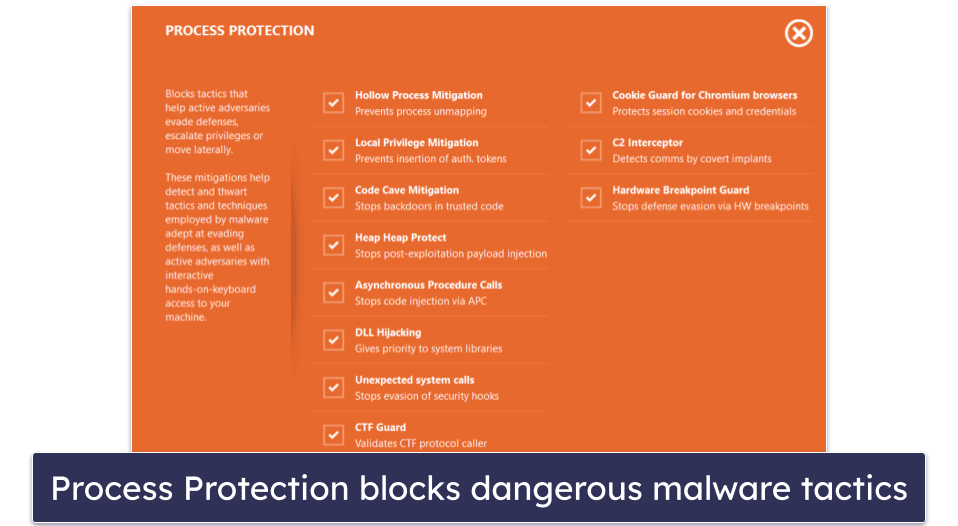
But overall, HitmanPro has a disappointing range of additional features. Its specialized BadUSB and fake sandbox anti-malware tools are pretty good, but HitmanPro isn’t a great choice unless you’re pairing it with another comprehensive antivirus suite.
HitmanPro Ease of Use & Setup — Easy to Navigate (+ Tiny File Size!)
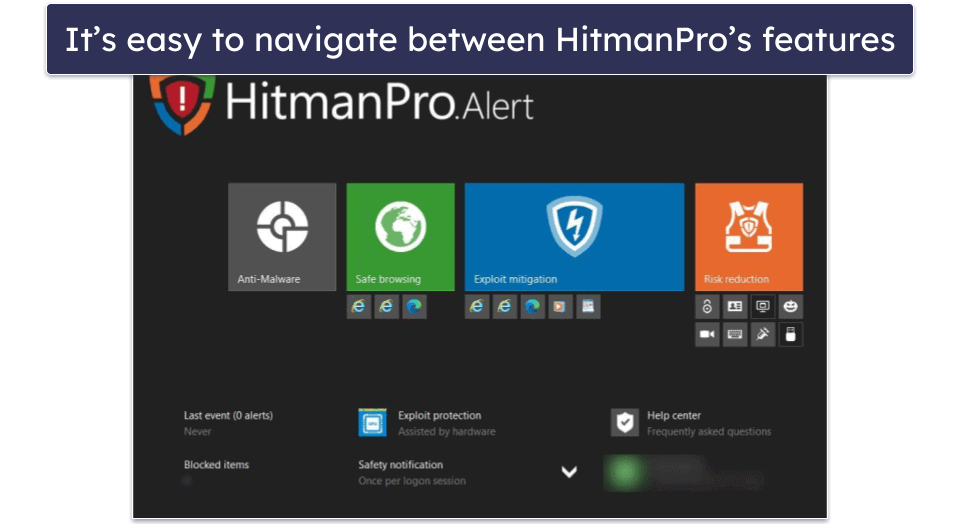
HitmanPro is straightforward to set up and use. Plus it’s only 14 MB in size (though the website says 10 MB), so it’s really quick to download, and you can run it without installation. Since it’s quite limited in a number of ways, I recommend using HitmanPro alongside a comprehensive antivirus suite and treating it as a last line of defense against malware.
How to Install HitmanPro (Just 3 Simple Steps):
- Get HitmanPro. Head to the official HitmanPro website and then click Products and choose which plan you want. Choose Buy now or the Free 30-day trial option to begin. If you’re purchasing HitmanPro, you’ll need to enter your payment information.
- Download HitmanPro. Afterward, you’ll be taken to a download page. Both products are listed next to each other, so read carefully and make sure you select the right one.
- Follow the prompts. After the download is finished, double-click on the download in your File Manager. An installation wizard will pop up to run you through the installation process, including a few initial setting questions. Simply follow the prompts to get through the setup.
It took me less than 5 minutes to download and set up HitmanPro. If you opt for the pricier plan, the malware scanner is included as a separate application.
HitmanPro’s interface is really simple. A full malware scan can be started with one click. You can also access the quick scan from a simple dropdown menu.
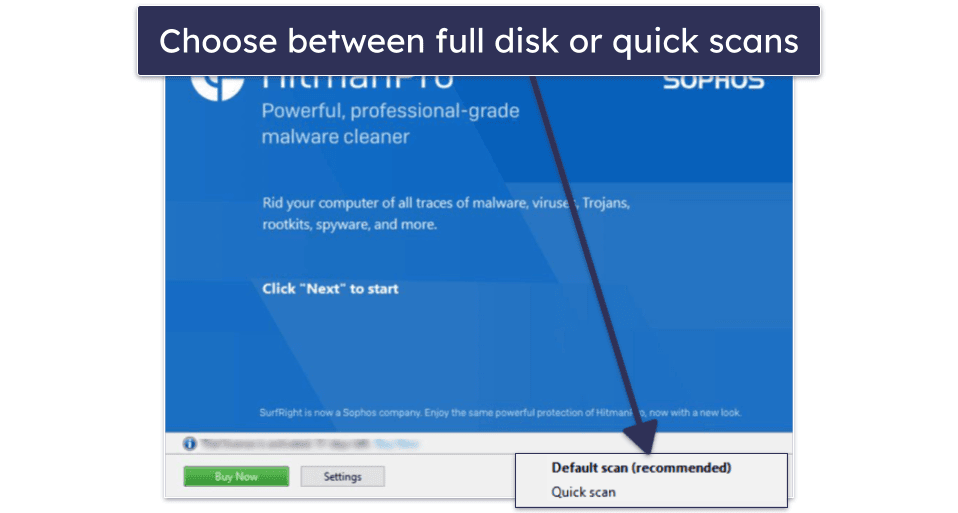
The settings button allows you to schedule scans and adjust various options — such as whether the malware scanner should scan for tracking cookies or potentially unwanted applications.
Scheduling scans is easy. All you have to do is choose between a quick or regular scan, select a day and time you want the scan to run, and hit OK.
The settings menu also provides access to the quarantine vault, containing logs of every scan completed.
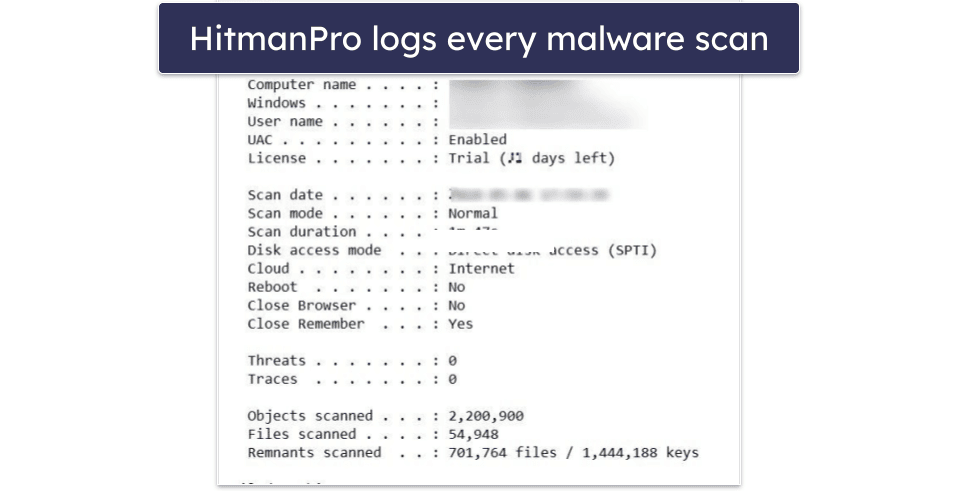
HitmanPro’s UI includes a lot of specific features and protections, but it’s still straightforward to navigate.
You can access each feature from 4 large buttons and enable/disable individual features depending on your needs.
However, I don’t like how hard it is to initiate a quick scan in HitmanPro. If you click the “Anti-Malware” button, the only option is to scan the entire computer. This opens the separate HitmanPro application and automatically initiates a full system scan.
When you go to access the different scanning options or run a scan, HitmanPro will stealthily open another instance of the program. This strikes me as odd but the second instance doesn’t open a Window so at least it isn’t visually intrusive.
Nonetheless, I found HitmanPro easy enough to navigate, HitmanPro’s visual elements are very barebones and the style is very much in the Windows 8 mold.
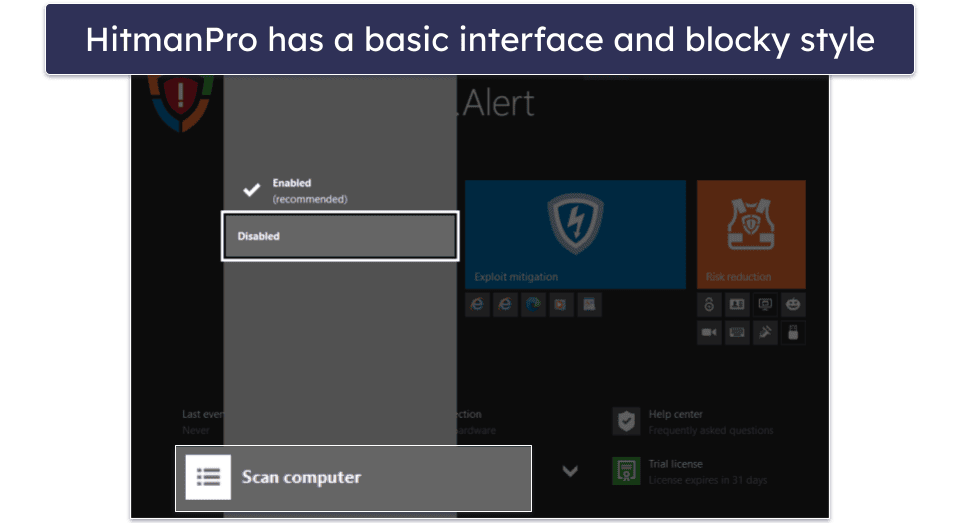
For the most part, HitmanPro ran smoothly, but I did encounter a visual bug that required me to completely reinstall HitmanPro to fix. The top right corner of my screen had a tab that read “an update is available,” but no matter how many times I updated the antivirus, the banner remained. It took reinstalling it to fix it.
Overall, however, HitmanPro is fairly accessible and easy to use.
HitmanPro Customer Support — Slow Email Responses & Small FAQ Section
HitmanPro doesn’t have many options for customer support. If you need help, you can access:
- Email support.
- FAQs (online knowledge base).
When I contacted support via email, I received a reply in 2 days. The response answered my query about a particular background process protection feature in great detail.
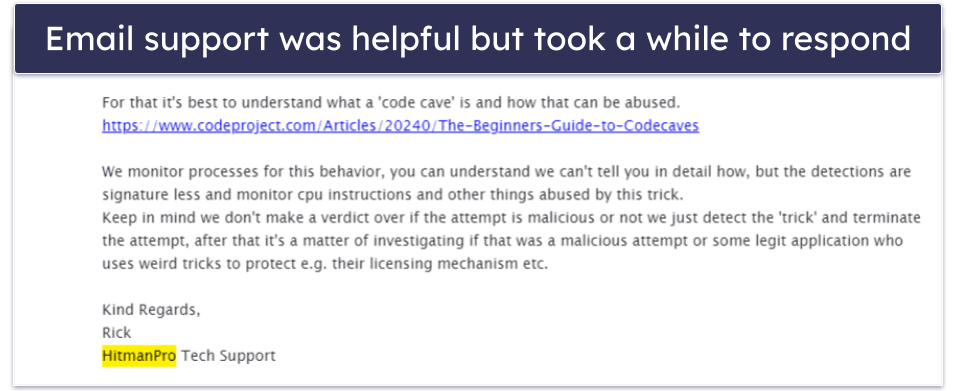
Even so, I was disappointed in the time it took HitmanPro to reply. Most competitors only take a handful of hours to respond at most.
The FAQ section provides useful information, though it doesn’t include a wide array of topics. While it outlines the basic issues you may experience during HitmanPro.Alert installation and usage, advanced users might struggle to find information on complex issues.
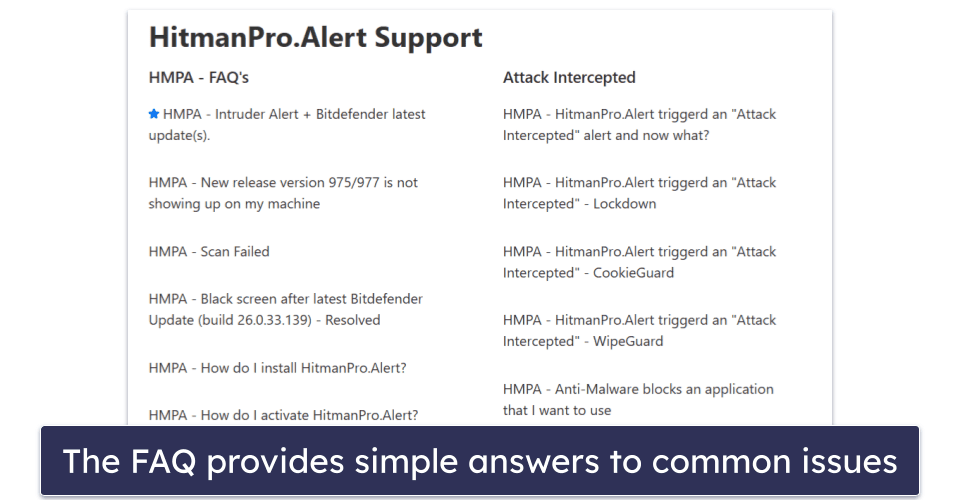
Other antiviruses have more comprehensive knowledge bases with instructional videos and in-depth instructions — for example, Norton’s knowledge base includes forums that are populated by tech support people and users that answer complicated questions in detail.
Overall, HitmanPro’s customer support isn’t very good. While informative, the email support team was slow to reply. What’s more, HitmanPro doesn’t provide a comprehensive knowledge base, live chat, or phone support — something many competitors offer.
Can HitmanPro Fully Protect Your Devices?
HitmanPro offers good malware scanning, but it doesn’t have good real-time protection and it lacks many useful extras. There’s also no Mac or mobile support, meaning HitmanPro can’t protect all of your devices.
HitmanPro remote session protection and exploit protections are pretty impressive, but the real-time protection and password protection are pretty bad. The real-time protection failed to capture any malware sample downloads in my tests, and when I ran a keylogger tester on my computer, it could still capture some details (like what website I was accessing).
Overall, HitmanPro doesn’t do anything that sets it apart from its more affordable and full-featured competitors. If you’re looking for a low-cost, lightweight antivirus program, there are some great free options available, and if you want to invest in a secure paid antivirus, other top competitors simply offer better protection.
That said, if you want to try HitmanPro or HitmanPro.Alert, both programs offer risk-free 30-day trials (no card required) and 30-day money-back guarantees.
Frequently Asked Questions
Is HitmanPro free?
HitmanPro doesn’t provide any free packages or money-back guarantees. However, it does offer a 30-day free trial. If you’re looking for a 100% free antivirus program, you can check out our list of the best free Windows antiviruses.
Is HitmanPro a good antivirus?
Not really. HitmanPro includes a decent on-demand malware scanner. When I tested the scanner, it captured 90% of the malware samples I had hidden in my computer. However, I had issues with some of the features in HitmanPro — the real-time malware protection and keystroke protection didn’t work as well in my testing as I’d have liked.
If you just want to scan for malware, then HitmanPro.Alert is a decent option, but its buggy real-time protection keeps it from being a good internet security suite for most users. If you’re looking for a comprehensive antivirus suite with good antivirus scanning, real-time protection, web protections, and more, then I’d recommend going with one of our top antiviruses instead.
Can You Get HitmanPro for Android, Mac, or iOS?
Unfortunately, HitmanPro doesn’t offer any protections for Android, iOS, or Mac. HitmanPro is only available for Windows. If you’re looking for an antivirus that offers good protection for all of those other platforms, I recommend Norton. Or you can read our lists of the best antiviruses for Android, Mac, and iOS if you’re looking for coverage on a specific platform.
Is HitmanPro a standalone antivirus?
No, HitmanPro is not meant to be used as a standalone antivirus. Many antivirus suites, such as Norton or Bitdefender, are meant to be used on their own and provide you with comprehensive security. HitmanPro, on the other hand, is designed to be used in tandem with another antivirus suit, so you can get a second opinion on malware scans.
It’s why HitmanPro’s extra features are somewhat lacking. Rather than trying to be your all-in-one antivirus suite, HitmanPro relies on you having another antivirus installed, so it can get away with limitations like having less-than-effective real-time protection.