

X-VPN Review: Quick Expert Summary
X-VPN is a decent VPN with useful extra features and user-friendly apps. It uses the standard 256-bit AES encryption, includes a kill switch, follows a no-logs policy, and even has full leak protection.
It maintains good speeds, offers a medium-sized network, and includes torrenting-optimized servers that work well. It also has an ad blocker, protection from malware and trackers, a private browser (Android only), and split-tunneling.
However, some issues prevent X-VPN from being a top-ranked VPN. For one, its streaming support isn’t great — there are much better streaming VPNs out there, like ExpressVPN. Its obfuscation doesn’t work very well, and some features are buggy.
X-VPN offers 1-month, 1-year, and 2-year deals, all covered with a 30-day money-back guarantee. It also has an okay free plan.
X-VPN Full Review — Good Speeds & Feature-Rich Apps
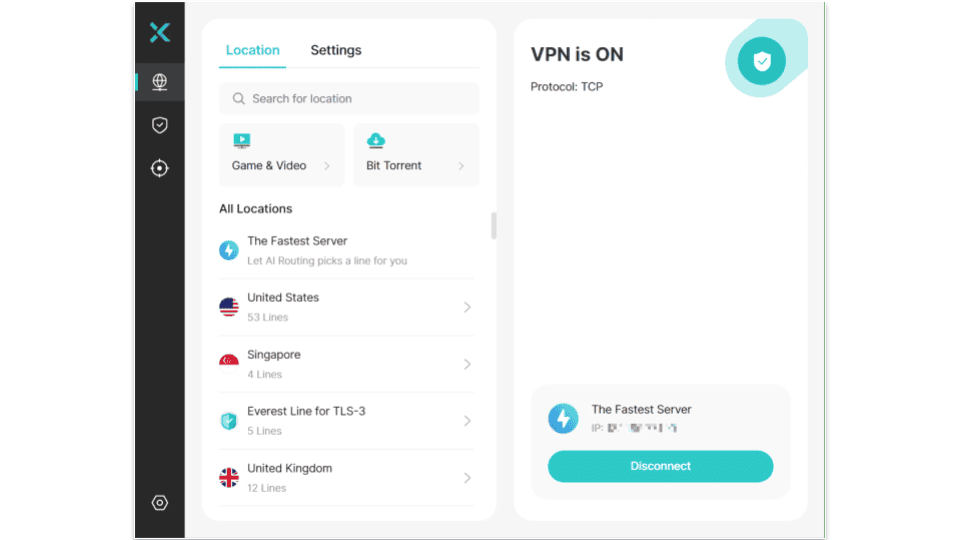
I thoroughly researched and tested X-VPN to see how it compares against the top VPNs on the market. While it has some critical issues, it’s an affordable VPN with good speeds across its entire server network.
It comes with some useful extra features, like split-tunneling, an ad blocker and tracker, malware protection, and a private browser. Its apps are easy to use, though I found them lacking in some other parts.
X-VPN has some serious faults. The apps don’t explain all features very well, and worse yet, some features don’t work at all. Its obfuscation feature and some of its streaming servers simply don’t do what they’re supposed to.
Overall, X-VPN is a fast and affordable VPN for some simple online activities, like browsing or torrenting, but it lacks a lot of features that could make it a top-ranked VPN.
X-VPN Plans & Pricing — Competitive Prices + a Limited Free Plan
X-VPN offers a free plan and premium deals, starting at $2.99 / month. You can subscribe to the Premium option for 1 month, 1 year, or 2 years.
The free Basic plan offers a daily cap of 500 MB on desktop, where you can only connect to a random free server, with no option to choose or even see the server’s location. On mobile, you get unlimited data, but it’s ad-supported. When you connect to a server, you have to watch a 30-second ad before connecting, and since the app disconnects as soon as your phone locks, you have to go through the same steps each time.
The free plan is also very bare bones. You only get 1 connection and no other features (not even a kill switch). If you’re after a free VPN, Proton VPN has one of the best free VPN plans on the market, with no data cap and no ads.
X-VPN’s Premium offer gives you access to all features, regardless of subscription length, and all deals come with a 30-day money-back guarantee. It lets you connect up to 5 devices on a single subscription, which is less than other top VPNs — for example, Private Internet Access allows unlimited connections.
X-VPN accepts payment through credit and debit cards (such as Visa, Mastercard, American Express, or Discover), PayPal, and cryptocurrencies like Bitcoin and Ethereum through CoinPayments. If you’re looking for an affordable VPN that works with more crypto options, I recommend Private Internet Access or CyberGhost VPN.
X-VPN Features — Covers the Security Basics but Has Some Faults

X-VPN has the following industry-standard security features:
- 256-bit AES encryption. X-VPN uses the same encryption standard as banks and militaries worldwide to protect user traffic.
- No-logs policy. X-VPN doesn’t make logs of your activity, such as the websites you visit or your IP address. However, I wish the policy was audited by an independent security firm like other top VPNs.
- Kill switch. X-VPN cuts off all internet traffic when the VPN disconnects unexpectedly, preventing your real IP address and any of your traffic from leaking without VPN protection.
X-VPN also has advanced security features. You get RAM-only servers, which erase all data upon server restart, and perfect forward secrecy — it refreshes your encryption key often so hackers can’t get their hands on your traffic data. In addition, it includes built-in full leak protection against IPv6, DNS, and WebRTC leaks. I tested 10+ servers, and I didn’t have a single IP leak occur.
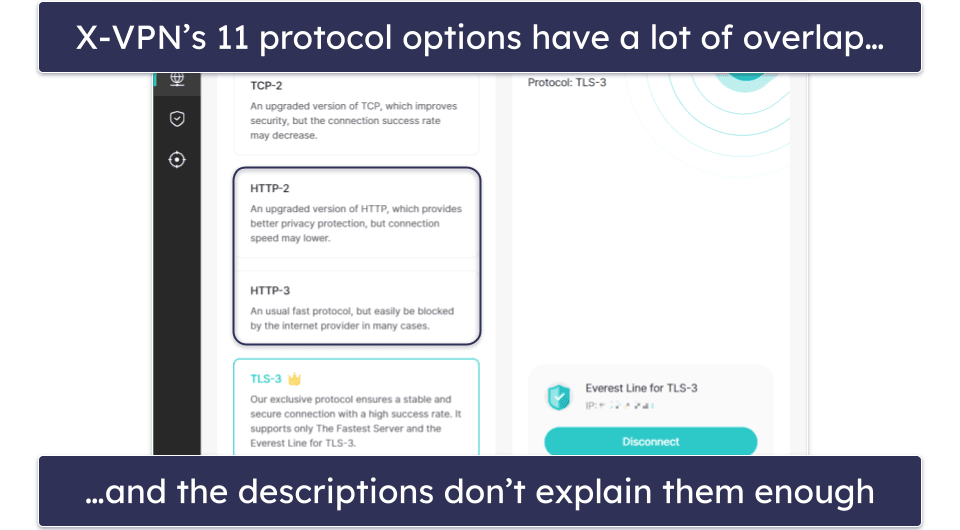
However, X-VPN’s protocols really confuse me. It lets users pick from 11 options, 9 of which are X-VPN’s proprietary builds called “Everest” protocols, and 2 of which are open-source. Here are the options:
- OpenVPN and WireGuard. The most popular open-source VPN protocols on the market. WireGuard is faster, but OpenVPN is more secure.
- UDP. Pretty good speeds for real-time communication, but the connection can be unreliable.
- TLS, TLS-2, TLS-3. TLS is the protocol that makes HTTPS connections more secure. Its official releases are numbered up to TLS 1.3, so TLS-2 and TLS-3 are “homebrewed” upgrades X-VPN made: TLS-2 is for security, and TLS-3 is for fast and stable connections.
- TCP, TCP-2. TCP is a good protocol for stable and secure connections, but it’s not very fast. TCP-2 is a variant developed by X-VPN.
- HTTP, HTTP-2, HTTP-3. HTTP is a file transfer protocol that doesn’t have any security layers on its own. Customer service reps explained that X-VPN’s HTTP protocols are good for unblocking websites, but that doesn’t match with the in-app descriptions. Also, X-VPN says that these proprietary versions are a combination of HTTP, 256-bit AES, and obfuscation, but it says the same for all of its protocols.
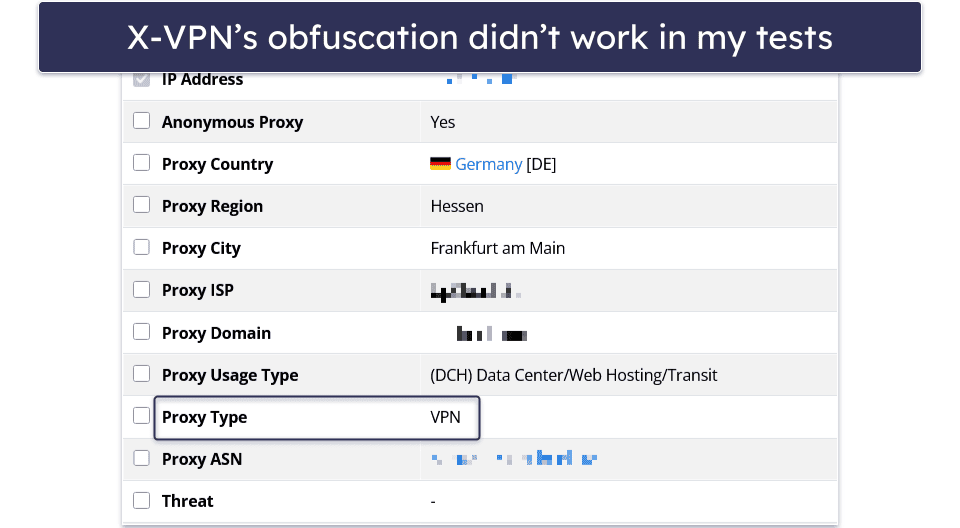
X-VPN has obfuscation, too, which is automatically enabled on all servers on its Everest protocols. However, when I tested it, the results consistently showed that I was using a VPN. I also checked it with sites that try to block VPNs — I tried to go on Netflix Serbia while connected to my local Serbian server and got an E106 error code, which means that Netflix detected that I was using a VPN.
Aside from these issues, X-VPN also has good extra features that actually work:
- Split-tunneling. Lets you pick which apps connect through the VPN, and which ones don’t. I tested it by excluding my Edge browser from the VPN connection and then checking the IP addresses on Edge and Firefox — Edge showed my real IP address while Firefox showed the VPN server’s address. It’s available on Windows and Android, and it was pretty easy to set up on my laptop and my phone.
- Double VPN. Routes your connection through 2 servers for extra security. However, you can’t choose the entry server manually like you can with Surfshark.
- In-app browser. X-VPN’s Android app has a simple built-in browser with a functional ad blocker. It also wipes your history when you leave the X-VPN app.
- Dark Web Monitor. X-VPN lets you list up to 5 email addresses, and it warns you if any of them appear in a dark web data leak.

- Ad blocker. The ad blocker is available on the Windows app. In my tests, it worked very well, blocking all types of ads, including pop-ups, banners, and overlays. However, I still prefer PIA MACE, because it works on more platforms, including macOS, Linux, and Android.
- Browser Protection. Available on desktop, it blocks trackers and malicious websites, it scans your downloaded files for malware, and it checks pages’ security in search engine results. While all of these features worked very reliably on Edge and Chrome, having Browser Protection active completely stopped me from browsing on Firefox, as it reported certificate issues with X-VPN.
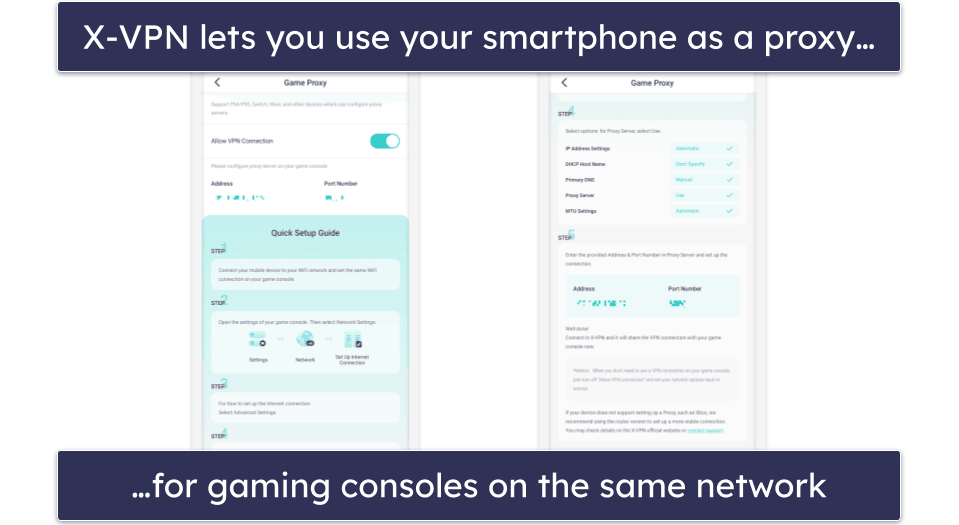
- Connection sharing for gaming consoles. X-VPN’s mobile apps let you set them up as proxies for your gaming consoles. That means that you can cover your gaming console’s internet connection with X-VPN and connect it to a gaming server, even if the console has no native support.
- Password generator. X-VPN also has a simple generator that can help you create randomized passwords. It lets you adjust the character pool it uses and the password length. It’s a useful tool, but I much prefer ExpressVPN Keys, because, aside from generating strong passwords, it also stores them in a super secure digital vault where they can’t be compromised.
X-VPN Privacy & Security — Has a No-Logs Policy but No Audits to Prove It
X-VPN has a strict no-logging policy. It doesn’t monitor your browsing history, bandwidth, or the files you download. While it does log your email address and some connection timestamps, its Privacy Policy claims that these logs are for statistical purposes and are deleted after 48 hours. You can use a fake email address to make an X-VPN account if you don’t want to share your real one.
However, I’d be more inclined to trust X-VPN if its policy underwent an independent audit. Many top VPNs, like ExpressVPN, have passed audits with a trustworthy third party backing their claims.
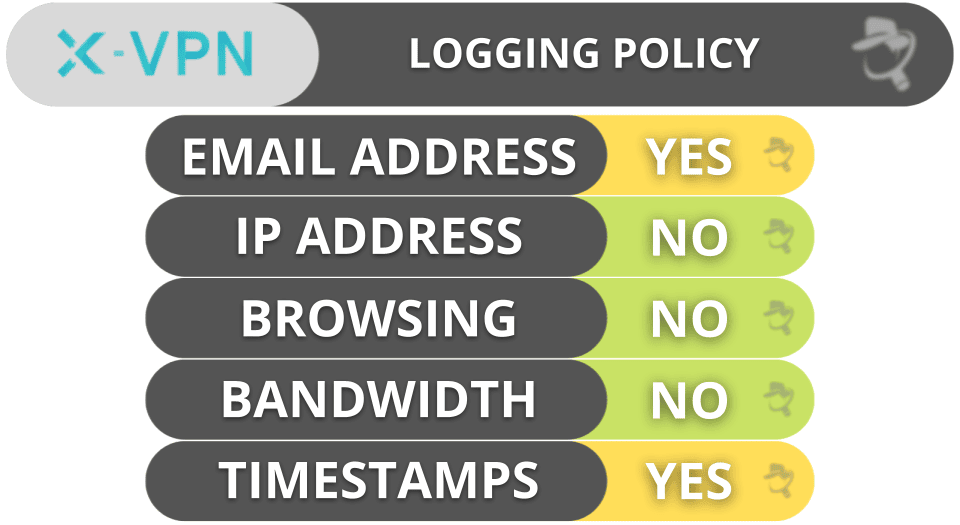
X-VPN is based in Kowloon, Hong Kong, which isn’t a part of the 5/9/14 Eyes Alliances (an intelligence sharing program between countries that involves massive amounts of data). Also, Hong Kong has different data privacy laws from mainland China. That said, X-VPN doesn’t publish transparency reports that would show if the authorities made requests for user data, so there’s no way of knowing if it really upholds its no-logs policy.
Overall, X-VPN has a well-detailed privacy policy, but it doesn’t have any independent audits or transparency reports that would give it credibility.
X-VPN Speed & Performance — Pretty Good Speeds on Nearby & Distant Servers
I tested X-VPN’s speeds on my Windows 11 PC on servers in 10+ countries, evenly spread throughout the world. I had the best speeds when connected to nearby servers, but I didn’t notice any significant slowdowns until I tested the distant ones.
Regardless of the server I picked, websites loaded in 1–2 seconds (with the odd exception of Reddit, which wouldn’t load on some servers), and I could stream YouTube videos in high quality on most servers. I only had issues loading the highest quality videos on really distant servers, like the ones in Australia or Japan.
First, I ran a speed test to determine my baseline speeds without a VPN connection.
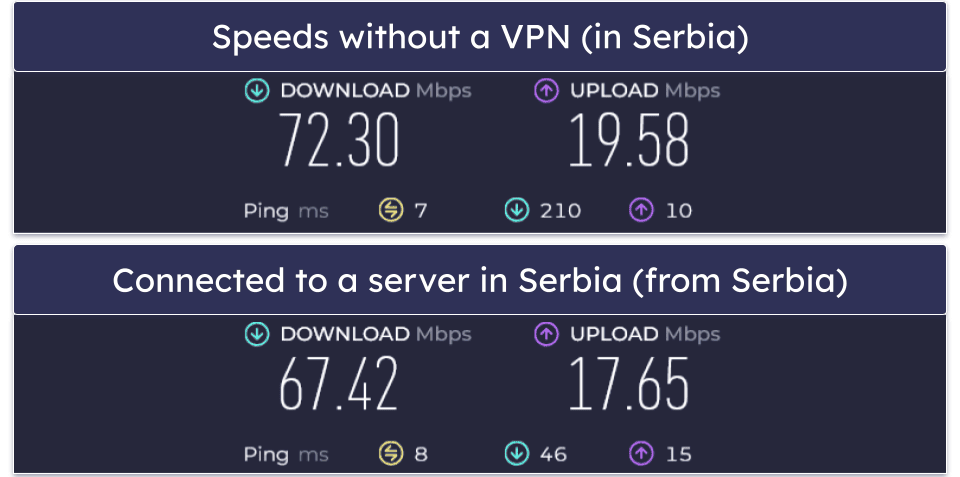
Then, I connected to a local server (in Belgrade, Serbia) to get an idea of how much it would slow down my connections further. I was very satisfied with the results because my ping didn’t increase significantly, and my speeds decreased by about 6%, which is pretty good.
Then, I clicked on The Fastest Server to let X-VPN pick a high-speed server for me. Because it doesn’t tell you what server location it connects you to, I had to look up the IP address to determine that it connected me to a server in Sofia, Bulgaria. My connection speed went down by 25%, but I didn’t see much of a difference until I tried to load a video in 4K quality — it took about 10 seconds to load.
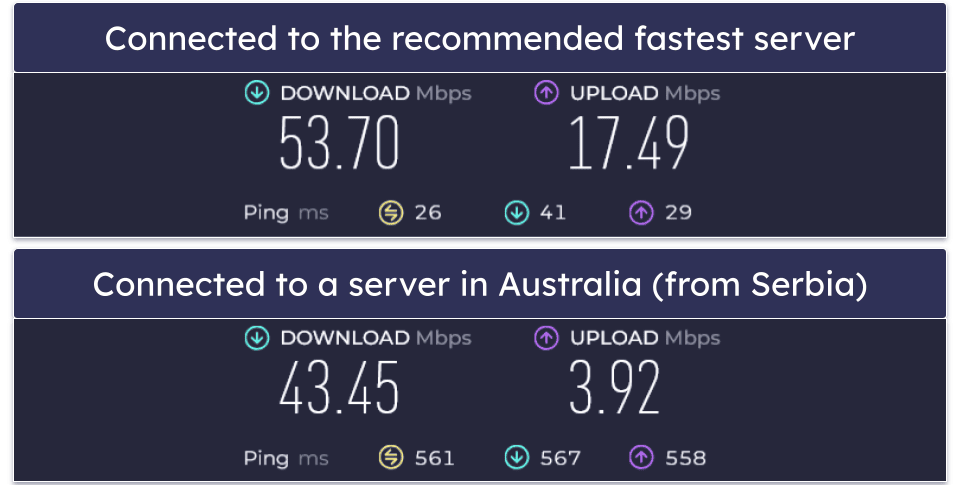
Lastly, I connected to an Australian server to see how it behaved over large distances. My speed was 40% lower, but most websites still loaded in 1–2 seconds. My ping also increased dramatically — it was 80 times higher than without a VPN.
My torrenting speeds were about the same on most servers I tested; it took me 7–8 minutes to download a 1 GB file without a connection, and it took 9–10 minutes while I was connected to local and nearby servers. I only noticed a significant increase on distant servers, where it took about 15 minutes to download.
X-VPN Servers & IP Addresses — Medium-Sized Network + Specialized Servers
X-VPN has servers in 65 countries. While it’s not the largest network on the market (top VPNs have more server locations, like ExpressVPN has servers in 105 countries), it’s spread out around the world pretty well, so most users should be able to find a nearby server to connect to for the best speeds.
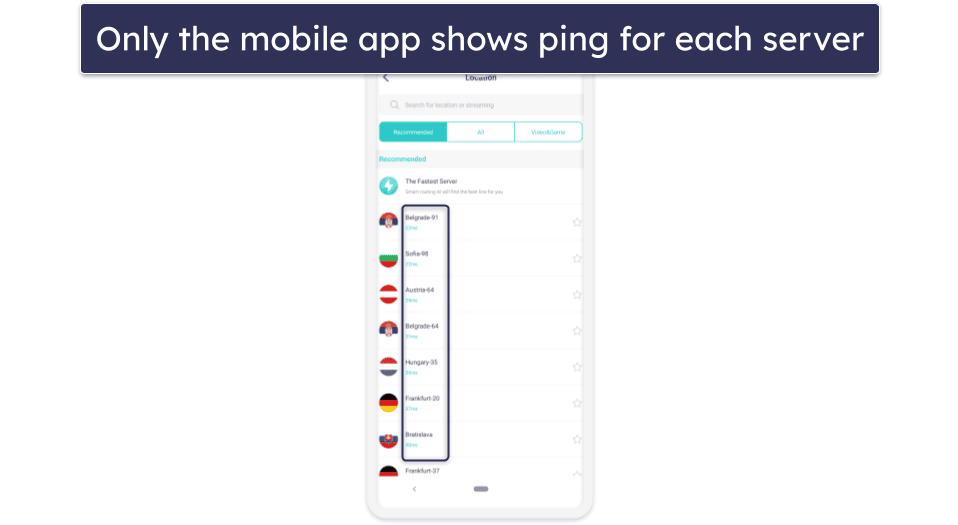
I like how X-VPN’s mobile app shows the ping for each server, but I wish the desktop app did the same.
I like how it has separate locations for 20+ cities in the US across 15+ states, so it’s easy for US users to connect to a server nearby. Aside from the US, it also has multiple cities covered in the UK, Canada, Australia, France, and India.
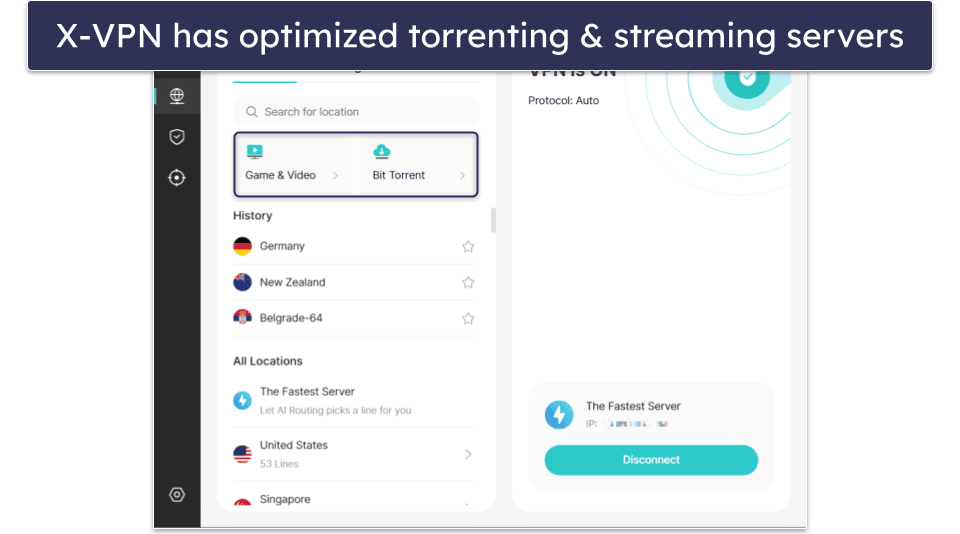
It also has specialized servers for gaming and streaming. The gaming servers are optimized to work with specific games: PUBG, Battlegrounds Mobile India, Roblox, and Pokémon TCG Live. The streaming-optimized servers are spread across 10 countries and work with 10 different top streaming platforms, including Netflix.
However, I wish X-VPN disclosed more information about its servers. While I didn’t have any problems torrenting on any of the servers I tested, X-VPN’s app or website doesn’t say if it allows torrenting on its entire network, or only on some of its servers. I had to reach out to customer support to find out that some servers don’t support torrenting. Also, it isn’t transparent about which of its servers are virtual and which ones are physically located in the country — I like how Private Internet Access displays a globe icon next to all virtual servers.
X-VPN Streaming & Torrenting — Not Great for Streaming, but Good for P2P
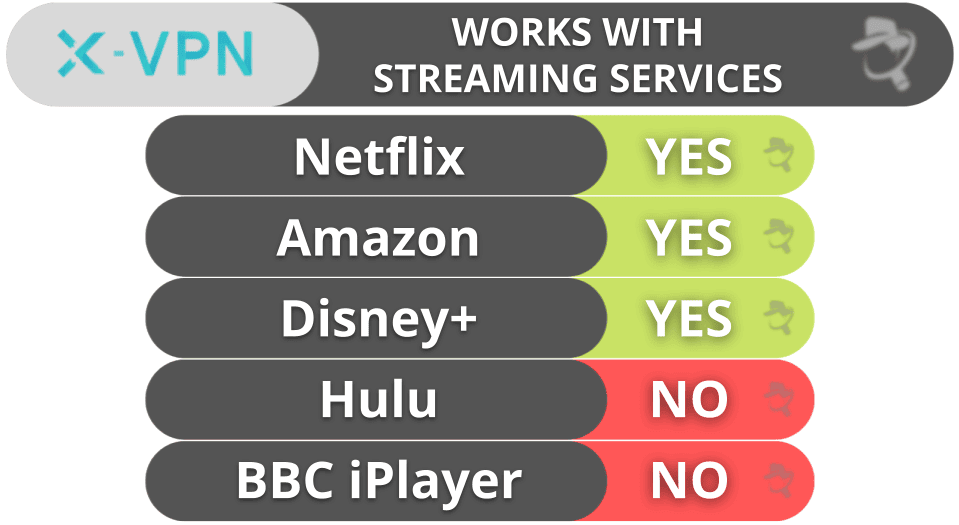
X-VPN isn’t the best choice for streaming. It claims to work with 15+ streaming services, and it offers specialized streaming servers for 10 of them, but not all of them work.
For example, X-VPN works consistently well with the 5+ Netflix libraries it has specialized servers for, as well as Amazon Prime Video and Disney+, but it doesn’t work with Hulu or BBC iPlayer.
If you want a VPN for secure streaming, you’re much better off with a VPN like ExpressVPN, which works reliably with 100+ streaming platforms worldwide.
X-VPN allows torrenting on almost all of its servers. According to customer support, the only servers that don’t support P2P traffic have the -56 suffix. However, there are very few of them, so every country in X-VPN’s network has at least 1 server that supports P2P.
It also has servers optimized for torrenting, listed under For Bit Torrent. These servers are in 15+ countries, including the US, UK, Germany, and Canada, and they have somewhat better speeds for torrenting. When I tested the torrenting server in Germany, I downloaded a 1 GB file in 9 minutes, which is slightly slower than without a VPN connection, but slightly faster than on other X-VPN servers.
That said, I wish it had more P2P features like port forwarding or SOCKS5 proxies, as other top VPNs like Private Internet Access have these features.
X-VPN Ease of Use: Mobile & Desktop Apps — Good Mobile Apps
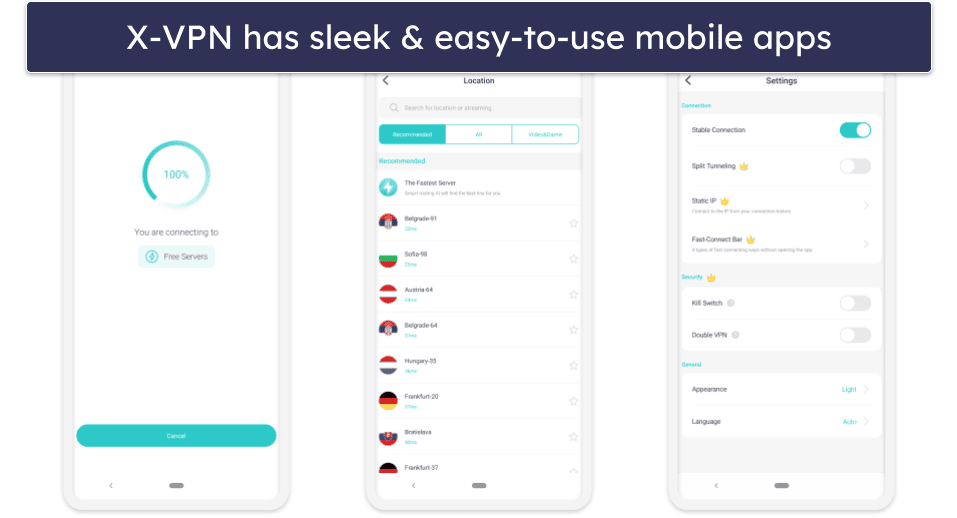
X-VPN has easy-to-use apps for a variety of platforms, including Windows, macOS, Android, iOS, and Linux, as well as specific devices, such as Chromebooks, Apple TVs, and Fire Sticks. It has router support, too.
The mobile apps are very user-friendly. The app is separated into tabs for easy navigation: the Home tab has a connect button and lets you access the servers menu and the protocol list, the Data tab has statistical information about your VPN usage, the Browser tab is X-VPN’s private browser, the Help tab has links to X-VPN’s support library and live chat, while the Me tab has the app’s settings and some extra security tools.
The main difference between the Android and iOS apps is the in-app browser — it’s only available on Android.
The desktop app is simple and clean, with a main screen split into two. The left side has the server menu and a Settings tab where you can find split-tunneling, the kill switch, and the protocol list. The right side shows basic connection info and has an auto-connect button that connects you to the most recently used server.
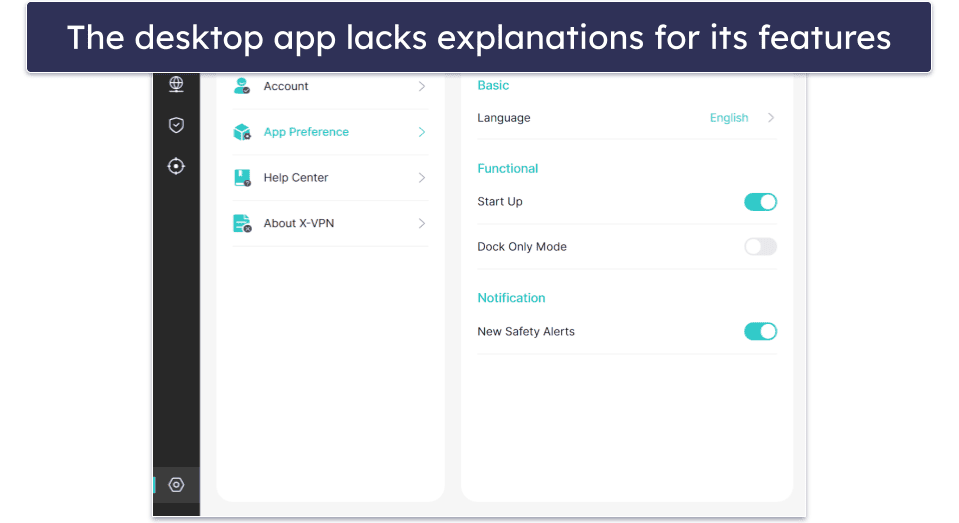
However, I don’t like how the desktop app lacks a lot of explanations for all its features. For example, there’s a Start Up toggle in App Preferences, which is located in a second Settings section and is very confusing. A customer service rep said that it should make X-VPN automatically launch on system start-up, but the feature didn’t work for me. I much prefer other top VPNs’ desktop apps, like ExpressVPN, which has very good, concise explanations for all its features and settings.
Overall, the apps are simple, but the desktop app could seriously be improved. Installing the VPN on both desktop and mobile took only a minute.
X-VPN Customer Support — Good Live Chat but Slow Email Support
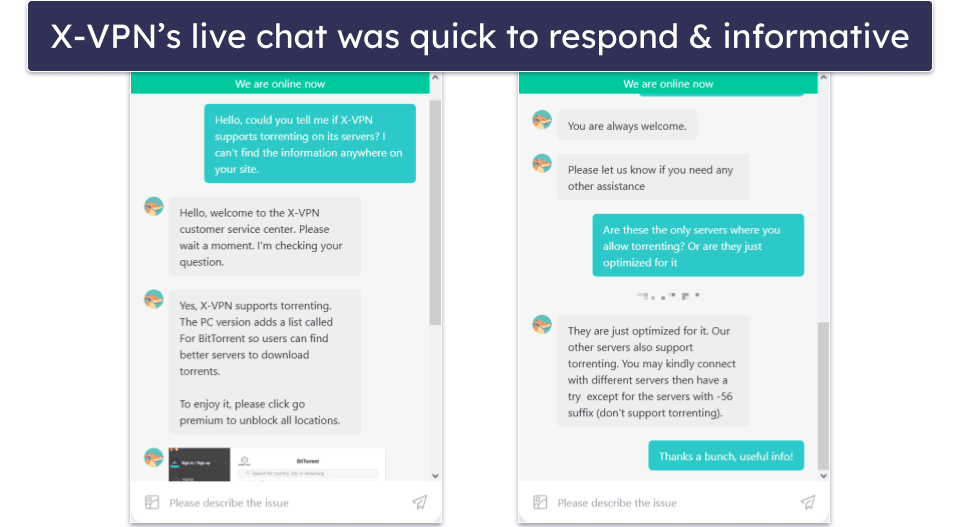
X-VPN’s customer support is pretty good, but there are some minor issues to improve. It offers live chat, email support, and a detailed troubleshooting library. It also doesn’t require you to be a paid user or registered at all to use all these support lines.
The live chat is really good. It seems to be available 24/7, and a support rep always responded within 1–2 minutes of me contacting them. The support reps gave me all the answers I needed clearly and concisely, and I appreciate that it was a human support rep, and not a chatbot, because chatbots are often bad at more complex troubleshooting issues.
Email support, on the other hand, is somewhat slower. I sent multiple test emails at different times, and each one took 24+ hours to get a response. That’s worse than top VPNs like ExpressVPN, whose support reps usually reply over email within a few hours.
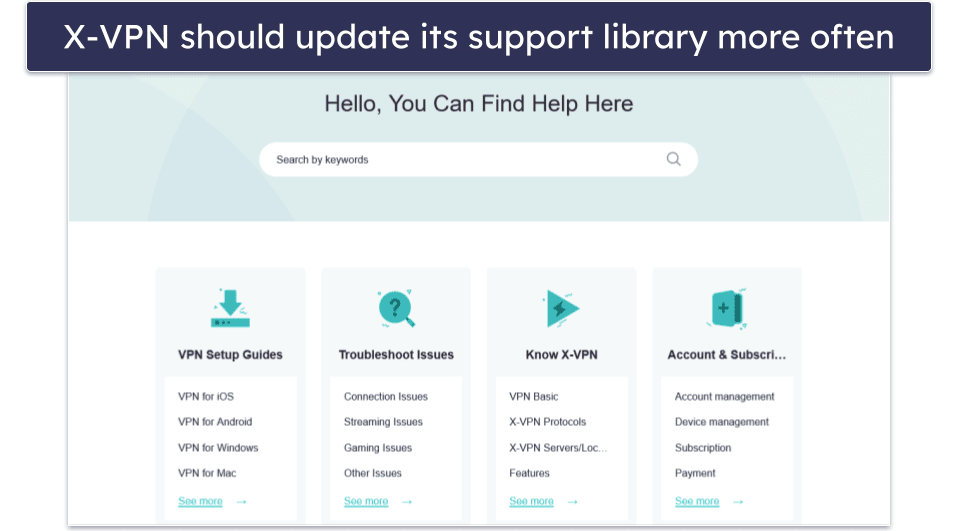
The troubleshooting library is well-organized, and it includes step-by-step guides with videos and screenshots, making it easy to set up X-VPN on any device. It also answers a lot of questions about X-VPN and VPNs in general, but I found that some of these answers are outdated and don’t match the most recent versions of X-VPN’s apps.
Also, I couldn’t find explanations for some features that aren’t explained in the app itself either. It’s a good starting point, but you’ll likely rely on live chat more if you encounter something that isn’t covered there. Many top VPNs, like Private Internet Access, have more extensive troubleshooting libraries.
On average, X-VPN’s customer support is pretty good. The live chat feature is excellent, and the email support is good if a little slow. The setup guides are easy to understand and follow, but the knowledge base needs to be updated a bit more regularly and thoroughly.
Is X-VPN Safe to Use in 2026?
X-VPN has decent security features. It uses industry-standard VPN security features, such as 256-bit AES encryption, full leak protection, and a no-logs policy. Its tracker and malware blocker works great, and it uses RAM-only servers across its entire network.
But, it’s somewhat difficult to trust X-VPN if you have a critical eye. It hasn’t published any transparency reports that would back up its no-logs policy, and it hasn’t passed an independent audit either. Its list of protocols is confusing, its apps and site are rife with typos, and some of the features it brags about simply don’t work — such as obfuscation, or many of its streaming-optimized servers.
Those flaws aside, its other features work well. It has great speeds, easy-to-use apps, and plenty of useful extra features like split-tunneling and a private browser. It has live chat support, a barebones free plan, and its premium deals all have a 30-day money-back guarantee.
Frequently Asked Questions
Is X-VPN free?
Yes, X-VPN offers a free plan, as well as a premium plan. The free plan has a data cap of 500 MB daily on desktop devices, while it’s supported by ads on mobile. The 500 MB is a very small data cap, and the ads on mobile are incredibly annoying, so you should evaluate whether the free plan is good for you. Also, I don’t like how X-VPN locks some important security features, such as its kill switch, behind a paywall.
If you need a free VPN, you’re better off with a VPN like Proton VPN, which has a free plan that doesn’t have a data cap, and still has excellent speeds and security.
Is X-VPN trustworthy?
It’s hard to say. It hasn’t published any transparency reports, and its no-logs policy hasn’t passed independent security audits. Its list of protocols is also quite confusing, and the typos all across the site and apps make it look unprofessional.
That said, most of its other security features, like its full leak protection, work really well. If it fixed all of the issues I mentioned above, I’d be more inclined to trust it.
Does X-VPN allow torrenting?
Yes, it does. It has specialized torrenting servers in 10+ that maintain really good speeds while downloading or seeding.
It actually allows P2P traffic on almost all of its servers, even though it doesn’t declare this anywhere. Customer support confirmed that all X-VPN servers support torrenting, except for a few servers in the US and Australia, but there are still servers that support torrenting in those countries.
Is X-VPN good for streaming?
Not really. It has servers optimized for 10 streaming platforms, across 15+ countries, but not all of them work. For example, X-VPN works well with Amazon Prime Video and 5+ Netflix libraries, but it doesn’t work with BBC iPlayer or Hulu.
For secure and stable streaming, I recommend ExpressVPN. It works reliably with 100+ streaming platforms worldwide, and it has excellent speeds for smooth streaming.
Editor's Note: ExpressVPN and this site are in the same ownership group.