
Twingate Review: Quick Expert Summary
Twingate is a cloud-based security solution for businesses and other organizations. If you’re just looking for software to secure your personal internet connection and stream and torrent safely, you should get a personal VPN instead. ExpressVPN is our favorite personal VPN in 2026.
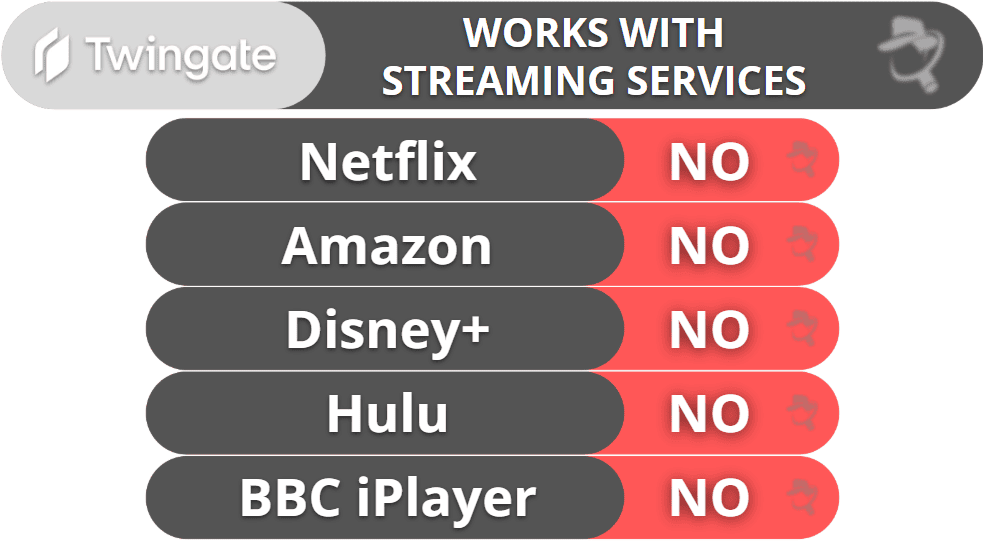
Twingate is a solid choice for business security and access control, but it’s not a VPN — it doesn’t change your IP, work with streaming services, or have P2P support. Instead of routing your traffic through a central server, it creates direct connections between you and a private resource. This makes it very fast and secure. Twingate is also very easy to deploy, scale, and use compared to traditional VPNs.
Twingate offers:
- Device Posture Security — Checks to make sure devices connecting to your network meet specific security requirements.
- Multi-factor authentication — Makes users verify their identities through multiple channels before they can access your organization’s resources.
- Single Sign-On integration — Lets users access multiple apps with a single login.
- Split-tunneling — Choose which traffic goes through Twingate and which uses your regular internet connection.
Twingate has 3 tier-based subscriptions with monthly and yearly plans. Plus, it offers a 14-day free trial and has a free plan, so you can test it out risk-free. You can have 5, 100, 500, or unlimited users, and each user can have 5 to unlimited connections depending on your plan. Twingate doesn’t back purchases with a money-back guarantee.
Twingate Full Review — Secure & Easy-to-Use VPN Alternative
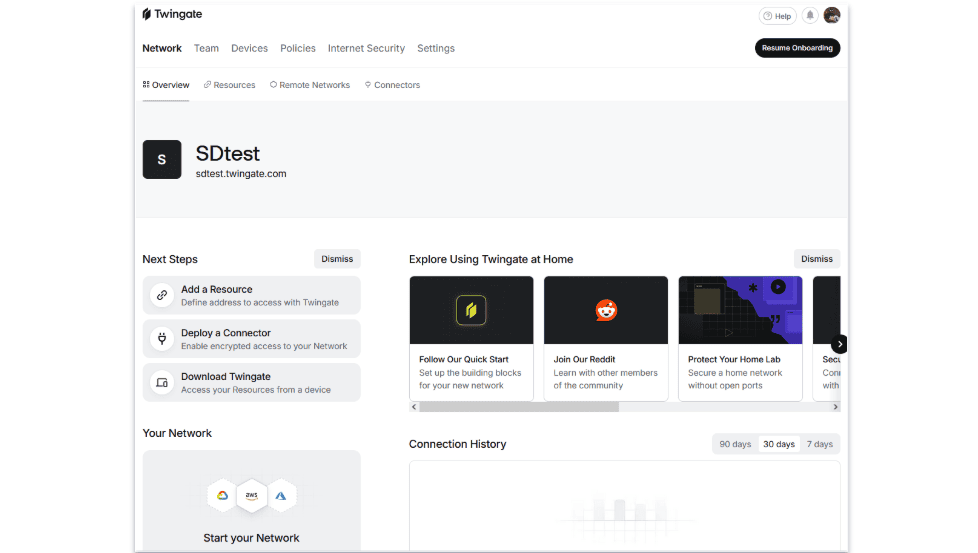
I conducted extensive research and testing on Twingate to see if it’s better than a business VPN. My conclusion is that while it’s not strictly better, it’s a very good alternative. Note that Twingate is comparable to business VPNs, like Perimeter 81, and isn’t suitable for people who want to use a VPN for streaming, gaming, or browsing — those users should check out a personal VPN, like ExpressVPN, instead.
Twingate stands out for the fact that it creates direct connections between users and private resources, which is faster and more secure compared to routing all traffic through a central server. I’m also a big fan of how easy it is to set up and use, particularly for end users.
Twingate Plans & Pricing — Has Affordable Tiered Plans + a Free Plan
Twingate’s paid plans start at $5.00 / month / month per user. It has 3-tier-based subscriptions available as monthly and yearly plans: Teams, Business, and Enterprise. It also offers a free Starter plan.
The free Starter plan allows up to 5 users and includes only basic features. It may be useful for very small teams and is a good way to test out Twingate’s features.
The Teams plan is virtually identical to the Starter plan in terms of features, but it allows more users (up to 100), admins, remote networks, and resources, making it more suitable for larger organizations.
The Business plan gets you everything in the Teams plan, plus advanced features, like better Single Sign On (SSO) and Device Posture Check (DPC) support, user provisioning, and more. It also further expands the number of users, admins, remote networks, and resources you can have.
The Enterprise plan is virtually identical to the Business plan in terms of features, but it gives you access to certain features that are currently in beta, such as an extension for browser security. There is no limit on the number of users etc. with the Enterprise plan.
The provider allows 5 connections per user, which is the same as Perimeter 81, a top corporate VPN, but one short of NordLayer.
Twingate only accepts payment via credit card, unless you’re on the Enterprise plan, in which case you may be able to pay by invoice. It doesn’t offer a money-back guarantee, but its Teams and Business plans come with a 14-day free trial, and you can attend a 20-minute demo to see Twingate in action.
Here’s a quick overview of Twingate’s plans:
Twingate Features — Secure Alternative to a Business VPN
Twingate doesn’t include many features typically associated with a VPN. Twingate is designed for business security and access control, not for privacy and anonymity.
Unlike traditional VPNs, which route all traffic through a central gateway, Twingate connects users directly to specific apps and services within their organization. This avoids having a single point of failure, making it more resilient. All connections are protected with 256-bit AES encryption, the same level used by banks and militaries. Additionally, Twingate follows a Zero Trust approach, meaning every connection is verified and restricted to only what the user needs.
Here are some of the key differences between Twingate and a traditional VPN:
- No VPN protocols. Instead of OpenVPN or WireGuard, Twingate uses mutual TLS (mTLS), a security standard used by banks and cloud services.
- No kill switch. A kill switch shuts down your internet connection if your VPN connection drops. Since Twingate only encrypts traffic to private company resources by default, a disconnect just cuts off access to those resources.
- No leak protection (DNS, IPv6, WebRTC). Twingate was never designed to hide browsing activity or mask your real IP.
- Not a no-logs service. It collects data on access attempts, device security status, and connection metadata for security and compliance purposes.
As a service made for organizations, Twingate comes with some corporate-specific advanced security features. It has Device Posture Security (DPC), which ensures that only trusted, secure devices can access company resources by checking a device’s OS version, antivirus status, firewall status, etc., before granting access.
It also has Single Sign-On (SSO) integration, which simplifies authentication by letting employees access multiple resources with a single login. It works with Google Workspace, Okta, Microsoft Entra, JumpCloud, and more. Finally, it supports multi-factor authentication (MFA), which increases security by making it so that employees have to confirm their identities through multiple channels before they can access any resource.
In addition, Twingate includes:
- Split-tunneling. Choose which traffic is routed through Twingate and which isn’t (a feature included with many top VPNs).
- Custom DNS filtering. An add-on available on Business and Enterprise plans that allows you to control which websites or domains users can access by enforcing custom DNS rules. This helps block malicious sites, enforce company policies, and improve security.
- Browser security (beta). Available for Enterprise users, this extension allows you to restrict which browsers can access sensitive resources and block the copy, paste, print, upload, download, and print actions to prevent data loss.
Twingate Privacy & Security — Doesn’t Keep Logs of Personal Traffic
Twingate can’t be considered a no-logs service, but this isn’t surprising. Like corporate VPNs, it has to log some information to keep your company network secure and ensure that only the right people can access sensitive resources.
It doesn’t collect any data on personal traffic, but it does collect data that’s necessary for security, access control, and compliance within organizations, including who accessed which business resource, device security posture, and connection metadata (time, location, and attempts). It also collects data from any third-party applications that are integrated with it.
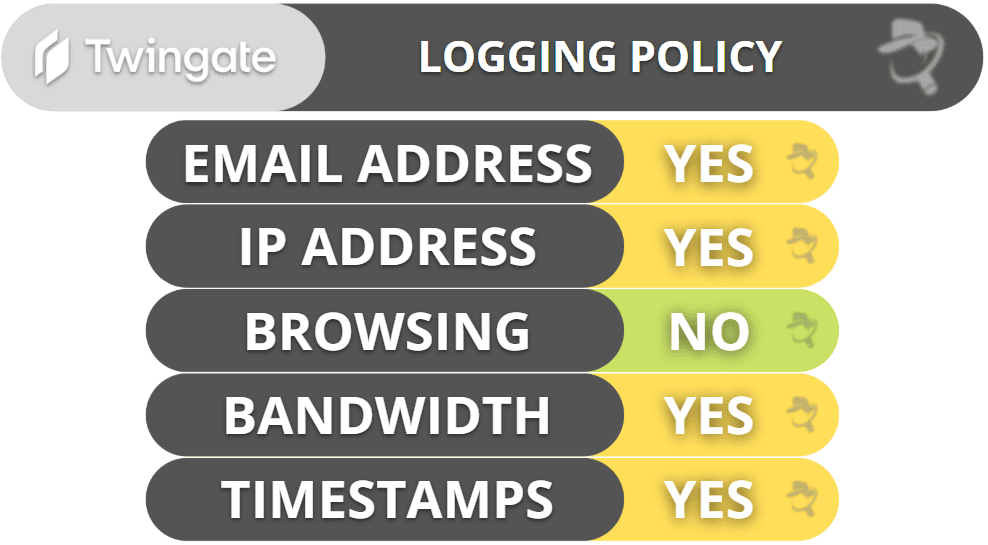
Twingate is based in the US, which isn’t ideal because it’s a member of the 5/9/14 Eyes Alliances — a group of countries that share surveillance data.
Overall, Twingate offers a good balance of privacy and security. It doesn’t keep logs of any personal traffic but it collects data that’s necessary for it to secure company resources.
Twingate Speed & Performance — Creates Direct Connections for Very Fast Speeds
Twingate should be faster than a traditional business VPN because it doesn’t route traffic through a central server. Instead, it creates direct connections between users and private resources, reducing both the distance data has to travel and the risk of congestion at a single point.
Additionally, Twingate only encrypts traffic to private resources. This means any traffic that doesn’t need access control, including your personal traffic, won’t be slowed down.
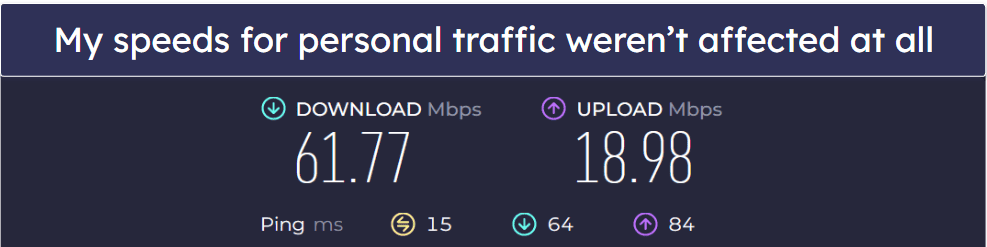
I tested Twingate’s speeds when running personal tasks, like browsing. As expected, my connection speeds didn’t change at all, since that traffic just uses my regular internet connection.
I wasn’t able to run a speed test on a third-party site to check Twingate’s performance because Twingate doesn’t identify the third-party site as a business resource. However, encryption generally has a minimal impact on speeds.
Overall, Twingate avoids unnecessary slowdowns for personal traffic and should deliver fast, direct connections to private resources.
Twingate Streaming & Torrenting — Not Designed for Streaming & Torrenting
Twingate is bad for streaming or torrenting — it simply isn’t designed for this purpose. If you need a VPN for streaming, consider getting ExpressVPN. It works with 100+ streaming platforms, including Netflix, Amazon Prime, Disney+, Hulu, and BBC iPlayer, and it’s the best VPN in 2026 overall.
There are also better VPNs for P2P file sharing. Private Internet Access is a great choice because it allows torrenting on all of its servers, works with all major torrent clients.
Twingate Ease of Use: Mobile & Desktop Apps — Excellent for Both Admins & End Users
Twingate has apps for Android, iOS, Windows, macOS, Linux, and ChromeOS. It also provides a web-based admin console that can be used by IT teams to manage users, policies, and network configurations.
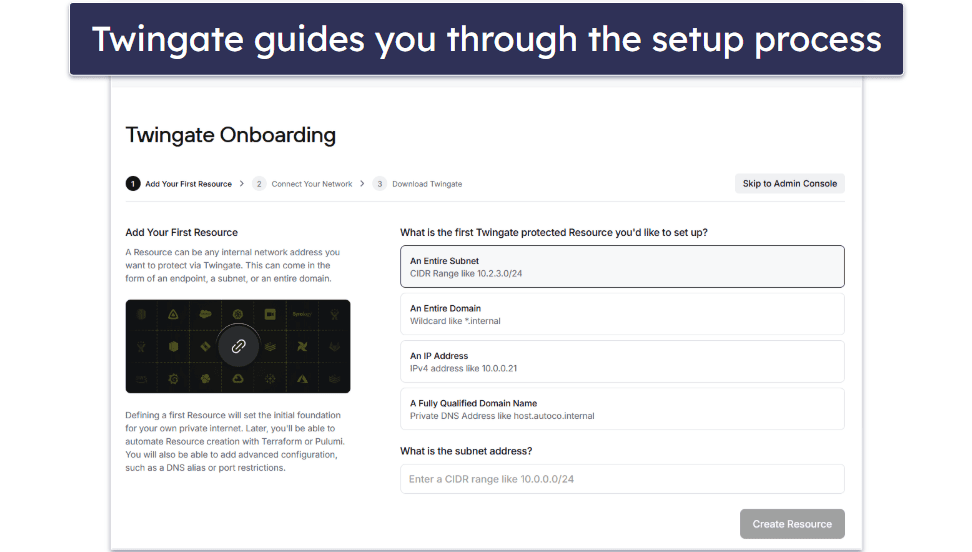
Setting up Twingate takes some IT knowledge, but the process is smooth and straightforward thanks to clear step-by-step guidance. Since it doesn’t require any hardware, it’s much easier to deploy, maintain, and scale.
Another advantage of Twingate compared to traditional VPNs is that it’s extremely easy to use for end users. After installing the Twingate app on your device (which only takes 2–3 minutes), all you need to do is log in using your company’s credentials, and that’s it — Twingate will run in the background, automatically securing access to private company resources. There’s no complex setup necessary, nor do users have to manually connect to a VPN. It’s also great that Twingate basically works the same across all platforms.
Overall, Twingate gets top marks when it comes to ease of use for both network administrators and end users.
Twingate Customer Support — Great Help Center but Has Few Support Channels
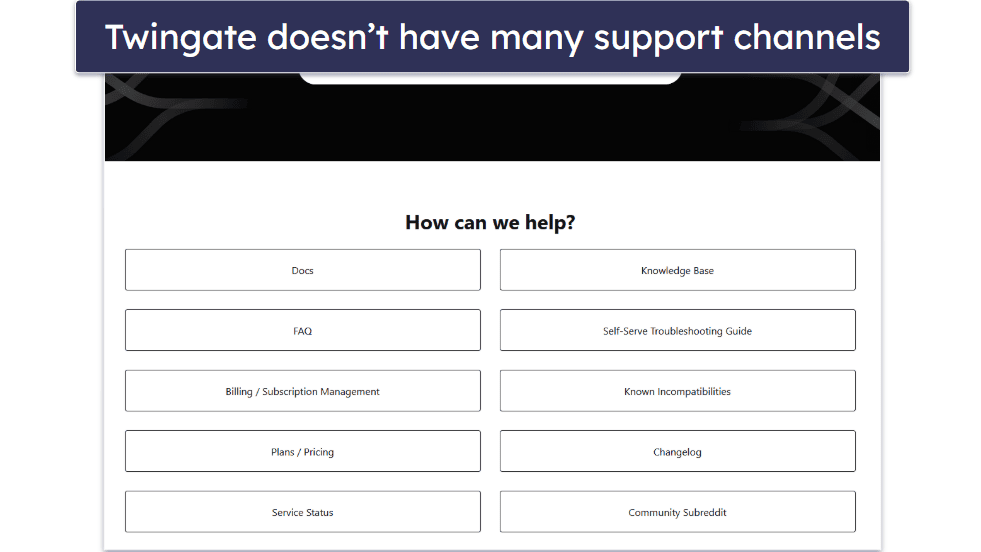
Twingate provides support to all users via its Help Center and community subreddit. It also offers pre-sales or trial support for non-Starter-plan customers. Break/fix email support is only available to customers on the Business plan with 25 or more users and customers on the Enterprise plan. This isn’t great compared to other top business VPNs. For example, both Perimeter 81 and NordLayer provide 24/7 live chat support and email support to all users, and Perimeter 81 even has phone support.
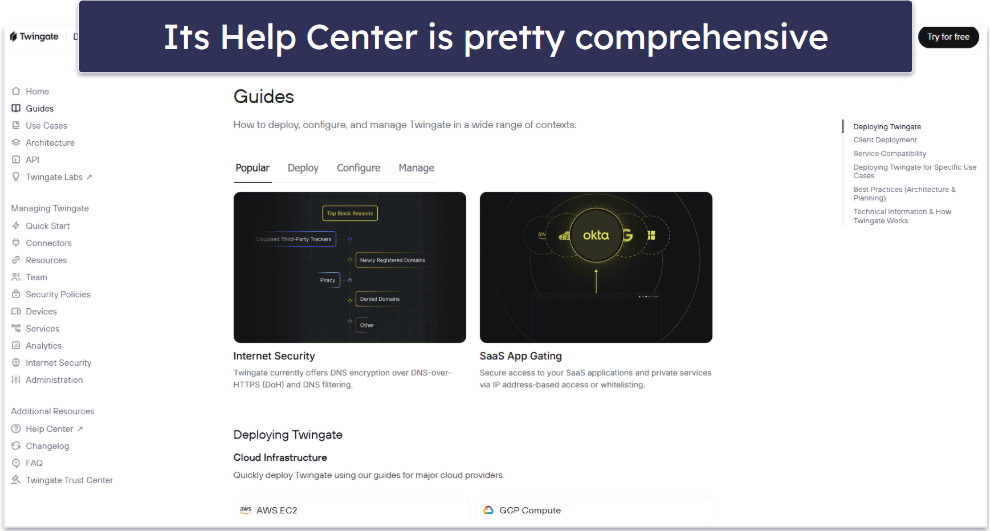
All that said, Twingate’s Help Center is quite good. It includes setup guides, troubleshooting tips, and extensive documentation of its various features. I also like that many of its articles come with helpful visual guides. Some even have tutorial videos.
Its subreddit, on the other hand, is less impressive. It isn’t super active, so you might have to wait a couple of days to get a response from an expert.
Overall, Twingate’s customer support isn’t the best. It doesn’t have 24/7 live chat support and limits email support to higher-paying customers. That said, its Help Center has extensive documentation and many useful guides.
Is Twingate Better Than a VPN?
It’s difficult to compare Twingate to VPNs because it’s not a VPN. It’s fast, secure, and easy to scale. It also comes with lots of useful features, like Device Posture Security, multi-factor authentication, Single Sign-On integration, split-tunneling, and more. Twingate is also very intuitive to set up and use, especially for end users.
That said, it doesn’t include many standard features of a VPN, such as different server locations or a kill switch. It won’t hide your IP address, and it doesn’t support streaming or torrenting. The one area where it can improve is customer support by making email support more accessible and adding 24/7 live chat support.
Twingate has 3 tier-based subscriptions with monthly and yearly plans. You can have up to unlimited users and connections with its highest-tier plan. Its plans don’t come with a money-back guarantee, but you can test it out risk-free by using its free plan or taking advantage of its 14-day free trial.
Frequently Asked Questions
How does Twingate compare to a business VPN?
They each have different strengths and weaknesses. Both provide secure remote access, but they work differently. Business VPNs route all traffic through centralized servers, whereas Twingate creates direct, encrypted connections between users and specific private resources. This makes Twingate faster, more secure, and more scalable. But this also means that Twingate isn’t as good for privacy.
Is Twingate safe?
Yes, Twingate is safe because it follows a Zero Trust security model, meaning every access request is verified and restricted. It uses strong encryption (mTLS and 256-bit AES) to protect data and doesn’t rely on a central VPN server, reducing the risk of breaches and failures. Additionally, unlike traditional VPNs, which grant broad network access, Twingate only allows users to connect to specific resources, limiting potential damage if credentials are compromised.
Does Twingate encrypt your data?
Yes, Twingate uses 256-bit AES encryption, which is the same level of encryption used by banks and militaries, as well as most top VPNs. However, by default, Twingate only encrypts traffic between the user and private resources — it doesn’t encrypt personal traffic.
Does Twingate hide your real IP addresses?
No, Twingate doesn’t hide your real IP address. When you connect to a server using a traditional VPN, it assigns you an IP address that matches the location you’re connected to and hides your real IP address behind that. However, Twingate doesn’t route your traffic through a server like a VPN does. It creates a direct, encrypted connection between you and the private resource you’re trying to access. As a result, it doesn’t hide or change your IP address. This means that Twingate can’t change your location and isn’t good for protecting your privacy.