

Published on: January 18, 2025 Updated 2 times since publishing
Only 4 Steps (Quick + Easy) to Unblock Hulu at School in 2026:
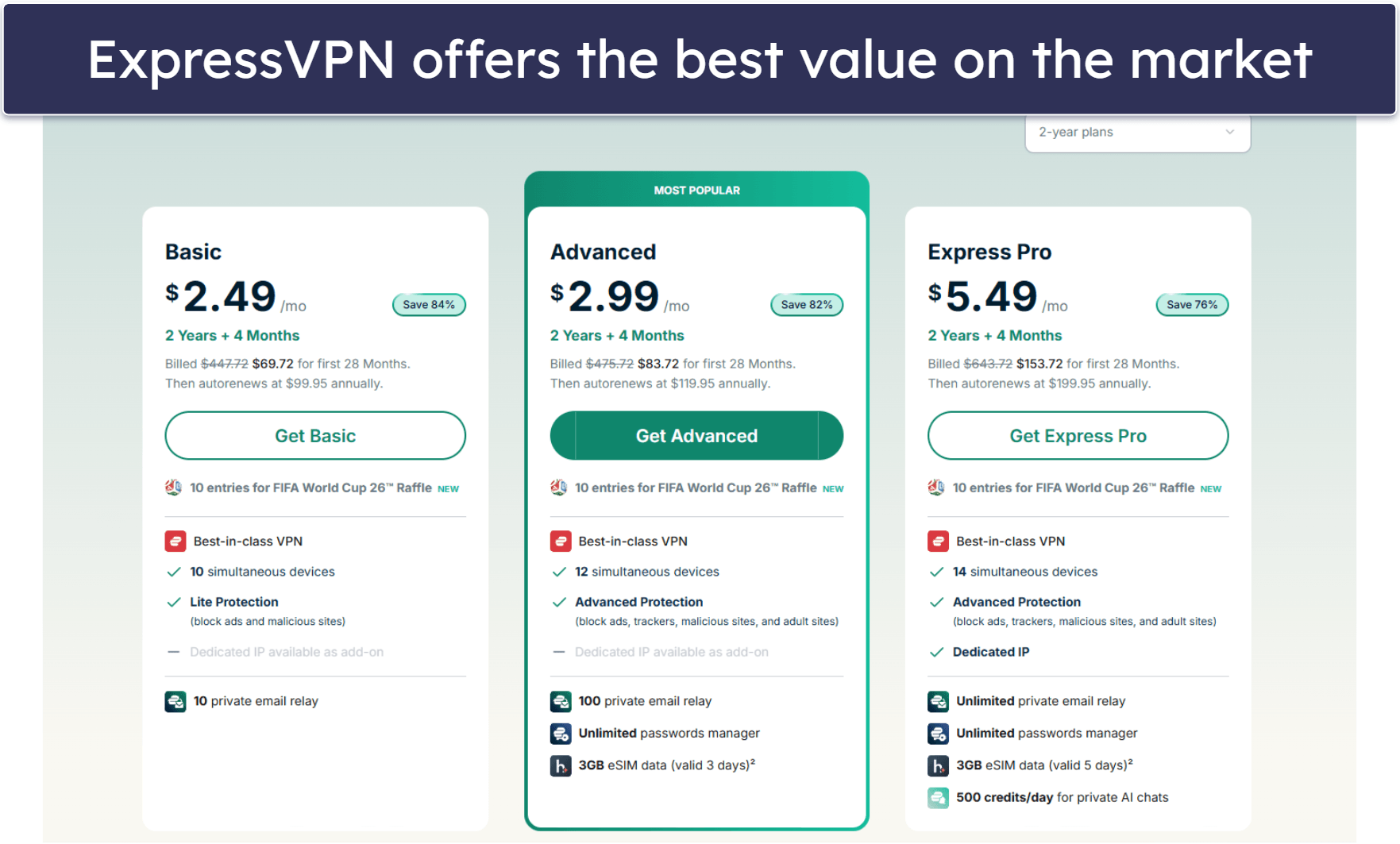
- Download and set up a VPN. The best VPN for unblocking Hulu at school is ExpressVPN. It works seamlessly on all major devices, including Chromebooks, gets around school network restrictions, and even bypasses VPN blocks.
- Enable server obfuscation. Obfuscation disguises your VPN use, making it appear as regular internet traffic. This step is only necessary if your school blocks VPN connections.
- Choose a VPN server. Launch the VPN app and connect to a nearby server to ensure optimal speed for buffer-free streaming.
- Log into your Hulu account. After connecting to the VPN, you can securely watch shows and movies on Hulu without issues, just like at home.
A VPN (virtual private network) is the simplest and most dependable way to unblock Hulu at school. VPNs get around all methods schools use to block access to the platform, like web and IP filters and DNS blocks. They encrypt your traffic, which stops the school network administrator from seeing what you’re doing online. This also means they can’t prevent you from visiting the Hulu site or app.
After testing numerous VPNs, I can safely say ExpressVPN is the top choice for unblocking Hulu on school networks. It easily bypasses common school blocking methods, reliably accesses Hulu from anywhere, and can even hide your VPN use from school network administrators. Editor's Note: ExpressVPN and this site are in the same ownership group.
How to Unblock Hulu at School From Any Device
1. Choose a VPN that bypasses school restrictions & works with Hulu.
My top recommendation for unblocking Hulu at school is ExpressVPN. It bypasses content filters, firewalls, DNS blocks, and other restrictions commonly used by schools to limit access to streaming sites like Hulu. Plus, the VPN has servers in many US locations that allow users to access Hulu hassle-free.
2. Download and install the VPN on your device.
Go to the VPN’s website and download the app for your device. On mobile, you can check the Google Play or Apple App Store for the app. If your school computer or school-issued device (like Chromebook) blocks VPNs or app installations, you can download a browser extension — every VPN I recommend has browser extensions for all popular browsers like Chrome.

If the school network blocks the browser extension, you can connect to a phone hotspot to download a VPN. This lets you bypass any network-based restrictions since your wireless carrier won’t impose the same blocks as your school.
3. Launch the app, connect to a server, and log into Hulu.
Find the server list in the app and pick the closest server to get the best possible speeds. Once that’s done, you can securely access Hulu at school, without worrying about your network administrator or teachers seeing what you’re watching and where.

Quick Summary of the Best VPNs for Unblocking Hulu at School in 2026


🥇1. ExpressVPN — Best VPN for Unblocking Hulu at School in 2026

Basic 12-Months plan: $3.99 / month
1-month plan: $12.99 / month

ExpressVPN is my top pick for unblocking Hulu at school. It bypasses common school restrictions such as DNS blocks, URL filtering, and firewall rules. It also automatically obfuscates (hides) your VPN traffic if it detects network-based VPN blocks, so your school won’t be able to tell you’re using a VPN.
ExpresVPN is one of the best VPNs for Hulu. It has 20+ server locations in the US that can access the Hulu app and site hassle-free. This also makes it easy to connect to a nearby server and get buffer-free speeds for streaming Hulu on your school’s network.
The VPN works on any device you use for school, including Android, iOS, Windows, and macOS, as well as Chromebooks. It also offers a Chrome browser extension, allowing you to control the VPN directly from your browser.
Read our full ExpressVPN review
🥈2. Private Internet Access — Good VPN With Optimized Servers for Hulu

6-month plan: $7.50 / month
1-month plan: $11.95 / month
Private Internet Access (PIA) has streaming-optimized servers for Hulu that can access the platform on a restricted school network. It has US East and US West streaming servers that are regularly tested to ensure they can access the site and app from anywhere.
It also has Shadowsocks servers in the US that obfuscate your traffic and let you safely access Hulu without being detected. If you’re using a school-issued Chromebook or a school computer that doesn’t let you install the VPN app, PIA’s browser extension is a great solution. It gives you access to the streaming-optimized servers for Hulu that work with the Hulu site.
Read our full Private Internet Access review
🥉3. NordVPN — Unique Feature for Accessing Hulu at School

Plus 24-month plan: $3.59 / month
Complete 24-month plan: $3.99 / month
Prime 24-month plan: $6.99 / month
NordVPN’s Meshnet is perfect for unblocking Hulu at school. It lets you create an encrypted network and link your school-issued Chromebook or school PC to your home PC. You can use this connection to access your home computer on the school network and reroute all traffic through it, for uninterrupted and safe access to Hulu.
NordVPN has US servers in 15+ locations, including the US, that can access Hulu. The servers are located on the main connection menu and take just a couple of clicks to connect to — though all of ExpressVPN’s servers include obfuscation. All of these are accessible through its browser extension, too, which is handy if your school PC won’t let you download the VPN app.
Editor's Note: Intego ONE, Private Internet Access, CyberGhost and ExpressVPN are owned by Kape Technologies, our parent company.
Quick Comparison Table
Editor's Note: Intego ONE, Private Internet Access, CyberGhost and ExpressVPN are owned by Kape Technologies, our parent company.
Testing Methodology: Comparisons & Ranking Criteria
I used our proven testing methodology to find VPNs that can unblock Hulu at school. I tested each VPN against the typical blocking methods schools use, and I also evaluated their ease of use, connection speeds, security features, and more. Here’s a detailed breakdown of how I tested and ranked each VPN:
- I tested each VPN’s ability to unblock Hulu at school. The VPNs I recommend bypass all common restrictions, including URL and keyword filters, IP blacklists, DNS blocks, and firewall rules.
- I made sure each VPN actually works with Hulu. Hulu blocks many VPNs, so you need one that accesses both the site and the app. Every VPN I recommend here has US servers that work with Hulu.

- I evaluated each VPN’s connection speeds. VPN encryption can slow down your internet, but the VPNs I chose deliver excellent speeds, even on heavily restricted networks. ExpressVPN stood out as the fastest in my tests.
- I verified each VPN’s obfuscation capabilities. Each VPN on my list uses obfuscation to bypass restrictions that might block VPN usage on school networks, ensuring you can unblock Hulu at school.

- I considered device compatibility. All the VPNs I recommend have apps for major devices like Android, iOS, Windows, macOS, and ChromeOS. They also include browser extensions you can use if your school-issued Chromebook or school computer won’t let you install the VPN app.
- I considered each VPN’s value for money. The VPNs I recommend provide great features for their price, including extras like split-tunneling and a money-back guarantee, letting you try them risk-free while unblocking Hulu at school.
What Is a VPN & How Does It Help You Access Hulu?
A VPN is a tool that keeps your online activity private by encrypting your internet traffic. This means third parties, like your school network administrator or your ISP (Internet Service Provider), can’t see what you’re doing online. Even if someone intercepts your data, they’ll only see random symbols they can’t read.
This encryption is what helps a VPN bypass school restrictions. Schools often block websites using firewalls or filters that monitor traffic for specific domains or IP addresses. Since VPNs encrypt your traffic, these systems can’t tell which sites you’re trying to access and can’t block them. Think of it as sending a sealed package — they can see that something’s being sent, but not what’s inside.
Some schools also use DNS filtering to block websites by intercepting attempts to translate domain names (like “www.example.com”) into IP addresses. A VPN circumvents this by encrypting your DNS requests or using private DNS servers, preventing the school from identifying the sites you’re trying to visit.
Additionally, a VPN changes your IP address to the VPN server you’re connected to. This allows the VPN to access Hulu from anywhere.
Other Ways to Unblock Hulu at School
If a VPN isn’t an option and you’re looking to get around your school’s restrictions, there are a few other methods you can try. Here are some alternatives:
- URL shorteners. URL shorteners convert long website links into shorter, generic versions that might bypass filters targeting specific domain names. However, some schools may block the use of URL shorteners, so this method isn’t always reliable.
- Smart DNS. A smart DNS works by redirecting your traffic through different servers, making it appear as if you’re browsing from a different location. This may allow you to get around IP blocks, but note that it doesn’t encrypt your data, so the network administrator can see what sites you’re visiting.
- Proxy servers. Proxies act as intermediaries between you and the websites you want to visit, masking your IP address and requesting the sites on your behalf. However, proxies don’t offer the same level of encryption as a VPN, and they can be more difficult to set up and use.
- Use your phone’s mobile data. If your school’s Wi-Fi blocks certain websites, you can bypass the restrictions by using your phone’s mobile data to access Hulu or set up a mobile hotspot and connect your school PC to it. Note that this will eat up a lot of data, so it’s only a good option if you’ve got unlimited mobile data on your plan.
- Tor network. Tor is an open-source network that anonymizes your internet activity by routing it through multiple nodes. While it can help bypass restrictions, the extra encryption layers can slow down your connection significantly.
Frequently Asked Questions
How can I unblock Hulu on my school computer?
If Hulu is blocked on your school computer, the best way to unblock it is with a VPN. A VPN encrypts your internet traffic and routes it through a secure server, allowing you to bypass restrictions like URL and keyword blocking, DNS-level blocks, and firewall rules. If you can’t use a VPN on your school computer, the VPNs I recommend have browser extensions for all top browsers that access Hulu without issues.
How do I unblock Hulu on Chrome at school?
Your best bet is to use a VPN to unblock Hulu on Chrome at school. A VPN reroutes your traffic through a secure server and bypasses school restrictions. If you’re using a school device that doesn’t allow you to download a VPN, you can try downloading a VPN browser extension or try any of the alternative methods I discuss here.
How to get Hulu to work at school?
The best way to get Hulu to work at school is to use a virtual private network (VPN). The best VPN for getting around school restrictions and safely streaming Hulu content is ExpressVPN. If you can’t download and install a VPN due to your school’s restrictions, try using a VPN provider’s browser extension.
Does Hulu allow VPN usage?
Most of the time, no. Hulu actively blocks lots of VPN services, so it’s important to find one that works. The VPNs I recommend have US servers in 15+ locations that access the Hulu app and site without issues.
Editor's Note: ExpressVPN and this site are in the same ownership group.
