

Published on: February 23, 2024 Updated 3 times since publishing
- 🥇 Proton Pass : Proton Pass gives you unlimited password storage across all your devices, strong 256-bit AES-GCM encryption, and a zero-knowledge architecture. Even on the free plan, you get vault sharing, passkey support, email aliases, and 1 GB of secure storage. It’s also fully open-source and independently audited, making it one of the most trustworthy free options for iOS in 2026.
I tested tons of free password managers on my iPhone and could only find a few that are truly good. Many come with strict device limits, lock important features behind paywalls, restrict how many passwords you can save, and constantly issue you with ads to upgrade. I even tried Passwords, the built-in password manager provided by Apple on iOS 18, and found it just doesn’t have all the features of a top password manager in terms of security and convenience.
If you’re looking for the best password manager, you need a premium one. Premium password managers use industry-standard encryption, offer zero-knowledge architecture for ultimate privacy, support multi-factor authentication to leverage iOS’s biometric capabilities, and come with a ton of extras like dark web monitoring and password health auditing. They also include seamless iCloud integration, auto-fill for Safari, and form-filling capabilities that meet the expectations of iPhone and iPad users worldwide. Some even come with unique additions, like Proton Pass’s email alias feature.
That said, there are still a few good free password managers on the market. I spent the past few weeks testing a bunch on my iPhone and found a few that really stand out. Each of the below password managers provides excellent security and enough extra features to keep your accounts safe in 2026 — all without needing to spend a penny.
Quick Summary of the Best Free Password Managers for iOS


🥇1. Proton Pass — A Free Plan Full of Premium Features


Proton Pass is my top choice for iPhone users who want strong security, unlimited password storage, and excellent free features, without the constant pressure of upgrades. Built by the team behind Proton Mail and Proton VPN, Proton Pass is backed by a long reputation for privacy-first services. It uses end-to-end encryption with a strict zero-knowledge policy — meaning not even Proton can see what’s inside your vault.
What makes Proton Pass the best free option for iOS is how much you get on the free plan compared to most competitors. Instead of limiting you to a handful of entries or a single device, Proton Pass Free lets you store unlimited passwords across an unlimited number of devices, including iPhone and iPad. I tested it on my iPhone, and syncing worked flawlessly between Safari, Chrome, and the Proton Pass iOS app.
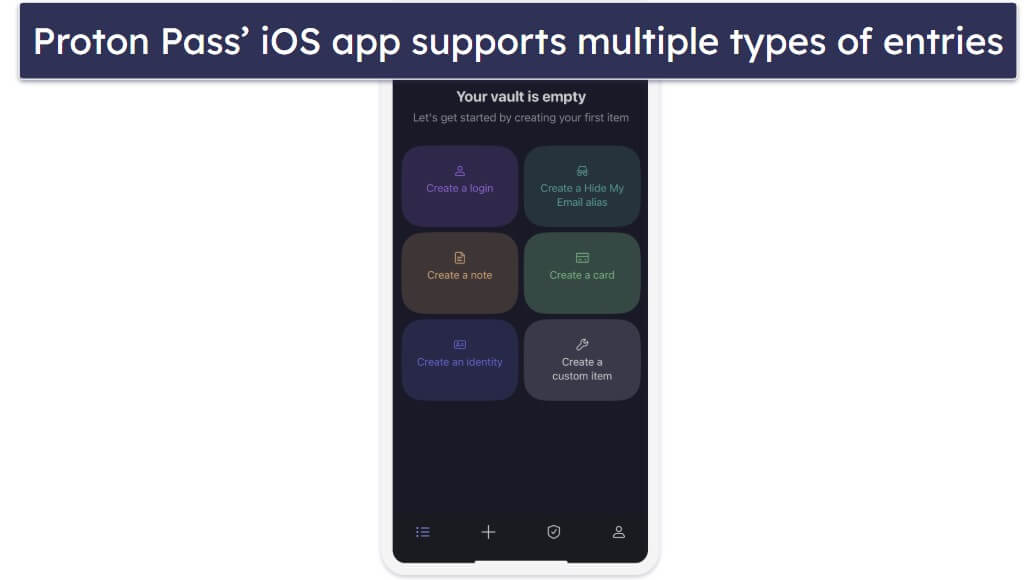
Here are some key features you get for free:
- Unlimited password storage on iOS and other platforms. Store as many usernames and passwords as you want without hitting a limit.
- Vault sharing. Share up to 2 vaults with up to 2 people, making it easy to manage logins with family or close collaborators.
- Passkey support. This allows you to log in to apps and websites without traditional passwords.
- Alerts for weak/reused passwords. Provides warnings if a password is too weak or used across multiple accounts.
- Email aliases (via SimpleLogin integration). These help protect your real email address from spam and phishing.
One of the things I liked most during my testing was how well Proton Pass handled auto-fill on Safari. Whether it was banking details or app logins, everything synced quickly and filled in accurately. Unlike Apple’s built-in Passwords app, Proton Pass also supports cross-platform sharing, so you can securely share credentials with colleagues or family members who aren’t on iOS.
I also like that Proton Pass notifies you if your saved logins are weak, reused, or compromised in known breaches. This makes it easy to identify accounts that require an update before they become a greater risk. While some free password managers lock this feature behind a paywall, Proton includes it even on its free plan.
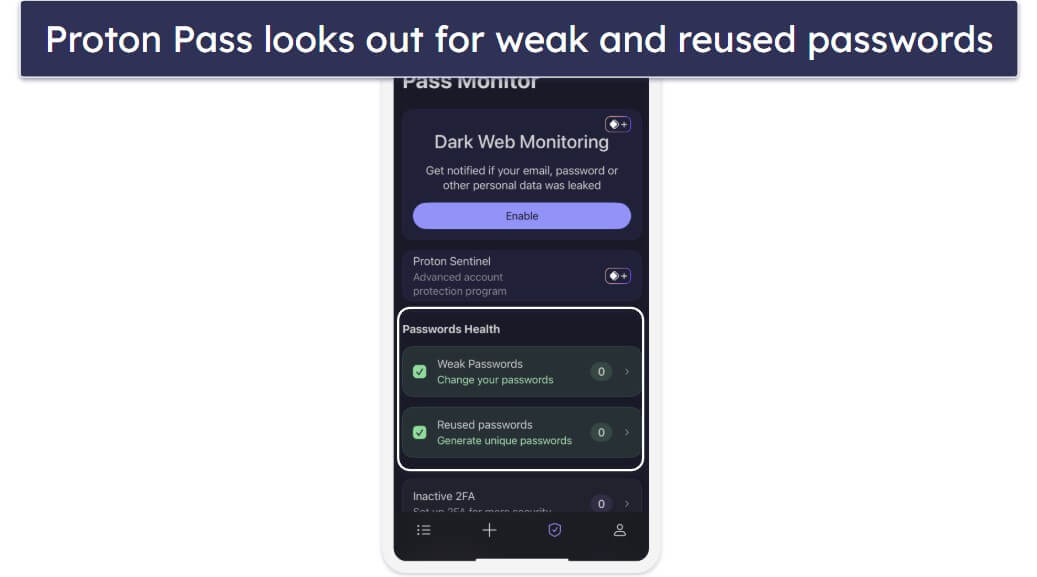
That said, the free plan doesn’t give you extras like unlimited alias creation, dark web monitoring, or integrated 2FA support. However, upgrading to Proton Pass Plus at just $2.49 / month adds all this, file attachments, and 10 GB encrypted storage. The Family plan extends coverage to 6 users for just $4.99 / month. If you’re already a Proton Mail or Proton VPN subscriber, it integrates seamlessly with the Proton ecosystem, which is a huge plus.
Bottom Line:
Proton Pass is the most feature-rich free password manager available for iOS. I really like its unlimited password storage, vault sharing, and built-in email aliasing — things you don’t normally get without paying. If you’re looking for a free option that doesn’t feel stripped down, Proton Pass is the best choice for iPhone and iPad users in 2026.
Read the full Proton Pass review
🥈2. 1Password — Unlimited Password Storage Across Multiple Vaults
1Password is a feature-rich password manager for iOS users. Unfortunately, it doesn’t offer a free version like Proton Pass, but it does provide a risk-free 14-day free trial — allowing you to test its features, which include:
- Unlimited password storage. Store as many passwords as you want.
- Multiple vaults. Organize your data into various categories.
- Watchtower. Monitor the strength and security of your passwords.
- Travel Mode. Hide sensitive data when crossing borders.
- Biometric authentication. Utilize Face ID and Touch ID for secure and quick access.
- Passkey support. Securely access compatible websites and apps without traditional passwords.

1Password allows you to create multiple vaults for different categories, like personal, work, or family, each with customizable permissions. You can share specific passwords, such as your Netflix password, with your kids by creating a separate vault. The Psst! feature enables secure sharing of logins and files with anyone — even non-1Password users — by generating a time-sensitive link. The app also maintains a history of your vault items, providing a safety net for accidentally deleted data and allowing you to access old information when needed.
Watchtower serves as 1Password’s security audit hub, identifying weak or reused passwords and assigning a security score to your vault. It also tracks your credit card expiration dates — a feature I’ve found very useful. Additionally, Watchtower monitors your logins for sites that adopt passkeys, allowing you to switch to them when they do.
Travel Mode offers a secure way to cross borders without exposing sensitive data. When activated, it only shows vaults labeled “Safe for Travel,” keeping other vaults hidden during potential device inspections.
Although not free, 1Password offers considerable value for the price. At $2.99 / month for 1Password Individual, you get a comprehensive set of features (some of them unique, like Travel Mode) that are well-integrated into the iOS ecosystem. The 1Password Families plan is equally good (in fact, it’s our #1 password manager for families). It covers up to 5 members for $4.49 / month, with the option to add more members for a small fee.

Bottom Line:
While 1Password doesn’t offer a free version, its 14-day trial gives you a taste of its rich features optimized for iOS. If you decide to subscribe, you’re looking at a premium experience that offers a high level of security and organization, making it a strong contender for anyone using iPhones or iPads.
Read the full 1Password review
🥉3. RoboForm — Best Form-Filling With Excellent Security
RoboForm offers unparalleled form-filling capabilities. Unlike most free password managers, which offer only basic form-filling features, RoboForm impressed me in my testing by accurately completing complex online forms. This makes it a great choice for frequent travelers (fill out visa applications, hotel bookings, or flight reservations), online shoppers (auto-fill payment details), or pretty much any iPhone user who finds typing extensive details on smaller screens tiresome.
Other important features on the free plan include:
- Unlimited password storage. Offers limitless storage for passwords, identities, bookmarks, and notes on 1 device.
- Password auditing. Provides a detailed report on the strength of your stored passwords, helping you to update and maintain strong credentials.
- Two-factor authentication (2FA). Supports 2FA for an added layer of security.
- Bookmark storage. Allows you to securely save and organize your favorite website bookmarks for easy access.
- Passkey support. Enables a secure and convenient way to sign in to websites without using traditional passwords.
The RoboForm app for iOS is well-optimized, featuring a clean and intuitive interface. It supports the Safari browser, offering auto-fill functionalities that make web browsing on an iPhone or iPad a breeze.

RoboForm also offers a secure vault for bookmarks, notes, identities, and even contacts. This is excellent for iOS users who want to centralize storage of various types of data. The app also allows for the arrangement of your data into folders and subfolders, like work, personal, or family — which I think is very convenient for keeping everything neatly organized.
The password generator creates secure passwords with letters and numbers. However, it would have been nice if the iOS version of RoboForm also allowed for passphrase creation, a feature that NordPass offers on both iPhone and iPad.
RoboForm’s free plan doesn’t include password sharing — unlike Proton Pass’ free plan. It’s also limited to just 1 device. RoboForm Premium lets you sync your data across multiple devices and offers cloud backup, all for an annual fee of $0.99 / month. If you’re managing passwords for a family, RoboForm Family extends these benefits to up to 5 users for $1.60 / month a year.

Bottom Line:
RoboForm is a great pick for iOS users, excelling particularly in advanced form-filling capabilities. Although it doesn’t offer the extensive free features that Proton Pass does, such as password sharing, its unique strengths in form-filling and organizational efficiency make it a worthy choice for anyone in the Apple ecosystem.
Bonus. NordPass — Most Intuitive User Interface
NordPass boasts a user-friendly interface and robust encryption, making it an excellent choice for iOS users. Its sleek and intuitive design harmonizes with the iOS aesthetic, ensuring seamless navigation on iPhones and iPads.
Unlike most competitors that use 256-bit AES encryption, NordPass employs the XChaCha20 algorithm. This modern encryption method is considered to be as secure as 256-bit AES and has never been cracked.
NordPass Free includes the following features:
- Unlimited password storage. Store as many passwords as you want across multiple devices.
- Secure notes. Allows for the secure storage of notes.
- Password generator. Helps you generate strong and unique passwords.
- Passkey support. Allows you to sign in to websites securely without traditional passwords.
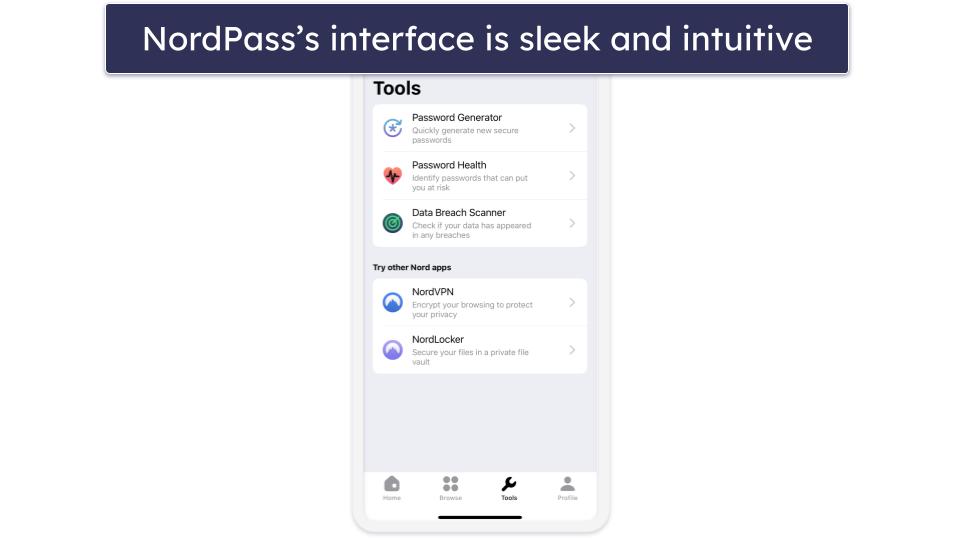
NordPass supports auto-save and auto-fill functionalities on Safari and other major browsers. The iOS app also supports biometric authentication like Touch ID or Face ID, offering a seamless and secure login experience on compatible Apple devices.
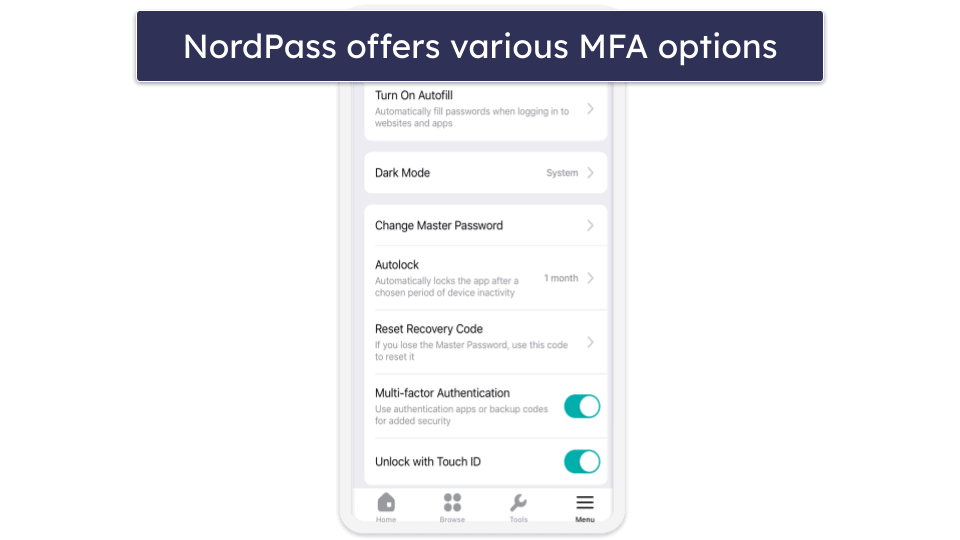
NordPass offers multi-factor authentication options, too, enhancing your account’s security. However, it doesn’t come with its own built-in authenticator for generating one-time passcodes, a feature available in some competitors like RoboForm.
NordPass’s free plan offers unlimited password storage across multiple devices, but it comes with a catch — you can only be logged into 1 device at a time. Some other features, such as password auditing and sharing, are locked behind a paywall, too. Still, I think it’s a good alternative to Apple’s Passwords because, unlike Passwords, it allows you to store credit card details and secure notes, it offers round-the-clock customer support, and it allows you to organize your vault into as many folders as you like.
Upgrading to NordPass Premium for $1.49 / month unlocks a suite of features that go beyond basic password management. You get the convenience of using NordPass across unlimited devices simultaneously, which is a big plus for those juggling between an iPhone, iPad, and MacBook. The plan also includes some interesting and rare features such as email masking.
Bottom Line:
NordPass offers a solid blend of a user-friendly design and excellent security features well-suited for iOS users. While it lacks some of the multi-device functionalities and built-in authenticators offered by competitors, its unique encryption algorithm and intuitive interface make it a strong contender for anyone in the Apple ecosystem looking for a reliable password manager.
Quick Comparison Table
Testing Methodology: Comparison & Ranking Criteria
To identify the best free password managers currently on the market, I compared all the products I tested based on carefully selected criteria:
- I evaluated the features you get with each free plan. Many free password managers limit their best features to paid plans. I looked for free plans that offer well-functioning essential features like secure password generation, auto-save, and auto-fill. Some, like Proton Pass and RoboForm, even offer additional perks like password auditing and sharing.

- I tested the ease of use. A good free password manager should be intuitive to set up and use. All of my choices are intuitively designed and offer biometric logins on iOS.
- I examined how secure each product is, focusing on encryption methods like AES-256, two-factor authentication (2FA), and zero-knowledge architecture. These features ensure that all your data stays protected.

- I compared each password manager to Apple’s built-in Passwords. While Apple’s tool is decent, all the password managers on my list offer more in terms of features, even on their free plans.
Risks & Disadvantages of Using a Free Password Manager
While the best free options offer basic password management, they often lack advanced features like dark web monitoring or password vault auditing, not to mention fancy extras like a VPN, hidden vaults, masked emails, virtual payment cards, etc.
Most free plans restrict you to single-device usage, too, and even limit the number of passwords you can save in your vault. RoboForm Free, for example, lets you store unlimited passwords, but only on one device — a significant limitation if you use multiple devices.
For those seeking top-tier protection and features, premium plans are the better route. They’re generally affordable, with Proton Pass Plus available for $2.49 / month and 1Password at $2.99 / month. Plus, these premium options often come with free trials or money-back guarantees, giving you a risk-free opportunity to explore their capabilities.
Free vs. Paid Password Managers for iOS
Free password managers can be a good starting point for basic password storage and auto-fill functionalities. However, they come with limitations that can impact your overall experience. All of the password managers on my list offer really good free plans… but they just can’t compare to their premium versions:
Apple’s Built-In Password Manager vs. Third-Party Password Managers
If you don’t want to pay for password management, one option on iOS is to use Apple’s iCloud Keychain and (starting from iOS 18) the related Passwords app.
Apart from being free, Passwords has some other distinct advantages — it works seamlessly across Apple devices, stores unlimited passwords, Wi-Fi credentials, codes, and passkeys, and comes with password auditing and breach monitoring, and biometric logins via Face ID. You also don’t have to do much to set it up — it pretty much works out of the box.
While that’s all fine and dandy, I still think you’ll be better off with any of the free password managers from my list, especially if you or your contacts use non-Apple devices as well. The reason? Passwords has no Android app (not to mention Linux), its compatibility with Windows is questionable (you can set up iCloud on Windows, but it’s pretty complicated), and it has no Firefox browser extension (which is very limiting if that happens to be your primary browser). Moreover, you can forget about password sharing if your family, friends, or colleagues don’t have the latest Apple devices themselves.
The list of disadvantages doesn’t end here, either. You may dislike the idea of having all your eggs in one basket, so to speak. Especially if that “basket” is closed-source, meaning no one outside of Apple can review and inspect Passwords’ code for potential flaws. You may also want more options to organize your entries using folders and tags. Or a secure place to store other items, such as payment info, important documents, photos, etc. Unlike the best password managers of today, Passwords simply doesn’t offer any of this.
Free Password Managers to Avoid
- Passwordstate. In April 2021, the Passwordstate password manager was compromised in a supply chain attack, where its update mechanism was hijacked to distribute malware (dubbed “Moserpass”) that harvested sensitive system and user data from affected enterprise customers. Given the severity of the attack and the fact some users felt “abandoned” by ClickStudios (Passwordstate’s makers) in the aftermath of the attack, avoiding this password manager altogether is probably the safest solution.
- LifeLock. While LifeLock has long been a household name in security, it’s had its share of scandals. The most recent happened in 2022 when a data breach led to more than 6,000 customers losing access to their password managers. Attackers used “credential stuffing” to take control of these accounts. Given these security issues, it’s hard to recommend LifeLock as a reliable option for password management on iOS.
- ZenRAT. ZenRAT, a malware created by cybercriminals, impersonates Bitwarden, a reputable password manager, misleading users by mimicking the popular service. This malware steals information from any device that downloads it. Always make sure to download apps from trusted sources and double-check URLs to ensure you’re not downloading an impersonator.
Top Brands That Didn’t Make the Cut
- LastPass. LastPass, once a popular choice among free password managers, suffered major breaches in recent years. These incidents compromised its security, and we can no longer recommend it.
- Keeper. Keeper certainly offers a secure environment with 256-bit AES encryption and a variety of multi-factor authentication options. However, the overwhelming majority of its great features are only available on the paid plan. As such, I don’t think it merits a spot on my list.
- Sticky Password. Sticky Password has high browser compatibility and a unique USB portability feature, ideal for travelers and students. However, its free plan has two significant drawbacks. First, it doesn’t sync between devices. Second, it lacks a password-sharing feature. These limitations make it less competitive, despite its unique features.
- Avira. Avira offers an intuitive and secure platform with unlimited password storage across multiple devices. However, its free plan is notably less feature-rich compared to Proton Pass or RoboForm. It may have unlimited device coverage and 2FA compatibility, but it lacks advanced features like data breach monitoring and password vault auditing. The paid version does offer these, but it’s not the best value for the features provided.
Frequently Asked Questions
Is a free password manager secure enough for my needs?
Yes, depending on what your needs are, a free password manager can provide adequate security. Reputable options like Proton Pass employ strong encryption and have a zero-knowledge architecture, ensuring only you have access to your data. However, you’ll often miss out on advanced features like unlimited password storage, dark web monitoring, and password sharing — which are usually reserved for paid plans. Make sure to choose a brand known for robust security to best meet your requirements.
Can I switch from a free to a paid password manager easily?
Yes, transitioning from a free to a paid plan is typically straightforward. Most services allow you to upgrade directly from within the app, and your existing data usually gets automatically transferred to the premium account, unlocking additional features and benefits immediately.
Can I use a free password manager on multiple devices?
It depends on the specific password manager. Some, like Proton Pass, offer unlimited device coverage in their free plans, while others, like RoboForm, restrict usage to a single device. Make sure to check the device limitations of the free plan before committing.
What are the main limitations of using a free password manager?
The most common limitations include restricted device access, limited password storage, and a lack of advanced features like password sharing and dark web monitoring. Although free plans offer basic functionality like password generation and auto-fill, they often fall short in providing comprehensive security and convenience features.
Do free password managers support two-factor authentication (2FA)?
Yes, many reputable free password managers support 2FA. Brands like RoboForm offer this feature even in its free plan, adding an extra layer of security to your password vault. However, the types of 2FA supported can vary, so it’s essential to check the specifics.
Do free password managers offer customer support?
Customer support availability varies between brands. While some, like RoboForm, offer 24/7 email support even for free users, others may limit support resources to online FAQs and community forums. If customer service is crucial for you, consider this factor when choosing a password manager.

