

Published on: February 12, 2024 Updated 3 times since publishing
- 🥇 Proton Pass : Proton Pass is the best free password manager for Android. It offers unlimited password storage, unlimited device syncing, secure notes, and reliable auto-save and auto-fill. It also includes email aliasing for extra privacy, which most competitors lack even on paid plans.
I’ve tested various free password managers for Android and found some excellent choices. I looked for apps that were not only free but also genuinely secure and easy to use. The challenge was to weed out the ones that make promises but don’t deliver, especially when it comes to features that you can trust without having to upgrade to a premium service.
Free password managers do a decent enough job, but it’s important to remember that paying for a password manager often gets you more security and features. For example, paid versions of password managers are likely to come with two-factor authentication (2FA), the ability to share passwords securely, priority customer support, and more.
Dashlane is a great example of this. It has plenty of free features for Android, but upgrading to Dashlane Premium unlocks a treasure trove of advanced tools, including comprehensive dark web monitoring and a secure VPN for extra protection. These premium features provide additional layers of security and convenience, which I think are great additions for a pretty low cost.
Quick Summary of the Best Free Password Managers for Android


🥇 1. Proton Pass — Best Overall Free Password Manager for Android


Proton Pass is my top free password manager for Android in 2026. What sets it apart is its uncompromising focus on security and privacy, coupled with its really generous free plan. Unlike many other free password managers that strip away most of their useful features, Proton Pass’s free plan comes with lots of features, including unlimited password storage and syncing across devices.
When I tested Proton Pass on Android, I found the setup refreshingly simple. The app’s clean interface made it easy to save, organize, and retrieve logins. Auto-fill worked reliably across the apps I use most often — from banking apps to streaming services — and I liked that I could generate strong, unique passwords without jumping through menus. This consistency matters on Android, where some managers can feel clunky.

Another highlight is Proton Pass’s commitment to end-to-end encryption using the modern 256-bit AES-GCM cipher. This ensures not only your passwords but also metadata like usernames and email addresses stay protected. Many free managers don’t encrypt this extra data, which means Proton Pass gives you a stronger privacy shield out of the box.
I also appreciate Proton Pass’s additional free features that go beyond storing logins. For example, the ability to create secure notes proved helpful for safely storing sensitive personal information, such as Wi-Fi credentials and recovery codes. Another underrated but practical extra is vault sharing. Even without upgrading, Proton Pass lets you share 2 vaults with 2 people — a rare feature among free plans. I used it to share a set of streaming service logins with a family member, and it worked seamlessly.
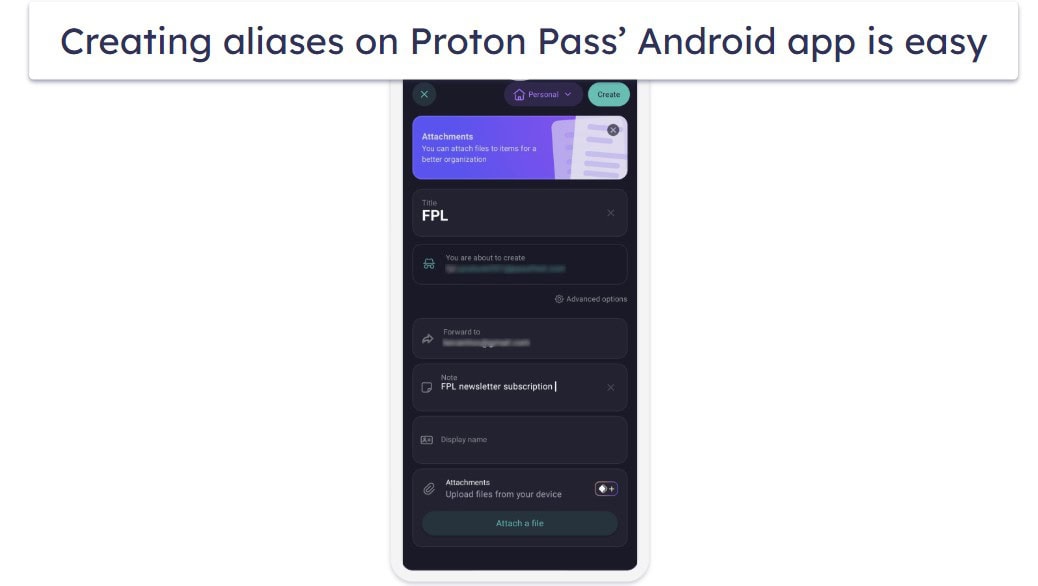
A unique feature I found really handy is Proton Pass’s email aliasing. Even on the free plan, you can generate aliases to mask your real email address when signing up for services. This not only helps reduce spam but also limits the amount of your personal data that leaks across the web. While most password managers — even premium ones — don’t offer this feature, Proton Pass builds it right into its ecosystem.
Still, the free version isn’t perfect. For instance, to access features such as the TOTP authenticator and dark web monitoring, you must upgrade to a premium plan. Additionally, while the auto-fill experience is smooth, I found it sometimes struggled on apps with unusual login screens. That said, these were rare occurrences and didn’t diminish my overall experience.
If you need more, Proton Pass’s paid plans are very reasonably priced. For just $2.49 / month, Proton Pass Plus adds advanced features like support for up to 50 vaults, unlimited email aliases, dark web monitoring, and enhanced sharing options. Families can opt for Proton Pass Family at $4.99 / month, which covers up to 6 users — a solid deal if you want everyone protected under the same subscription.
Bottom Line:
Proton Pass offers unlimited password storage and syncing across devices — a feature that most competitors heavily restrict on their free tiers. Combined with end-to-end encrypted metadata, secure notes, vault sharing, and unique extras like email aliasing, Proton Pass provides excellent value without pushing you too quickly into a paid upgrade. While its premium plans unlock even more, the free version alone is powerful enough to handle most Android users’ needs.
Read the full Proton Pass review
🥈 2. 1Password — Top Security With Unique Extras
1Password is another great choice for password management, especially for Android users. While it’s not free, the 14-day trial offers a full preview of its premium features, allowing you to have a thorough test drive without any upfront cost. Honestly, the trial period is perfect for getting a feel for its comprehensive capabilities.
What I love about 1Password is its multi-vault feature. It’s super handy for organizing different aspects of your life. I could separate my work, personal, and family info easily and with just a few clicks. For example, I added my Netflix account to my family vault while keeping my work logins separate. RoboForm can also do a similar thing, but it’s a bit more hands-on, and it takes more effort to get everything organized just right.
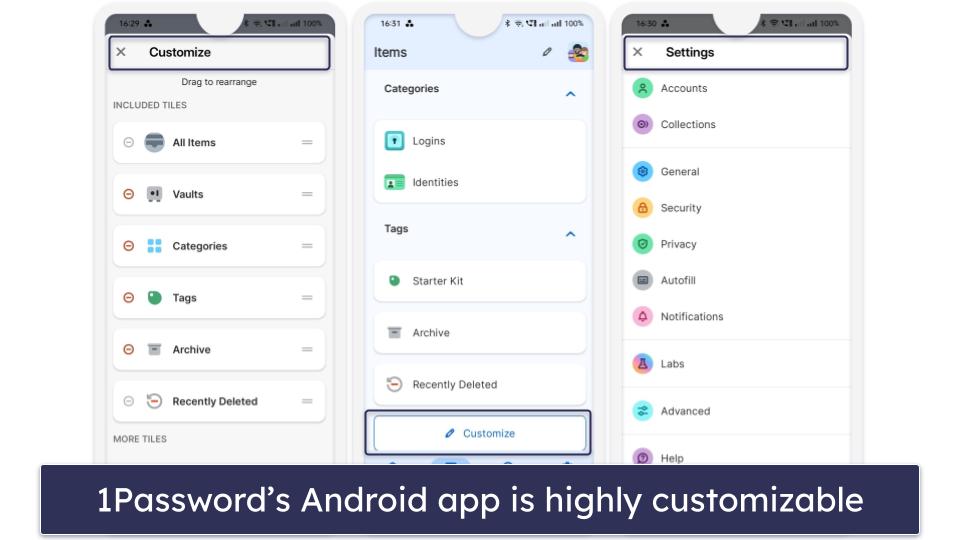
The customization of the 1Password Android app is spot on. Setting up my home screen was straightforward, and I loved being able to pin crucial items like my garage code and Wi-Fi password right where I could see them. It’s these little things that make the app feel really personal and tailored to my needs.
1Password also has great 2FA — it works with common TOTP authenticator apps, and it provides biometric verification for Android which adds a nice layer of security.
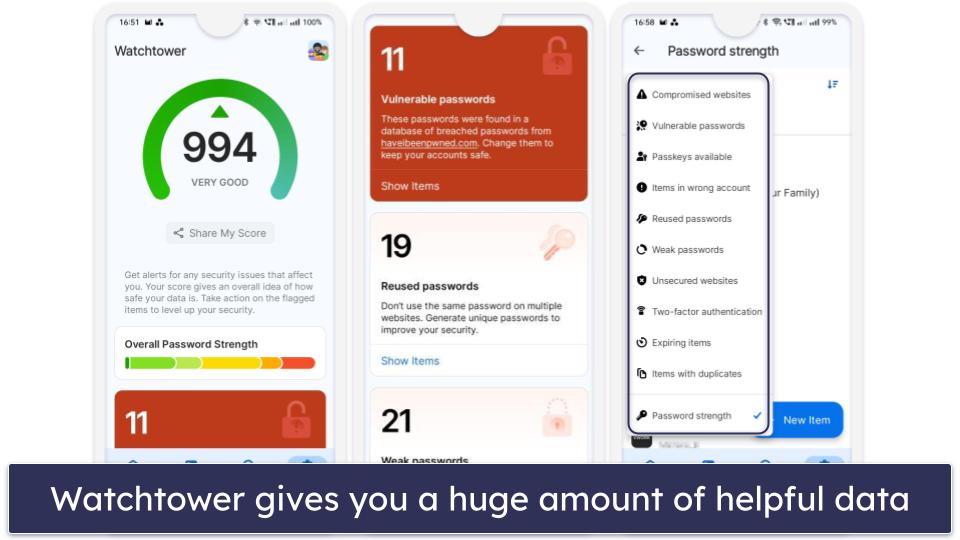
Finally, the Watchtower feature is great. It’s a comprehensive tool that checks your passwords for weaknesses, alerts you to any that are reused or vulnerable to cyber attacks, and even identifies those compromised in data breaches. It also gives a handy security score for your vault. I appreciate how it makes updating my reused passwords easy and keeps me informed about credit card expiry dates. I also appreciate how Watchtower issues notifications about passkey support on saved sites — a feature I haven’t seen in other password managers.
After thoroughly enjoying the trial, the Individual plan at $2.99 / month and Families plan at $4.49 / month were a pleasant surprise. Honestly, I found myself upgrading without much hesitation. The Families plan, with its option to add unlimited users at a small additional fee, offers fantastic value.

Bottom Line:
1Password on Android offers a solid mix of security and user-friendliness. The Watchtower feature is particularly impressive, providing an in-depth analysis of password strengths and potential vulnerabilities. It’s straightforward to use, making the management of reused passwords and credit card expiration tracking much simpler. Unique features like multiple storage vaults give 1Password an edge over competitors. For those considering a comprehensive and secure password manager, 1Password is worth the trial, and its family plan offers great value for multiple users.
Read the full 1Password review
🥉 3. RoboForm — Affordable Plans With a Built-in Authenticator
RoboForm has the best form-filling abilities of all the password managers I’ve tested — and I put it to the test extensively. Unlike some other free password managers that struggle with complex web forms, RoboForm handles them excellently. Its precision meant that I breezed through online forms on my Android device, making the whole form-filling process frustration-free.
RoboForm’s free version provides unlimited password storage but restricts it to 1 device. In my tests, switching devices more than twice locked me into Read Only mode. This means you can still view your saved passwords, but you’re unable to add any new ones to your account. Despite this, it’s easy enough to turn off Read Only mode on your desired device (I just asked customer support) and I appreciate the unlimited storage for credentials, bookmarks, notes, and more.
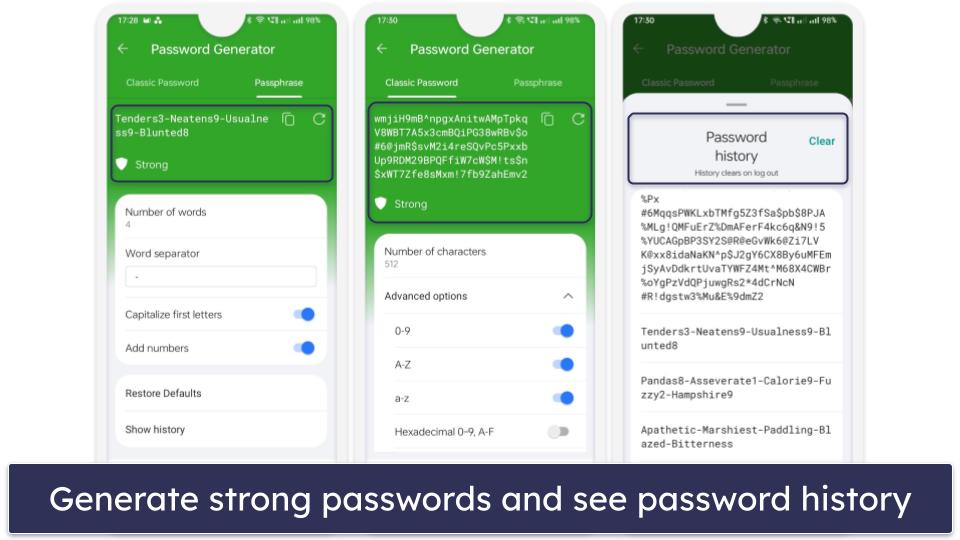
The password generator in RoboForm is one of my favorite password generators. By default, it creates 16-character passwords, blending uppercase and lowercase letters, numbers, and symbols, but avoiding similar characters. What’s great is the flexibility it offers — you can ramp up the character count to a whopping 512 characters or even opt for passphrases of up to 8 words long. You can even have a look at your password history, which is great if you forgot to save a password.
RoboForm’s free version also includes a password audit tool. It checks your password’s strength and encourages regular updates to ensure you maintain strong credentials.
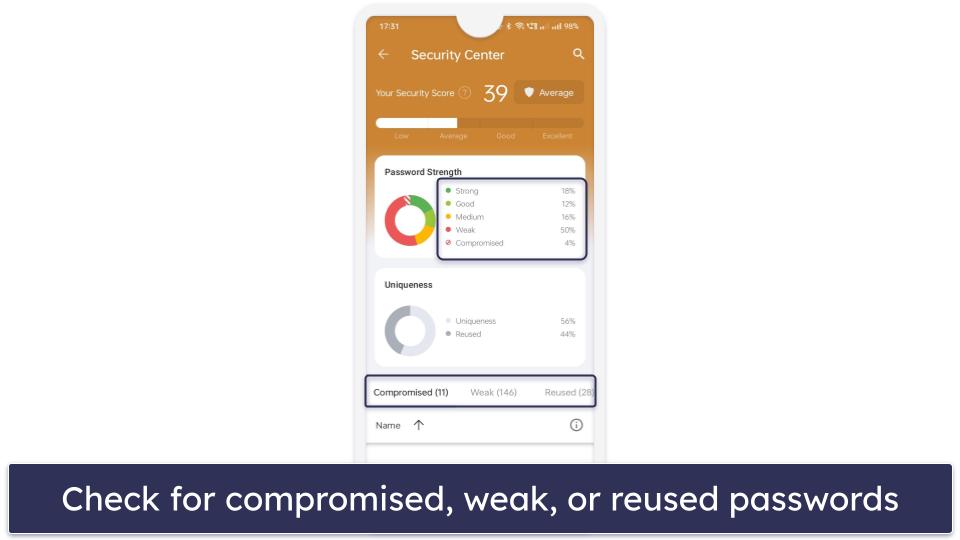
Finally, RoboForm lets you organize your data with the help of folders — but it’s not that intuitive. I much prefer 1Password’s multiple vault system which makes organizing much easier.
While RoboForm’s free offering is good, RoboForm Premium at $0.99 / month unlocks even more features. It lets you sync across multiple devices, choose between storing your passwords on the cloud or your device, and lets you share two secure folders containing logins. The RoboForm Family plan, priced at $1.60 / month, offers families excellent value by giving you 5 premium accounts to share in your household (but it doesn’t come with any additional features).

Bottom Line:
RoboForm Free for Android is great for form-filling and offers a suite of features that stand up well against the competition. The free version is great for single-device use and the premium upgrade is worth considering for its expanded capabilities. With a top-notch password generator and other user-friendly features, RoboForm strikes a good balance between functionality, ease of use, and advanced security, making it a good choice for Android users.
Bonus. NordPass — Intuitive Interface & Secure Encryption for Android
NordPass offers an extremely user-friendly experience paired with very good security on Android. The app’s setup is quick and straightforward, making it an excellent choice for users new to password management.
NordPass Free limits users to 1 active device login at a time but provides unlimited password storage, secure note-keeping, auto-fill, and more. The unlimited storage is great given that some free plans are very restrictive (Kaspersky only allows you to store 5 passwords). NordPass also allows you to switch and sync your data between devices, but you can only be logged into 1 device at a time. This might be inconvenient for users who regularly switch between multiple PCs or Android devices, but it’s still better than what most other free password managers offer.
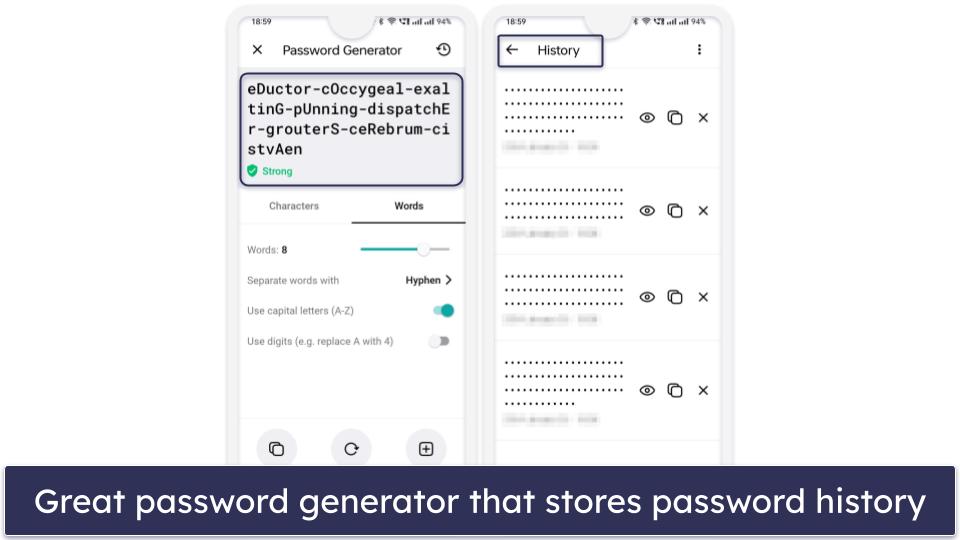
The password generator in NordPass is very good, matching the performance of the top competitors on this list. NordPass allows you to create passwords of up to 60 characters with a mix of upper and lowercase letters, digits, and symbols. You can also create easy-to-remember passwords and passphrases with up to 10 words in length. Like RoboForm, NordPass also stores your password history, but I liked the fact that NordPass shows you the exact date and time the password was created.
NordPass also includes multi-factor authentication in the form of backup codes. You can use authenticator apps like Google Authenticator or Authy, too, but it doesn’t have a built-in authenticator like RoboForm does. And while NordPass offers email masking, unlike Proton Pass, this isn’t available in the free plan at all.
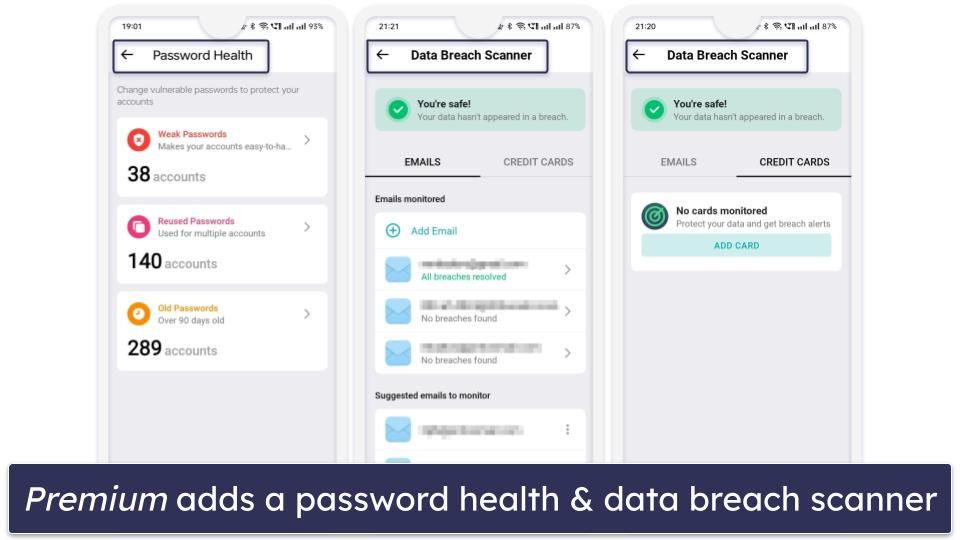
With NordPass Premium, you’ll get access to multi-device usage, a very generous 3 GB encrypted storage, a password health checker, an email mask feature, and a data breach scanner. The premium version comes at a cost of $1.49 / month and the Family plan — which gives you 6 premium accounts — costs $2.79 / month.
Bottom Line:
NordPass Free delivers a user-friendly and secure experience for Android users. While the single-device login in the free version is a minor limitation, the app’s intuitive design and excellent password generator make it a great option. The premium version adds valuable features like a password auditing tool and data breach scanner, making NordPass a worthy contender among Android password management apps.
Quick Comparison Table
How to Choose the Best Free PM for Android in 2026
- Opt for free access with lots of features. When selecting a free password manager for Android, look for options that offer the best features with their free plans. For instance, Proton Pass provides unlimited password storage, unlimited device syncing, secure notes, and even free vault sharing. Likewise, 1Password offers a 14-day trial, letting you evaluate all its premium features without cost.
- Look for a free password manager with strong security. Essential for any password manager, especially for Android devices, is unbreakable security. Choose services employing 256-bit AES encryption or similar and zero-knowledge architecture. Proton Pass, for example, encrypts not only your logins but also metadata like usernames and email addresses — something many free managers skip.
- Assess the app’s performance on Android. The password manager you choose should function smoothly on Android platforms. It should reliably generate secure passwords and consistently auto-save and auto-fill logins without glitches. All the password managers on my list did this in testing.
- Choose a password manager that feels easy to use. A password manager that’s cumbersome or over-complicated isn’t practical. Choose one that simplifies detecting and saving new passwords, auto-filling saved logins, and customizing settings in the password vault so you can have a user-friendly experience on your Android device.
- Consider the pricing for upgrades. If you plan to eventually move to a paid plan, look for affordable options that offer significant value with additional features. Many password managers, like Proton Pass, also provide a money-back guarantee, so you can have peace of mind with your investment.
Risks & Disadvantages of Using a Free Password Manager
While there are reliable free password managers, most lack strong encryption, making them vulnerable to cyber threats. Unlike my top recommendations, which use stringent 256-bit AES or XChaCha20 encryption, certain free versions fail to provide this level of security.
The most capable free password managers offer basic functionalities like secure password storage, but often omit advanced features like dark web monitoring. Many also have limitations on how many passwords you can store. However, Proton Pass allows unlimited password storage and syncing across multiple devices on its free plan, which is rare in this space.
Another drawback of many free password managers is their limitation to a single device. Most free password managers confine users to just 1 device, which isn’t ideal for those with multiple devices. NordPass, for instance, limits you to one active device login at a time. Proton Pass is one of the few exceptions that truly offers unlimited device sync without forcing an upgrade.
Auto-fill efficiency in free password managers can vary as well. Some free versions struggle with consistently and accurately auto-filling login details, leading to a clunky user experience.
Investing in a premium password manager is wise if you want enhanced security and a broader range of features. It’s surprisingly affordable, too. Proton Pass Plus is priced at $2.49 / month, while 1Password offers its services at $2.99 / month. Moreover, these premium services usually include free trial periods or money-back guarantees, allowing you to test their full capabilities without any financial risk.
Free vs. Paid Password Managers for Android
Free password managers for Android offer a secure way to manage your passwords, but they often come with limitations. For example, RoboForm’s free version limits you to just 1 device, and NordPass only allows 1 active device login at a time. Proton Pass stands out here — its free plan provides unlimited password storage, unlimited device syncing, and even vault sharing, which is rare among free services. However, it still excludes its built-in authenticator and dark web monitoring.
Opting for a paid password manager typically unlocks helpful extras. These include unlimited password storage across multiple devices and advanced features like password sharing, emergency access, and dark web monitoring. Paid versions also offer superior customer support; for example, RoboForm’s free plan has basic email support, while its paid versions include priority email, live chat, and phone support.
I recommend starting with a free password manager to get a feel for the service and its functionalities. However, for a more comprehensive experience and better value, a paid service is the way to go. Investing in a paid password manager enhances your security while giving you more tools and support options. Moreover, most premium password managers offer free trials or money-back guarantees, allowing you to explore every feature without financial commitment.
Free Password Managers to Avoid
- Passwordstate. Recently, Passwordstate fell victim to a security breach where attackers exploited the software’s update process to deliver harmful files to users. These malicious files were designed to extract critical data such as usernames and passwords, significantly compromising user security. The breach was deepened by subsequent phishing attacks, highlighting a significant risk for those relying on the service, especially Android users who often download updates on the go.
- LifeLock. LifeLock, a well-known name in security, faced a major setback in 2022. A data breach resulted in over 6,000 customers losing access to their password managers, with attackers employing credential-stuffing techniques to hijack accounts. Given these vulnerabilities, recommending LifeLock as a safe password management option for Android users becomes challenging.
- ZenRAT. Bitwarden, a trusted password manager, has unfortunately been mimicked by cybercriminals through malware called ZenRAT. This imposter malware aims to steal information from any device it’s downloaded onto, including Android devices. Android users should be vigilant, ensuring they download apps only from reputable sources and verify URLs to avoid falling prey to such deceptive tactics.
Top Brands That Didn’t Make the Cut
- LastPass. LastPass offers a free password manager, but due to its history of data breaches and security concerns, we no longer recommend it.
- Keeper. Keeper is undoubtedly secure, boasting 256-bit AES encryption and diverse multi-factor authentication methods. Yet, its free version is limited to use on only 1 mobile device, and it doesn’t include secure password sharing.
- Sticky Password. Sticky Password offers broad browser compatibility and a unique USB portability feature, which is great for those on the move. However, its free version doesn’t support syncing across devices. Additionally, the absence of password sharing makes it less appealing for Android users wanting to share logins with family members or work with collaborative tools.
- Avira. Avira’s free plan provides an easy-to-navigate, secure environment with unlimited password storage across multiple devices. While this is advantageous, especially for Android users managing various apps, Avira’s free version lacks extra features like data breach alerts and password vault audits.
Frequently Asked Questions
Are free password managers safe for sensitive information?
Yes, they are safe for storing sensitive information. Reputable free password managers like RoboForm employ bank-grade encryption such as 256-bit AES and adhere to zero-knowledge protocols, ensuring that your sensitive information remains secure. However, you should select a password manager with a proven security record. Remember, the level of security also depends on your usage habits, like regularly updating passwords and enabling 2FA, which many free versions support.
Do free password managers work with all Android devices?
Most top-rated free password managers are designed to be compatible with a wide range of Android devices. Apps like RoboForm, for instance, generally work seamlessly across different Android versions and models. However, compatibility can vary, especially with older Android versions or less common device models. It’s advisable to check the specific requirements of the password manager on the Google Play Store or their official website to ensure it fits your device’s specifications.
How do free password managers generate revenue?
Free password managers typically offer basic services at no cost while providing more advanced features through paid subscriptions. These premium features might include enhanced security measures like dark web monitoring, the ability to use the password manager on multiple devices, and access to priority customer support. The revenue model is based on users finding value in the free service and choosing to pay for these additional, often essential, functionalities.
What are the main limitations of free password managers on Android?
Free password managers might limit the number of passwords you can store and restrict vault access to a single device. Advanced features like password sharing, dark web monitoring, or sophisticated password auditing are typically reserved for premium versions. These limitations can impact the convenience and the level of security offered by the password manager, making the free versions more suitable for basic needs rather than for managing a wide array of professional or multi-device needs.

