

Published on: February 9, 2024 Updated 2 times since publishing
Only 3 Steps (Quick + Easy) to Play Fortnite at School in 2026:
- Download and install a VPN. My top recommendation is ExpressVPN because it reliably bypasses filters and blocks that prevent you from playing Fortnite while on your school’s network.
- Connect to a VPN server. Pick a server that’s as close as possible to your real location for the best speeds and minimal lag while playing.
- Log into Fortnite. That’s it! You’re all set to play Fortnite without the school’s network blocking you.
Unlocking Fortnite at your school can be a daunting challenge. Many schools implement stringent network filters so students maintain focus on their academics, and it also helps conserve bandwidth — a lot of people playing Fortnite can cause major slowdowns on the network.
However, there is a simple solution — just use a virtual private network (VPN). A VPN is an app that has servers located all over the world and provides a reliable way to bypass network restrictions.
A VPN uses 2 main ways to bypass school filters. When you connect to a VPN server, it encrypts your internet traffic, rendering it indecipherable to network administrators — they won’t know you’re trying to access Fortnite. Additionally, advanced VPNs offer obfuscation features, further masking VPN traffic to evade detection by network monitoring systems.
Unfortunately, not all VPNs can get around school restrictions. I researched 30+ VPNs and found that ExpressVPN is the best one. It includes advanced security features that allow you to access Fortnite, it works with the site all of the time, and it’s easy to use. Editor's Note: ExpressVPN and this site are in the same ownership group.
How to Play Fortnite at School On Any Device
1. Choose a VPN that can help you access Fortnite at school.
I recommend ExpressVPN — in my tests, it was able to consistently bypass the network filters and firewalls commonly used by schools to block Fortnite.
2. Download and install the VPN to your device.
Visit the provider’s official website or your device’s app store and download the VPN app. Then run the installer and follow the on-screen instructions.

3. Launch the VPN, connect to a server, and start playing Fortnite.
You’re all set! You can now play Fortnite on your school network.

Quick Summary of the Best VPNs for Playing Fortnite at School in 2026


🥇1. ExpressVPN — Best VPN for Playing Fortnite at School in 2026

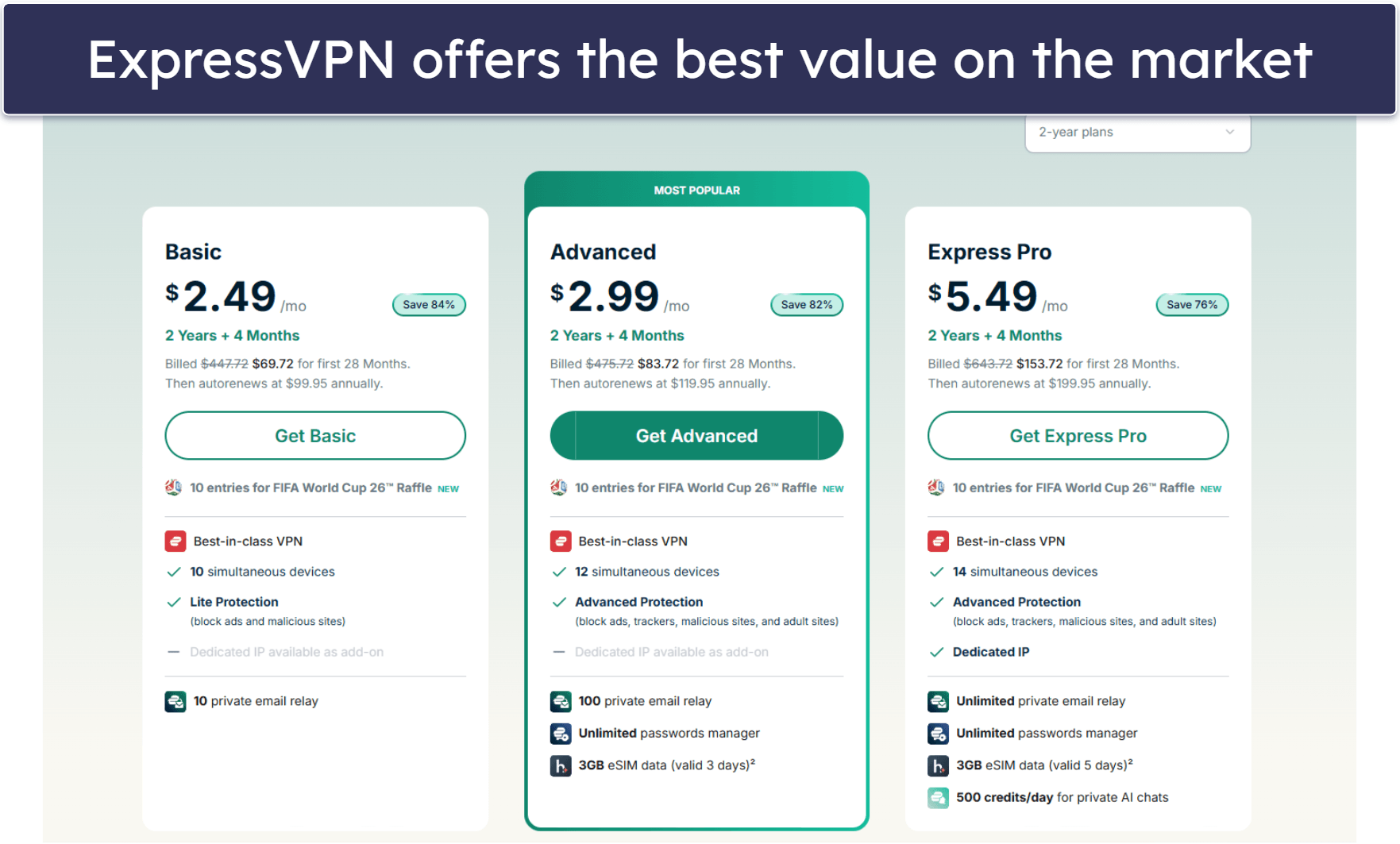
Basic 12-Months plan: $3.99 / month
1-month plan: $12.99 / month

ExpressVPN stands out as my top recommendation for unblocking Fortnite at school — it has the best security and obfuscation tools out there to navigate school networks seamlessly. Furthermore, it maintains unparalleled connection speeds, provides a vast server network so you can always find a nearby server for the fastest speeds, offers excellent gaming support, and has an intuitive interface.
ExpressVPN’s apps are available for a wide range of operating systems, including iOS, Android, macOS, Windows, and Linux. They’re also really intuitive and make it quick and simple to find and connect to a server. For example, there’s a Smart Location feature that automatically recommends the fastest server for you. I also like the Shortcuts feature, which lets you create a 1-click shortcut to Fortnite on ExpressVPN’s main window, so you can start playing as soon as you connect.
ExpressVPN’s security for gaming is top-notch. You don’t have to worry about DDoS attacks while playing Fortnite — all of ExpressVPN’s servers include DDoS protection.
Read our full ExpressVPN review
🥈2. Private Internet Access — Good VPN for Playing Fortnite on Mobile Devices
6-month plan: $7.50 / month
1-month plan: $11.95 / month
Private Internet Access (PIA) has great Android and iOS apps for playing Fortnite at school. The mobile apps (as well as the apps for Windows and macOS) have clean, easy-to-use interfaces that make it pretty easy to connect to a server and start playing Fortnite. I like how the apps display every server’s ping, so you can pick out the best one for gaming with minimal lag. There’s also the Quick Connect feature, which shows the last 6 servers you connected to, so you don’t have to look for your preferred servers every time.
PIA also has obfuscation through Shadowsocks proxy servers. It first routes your traffic to the special proxy servers, and then through the VPN network, before communicating with Fortnite. That way, if you want to play Fortnite from school, the school’s network won’t detect that you’re using a VPN and potentially block your connection. The proxy servers are located in 5+ countries, including the US and UK. It’s a really good way to bypass school network filters, but I prefer ExpressVPN, which has obfuscation on all servers.
Read our full Private Internet Access review
🥉3. NordVPN — High-Security VPN for Playing Fortnite at School

Plus 24-month plan: $3.59 / month
Complete 24-month plan: $3.99 / month
Prime 24-month plan: $6.99 / month
NordVPN has strong security to keep you safe while playing Fortnite at school. It uses RAM-only servers and maintains a strict, audited no-logs policy. It also has a Dark Web Monitor feature that alerts you immediately if it finds your Fortnite login credentials on shady websites.
I like NordVPN’s obfuscation, which is available on servers in 15+ countries (out of the 149 countries that NordVPN’s server network covers). While I wish it made obfuscation available on all servers, like ExpressVPN, the selection covers all regions so most users can find a nearby server.
The one thing that I find NordVPN lacks is DDoS protection on its servers, which ExpressVPN and Private Internet Access both have. Although the VPN protects your real IP address from angry gamers, the VPN server is still vulnerable to DDoS attacks that could shut down your connection to Fortnite — the good news is most school networks have DDoS protections.
Editor's Note: Intego ONE, Private Internet Access, CyberGhost and ExpressVPN are owned by Kape Technologies, our parent company.
Quick Comparison Table
Editor's Note: Intego ONE, Private Internet Access, CyberGhost and ExpressVPN are owned by Kape Technologies, our parent company.
How to Choose the Best VPN for Playing Fortnite at School in 2026
- Choose a VPN that reliably unblocks Fortnite. All the VPNs I tested and listed here bypass all sorts of network filters and blocks that would prevent you from playing Fortnite at school.
- Get a fast VPN. VPNs slow down your connection because of the encryption that makes your traffic unreadable, and that can be a problem if you’re playing a multiplayer game like Fortnite. All the VPNs on my list have great speeds, but ExpressVPN was the fastest.
- Pick a VPN with strong security and privacy. I only recommend quality VPNs that have industry-standard features, such as 256-bit AES encryption (used by militaries), a kill switch (cuts you off from the internet if the VPN server loses connection), and a no-logs policy (the VPN doesn’t keep any data about your online activity).
- Try a user-friendly VPN. The VPNs I recommend are compatible with a wide range of devices, with intuitive apps for Windows, macOS, Android, and iOS that make it super easy to connect.
- Choose a VPN that offers good value. All the VPNs on this list have excellent extra features, such as split-tunneling and obfuscation, as well as long money-back guarantee periods, so you can try any of them without risk.
What Is a VPN & How Does It Unblock Fortnite?
A VPN, or virtual private network, creates a secure and private connection between your device and the internet. It encrypts your online traffic, transforming it into code that’s nearly impossible to crack. This means that your online activity, including playing Fortnite, becomes unreadable to the network administrators at your school.
School networks often use filters to restrict access to specific sites and applications, including games like Fortnite. These restrictions identify and block the URLs, and sometimes the IP addresses and data ports, used by these sites and apps.
In addition, many school networks block VPN traffic. However, top VPNs include obfuscation tools, which mask your VPN connection and make it appear as a normal internet connection. This way, your school network won’t know you’re even using a VPN.
Other Ways to Play Fortnite at School
Besides using a VPN, there are other methods to bypass school network restrictions and play Fortnite:
- Use mobile data/mobile hotspots instead of Wi-Fi. Switch to your mobile data or connect to someone’s mobile hotspot. This way, you don’t even go on the school’s network, so its filters can’t prevent you from playing Fortnite. Keep in mind, however, that online gaming eats up a lot of data, so your phone bill could end up noticeably bigger than usual.
- Use proxy servers. A proxy server is like a stepping stone between you and the internet, hiding your real location. By connecting to a proxy server, your school’s network sees the proxy’s IP address instead of the Fortnite servers. Proxies bypass some filters, but might not work against more sophisticated network restrictions. Also, they don’t encrypt your data like VPNs,
- Use a smart DNS service. Smart DNS services redirect only specific parts of your traffic to fool the network filters about where your internet traffic is going. This can bypass some network blocks and give you access to Fortnite, but it requires some setup and technical know-how. Unlike VPNs, smart DNS services don’t encrypt your traffic to provide security.
Frequently Asked Questions
Why is Fortnite blocked at school?
Schools block Fortnite (and many other online games) to maintain a distraction-free environment for their students so they can focus on learning. Also, games with in-game chat options can be used for cyberbullying. Another reason is that many games going at once can use up a lot of the school network’s bandwidth, which might interfere with everyday school activities. If you really want to play Fortnite at school, you can use one of the VPNs on this list.
Can the school network administration see me using a VPN to play Fortnite?
Yes, the school can see you’re connected to a VPN. However, many top VPNs, including the ones on my list, offer obfuscation — this sophisticated tool hides your VPN connection and makes it appear as if you’re using a normal connection.
What else can I use a VPN for?
A VPN can also unblock many other websites and apps that the school’s network normally blocks, such as Instagram, YouTube, or other games. Even if you’re not bypassing any restrictions, a VPN is a great way to enhance your online security and keep yourself anonymous online. Plenty of high-quality VPNs, such as ExpressVPN, have extra useful features, such as an ad blocker and protection against trackers.
Can I use a free VPN for playing Fortnite at school?
While some free VPNs may work, I don’t recommend them. Free VPNs may have strong encryption, but they usually don’t come with obfuscation. So, the network won’t be able to see the website or app you’re using, but it will detect the VPN and most likely block it — and your access to Fortnite. ExpressVPN is a great affordable alternative, as it includes obfuscation, as well as other advanced security features to help you play Fortnite at school.
Editor's Note: ExpressVPN and this site are in the same ownership group.

