

Published on: April 5, 2023 Updated 8 times since publishing
Short on time? Here’s the best way to download and set up a VPN in China in 2026:
- Choose a VPN that works in China. This is important as not all VPNs work well in China. I recommend ExpressVPN.
- Download and install the VPN. Follow the on-screen instructions in the installation wizard. If you’re planning a trip to China, it’s best to download the VPN on your devices before you arrive, as most VPN websites are blocked there.
- Enable the VPN’s obfuscation tool. For example, in ExpressVPN‘s apps, you just need to connect to a server using any protocol. Obfuscation hides your VPN traffic from your Internet Service Provider in China and the Chinese government.
- Connect to a server in another country. Once connected, you can freely browse the internet in China.
Downloading a VPN in China isn’t as simple as visiting the App Store or a provider’s website. Most VPNs aren’t available in Android or iOS app stores, and China denies users access to virtually all of the top VPNs’ websites. While the restrictions are tough, they’re not unbeatable — if you know the right methods, you can still download and use a VPN in China.
After extensive research, I’ve found several reliable ways to get a VPN even when you’re already inside the country. Whether it’s using mirrored links, APK files, or international SIM cards, these solutions can help you regain access to a free internet. I also cover troubleshooting steps in case your VPN won’t connect, is running slowly, or keeps getting blocked.
On top of that, I recommend the best VPNs for bypassing China’s internet restrictions. Not all VPNs work reliably in China, so I’ve tested and chosen the ones that offer consistent access, strong encryption, and stealth technology to avoid detection. ExpressVPN is my top choice due to its robust obfuscation features, fast speeds, accessible customer support, and ability to stay ahead of the Great Firewall.
Editor’s Note: VPNs may encounter occasional disruptions due to local restrictions. ExpressVPN is considered reliable, and it provides a 30-day money-back guarantee for first-time users to try it risk-free. Note that using unapproved VPNs in China may be illegal, though there are no reports of the government penalizing foreigners for this. The government primarily targets those who set up or sell unauthorized VPNs. That said, exercise caution and always follow local laws. I don’t endorse using VPNs for illegal activities.

Editor's Note: ExpressVPN and this site are in the same ownership group.
10 Best Ways to Download a VPN in China
If you’re not yet in China, it’s much easier to prepare before traveling — download and install your VPN on all your devices in advance, test that it connects, and save mirror links or offline installers somewhere accessible. This ensures you won’t run into China’s VPN website blocks upon arrival.
If you’re already in China and don’t have a VPN installed, here are alternative methods to get one.
1. Use Mirrored Links
Mirrored links are exact copies of a VPN provider’s website hosted on different domains, making them harder for the Chinese government to detect and block.
Unfortunately, I can’t provide a list of VPN mirrored links because they change frequently. To find the latest working links, you can contact the VPN provider’s support team via email or ask a friend outside China to check the VPN provider’s official social media pages or website for mirror links and send them to you.
Avoid sharing links on Chinese social media apps like WeChat, as they are closely monitored, and links may be automatically blocked.
2. Use Your Hotel’s Wi-Fi Network
Some international hotels in China use VPNs on their networks to provide unrestricted internet access to guests.
However, hotel VPNs typically don’t allow access to all restricted content, and they may not let you visit VPN provider websites. If the network allows, try downloading the VPN directly from the provider’s site while connected.
3. Use a Free Proxy to Access the VPN’s Site
A proxy reroutes your internet connection through another server, allowing you to bypass firewalls temporarily. However, proxies don’t encrypt your traffic, so your activities may still be monitored. Here’s how to do this:
First, find a free web proxy or proxy app online (but be cautious—many free proxies track user data). Then, use it to visit the VPN provider’s official website. Now you may download and install the VPN app.
Click here for 7 more methods to download a VPN in China
4. Use a SIM Card or eSIM from Another Country
Most VPN apps aren’t available in China on the Apple App Store or Google Play Store. However, using a foreign physical SIM card or an international eSIM (a built-in digital SIM) with roaming may allow you to access app stores as if you were in another country.
Here’s what you need to do:
- Insert a foreign SIM card or activate an eSIM. It could be from your home country or any other country that doesn’t restrict VPNs.
- Enable roaming in your phone’s settings. Then restart your phone. This will allow you to see VPN apps on your device’s app store.
- Download and install a VPN. Make sure you choose a VPN with obfuscation that can bypass censorship in China — I recommend ExpressVPN.
- Connect to the VPN. You can now switch back to your China SIM card and browse the internet freely.
Downside: international roaming charges can be pretty expensive.
5. Download an APK VPN App
APK files are Android application packages that allow you to manually install apps without using the Google Play Store.
To download a VPN APK safely:
- Contact the VPN provider’s support team and request the official APK file via email.
- Download the APK only from the official VPN provider. Avoid third-party websites, as they may distribute malware.
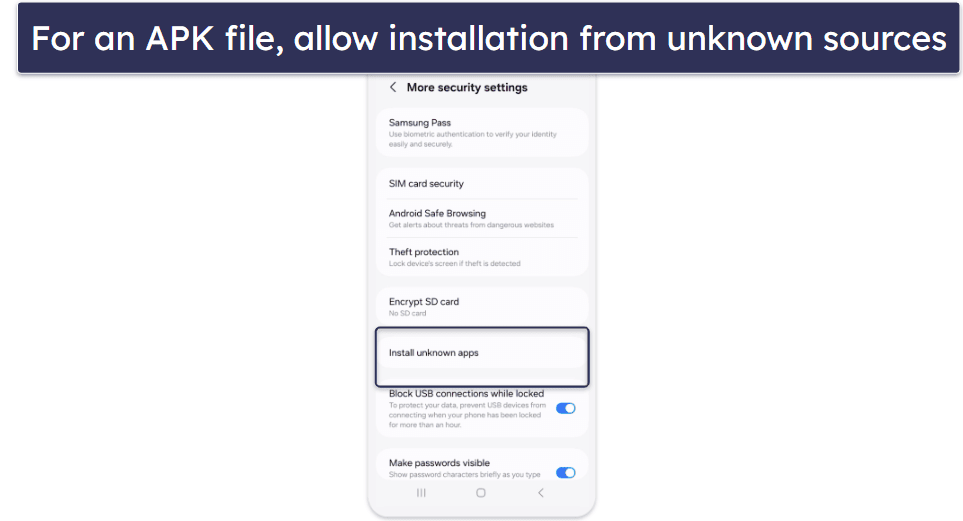
- Enable “Install Unknown Apps” in your Android settings before installing the APK.
6. Use Shadowsocks or Tor
If traditional methods fail, you can try using Shadowsocks or the Tor browser to access VPN websites. Shadowsocks is an open-source proxy designed to bypass censorship, making it harder for the Great Firewall to detect.
Similarly, Tor routes your traffic through multiple encrypted relays, which may allow you to reach blocked VPN sites. However, Tor’s speed is very slow, and its website is often blocked in China, so you may need to get the browser setup files from a friend outside the country.
7. Use a Free VPN to Download a Paid VPN (With Caution)
There are some free VPNs I recommend for China, and you can use one temporarily to access a reliable paid VPN’s website and complete the installation. However, most free VPNs are risky — they often have weak encryption, slow speeds, data limits, and may log or sell your data. If you choose this method, only use the free VPN to purchase and download the paid VPN, then uninstall it immediately.
8. Ask Someone for Help
If you can’t download a VPN using other methods, a trusted friend or colleague outside China may be able to assist you. They can download the VPN installation file and send it to you through a file-sharing platform. If they’re already in China and have a working VPN, they can transfer the installation file directly over Wi-Fi or Bluetooth to help you bypass restrictions.
9. Visit Hong Kong or Macau
Since Hong Kong and Macau have fewer internet restrictions, you can freely access VPN websites and download apps without interference. If you’re near these regions, consider a short trip to install a VPN before returning to mainland China. To stay prepared for future restrictions, store backup installation files on a USB drive, so you have an offline way to reinstall the VPN if needed.
10. Choose a Reliable VPN for China
Not all VPNs work in China, like Surfshark, NordVPN, CyberGhost, and Proton VPN. So, selecting one with proven obfuscation technology for restricted countries is essential. The best China VPNs, like the ones on my list below, consistently bypass restrictions by using stealth servers and frequently updating their IP addresses.
Editor's Note: Intego ONE, Private Internet Access, CyberGhost and ExpressVPN are owned by Kape Technologies, our parent company.
How to Download and Set Up VPN in China on Any Device
Windows
- Get a VPN that works in China.
Download the VPN app from the provider’s website before you arrive in China. Save mirror links or offline installers in case you need them later. I recommend ExpressVPN, as it has China-optimized servers, the fastest speeds, and an easy-to-use Windows app.

- Open the installer and start the app.
Locate the downloaded setup file in your Downloads folder, right-click it, and select Run as administrator. Follow the on-screen prompts in the installation wizard. Launch the VPN app and log in with your account details.

- Choose a nearby server and start browsing.
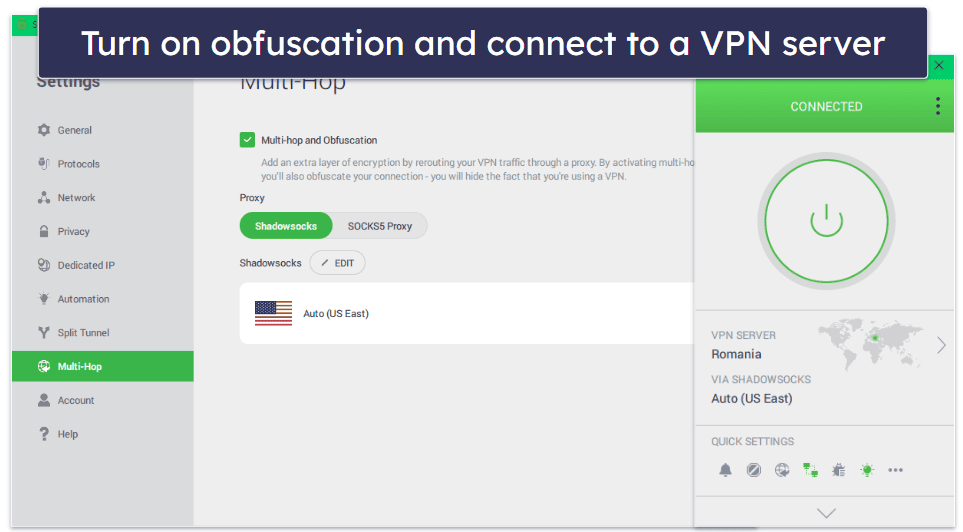
Connect to a server in Hong Kong, Japan, Taiwan, or Singapore for better speeds. Once connected, make sure to enable obfuscation to bypass China’s restrictions (PIA example below).
Android:
- Download the VPN app.
If you’re outside China, install the VPN app from Google Play before arrival.

- If you’re in China, download an APK file.
If you’re already in China, get the APK file from the VPN’s mirror link, email, or support team. Then, allow installation from unknown sources. On Android, go to Settings > Security (or Privacy) and enable Install unknown apps for your browser or file manager.
- Install the VPN
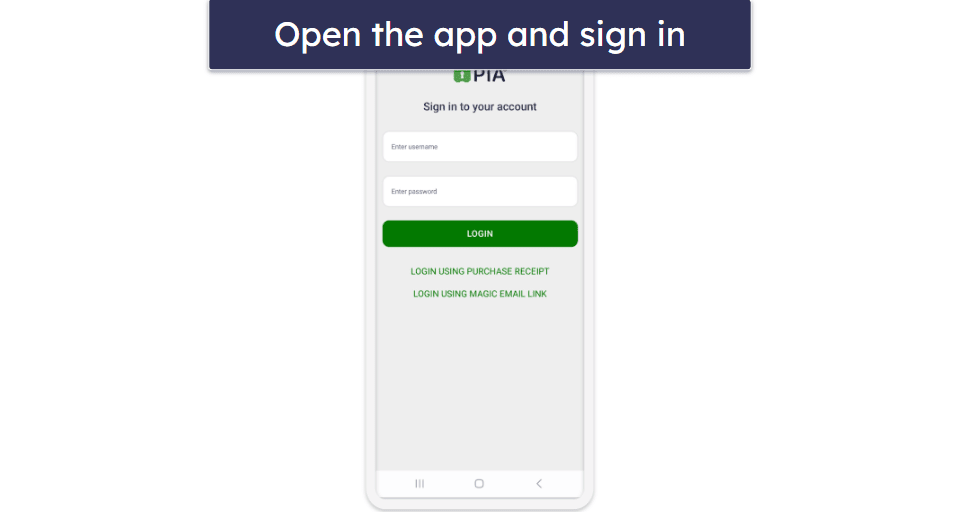
If you downloaded the app before arriving in China, just open it from your app drawer and sign in. If you have the APK file, open it and follow the prompts to install.
- Enable obfuscation
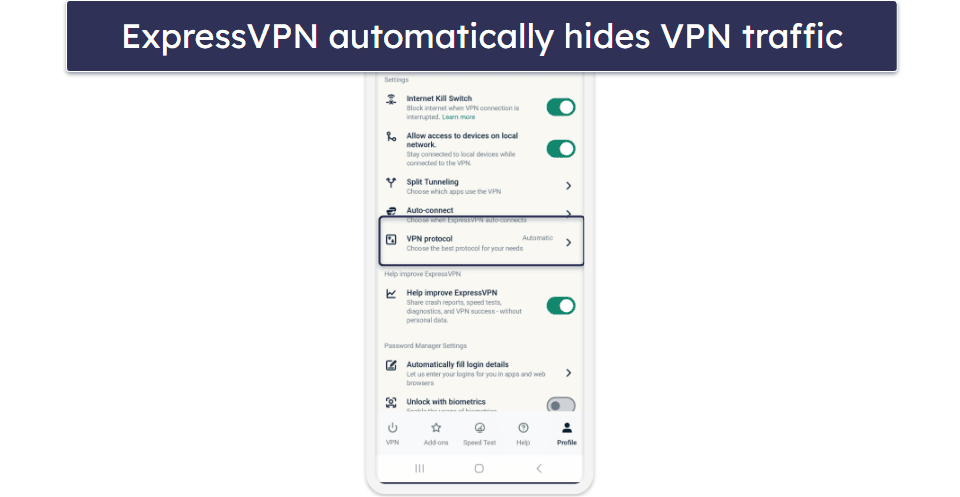
In the VPN app’s Settings, turn on Stealth/Obfuscation mode (ExpressVPN does this automatically).
- Connect to a nearby server
Choose a server in Hong Kong, Japan, or Singapore for faster speeds while in China, and start browsing.
iOS
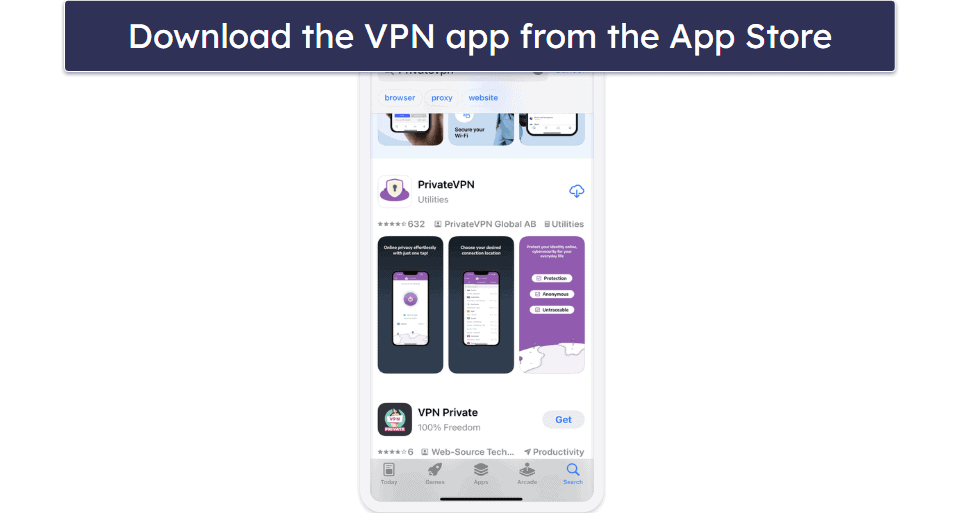
- Download the VPN app.
Get the app from the App Store before you arrive in China, since many VPN apps aren’t available there.
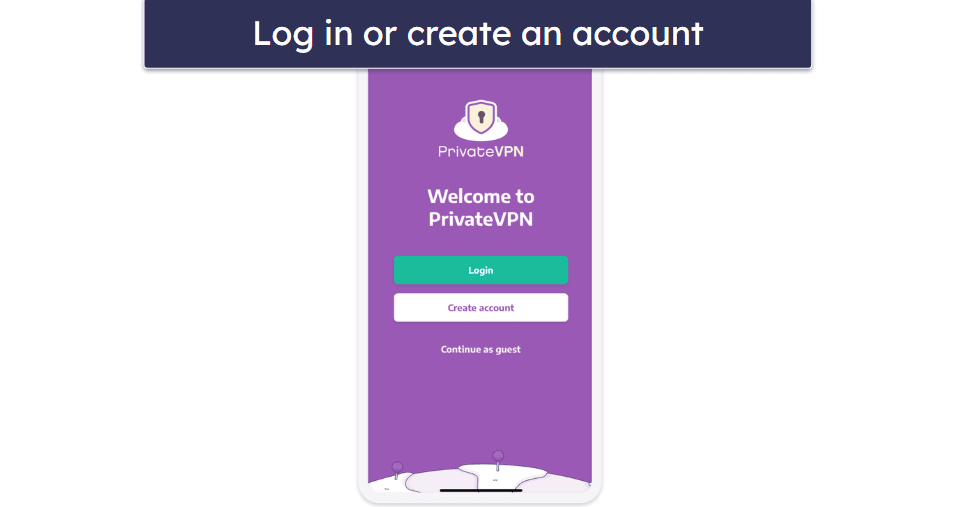
- Sign in to your account.
Once the app is installed, open it and sign in to your account.
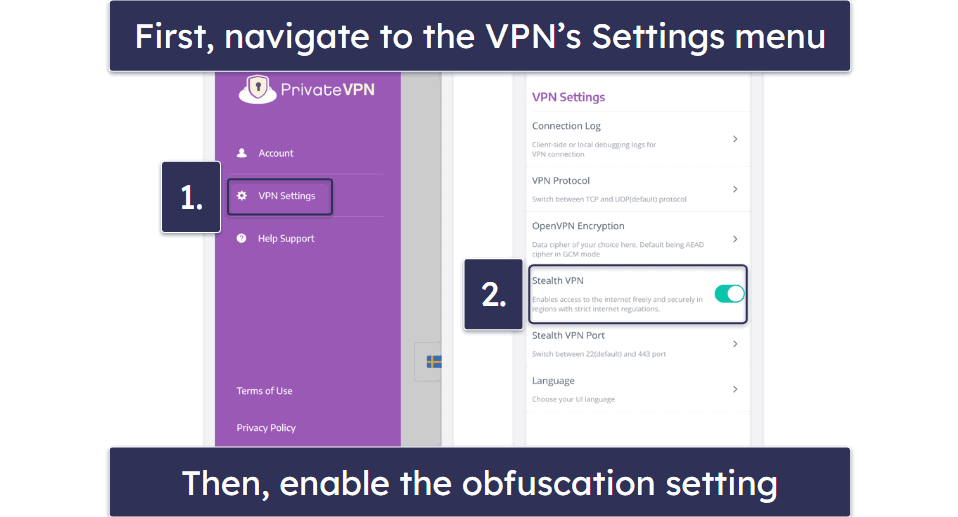
- Enable obfuscation.
In the app’s Settings, turn on stealth or obfuscation mode to evade the Great Firewall of China.
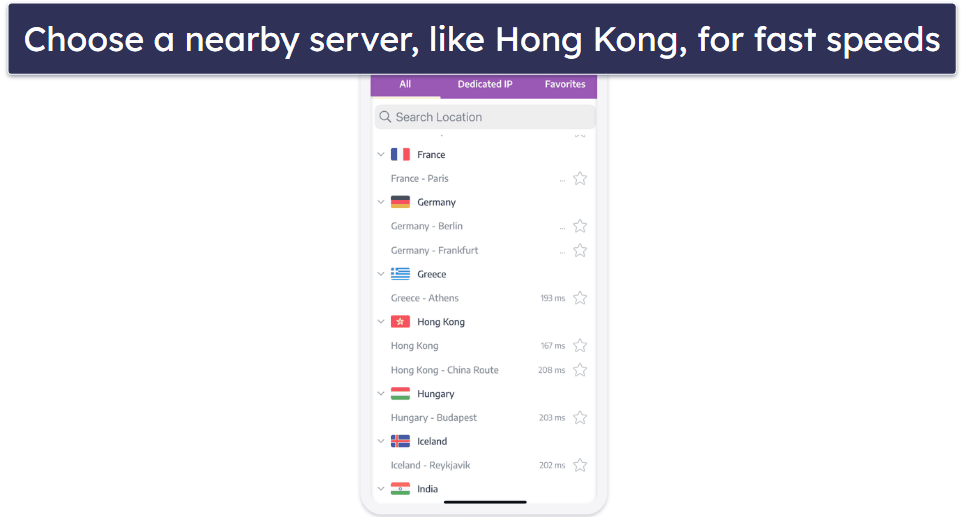
- Pick a nearby server and start browsing.
Choose a nearby server and connect. Now you can start using the internet securely in China.
macOS
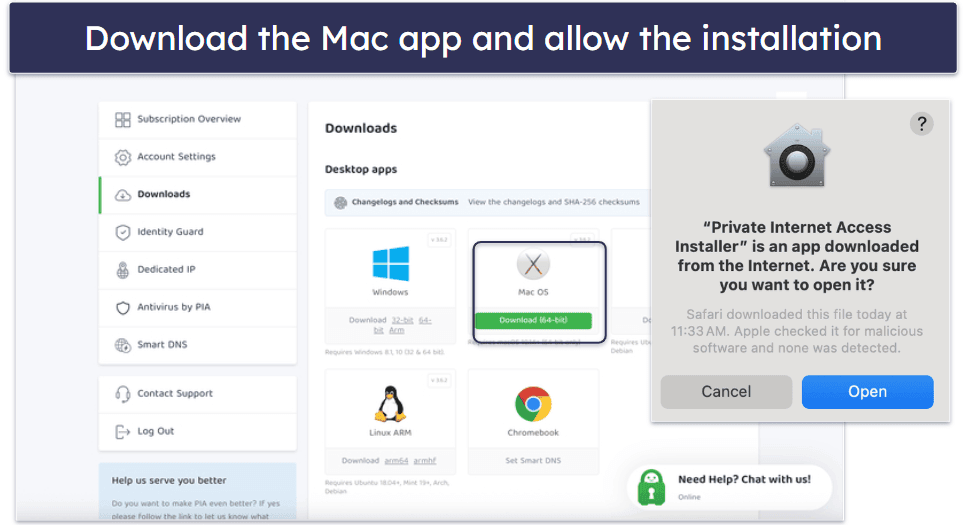
- Download the VPN app.
Download the VPN installer from the provider’s website before arriving in China. Save mirror links or offline installers just in case.
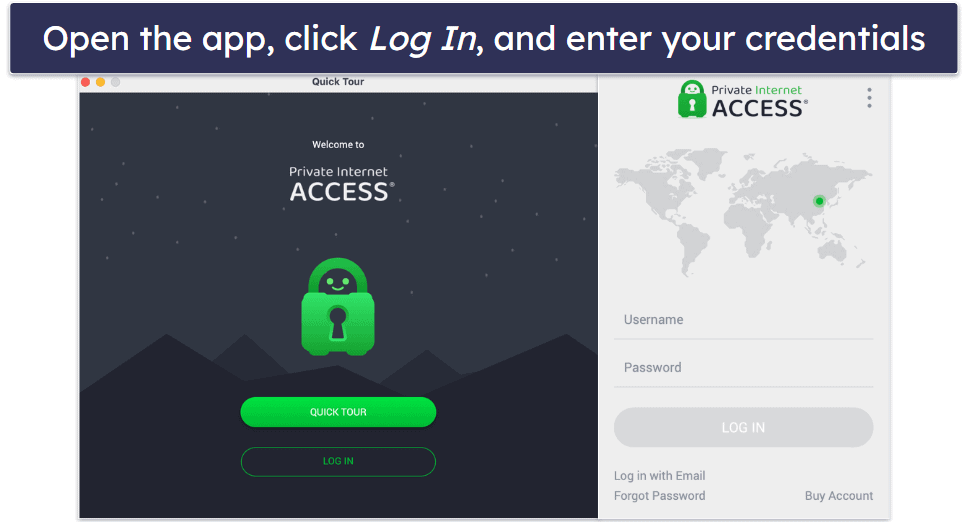
- Launch the VPN app.
Open the app and log in to your account.
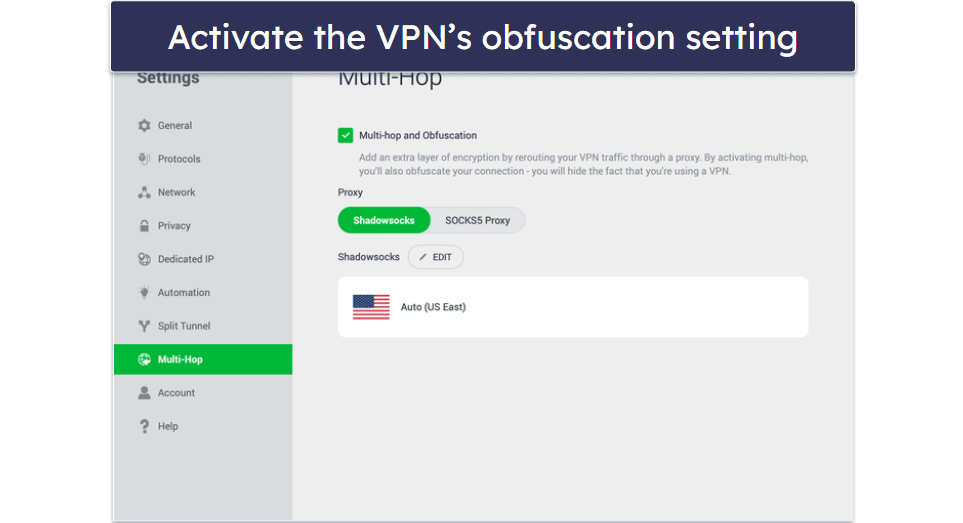
- Activate stealth mode.
In the VPN app’s settings, enable the stealth or obfuscation feature to help bypass China’s internet restrictions.
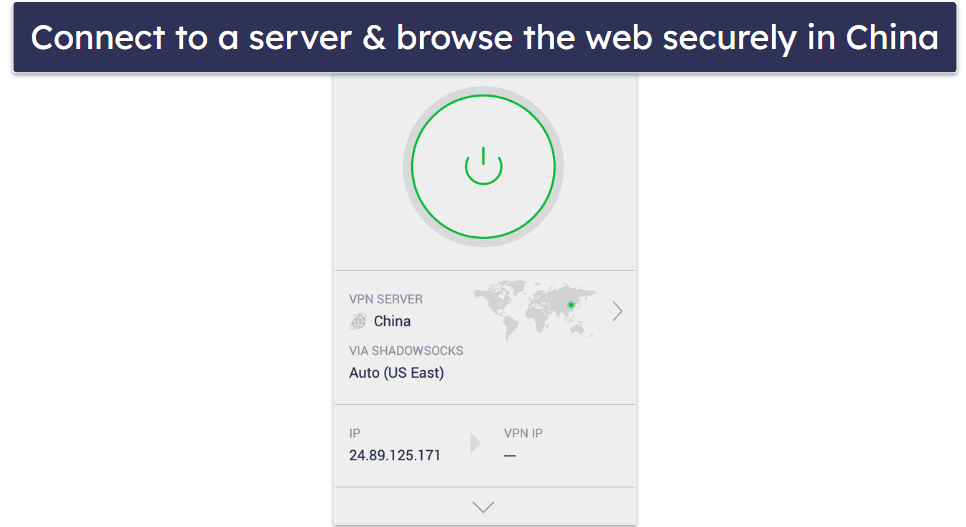
- Select a nearby server.
Connect to servers located in Hong Kong, Japan, or Singapore to enjoy faster and more stable connections while in China.
Quick Summary of the Best VPNs That You Can Download & Use in China in 2025


🥇1. ExpressVPN — Best Overall VPN for Bypassing Internet Restrictions in China in 2026


Basic 12-Months plan: $3.99 / month
1-month plan: $12.99 / month

ExpressVPN is without a doubt the best VPN for China. It supports obfuscation on all of its servers (like its nearby ones in Taiwan, Japan, Singapore, and Hong Kong) and protocols, which allows you to hide your VPN traffic. But the provider’s support reps recommend using the Automatic protocol setting to get the best results.
I like that ExpressVPN offers a list of servers optimized for users in China, located in 10+ nearby locations. These servers are designed to work well with the Great Firewall and provide the best possible speeds on obfuscated connections for apps like Facebook, WhatsApp, YouTube, and Gmail.
It also makes it easy to download its apps if you’re already in China. ExpressVPN’s email support is available 24/7, and it responds super quickly, so you’ll be able to get a mirrored link for the site within a day. I recommend using mirrored links as they are the fastest, safest, and easiest method of downloading the VPN within China.

ExpressVPN also comes with excellent privacy and security features for going online in China. One of my favorites for privacy is ShuffleIP. It changes your IP address (without disconnecting or changing your location) every single time you visit a new website or open/relaunch an app. This means no one can track you around the internet.
Its browser extensions have a cool function that matches your browser location with the VPN server location, which makes connecting to blocked sites more reliable since your browser data doesn’t conflict with your IP address.
ExpressVPN also comes with excellent privacy and security features, for going online in China, such as:
- RAM-only servers. ExpressVPN writes data to volatile memory (RAM) instead of a hard drive. This means that all data is erased every time its servers are rebooted, and there’s no data to share.
- Full leak protection. Protects you against DNS, IPv6, and WebRTC leaks, so your data is never exposed when you’re surfing the web from China. I ran 10+ leak tests with this provider, and I never experienced any leaks.
- An audited no-logs policy. ExpressVPN’s no-logs policy has undergone several independent audits, which confirmed that the provider doesn’t log any data. This also means it doesn’t have any data to share with the Chinese government, even if legally required to.
Read the full ExpressVPN review
🥈2. Private Internet Access — Highly Customizable VPN With Top-Notch Security


6-month plan: $7.50 / month
1-month plan: $11.95 / month
Private Internet Access (PIA) uses the Shadowsocks protocol, an encrypted proxy that works by disguising your VPN traffic as regular traffic, to allow you to browse the free and open web without detection. To use the provider’s obfuscation, you first need to select the OpenVPN protocol and then turn on the security feature with just one click (it’s located in the Multi-Hop menu tab).

PIA’s apps let you customize your connection, so you can get better speed or security for different online activities, like streaming, from China. For example, you can easily switch between 128-bit AES encryption for faster speeds and 256-bit AES encryption for maximum security, and configure the VPN to use TCP port 443, as this port helps you avoid port-blocking.
Additionally, this provider has servers in 50 countries, including Macau, Hong Kong, Japan, and Singapore, so you get stable connections when accessing content outside the country. It also has a Chinese server location, which lets you securely browse local sites (most VPNs don’t have servers for China).
Read the full Private Internet Access review
🥉3. PrivateVPN — Easy-to-Use VPN With Good Speeds


3-month plan: $6.00 / month
1-month plan: $11.99 / month
PrivateVPN is a beginner-friendly option for freely browsing the web in China. It obfuscates traffic via its Stealth VPN feature, which works by disguising VPN traffic as normal HTTPS traffic. And enabling this feature is pretty simple, as it conveniently has its own menu tab — after clicking the tab, you only need to switch the feature on.

PrivateVPN is a great pick for people new to VPNs. All apps come with an intuitive interface that makes it super easy to connect to any of its servers in mere seconds. Plus, PrivateVPN’s apps offer 2 different viewing modes on desktop — Simple View, which is great for anyone wanting to quickly connect to a server and forget about the VPN app, and Advanced View, which is better if you want to customize your VPN connection.
It has a relatively small server network that spreads across 200+ servers in 63 countries, but its server locations include Hong Kong, Japan, South Korea, Singapore, and Taiwan, so you have plenty of servers near China to choose from.
Read the full PrivateVPN review
Editor's Note: Intego ONE, Private Internet Access, CyberGhost and ExpressVPN are owned by Kape Technologies, our parent company.
Quick Comparison Table
Editor's Note: Intego ONE, Private Internet Access, CyberGhost and ExpressVPN are owned by Kape Technologies, our parent company.
Testing Methodology: Comparison & Ranking Criteria
I followed our detailed testing methodology to recommend the best VPNs that you can download and use in China. The VPNs on this list excelled in every category I used to test them and surpassed all other options on the market. Here is a more detailed breakdown of the testing criteria I used to pick and rank these VPNs:
- I made sure these VPNs work in China. The VPNs on this list have obfuscation tools that can get around China’s Great Firewall and all methods the Chinese ISPs use to censor access to the free internet.

- I picked VPNs with fast connection speeds. VPNs inherently slow down your internet connection due to the encryption-decryption process, and obfuscation adds to this. This is why I only recommend VPNs that maintain fast speeds, even with obfuscation turned on. The fastest on my list is ExpressVPN.
- I prioritized VPNs with strong encryption and privacy features. All the VPNs I recommend use industry-standard security features like 256-bit AES encryption, a kill switch (disconnects you from the internet if your VPN connection drops), a strict no-logs policy to prevent the VPN from logging your IP address and traffic, and protection against IPv6, DNS, or WebRTC leaks.

- I chose VPNs with large server networks. I recommend VPNs that have servers in places all around the world, but also in many countries neighboring China that don’t censor the internet, so you can get the fastest possible connection speeds.
- I assessed their overall value. Every VPN on my list is reasonably priced, offers user-friendly apps that are compatible with multiple platforms, and allows multiple simultaneous connections. Additionally, they all come with a generous money-back guarantee.
How Does China Block VPNs?
China employs a variety of sophisticated censorship techniques to block VPNs and restrict internet access, collectively known as the Great Firewall (GFW). These methods include:
- Deep Packet Inspection (DPI). In China, internet providers look closely at your data to spot patterns that show you’re using a VPN. If they detect it, your connection can be slowed down, blocked, or cut off. Some VPNs avoid this by using obfuscation, which makes your VPN traffic look like normal secure website traffic so it can slip past the Great Firewall.
- IP Blocking. China keeps a list of VPN server addresses and blocks them instantly when you try to connect. If your VPN server is on the list, you won’t be able to get online through it. Good VPNs work around this by regularly changing their server IPs, but in China, new ones can get blocked fast.
- DNS Filtering & Hijacking. In China, your internet provider can intercept the “lookup” request your device makes when you type in a website address. This means they can block you from reaching a VPN’s website, send you to a fake page, or give you the wrong address so the site won’t load at all.
- Port Blocking. The Great Firewall can block the “doors” (ports) VPNs use to connect, like the ones for OpenVPN or WireGuard. Good VPNs for China get around this by switching to ports that look like normal web browsing traffic, such as TCP 443, so your connection blends in.
- Keyword Filtering & SNI Inspection. The Great Firewall scans unencrypted traffic for banned terms like VPN provider names and can block or alter the request. It also checks website information sent before encryption (SNI) to spot VPN-related domains. Strong VPNs for China hide this data so it looks like normal browsing.
Having Issues With Your VPN in China? Try These Troubleshooting Steps
Here are some common issues that you may face while using a VPN in China and how to try and fix them:
- The VPN app can’t connect to the server. First, ensure your VPN is in obfuscation mode. VPNs like ExpressVPN make this really easy since it’s automatic across all servers and protocols. Make sure your VPN app is up-to-date — you have to reach out to the provider’s customer support reps via email to confirm this. You should also try different servers and protocols if possible. Since some VPNs keep a list of recommended servers for China that work the best there, it’s important to try to connect to these first. Finally, if the VPN allows it, configure it to route all traffic through port 443. This port is commonly used for HTTPS traffic, which is the secure version of HTTP, so the Chinese government is unlikely to block it.
- The VPN disconnects frequently. Try switching to a different network, such as mobile data instead of Wi-Fi, since some networks enforce stricter restrictions. Check for any conflicting software — other VPNs, proxies, or security apps might interfere with your connection, so disable them temporarily.
- Slow VPN speeds. If you’re experiencing slow speeds, connect to a server that’s geographically closer to China, such as those in Hong Kong, Taiwan, Singapore, or Japan, to reduce latency. You should also disable extra features like multi-hop (double VPN) and ad blockers, as they can slow down your connection. If your VPN allows it, consider changing encryption settings — 128-bit AES encryption is slightly faster than 256-bit AES, though not all VPNs offer this option. Finally, check if background apps (like streaming services, downloads, or cloud backups) are consuming bandwidth, as they can significantly impact your VPN performance. If these background processes are essential, check if your VPN supports split-tunneling to divert this traffic away from the VPN.
- Specific websites are inaccessible. Clearing your browser cache and cookies can help remove stored data that might reveal your general location. Try switching to a different browser — some, like Brave or Firefox, offer better privacy settings that might improve access. Using incognito or private mode can also help, as it prevents cached data and extensions from interfering with your connection. If your ISP is using DNS poisoning to block sites, try switching to a third-party DNS server, such as Google DNS (8.8.8.8) or Cloudflare DNS (1.1.1.1), to bypass restrictions.
Why Would You Need to Use a VPN in China?
The main reason to do this is to freely browse the web, as a lot of popular sites, including platforms like Facebook, Twitter, and Instagram, are blocked in China. With a VPN, you can easily visit these websites and communicate with your friends and family, though I only recommend visiting legal websites.
Additionally, a VPN provides better online privacy and security. For example, the best VPNs use 256-bit AES encryption, which prevents anyone from seeing which sites you visit. The Chinese government has a history of monitoring online activity, so using a VPN can help keep your online traffic private and protect your personal data.
Finally, VPNs are essential for work, study, and travel. Business travelers often need tools like Google Drive, Slack, or Dropbox — all blocked in China — to communicate with colleagues and complete tasks.
Top Brands That Didn’t Make the Cut
- VyprVPN. VyprVPN works well in restrictive countries like China, has a very secure VyprDNS feature, and accepts AliPay, but it doesn’t have as many advanced security features as the others on my list.
- TunnelBear. TunnelBear has a super cute and user-friendly interface, and both its free and premium versions work in China, but it doesn’t allow torrenting and lacks a money-back guarantee.
- Astrill VPN. Astrill VPN is a solid VPN for China since it uses regional IP addresses that bypass standard VPN IP blocks, but it’s slower than the VPNs on my list, and it’s pricey.
- Mullvad VPN. Mullvad VPN works reliably in China and lets you set up an account with an account number instead of using your email (great for privacy), but it has weak streaming support.
Frequently Asked Questions
How to download a VPN if I’m already in China?
If you’re already in China, you can still download a VPN multiple ways, such as using mirrored links, APK files, or international SIM cards (including eSIMs). Try contacting the VPN provider’s email support team for an updated mirrored link. You can also use a free proxy or the Tor browser to access blocked VPN websites.
Which VPN works in China now?
VPN availability in China changes constantly, but some providers consistently work. ExpressVPN is the most reliable choice, though every VPN on my list is a great pick for China. Whichever one you pick, I recommend you check its website or contact support for the latest working servers.
Why are VPNs blocked in China?
China blocks VPNs to control internet access and censor foreign content. The Great Firewall uses deep packet inspection (DPI), IP blacklisting, DNS filtering, and port blocking to detect and restrict VPN traffic. Only government-approved VPNs are legal, but they don’t offer true privacy. The VPNs on my list work reliably in China despite the Great Firewall.
Can China track my VPN?
China can detect VPN usage but not always see your data if the VPN has strong encryption. If you use a VPN with obfuscation, it disguises your traffic as regular HTTPS, making it harder to track. However, using an unapproved VPN can draw suspicion, so always choose a provider with proven stealth technology.
What should I do if my VPN stops working in China?
There are several troubleshooting steps you can try if your VPN isn’t working in China.
- Try different servers and protocols. Some VPNs (like ExpressVPN) list recommended China servers that work more reliably than others.
- Use obfuscation or stealth mode to make your VPN traffic look normal to avoid China’s VPN blocking strategies.
- Check for updates and contact support via email for the latest working solutions.
How do I set up a VPN in China?
Setting up a VPN in China requires a few extra steps:
- Choose a good China VPN. ExpressVPN is my top pick since it works reliably in China, has mirrored links to its site, and provides automatic obfuscation across all servers and protocols.
- Download the VPN app before you arrive in China if possible. If it’s blocked, try using a mirrored link, APK file (for Android), or a proxy to access the site.
- Install and connect. Choose a server in a nearby country (like Hong Kong or Japan) for better speeds.
- Enable obfuscation and the kill switch. If your VPN has a stealth mode, turn it on to bypass China’s restrictions, and make sure the kill switch is enabled to prevent accidental leaks.
That’s it. Now you’re all set to use your VPN in China!
Can I use an eSIM instead of a VPN in China?
Yes, but I don’t recommend it. eSIMs from outside China (like Hong Kong) let you bypass China’s censorship by connecting through foreign networks, but they aren’t a full replacement for VPNs. While eSIMs can provide uncensored access without VPN setup, they often come with expensive roaming charges and limited data plans.
VPNs offer stronger privacy and security by encrypting your traffic and protecting your online activities from surveillance. For most users in China, a reputable VPN provider remains the safer and more cost-effective choice.
Editor's Note: ExpressVPN and this site are in the same ownership group.


